We remain fully operational. Our teams are working around the clock to ensure your deliveries continue safely.

Descargar la aplicación


Servicios al cliente
Sobre nosotros
Copyright © 2025 Desertcart Holdings Limited
Descargar la aplicación



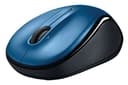


🖱️ Scroll smarter, work longer, stay connected.
The Logitech Wireless Mouse M325 in Blue combines micro-precise scrolling tailored for web and app use with an ergonomic design featuring textured rubber grips for extended comfort. Its wireless connection via a compact Logitech Unifying Nano receiver ensures compatibility across Windows, Mac, Linux, and Chrome OS. With an impressive battery life of up to 18 months, this lightweight, ambidextrous mouse is ideal for professionals seeking reliable, portable productivity.
| ASIN | B005HQ514C |
| Additional Features | Trackpad |
| Antenna Location | Gaming |
| Are Batteries Included | Yes |
| Are Batteries Required | Yes |
| Battery Average Life | 18 months |
| Best Sellers Rank | #242 in Computer Mice |
| Brand | Logitech |
| Built-In Media | Mouse Nano receiver, Sheet of 15 premium stickers, 1 AA battery (pre-installed), User documentation |
| Button Quantity | 3 |
| Color | Blue |
| Compatible Devices | Laptop |
| Connectivity Technology | USB |
| Customer Reviews | 4.7 4.7 out of 5 stars (1,920) |
| Enclosure Material | Rubber |
| Global Trade Identification Number | 00097855080592, 10097855080599 |
| Hand Orientation | Ambidextrous |
| Hardware Platform | Laptop |
| Item Weight | 4.16 ounces |
| Manufacturer | Logitech |
| Model Name | 910-002650 |
| Model Number | 910-002650 |
| Movement Detection | Laser |
| Number of Batteries | 2 A batteries required. (included) |
| Operating System | Chrome OS, Linux, Windows 10, Windows Vista |
| Power Source | Battery Powered |
| Range | 10.0 meters |
| Style Name | Modern |
| UPC | 803982763143 777787432118 887612183167 097855080592 069060137125 978550805928 |
| Unit Count | 1.0 Count |
| Warranty Description | 3 year limited |
E**S
Compact Mouse with Smooth Scrolling
Compact Mouse with Smooth Scrolling The Logitech M325 is a small, comfortable mouse that works perfectly for everyday use. It pairs quickly with the included USB receiver, and the wireless connection is solid with no lag. The scroll wheel is one of its best features—it has a smooth, precise feel that makes browsing and scrolling through long pages much easier. The size is just right for travel or smaller hands, and it feels natural to use for long stretches without fatigue. The battery life is excellent—I’ve used it for months without needing to swap batteries. The blue design gives it a nice pop of color compared to plain black mice. It’s not a full-size mouse, so if you prefer something larger for desktop use, this may feel a little small. But for portability and everyday tasks, it hits the sweet spot. Bottom line: A reliable, compact wireless mouse with excellent scrolling and long battery life. Great value for anyone needing a lightweight, travel-friendly mouse.
M**N
Nice mouse!
The mouse is relatively small, so it's good for medium or small hands. The first one I received had a battery that had leaked, so I returned it and bought another. The second one is great.
B**S
Logitech lasts a long time
the last Logitech wireless mouse lasted me almost ten years , i considered that pretty useful. easy to install , works like a charm.
I**L
Great battery life, very portable/compact size
The battery life on this mouse is very good. The cheap battery it came with lasted less than a month but if you use a good name brand battery it should last many months. I used mine daily for gaming and the battery life did not disappoint. It works smoothly on most surfaces. I use it on my laptop in bed with my blankets as my mousepad. The scroll wheel also functions as a 2 step button. When web browsing you can use it to open a link in a new tab if you click the link(first step), but if you push it too hard (second step) it will go back a page. Unfortunately, I suck at using the scroll wheel like that and almost always ended up opening a new tab but also going back a page when I didn't want to go back. Sadly after a while the left click button got somewhat sensitive, making it hard to drag things. It still works well if trying to double click but if you try to drag something across the screen it will sometimes randomly drop it. I probably clicked and dragged too much from my gaming. I should also mention the size is very small. That makes it portable, but if you have large hands (I do not) it might be uncomfortable after long periods of time. Overall a good mouse with a great battery life. It functions smoothly and is very portable. The size is not for everyone, but for those who like it, they will be happy with it.
G**A
Excellent Product!!
Excellent product. I will definitelly recommend it
M**K
Overall very good value!
Excellent interface and easy to install and use. Uses only one battery. small, but not too small and convenient for transporting with laptop. Works very nicely with desktop too. Overall very good value.
D**R
Well designed, compact mouse. Perfect for younger children too!
Wonderful wireless mouse! I've purchased 3 of this model over the years. Two were for my personal use and I'd always been impressed with how smoothly it operates and how easy it is to control. The batteries last so long that I have yet to have to replace one. My first had to be replaced due to being destroyed by one of my children. lol Until they got their hands on it, it had been functioning wonderfully. My second one is still in use. :) This third one, I bought for my youngest son. He attends a cyber school and his school issued laptop came with an external corded mouse. The touchpad mouse that is built into his laptop is overly sensitive, so when you type it causes the cursor to jump all around the page. There is no way to disable the tap function when typing unfortunately, so we decided to disable the touchpad entirely and use an external mouse. His hands are so little that it was very difficult for him to maneuver the corded mouse. However, I knew my mouse works for him because he's been using it for the last 2 years when he gets on my personal computer. I'm sure Logitech has other models that are also compact, but I got this one because I know for sure it's great for tiny hands. :) It arrived a couple of days ago and he's been able to operate it like a pro. I'm sure it would also be a great mouse for travel.
R**O
Just about perfect little wireless mouse
This is a wireless Logitech mouse I use in my Lenovo laptop on a daily basis. It uses a universal wireless dongle - universal because it will also work with other Logitech devices like keyboards. This is a bit smaller than a normal computer mouse but even with my large hands that's not a problem for me, but your mileage may differ. You can install the Logitech "Unifying Software" driver app which I downloaded from their website, and the setup is easy, intuitive, and mostly automatic. I also like that there is an on/off switch on the bottom of the mouse. It also doesn't take much power, takes one AA battery which based on my past experience lasts 18 months or more. I also like the wheel which feels and works great. This mouse is a basic mouse so not a lot of buttons or options. It has left button, right button, wheel scrolling, wheel button, wheel left, and wheel right.
Trustpilot
Hace 1 día
Hace 1 mes