We remain fully operational. Our teams are working around the clock to ensure your deliveries continue safely.

Descargar la aplicación


Servicios al cliente
Sobre nosotros
Copyright © 2025 Desertcart Holdings Limited
Descargar la aplicación

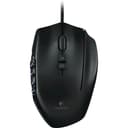
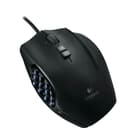
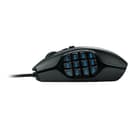
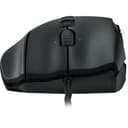
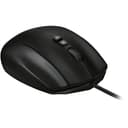
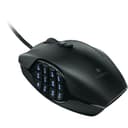
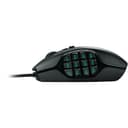
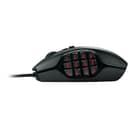
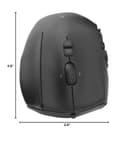
🎯 Dominate your game with precision and style — the ultimate MMO mouse for pros!
The Logitech G600 MMO Gaming Mouse is engineered for serious gamers with 20 programmable buttons including a unique 12-button thumb panel and a G-Shift function that doubles your command options. Featuring customizable RGB lighting, low-friction PTFE feet for smooth tracking, and an ergonomic design to reduce fatigue, it offers unparalleled control and comfort. Onboard memory lets you save profiles for seamless gaming across sessions, making it the go-to mouse for MMO mastery and beyond.


| ASIN | B0086UK7IQ |
| Additional Features | Ergonomic Design |
| Antenna Location | Gaming |
| Are Batteries Included | No |
| Are Batteries Required | No |
| Best Sellers Rank | #36,249 in Video Games ( See Top 100 in Video Games ) #1,164 in PC Gaming Mice #2,300 in PlayStation 5 Accessories |
| Brand | Logitech |
| Built-In Media | Mouse, User documentation |
| Button Quantity | 20 |
| Color | Black |
| Compatible Devices | Personal Computer |
| Connectivity Technology | USB |
| Customer Reviews | 4.5 out of 5 stars 17,220 Reviews |
| Enclosure Material | Ptfe |
| Global Trade Identification Number | 00097855088055, 10097855088052 |
| Hand Orientation | Right |
| Hardware Platform | PC |
| Item Dimensions L x W | 4.6"L x 2.9"W |
| Item Type Name | Logitech 910-002864 G600 MMO Gaming Mouse |
| Item Weight | 229 Grams |
| Manufacturer | Logitech |
| Model Name | LOGITECH INC. |
| Model Number | 910-002864 |
| Movement Detection | Optical |
| Movement Detection Technology | Optical |
| Number of Batteries | C batteries required. |
| Number of Buttons | 20 |
| Operating System | Windows 7 |
| Power Source | Battery Powered |
| Range | feet |
| Special Feature | Ergonomic Design |
| Style Name | G600 Mouse |
| Theme | Gaming |
| UPC | 097855088055 887603489834 631058208409 809394265411 734911345881 041114167432 801940714220 803246000472 080850209754 072090541701 801940459794 801940115560 767333082294 088020692221 012300306881 069060112191 097855089182 667649023885 804067189353 163120434367 978550880550 151903565704 803982776570 736983817051 |
| Warranty Description | Manufacturer's Warranty |
E**N
Compare G600 to Naga Epic
March 2014 Update - After about 1.5 years I'm having the double click issue. I did a manual repair (bending the spring back) that worked for a few months; but now it is back. - I've enjoyed this mouse enough, and there is nothing new in the space, so I'll be picking up a second to replace it. So I have the Razer Naga Epic Gaming Mouse and now this Logitech G600 MMO Gaming Mouse, Black (910-002864) . How do they compare? Short version, they are equal mice. - Pick the Naga if you use the 7-12 keys often in fast high pitched game play. - - You can reach them faster as you have the muscle memory to hit the right and there is nothing in your way. - Pick the G600 if you don't use them that often. - - You can reach them faster as you don't have the muscle memory and the 2nd set of grooves makes it so you don't hesitate before clicking them. Size: - They are both the same size with one slight exception, the Naga you place your ring finger next to the mouse and use it as part of your 'grip'. - The place your finger is on is extended on the G600 to be an actual button your finger rests on. - THIS is the major 'comfort' difference between the two mice and where I see a lot of complaints. - For the first hour, I was constantly hitting this key as on my Naga I was use to using this finger as part of my grip. - After retraining the muscles a little, this is no longer an issue for me and I now have an extra key to actually use. Thumbpad: - The G600 is 133% the size of the Naga in Length (or width depending on how you look at it). - The Width (or length...) is the exact same. - How does this feel? The Naga is FASTER. The rows are not as far apart and they are flat so its really easy to glide your thumb down and hit the right key. - The G600 is CONFIDENT... It is much easier to tell where your thumb is, and the way the keys are grooved you have 2 locations for your thumb, one hits 1-6, the other hits 7-12. Due to the spacing, Naga users you can compare this by moving your thumb to the last row (10-12), this is where your thumb will be to hit 7-12 on the G600. - Verdict? Depends on how many keys you actually use. I use 1-6 A LOT and don't use 7-12 that often. This actually makes the G600 shine as you have less memory of keys you don't use, when I swap to the 7-12 position I don't have to hesitate to hit a key because I KNOW my thumb is on the right one. - Counter Verdict? The Naga is simply faster. You don't have to get over the grooves and the rows are closer so you can get to 7-12 just as fast as 1-6. It does take more memory though. If you use all 12 keys all the time, the Naga may be the better mouse. Extra Keys: - G600 has the ring finger key, the 2 tilts of the mouse wheel as an advantage. All the other keys are located in the exact same spots for the two mice. Weight: - The Naga is slightly heavier, maybe the reason I got use to using that ring finger as part of the grip. - The G600 is lighter, but not having that extra finger to move it with actually makes the 'resistance' of each mouse the same. Software: - They both look great and function without issue for me. (Synapse 2.0 and Gaming 8.35) - They both have great macro / key press / toggles and such that cover most needs perfectly. - The Logitech does have more options for advanced users such as scripts and such though. Lighting / Looks: - Both have about equal brightness in lights and similar lighting options. - The Naga has an extra light on the wheel, but the sides of this wheel are actually a sticker that does come off after about a year of use. Skin: - The Naga has a rubberized skin (like the back of the kindle fire) where the G600 is more a textured plastic. They both feel nice but the Naga feels higher tech. Wireless: - The Naga can be unplugged and used as a wireless mouse (and includes a base station). - If you want a gaming mouse that can also go wireless, the Naga is a great option. Price: - At the time of this review the Naga commands a 50% price premium over the G600. If I was to go off Value, the G600 gets the nod. However, I don't as the mouse is a very important part of the computer and something I don't mind spending money on. - The wireless is really where the price comes from. Note: - I'm an MMO gammer (Rift/GW2) and I casually play RPG Shooters (Borderlands).
J**N
Great functionality and customizability
UPDATE: Dropped to 4 stars because after 2 and a half years of use, the middle mouse button has crapped out. I'm in the warranty process to see if I can get it replaced (if it's within warranty), and will update. UPDATE 2: Brought back to 5 stars! The moment I contacted support, they sent out a new one, no questions asked! I'd give Logitech 6 stars if I could (although I hope the refurb one they sent doesn't crap out in 2.5 years as well). I previously had a UtechSmart Venus, which I replaced with a wired Razer Naga 2014, which I then replaced with this guy. The Venus was fine, but the Naga had cooler buttons... but it had tracking issues, which is how I ended up with the Logitech G600. Although its buttons aren't mechanical, they're large, textured, angled, and very easy and comfortable to use. The up and down buttons are at very different heights so it's easy to know which is which, and the entire mouse fits so comfortably in my palm. The one wonky thing is just the right side button (note that this is obviously a right-handed mouse), which rests under your ring finger - I pressed this a few times when using it and ended up disabling it in the Logitech Gaming Software, since 12 side buttons + 2 up/down buttons + 2 left/right scrolls are plenty enough for me now, thank you very much. However if I ever decide to automate my entire computer with my mouse, maybe I'll re-enable the G-shift function, which allows for additional side button binds. That being said, the scroll wheel is very satisfying to use and is very stiff compared to the Razer Naga's. While this isn't too great for scrolling down hundreds of pages of documents, it's very good for controlled scrolling while gaming. The software for this is probably a bit better than Razer Synapse's, which gave me tracking issues. Logitech Gaming Software is well-designed and really easy to use, and its game-detection works well as well. I also enjoy having more than just green light to choose from, as that pairs well with my Corsair K70 RGB. However, one oddity is that there is a "mode" wheel with three choices - I originally thought that that only entailed lighting switches but guess what? It's actually three button binding modes... per profile. With their own individual lighting settings. Which is excessive. Especially since there's G-shift. But you know, if you wanted 2x12x3=72 different side binds per game so you can almost type the entire alphabet out three times, more power to you, right? Admittedly, LGS isn't perfect. When I alt-tab out of games it has a habit of not switching back to the game binds until I alt-tab out and back in again. While this isn't an issue with most games, it does bug me in fast-paced multiplayer games like League of Legends or CS:GO, where I have a lot of important functions bound to side buttons. I've died or made hilariously terrible plays many times while mashing my side buttons, only to realize that they weren't bound correctly because I alt-tabbed to change my music. I think there's a way to get around this though, using Logitech's persistent profile settings or whatever. Either way it's not a huge deal. If you move around a lot but also like to take your profiles with you, you can save I think three profiles to the mouse's hardware, but don't quote me on that. Anyways, if you're looking for a mouse with extra buttons and you've got $40 to spare, get this. It's pretty great, and the Logitech software is highly customizable. It might look like a mechanical alien hiding in a shell, but you can bind the entire alphabet onto the mouse. Which is pretty cool. -Reviewed from my Logitech G600 Gaming Mouse
E**N
The Best Mouse for Games, Not Just MMOs.
One of the best gaming mice I've ever used. The mouse is wired. I originally got the mouse for Final Fantasy XIV, but now use it for almost every game in my library. The mouse moves smoothly, as there are different options that allow gamers to select the speed (DPI) at which the mouse registers (or however it's articulated...I just know it works well). I have a normal-sized hand, I suppose, so the size of the mouse is just fine for me. Clicks feel great, I've never had issues with it in the years since I've bought the product. The 12 extra keys can be mapped for almost anything. Some game examples: Baldur's Gate 3, Divinity Original Sin, Rogue Trader...--I've used the extra keys for dialogue options; in Arc Raiders, I've used the extra keys for everything from selecting weapons, opening my map, to even in-game communication options (as I don't use voice communications when I'm playing most of the time).
M**Z
It's pretty good
Compared to the other multimouse buttons with the 12 keys on the side it's not bad. The first thing I noticed was that it was a lot smaller than I expected. My hands are not very large (measuring for this review it is 7.5 inches from top of middle finger to bottom of my palm/wrist) and it was a little uncomfortable. I definitely expected a little bigger product, but it didn't bother me too much. Here's what really got me though. The product game in Thursday, I've already requested an invoice to return it and will be mailing it back shortly. My first issue was that today I was noticing that the left click was unresponsive at times or would click randomly. I thought maybe it was something else, but noticed it when I was web browsing when it would go back twice or the page would navigate towards something else that I could have hovered over. My main issue was that one of the twelve keys on the side, G9, lost it's sensitivity. When I first got it and tested out keys it would work fine, however today I ran a few tests and now it will only work if I held it down all the way and even then it would take a second to respond. This is unacceptable in my opinion was in most MMO or quick response games I relied on my buttons to react instantly. The good things about this mouse are that when they buttons work they were highly responsive and took little effort to click them. Both left and right clicks worked great and fast. The buttons on the side were a little harder to push but not much. The buttons on the top/under the scroll wheel were the hardest I noticed to push down on. The lift and right mouse clicks were great and definitely my favorite feature on this mouse. Overall I liked it, however being defective in the mere 3 days I've had it makes me skeptical to get it replace which is why I opted a refund. If everything worked fine I would have kept it and enjoyed it. The rating would not have changed had everything worked fine for me and I didn't need to return it as like I mentioned earlier it was slightly smaller for my hand and some of the buttons were hard to push down. The side buttons (G9-20) were also rather small and at times you had to be careful to not hit the wrong one. Although it was mostly fine since it took some pressure to hit them and unless I didn't know where my thumb was I was hitting the button I intended to. The lights on the buttons worked great and were very vibrant as well. One more thing, the product that came with it was great and easy to use. Anyone could have used it without problems just fine.
J**H
Huge Hands / Over Analyst Review
I have this mouse, and I love this mouse. I have giant hands, I don’t have a measurement handy but I’ve met less than 5 people over 6ft that can match my hands. So, I say all that to say this, this mouse is comfortable, my very large hands rests into a fully relaxed and comfortable palm grip, I claw occasionally but only when I find my hand is getting too warm. Usually a house temp thing, body armor heat (I slide home on lunch breaks when I’m on duty and you can imagine how much body armor heats you up in Florida) or a hot beverage thing. I will say, I’ve never had my hands get warm and stay warm using a mouse before (skeleton fingers don’t retain much heat) but I can’t call that a real negative. *** If there’s one thing I want everyone to read though, it’s this. The third mouse button. It’s different. And because the mouse is heavy, I found myself hitting it early, and often, and it really detracted from my enjoyment of this mouse. HOWEVER, I got around this by peeling off the shipping plastic from the slides on the bottom of the mouse, folding it up into a nice little rectangle, and sliding it under the third mouse button. I can’t really say what this does for durability, I can’t imagine it’ll hurt it as I can easily slide it out with the tip of a razor blade, but it added just enough resistance to that third clicker that I can use it, but only when I WANT to. NOW, it’s become a super useful function. Pros: Large hand friendly. Complex macro functions for DAYS while gaming. 30+ commands. (MMO rotations.) High quality feel to side panel buttons. Not too hard, not too soft. Immensely comfortable. Braided cable. Programmable middle button. Left and right movement. Super useful gaming. Easy to use software. A few more that aren’t coming to mind. Cons: These are mostly personal things. Third button is a beast that needs to be tamed and adjusted for. Seems to run hot at times? Click noise is a little louder than I’d like. It’s VERY clicky. Mouse is heavy, and also back heavy. I find I need to rest my thumb on the 7/8/10/11 keys and squeeze a touch when I need to lift the mouse off the pad, and squeeze with my pinky as well due to the weight. Wish the scroll wheel was a tiny bit quieter. Most of these are tiny gripes. But I’m adding them to the list for the over analyzers like me. This is my first foray into an MMO, and this is my 7th mouse tested in about a month. To include to Naga Trinity which was too small and I didn’t trust to last based on its reputation, the Corsair Scimitar which didn’t have enough difference between the side buttons, and just felt “off” to me, the Corsair Nightsword which had a scroll wheel that felt like it was made of iron. Blah blah blah. But this mouse. It has an awesome reputation, and has earned it.
M**O
Take this over the Razer Naga.
I have just used it for only a few hours and I am already loving it. I've also used the Razer Naga Epic Chroma for 6 months and this Logitech G600 is a welcome change. I bought this as a mouse for my other PC. A fantastic mouse which gives users unparalleled control. It fits comfortably in the hand and the contours are nice however, the shape of the mouse favors people with a palm grip more. If you're more into the claw fingertip grip or claw grip which I am, you may find that you'll need some time to get used to the mouse but it is not very severe so you should be accustomed quite quickly. Buttons are easy to press and give an appropriate tactile response. The thumb buttons also have tactile indents on the G13 and G16 keys which help you to easily identify by feel which keys you will press. There is also something known as a G-shift button activated by your ring finger which effectively doubles the number of functions. I personally found this to be a killer feature. Its RGB lighting is bright and vibrant and can be seen well even in well lit areas however, in my particular unit, when the RGB is set to white, the G13 button seems to have a slightly different shade of white. It doesn't bother me so I won't take away a star for it. Also, you can set the RGB lighting be on static, a pulse or a cycle. You can also control the speed at which the lights pulse or cycle. The mouse also includes on-board memory which you can store your profiles on board without having to install any software. The cable is also braided for a nice and durable texture. The Logitech Gaming Software is relatively easy to use and is quite slick. When choosing a color for the RGB the software immediately applies it without you needing to do anything. Very handy when you want to quickly see your changes. Assigning macros is very easy, but compared to Razer's Synapse, it is a little bit more clunky. However, the best part of it all is that you do not need to create an account to customize your mouse unlike Razer which you need to. This was a massive plus for me. I do also own a Razer Naga Epic Chroma and compared to it, I would say the two are very similar in performance. The Naga does have better RGB lighting as its scroll wheel is lit while on the G600, it is not. Furthermore, the non-wireless version of the Naga also has it's Razer emblem illuminated. On the G600, only the grid of buttons for the thumb is lit. Also, the Naga's shape is more forgiving to people who use a claw/fingertip. The G600 is also more affordable than the Razer equivalent. Comparing Razer's and Logitech's offerings, I would say the Logitech wins. Razer is not bad either, but with the Logitech, you do get more functionality over form. I mainly use this for productivity and I have set the buttons to act as shortcuts like Alt-Tab, Task Switcher etc and the G600 is a joy to use. If you're looking for a mice for absolute control and functionality, look no further than the G600. It also has that killer G-shift button which is unique to the G600. There is also Corsair's Scimitar RGB offering to consider. While that one has truly impressive RGB, you do lose a little functionality as that one does not have a tilting scroll-wheel and also doesn't offer a G-shift equivalent.
B**N
Excellent, versatile mouse.
I think this is a five-star product with a couple reservations. I will list those reservations FIRST, with the disclaimer that I am very picky: 1. The hydrophobic surface gives a dry, almost chalky (like a blackboard) tactile feel. It gave me the heebie jeebies at first, but I gave it a fair chance and got used to it. It seemed my hand was getting warmer and sweating more on this mouse than my old one, but I also found that the surface countered that and didn't get sticky. 2. The left click, right click, and mouse wheel are kind of loose, at least on the G600 I received. The clicks themselves are not loose (they are near perfect for me, actually), but the buttons seem to rest "loosely" on top of the switches with no tension. This allows them to rattle a bit. It's most pronounced if I tap the buttons without depressing the switches--you can hear the rattle/reverb. It's a very minor build quality thing making it seem less tight/solid. The ring finger button does not have this problem at all. -------------------------- Now, with that out of the way, I will say this mouse is incredibly versatile. I did a lot of research before buying. After playing around with this thing, I figured out that there are a few things this mouse can do that even favorite professional YT reviewers and unboxers seemed to miss. The main thing I discovered that sets this mouse apart has to do with the difference between "profiles" and "modes." The way these function with the G600 is dependent upon whether you are using the software profiles or the on-board memory. If you use the on-board memory, you get three straight modes/profiles (they are synonymous on this setting). The software option is far more versatile, because it basically separates "modes" from "profiles." You still get three modes, but you get a unique profile for each application/game PER each mode. This means you can effectively set THREE different complete configuration profiles for EVERY application and cycle them on the fly. Better still, you can change the color scheme of the LEDs for each profile PER mode, so you can tell what you're on as you shift through them. Example: StarCraft2. Gold for Protoss, blue for Terran, and purple for Zerg. You could do the same thing for three characters or three builds on one character in an MMO. I have tried the G602, G700s, and G500s, but none of them had the "mode" functionality. On those, when you switch to software profiles, the on-board memory apparently gets supplanted instead of working in tandem. The Logitech Gaming Software has a "Profile Cycling" option that is supposed to allow you to make multiple profiles per app, but after spending an hour or two trying to make additional profiles and get the hotkey to work, it appeared to me to be a broken functionality. Support was non-existent. OTHER THOUGHTS --Form factor: I have medium-small hands. The width of the mouse and the fact that the ring finger rests on a button took a week or two to get used to. Not a big deal. The braided cable is nice--keep it away from sharp corners/edges. --Tons of buttons: I find most of the 12 on the side to be accessible and pleasant pleasant to use. All buttons except the wheel/tilt have quiet clicks, which I insist on. The side buttons are "mushy" buttons. I prefer this to the G602's side buttons that make a POP every time I go forward or back in a browser. I use the ring finger button for an additional button, rather than the "G-Shift" to effectively double the bindings (that is just serious overkill IMO). The tilt wheel and wheel button don't really trigger the scroll when used unless you're really sloppy, which they shouldn't. --DPI: The DPI setting is not represented by an LED on the mouse. I imagine that is because this mouse was designed for MMOs. All in all this is a great mouse. I hope this was helpful and thanks for reading!
E**K
Good alternative to a Naga, maybe better
I have been a longtime user of a Razer Naga and after about 6 years, it finally started failing on me and decided to jump on the G600 to save a few bucks (I do not need a Naga with 3 different faceplates). I had the 2014 Naga with two mouse buttons on top, right behind the mouse wheel. They looked comparable but the G600 might have won me over. It is just a little bit bigger than a Naga so it fits a little better in my hands. The keypad is very different from a Naga. Each button has a certain texture that makes it more textile (it's almost rough, in a good way) and each have a different shape. This threw me off - buttons G9-G14 and G15-G20 are grouped together by the button shape. Both groups of 6 buttons are concave towards each other so that you can really feel when your thumb rests on a certain group (the only way I can describe is that each group of 6 buttons essentially forms a crater-like feeling from their slope). Also note that G10 and G19 feel much skinnier and completely different from every other button on the keypad, which is weird and one of 2 things I wasn't a fan of at first. The mouse wheel is not as ribbed as the Naga's-there's still some notches on it but they're less pronounced so it feels smoother. There's feedback on scrolling so it feels like you are passing some notches. Overall, the mouse wheel feels less weighty than the Naga's. Edit: the mouse wheel click is also pretty loud. The G8 button is significantly lowered than G7. You can see that in the pictures but I didnt expect it to be so much lower. Just don't map anything important to it since you can't reach it easily. Overall, I very much like the G600. The addition of the G-Shift key adds a whole other layer of customization to it since you can map even more to the mouse which is accessible with the ring finer. That is so useful to me as I play WoW and need great keybinds. It feels heavier and bigger than the Naga which makes it feel a little less cheap-my Naga actually feels really light after using this for a day. My least favorite thing about it is probably the mouse wheel, feels like the cheapest part. Just so you know, the G doesn't light up on the mouse. I don't care about the RGB, but some people might. The software is great to customize the lights, keybinds, etc. Overall a great gaming mouse if you need a keypad accessible.
Trustpilot
Hace 5 días
Hace 2 meses