We remain fully operational. Our teams are working around the clock to ensure your deliveries continue safely.

Descargar la aplicación


Servicios al cliente
Sobre nosotros
Copyright © 2025 Desertcart Holdings Limited
Descargar la aplicación
Buy anything from 5,000+ international stores. One checkout price. No surprise fees. Join 2M+ shoppers on Desertcart.
Desertcart purchases this item on your behalf and handles shipping, customs, and support to Uruguay.
💼 Elevate your digital workspace with storage that keeps pace with your ambition.
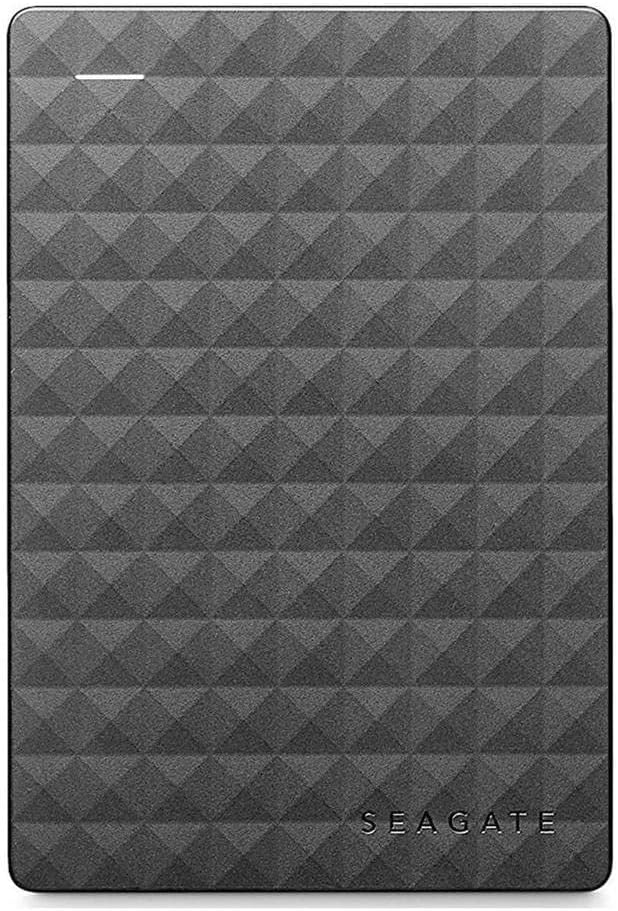
The Seagate Expansion Portable 2TB External Hard Drive offers a robust, no-fuss storage solution with massive capacity and USB 3.0 speed. Designed for Windows users, it delivers plug-and-play simplicity in a sleek, portable form factor, making it ideal for professionals needing reliable, on-the-go backup and file access. Its durable aluminum casing and trusted brand reliability ensure your data stays secure, all backed by a 1-year warranty.


| ASIN | B00TKFEE5S |
| Additional Features | Portable |
| Best Sellers Rank | #176 in External Hard Drives |
| Brand | Seagate |
| Built-In Media | Seagate ExpansionPortable Drive 2TB USB3.0 |
| Cache Memory Installed Size | 2 |
| Color | black |
| Compatible Devices | Laptop, PC |
| Connectivity Technology | USB |
| Customer Package Type | Standard Packaging |
| Customer Reviews | 4.6 out of 5 stars 129,862 Reviews |
| Data Transfer Rate | 5120 Megabits Per Second |
| Digital Storage Capacity | 2 TB |
| Enclosure Material | Aluminum, Glass, Ceramic |
| Form Factor | Portable |
| Global Trade Identification Number | 00763649064887, 07636490063435 |
| Hard Disk Description | Drive |
| Hard Disk Form Factor | 3.5 Inches |
| Hard Disk Interface | USB 3.0 |
| Hard-Drive Size | 2 TB |
| Hardware Connectivity | USB 3.0 |
| Installation Type | External Hard Drive |
| Item Weight | 0.4 Pounds |
| Manufacturer | SEAGATE |
| Media Speed | 1 |
| Model Name | Expansion |
| Model Number | STEA2000400 |
| Number of Items | 1 |
| Special Feature | Portable |
| Specific Uses For Product | 1 |
| UPC | 667562731676 763649064887 |
| Unit Count | 1.0 Count |
| Warranty Description | 1 Year Manufacturer's Limited Warranty on Hardware against manufacturing defects only |
R**D
Yes even you can upgrade your PS4 HDD, no experience necessary!!
I had read on a couple of forums that this HDD is one of the most economical ways to upgrade space on the PS4. I purchased 2 of them, one to use in the PS4 and one for the backup and to load movies on for the car trips so this will be a review as well as a little step by step for those of you looking to use this unit for the same thing. DISCLAIMER: I have never opened a computer on purpose and am not trained in any way on how to do what I did, but it was super easy following the steps laid out by Sony. In order to use this drive for the PS4 backup I used my laptop to format the drive to FAT32. The default format is ntsf and will not work for the PS4 backup. Plus there is some install files that are not needed for this use. I then used this drive to back up the nearly 500GB of apps and player data following Sony's guide for this which is here: [...] It took about 3 hours using this drive because of the write speed. A solid state drive would have been faster and probably twice as expensive. Then I formatted the other drive keeping the ntsf format but ridding the drive of the unnecessary files. Removing the drive from the case is fairly simple using the smallest screw driver I had in my set from about a half inch away from a corner sliding it along the seam towards the corner until one of the clips pop. The lid then comes off easily under fingernail power. NOTE: this will void the warranty so make sure you have formatted and tested the drive prior to breaking the case seal. Be careful not to crack the case, we are going to use it later. The drive is held in the case by 4 rubber screw covers that keep it snug. Turn it over and with a gentle tap it falls loose. Take the covers off the screws and remove the screws. There is a foil cover protecting the usb adapter which you should remove carefully and set aside with the screws and rubber covers (I'll explain why in a bit). The adapter comes of easily with a little wiggle. Installing the drive is super easy thanks to Sony having the foresight to know 500GB just wouldn't be enough memory. Follow these simple directions to install the drive: [...] Make sure to download the reboot update file to a thumb drive prior to restarting your PS4. You will also need your PS4 controller cable to use the controller until the initialization is completed. DO NOT SIGN INTO PLAYSTATION NETWORK UNTIL YOU RESTORE YOUR PS4 FROM THE BACKUP DRIVE. It takes as much time to restore as it did to backup so be ready to do something else for a bit depending on how much data you have... oh wait, I have an idea, lets use the old PS4 drive to make another 500GB external drive! Put the drive back together using the removed USB adapter, screws, rubber covers, and aluminum sticker shield. DO NOT START THE FORMAT PROCESS UNTIL YOUR PS4 IS INITIALIZED, RESTORED, SIGNED INTO PSN AND YOU HAVE CHECKED FOR ALL OF YOUR DATA, APPS AND GAMES. YOU MAY REGRET NOT LISTENING TO THIS ADVICE IF THE DRIVE IS CORRUPTED. Unfortunately you are not able to initialize the PS4 drive the same way you can the other HDD. You have to manually delete each partition and format from Computer Management. I found the step by step on this here :[...] The hardest part was finding where to go to find the drive because the author of this post missed a step on how to get there. What I did was went to CONTROL PANEL> SYSTEM AND SECURITY> ADMINISTRATIVE TOOLS> COMPUTER MANAGEMENT and found the drive the same way you would on file explorer. The rest of the instructions are fairly straight forward. Now having used the PS4 for about a week I can tell you that it works great, has plenty of storage room, and is quiet during operation. I did a lot of research on solid state drives prior to picking this drive instead because for me the speed gained was not worth the extra money watching the side by side reviews like this one : [...] I feel like I made the best choice for my budget, experience, and needs. I have since also installed the second drive into the other PS4 we have and used the 500GB drive I made from the first PS4 upgrade for the backup.
V**Y
Quality No Frills Storage Expansion Drive, Fast USB 3.0 Connection
The 2TB Seagate Expansion Portable USB 3.0 hard drive is excellent expansion storage choice in an attractive package. This basic drive has a lot in common with other USB 3.0 compact drives including a similar price. This is the current model of the older and well received Seagate Expansion STBX2000401 still available on Amazon. I have used a number of Seagate and Western Digital external USB 3.0 hard drives. Over time the newer drives tends to operate a bit faster than my older ones. That is my sense with this Seagate 2TB USB 3.0 drive when used with USB 3.0. This drive has been used in a Windows environment and it plays very nice. Some older Seagate drives did NOT play nice on Linux systems unless the drive's sleep mode was disabled with the Seagate tools. If you plan to use the drive on Linux you may need to change the settings using Seagate tools on a Windows computer before use on Linux or sleep mode might cause loss of access until it is re-plugged. In my casual testing (copying a 9GB folder of updates, iso files, and many mixed large and small files) performance is on a par with other recent Seagate and WD drives I have for my own business and for clients. At this point I think the USB 3.0 external drive market is pretty much a commodity space. The drive fits easily in a pocket and as typical it uses a single cable for power and data making connections simple. The drive is compatible with USB 2.0, albeit at slower USB 2.0 speeds. The form factor for the drive is similar to the WD MyPassport Ultra and thicker than the WD My Passport Slim which are both more expensive. We are not talking about any big difference in size. The drive comes packaged with the drive itself, a shortish USB 3.0 cable, a quick start guide, and 1 year warranty. No fancy premium software is included. Just the basics. The Seagate Expansion 2TB is an economical commodity storage expansion. It clearly hits the target for the commodity USB storage market. Because it works quite well for a good price I'm giving this drive 5 stars. UPDATE Nov 6, 2017: In the just about 2 and a half years since getting this drive it still to works fine. First in it's role as a backup drive. Next as a carry along scratch drive in my kit for visiting clients. It has worked dependably as I was expecting for whenever purpose I've needed it. No problems. Since this drive was released as a top performer at the price in March 2015 this model has done. Now there are newer drives I would pick today. I see very few 2017 model drives from Seagate (or their subsidiary LaCie). I've had very good luck with recent WD My Passport drives though they seem to have uglyfied their cases... I think that while dated this Seagate Expansion drive has served me well and continues to do so. I still feel it deserves 5 stars.. Hope this helps someone.
J**.
It's Bigger on the Inside!
I bought this for three reasons. The first was because my computer's hard drive was getting full with things that I need to keep, so I needed a place to store all of the files that I do not need to access every day. The second was because I needed a place to back up my computers in case of failure. The third was because... well, I just really like USB storage devices. I really should start collecting flash drives. I really like the drive. It is small, slim, and looks cool. The cable it comes with is rather short at about 18 inches, which is excellent. I was concerned about having to store a long cable for something that's just going to sit on the desk right next to the computer when I'm using it. I do recommend buying a case for the drive, simply to make it easier to keep the cable with it. The actual memory as shown by a computer is about 1.8 TB (All USB drives have a bit less memory than advertised because the way a computer counts the bytes is a bit different from the way we count). Plenty of memory for my purposes. My computer's hard drive has about 274 GB of space, and a significant portion of that is taken up by system files, so you can back up your files from a number of computers on this drive. When I first plugged it in, I got a message saying something about there being problems with clusters on the drive (I don't remember exactly what it said), but I just let the computer scan and correct the drive, and now it's good to go. It's easy to use, and works just like a flash drive. Just plug in and drag and drop files. I wish my computer had USB 3.0 ports so that I could take full advantage of the speed of this drive. I was really impressed by the size and convenience of the drive. My dad also owns a 2TB Seagate USB 3.0 external hard drive. His is about the size of a VHS tape, is very heavy, has a long USB cable, and also has a power cable that plugs into an AC outlet. This drive is about the size of my rather small cell phone, has a short USB cable with no other cables, and is very lightweight. I hope to get years of good use out of this drive.
E**D
FABULOUS -- best back system u can have cause Cloud slow -- you need Cloud for off site, but you get "more-better" adding this.
These are amazing -- hook them to one PC USB 3.0 best, then use networking to share all your PCs (and Linux and AIX and SCO and any Unix that does netbios -- Samba being the king there) -- and then back up all the time. I use Vice-Versa Pro with the VV Pro Scheduler -- I am backed up every 2 minutes on my critical data. It has a real time mode in the software but reality is it take 2 minutes anyway. The VV software is the only one of 6+ I tried that works well with Unix shares. Of course, you should have a means of some sort of off site backup. If you are at the office and go home just get two, dismount one and replace with the other each day. Our office is at home so I do a daily Cloud backup. But restoring from the Cloud is SLOW SLOW SLOW and tedious. Having it right there on site and fast is great if you have a major need for large amounts of data. Add to that, the VV software keeps (at your settings) many copies of backups (so many per day, week, month, year, etc). I use their default, which works well. You are working on code (I am a programmer) and make a tragic mistake ... OK ... the 2 minute older version is there, 4 minute older is there, etc -- some quick file comparisons and you usually find the problem -- or if you went stupid just restore an older copy. My point is -- Cloud is good for off-site automated backups. I use DriveHQ which is very good. But there is only so much bandwidth so I limit that -- critical still goes to the Cloud pretty often but nothing like a local drive. And all these copies are much cheaper locally. And 4 terabytes is a LOT. I actually do the backups to one all day long, then each night back one to another on a different computer in the network but at a different physical location. Fire -- grab them and run. But I would still want an off-site as well. So this is best for anything but total disaster, Cloud is best for total disaster. And this is ALL opinion, I know others will disagree, please don't flame me -- there are other valid views, I recognize that -- but for me this works well.
C**H
Long lasting
We bought this a very long time ago, but it is still working fantastically with no issues. Great little connection for backup files and of course extremely portable.
T**E
Simple Plug and Play on Xbox One S
I really hate the new game consoles, have to get that out of the way. I miss the days of being able to buy a game, put it in the system, and just play. Nowadays, you have to install the whole game off the disc, then the online updates, and that game console HDD gets filled up real quick. This drive solves that, for now. Didn't have to change the file system on the drive with a PC, the console itself formatted it in roughly two seconds, and it's now designated as the go-to drive for the Xbox. Games and saves install directly on it as if it were actually inside of the system itself. Another bonus is that there is only one plug on this drive. A USB 3.0 port that not only provides for fast data transfer, but also provides the power for the unit, so an extra power supply is not needed. I'm really happy with this drive. It's pretty quiet, can't hear it next to the Xbox unless you're installing a game, and even then it's a very quiet whine from the drive that any background noise whatsoever would drown it out. It's really quiet, but if you put your ear to it, you can tell it's spinning. Data transfer has been flawless for HD gaming on the Xbox One S. USB 3.0 provides faster transfer speed than any optical drive, so games load quickly from the drive itself, can't really tell a difference between the internal drive or this external. Bottom line? Perfect gaming drive for my needs. Costs about the same as a new game. My Xbox can breathe again with it's newfound storage.
L**L
Giant storage capacity, sleek design, fast transfers, and DURABLE!!!
It still blows my mind how far technology has come in the last 20 years. Ok, so call me outdated or old, but I still remember the days of 56k dial up modems (If you were a teenager in the mid 90's I'm willing to bet money you can perfectly repeat out loud that AOL dial up noise), and the "gigantic" maximum storage capacity of about 700mb from floppy discs, DVD's, and Smart Media. Now just 1TB is equal to 1,000,000MB!!! In case you're wanting to do the math, in order to store 1TB of data back in the mid 90's you would need around 1,430 DVD's. Meaning you can fit your ENTIRE N'Sync and Backstreet Boys discography's onto your hard drive without even breaking a sweat. Now DVD's are just typically reserved for High Speed chases in Action movies because they OBVIOUSLY contain either the cure for the virus the mad scientist started or America's nuclear launch code sequences. Anyway, I digress. Seagate has been my go-to for simple extra storage ever since WD failed me twice several years back. I've also used Seagate's customer service line once because I could not figure out a format issue and my problem was immediately solved by a professional and courteous customer representative. If if I need to back-up important files. save data as to not use my laptop's built in hard drive, or if I want to format it for my Xbox 1 or PS4 so I do not eat up all the space on the consoles themselves, Seagate is a perfect choice. And as a bonus concerning gaming consoles, you can take that backed up data, plug it into another console, and continue playing just as if you were at home, eating nachos, and sobbing as 12 year old's show you no mercy in online gaming modes. Pro's: 1) Enormous amount of space for data storage (different options available for how much storage you will need). 2) Price ($69.99 is absolutely a bargain for a 2TB external hard drive from a reputable company) 3) Durability - Oh my Lord, I cannot stress ENOUGH how durable this hard drive is. If you're like me and like to drop expensive things, you will not be disappointed. I've probably dropped my drive 3 times (about 3 feet onto tile or asphalt) since purchasing it a week ago and it's as if the engineers at Seagate made drop protection a priority when designing their drives. 4) See #3 5) Optional carrying case if you are worried that you may possibly drop your drive out of a vehicle involved in a high speed car chase. Nice little add-on, but as I mentioned before I own about 4 external Seagate drives right now for different reasons, and have never used a carrying case. They all still work perfect, and I am definitely not the most careful person when handling them. Bravo Seagate. Cons: 1) ? I've got nothing.
B**N
9 years of constant use. Quality product.
I purchased this drive in December of 2016 and we are now into October of 2025. I've put this tough little guy through it's paces that's for sure. I just recently started having issues with my drive not connecting to my Xbox. So after a good 9 years of abuse I'd say I got my money's worth. Just xbox games they can be redownloaded but my save files are important so Im buying a new one. Thanks for all these years of reliable data storage and transfers.
Trustpilot
Hace 2 semanas
Hace 2 semanas