We remain fully operational. Our teams are working around the clock to ensure your deliveries continue safely.

Descargar la aplicación


Servicios al cliente
Sobre nosotros
Copyright © 2025 Desertcart Holdings Limited
Descargar la aplicación




Buy anything from 5,000+ international stores. One checkout price. No surprise fees. Join 2M+ shoppers on Desertcart.
Desertcart purchases this item on your behalf and handles shipping, customs, and support to Uruguay.
⚡ Flash Your BIOS Like a Boss — No Fuss, Just Power!
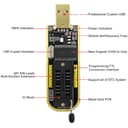
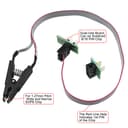
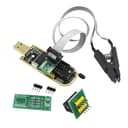
The KeeYees SOP8 SOIC8 Test Clip paired with the CH341A USB Programmer is a professional-grade tool designed for efficient in-circuit programming of most 24/25 series BIOS chips. It supports both wide and narrow SOP8 chips with a 1.27mm pitch and comes with essential adapters and a detailed PDF tutorial. Ideal for backing up, erasing, programming, and calibrating BIOS firmware, this kit empowers tech-savvy professionals to unlock, customize, and repair chips without disassembly, making it a must-have for hardware enthusiasts and IT specialists.


| ASIN | B07SHSL9X9 |
| Antenna Location | Professional |
| Best Sellers Rank | #86 in Computer Graphics Cards |
| Brand | KeeYees |
| Built-In Media | 1 x CH341A Programmer, 1 x SOP8 Test Clip, 1 x 8Pin to 8Pin Converter, 2 x SOP8 SOP16 to 8Pin Converter, 2 x 2.54mm 4Pin header |
| Compatible Devices | Desktop |
| Customer Reviews | 4.1 out of 5 stars 665 Reviews |
| Display Resolution Maximum | 3840x2160 |
| Graphics Card Interface | PCI Express |
| Graphics Card Ram | 1 GB |
| Graphics Coprocessor | AMD |
| Graphics Description | dedicated |
| Graphics Processor Manufacturer | AMD |
| Graphics RAM Type | EEPROM |
| Graphics Ram Size | 1 GB |
| Graphics Ram Type | EEPROM |
| Manufacturer | KeeYees |
| Model Name | CH341A |
| Number of Fans | 1 |
| UPC | 713871269963 |
| Video Output Interface | USB |
| Video Processor | AMD |
S**T
Works Great for Programming BIOS
I'm new to BIOS programming, but after understanding it's quirks, this is quite a powerful tool! My chip was from an HP ProBook 640 G3 and is held in place with a spring retainer mechanism; therefore, programming is done out of circuit. The spring clip of this device _must_ make solid contact, even at the risk of crumpling the pins. Just flatten them out later like I did. If using IMSProg like me, the telltale sign of a bad connection is that erasing only takes a few seconds. With a solid connection, it should take closer to a minute. The programmer works well and is a very inexpensive alternative to raspberry pi and whatnot. If you have a locked BIOS and need to get by the forgotten/unknown password, this is your oyster. Very Best Regards, Tom Scott 🗽 Author of Stack the Legal Odds in Your Favor ● Speaker ● World's Leading Expert on the Corrupt U.S. Legal System
D**E
Worked to change VIN on salvage yard radio
I purchased this to program a salvage yard radio into a different GM vehicle. At first the readings I got from the eeprom were blank, I tried repositioning over and over and then with some research I found that I needed to add an additional jumper to the device to match the voltage read/write of the eeprom. If you are having the same problem please look through my photos for jumper placement, this is only for automotive I do not suggest changing jumper settings for any other type of programming.
J**E
Allowed me to downgrade BIOS on my ASRock X370 Taichi motherboard
I upgraded the BIOS on my ASRock X370 Taichi motherboard, ignoring the warning on the download site that downgrading wasn't possible. Then I found myself wanting to downgrade it. Oops. Fortunately I was able to learn online that I could probably downgrade it with one of these CH341a programmers. I know nothing about these EEPROMs and stuff, but I managed to do it, so I'll share how in case this helps anyone. I created a Ubuntu USB stick and booted another computer with it to run this programmer. The YouTube video I found on using this said the second LED on this programmer will light up when you have a good connection to the chip, but I couldn't get it, and when I'd try to run the Linux 'flashrom' program to read the chip, it said no chip found. Then I read one reviewer that said this chip clip is junk, so I bought a blue Pomona one that was supposed to be better and soldered it to the wires from this one. That one IS a better clip, but in retrospect I believe the one included with this kit would've been adequate for me since the problem turned out to not be the clip. I noticed that when I had the clip on the chip solidly, some LEDs on my motherboard that are usually blue when the computer is on would light up a very dim green, but flashrom still didn't see the chip. If I turned the clip around 180 degrees, I'd get no light from those LED's but flashrom would now say "unknown chip", which really threw me since it made me think it was now seeing the chip and just didn't recognize that model chip. Turned out the orientation the lit those onboard LED's a little was the right one. I couldn't read the writing on top my chip, so I couldn't Google for its model # to find its voltage. I assumed 3.3V, but ended up changing the jumper to 5V also, with no luck either way. Later I learned that the chip was probably 1.8V and Amazon sells voltage converters for use with this programmer for that. But before I bought one of those, I decided I'd try something that was probably stupid. I just turned my PC on with the clip clamped onto the chip, figuring it would supply 1.8V. To my amazement, it worked! For the first time, flashrom was able to identify my chip as a MX25U11283SF, which I then Google'd and found is in fact a 1.8V chip. So I'm not sure how I didn't kill it with the 3.3V and 5V, but I was finally able to program an older version of the BIOS downloaded from ASRock's site, and the computer has been working fine since. By the way, the second LED on the programmer only came on during read/write activity for me. P.S. one of the product photos tells you to make sure to connect to pin 1 on your chip correctly, yet in the photo pin 1 on the cable going into the programmer is backward from how it should be! Look at the diagram on the programmer to find its pin 1.
C**Y
I love this tool
Love this little tool. Wish I had more excuses to use it. A friend locked themselves out of their laptop by setting a BIOS password that they couldn't remember. I cleared the CMOS memory several times, but the password persisted. I did some research and learned that modern laptops don't store BIOS passwords in CMOS. Instead, they are stored in non-volatile memory, such as the eeprom on the BIOS chip itself. Further research indicated that this particular laptop likely used an AMI BIOS implementation, and that the password could likely be decrypted or cleared. I happened to have this tool on hand and was itching for a reason to use it. I had never used a BIOS programmer before, so I read a few guides, identified the BIOS chip, and downloaded and reviewed its datasheet. I booted Ubuntu on another laptop and installed flashrom. I verified that flashrom was compatible with the BIOS chip. I hooked up the clip, and flashrom recognized the chip on the first attempt. I dumped the ROM three times and confirmed the checksums for each dump matched. I used UEFITool and confirmed that I was looking at an AMI BIOS and that the AMITSESetup variable was present. I found a tool on GitHub named AMITSESetup Decryptor & Unlocker that was unable to decrypt the password, but it did clear the password from the ROM dump. I flashed the modified ROM back to the BIOS chip, and much to my surprise I was able to boot the computer with no issues and no BIOS password prompt!
E**S
Failed after a single use, would not detect
While the incuded clip and accessories were helpful and decently built, the CH341A device itself failed after only a single use. TL;DR - The USB Type A plug was defective. This part is the rectangluar thing that plugs into the computer. It failed to maintain a reliable D+/D- connection due to issues with manufacturing and/or a severe (but difficult to detect) quality problem with the part itself. TL;DR2 - If your device arrives with a 'slanted' USB-A plug (slanting downward from the board plane about 10-15 degrees) its likely that it will suffer from similar issues. If you see issues initiate a return immediately instead of being curious and stubborn like me. :) Read on for some data from testing and analysis on the USB-A plug part itself. There are a few different revisions of this "black CH341A" device circulating via different sources. There are a lot of resoruces for details on these and schematics so I won't get into that here. A quick visual inspection revealed a few interesting facts. - The board's connections were generally very well soldered, which is good. - The board's parts were generally very well placed, fully within the pads - with one exception. - The CH341A chip itself was placed with an offset of 1/8 of a pin's width to the right of its intended pads. This isn't a serious issue - connectivity wasn't impacted and no bridging was present - but it may indicate poor QA on the line, at least for this run of parts. - The USB-A port frame is solidly mounted to the board with the through-hole ground lugs on either side soldered quite well to the board, which is good. - The four primary USB connections (GND, D+, D-, Vcc/5V) were also soldered in pretty well, which is also good. - The USB-A plug itself was tilted down slightly from the board's plane, by about 10-15 degrees, which is a concerning indicator that manufacturing QA might be very, very lax, but this isn't an immediate dealbreaker. So visually things looked pretty good, with a few minor exceptions that I'd generally consider within acceptable range for a cheap device like this. I've definitely seen a lot worse in a visual inspection of an inexpensive electronics hobby part and most of those parts end up working fine. So far, so good. The failure pattern looked like this: 1. Attached to a bare (not in-circuit) W25Q64FV SPI EEPROM via clip (clip worked fine) 2. Plugged in to USB 2.0 port on Ubuntu 20.04 Linux system (detected, USB device mounted successfuly) 3. Used flashrom 1.12 to read the ROM 3 times, write once, read 3 times to verify (worked great) 4. Unplugged from USB port (device removed successfully) 5. Attached to new, bare (not in-circuit) WV25Q64 SPI EEPROM via clip (clip worked fine) 6. Plugged into same USB 2.0 port (*power light turned on, did not detect at all*) 7. Unplugged and re-plugged several times (*power light turned on, intermittently detected but failed to enumerate*) After repeating step 7 a few dozen times, here are the results from my notes. I used `dmesg -w` to follow kernel logging to see detection/enumeration events. 1. No detection 2. No detection 3. Detected device attach, failed to enumerate device 4. No detection 5. Detected device attach, failed to enumerate device 6. No detection 7. No detection 8. No detection 9. No detection 10. Detected device attach, enumerated successfully 11. No detection 12. No detection 13. Detected, failed to enumerate 14. No detection (same until try 30) After this extended test, I tried various depths of insertion of the USB device. I've encountered similar problems with other USB Type A devices and cables that ended up being related to poor connection within the USB Type A connector itself. In those cases, "wiggling" the plug often helped estabish a proper connection, at least temporarily. To test this I tried removing the plug and inserting it to different depths while holding it long enough to allow it to enumerate (about ~1.5-2 seconds). Test 1, 3mm depth: Powers on, no detection Test 2, 4mm depth: Powers on, no detection Test 3, 5mm depth: Powers on, detects device, no enumeration Test 4, 6mm depth: Powers on, detects device, enumerates successfully Test 5, 7mm depth: Powers on, detects device, no enumeration Test 6, 8mm depth: Powers on, detects device, no enumeration Test 7, fully inserted flush with port: Powers on, no detection While the device was attached and failing to detect, I probed the key voltages with a multimeter. All of the power delivery was fine. The CH341 was powered with 5V on its Vcc pin, the ADS1117 was powered with 5V and outputting 3.3V succcessfully, and the 5V and 3.3V pins on the headers were succesfully powered as well. Given that data, it looked like the D+ and/or D- connections were failing to establish connection properly within the USB Type A plug. I'm a curious person and, rather than waiting for a return cycle, I wanted to get this working ASAP to clear a few projects off my bench. *Don't try this at home, since you probably can't reutrn it after doing any desoldering! Providing this part to share my analysis and experince* I desoldered the USB Type A plug and found that the D+/D- lines were definitely suspect. The part they chose to use on this run was more flimsy than I'm used to seeing. While desoldering, the pins themselves easily separated themselves from the frame. This can happen when desoldering this type of part but I've never seen internal pins this loosely mounted within a Type-A plug frame. Again, not a serious problem - the heat required desoldering these types of higher-thermal-mass plugs generally destroys the plug in the process. But this one fell apart way easier, and way faster, than expected. After cleaning up the remaining solder and attaching a new, more robust Type A plug part the device powered on when connected but failed to enumerate. I'm guessing that the heat from desoldering the port (~300c) likely propigated to other parts via the large ground planes, so this is kind of expected. So that's it. Basically, a shoddy USB-A connector made this device pretty useless unless it was connected and held in place at just the right depth. That won't work for most of us. So check your USB connector and if it fails to detect or enumerate, just ask for a replacement like I should've done. :)
D**O
Revived a bad bricked flashed MOBO!!
This did the trick but not for the faint of heart. The directions are not the best or most clear, so it took a bit of Googling to fiqured out how to use it for my particular bios eprom. No reason to deduct any stars but it does take detective work and again it is not for the faint of heart or someone looking for plug and play, although I assume the avg user wouldn't buy something like this. My Mobo power was interrupted midway through a bios update and it bricked the mobo! With no bios flashback I had no choice but to use this tool and again it did the trick, awesome little device!
P**E
Works perfect and fixed my wireless CarPlay adapter!
For just $13 or so this kit includes everything you need to read/erase/flash an EEPROM chip without desoldering anything. I ordered it because my Carlinkit wireless CarPlay adapter was not working at all after I tried to update it - it completely died and would not turn on. I was pretty bummed that I may have to buy yet another adapter that costs $90 or more. But using some instructions, a flash dump from GitHub (search “ludwig wireless carplay”), and this kit, I was able to resurrect my $90 adapter! I just attached the clip to the SOIC-8 flash chip, erased it, and then programmed the known-good flash dump from GitHub. And voila now I have CarPlay again, thanks to this kit! 1000% worth it.
L**D
***READ THIS BEFORE BUYING****
So, you like Chinese motherboards, eh? Little dabble in X99/X79 platform, eh? Windows Update did a forced restart during BIOS update, eh? Or straight trying to revive your dead 1st gen intel i7 CPU motherboard for them gaming session-poos? Jokes aside, if you are trying to get this to work you might or might not have a success. I was trying to revive 2nd socket in Klliser x99 zx-du99d4 v1.12 motherboard. I simply wanted to flash 1.11 version BIOS to see if I can revive the socket. 1. This CH341A programmer does not solve everything. It was beyond difficult trying to find the bios chip and then finally I was able to get the clip across it, but had to take off South Bridge cooler, by using another small southbridge cooler. So, strike 1, you have limited space to work with using these clips. 2. Upon using 2 softwares for CH341A, I was not able to read the chip at all. In fact, the chip does not exist in CH341A software. It just doesn't exist there to write to either. In my case it was MX25L12833F bios chip. So, that means if your software does not have the exact chip or something with near exact values (which is sketchy to write bios with another chip values, because blocks are different) then this programmer is useless. Many motherboard bios chips could not be in software. 3. Clicking detect chip in the software also did not find I had anything connected to this programmer. 4. I was able to update BIOS using AFUWINGUI v5.12.03.2074 software, but without the clip. I also saved original bios prior using same software. I also knew if I brick the bios going to 1.11 version would mean that I had no clip programmer to use to fix it. Everything went well, but socket remained dead from factory. Only 1 cpu can be used. I then reflashed BIOS using AFUWINGUI saved BIOS file. This thing can be wonderful if clip actually sees the chip, or this programmer actually works. I am giving this 2 stars just from the standpoint of possibilities if it does work, but it is also hard to understand what is what. You will need to know proper voltage for the bios chip before programming using this device, or you might fry the chip from my understanding. I've spent hours on Russian and Ukrainian forums looking for quirks of the bios update, and I tell you...most people that build Xeons don't even know 100% how some of it works. If you can find your chip in AsProgrammer_1.4.1 or CH341A_1.30 softwares, then you should give this one a shot. BUT...I would download those programs first and do backwards search to see if you can find your BIOS chip based on model name and number PRIOR to ordering this. If you can't find your chip revision number in any of those softwares, then DO NOT bother purchasing this. Get strong magnifying glass and a light. Also, some BIOS updates and motherboards require psu to be plugged into the motherboard, with battery in. Some no battery, but with PSU. Some no psu or battery. Also, disconnect your RAM/HDDS/SSDs, remove CPUs and other PCIE devices, unless you want to gamble with devices and cpus, and possibly willing to sacrifice them to lord Huananzhi? All praise the king Huanan! His lordship requires you to buy more pristine Xeons to beat your modern Ryzen Threadripper in multithreading. Let your 2 socket system rule the land once more. From Server to whatever you need your 256 cores for. LOL There are more programmers that cost over 70 bucks, perhaps those work better. I can't tell you. My Tech level is: used to fix computers for a company, and service faults in the system. I kind of know my stuff :D and I don't see this unit not working due to user error, after tons of research.
Trustpilot
Hace 1 mes
Hace 4 días