We remain fully operational. Our teams are working around the clock to ensure your deliveries continue safely.

Descargar la aplicación


Servicios al cliente
Sobre nosotros
Copyright © 2025 Desertcart Holdings Limited
Descargar la aplicación




Buy anything from 5,000+ international stores. One checkout price. No surprise fees. Join 2M+ shoppers on Desertcart.
Desertcart purchases this item on your behalf and handles shipping, customs, and support to Uruguay.
🚀 Elevate your Wi-Fi game with Huawei’s 5G powerhouse—because buffering is so last decade.
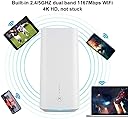
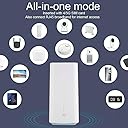
The HUAWEI 5G CPE Pro is an unlocked, dual-band 5G router delivering ultra-fast download speeds up to 2.3 Gbps and supporting up to 64 devices simultaneously. Designed for medium to large homes, businesses, or travel setups, it offers extended Wi-Fi coverage vertically and horizontally. Lightweight and stylish, it includes a 2-year warranty and an intuitive app for full control, making it a future-proof solution for high-demand connectivity.


| ASIN | B07X9TQK79 |
| Antenna Location | Home, Staff |
| Antenna Type | Internal |
| Best Sellers Rank | 73,807 in Computers & Accessories ( See Top 100 in Computers & Accessories ) 660 in Network Repeaters |
| Box Contents | 1 x Ethernet Cable, 1 x Huawei 5G CPE Pro, 1 x Power Adapter, 1 x Quick Start Guide, 1 x Warranty Card |
| Brand | HUAWEI |
| Brand Name | HUAWEI |
| Colour | White |
| Compatible Devices | Laptop, Personal Computer, Smart Television, Smartphone, Tablet |
| Compatible devices | Laptop, Personal Computer, Smart Television, Smartphone, Tablet |
| Connectivity Protocol | Wi-Fi, Ethernet |
| Connectivity Technology | Ethernet, Wi-Fi |
| Control Method | Touch |
| Controller Type | Touch |
| Coverage | Strong, wide coverage |
| Customer Reviews | 3.7 out of 5 stars 125 Reviews |
| Data Transfer Rate | 2.3 Gigabits Per Second |
| Frequency | 6 GHz |
| Frequency Band Class | Dual-Band |
| Frequency band class | Dual-Band |
| Has Internet Connectivity | Yes |
| Is Modem Compatible | Yes |
| Item Type Name | 5G Router |
| Item Weight | 700 Grams |
| LAN Port Bandwidth | 100 mbps |
| Manufacturer | Huawei |
| Manufacturer Part Number | H112-372 |
| Maximum Upstream Data Transfer Rate | 1150 Megabits Per Second |
| Model Name | 5G CPE Pro |
| Model Number | H112-372 |
| Model name | 5G CPE Pro |
| Number of Antennas | 4 |
| Number of Ports | 2 |
| Operating System | Versatile Routing Platform |
| Other Special Features of the Product | WPS |
| Product Warranty | Technical Support enquiries: [email protected] 2 year warranty with Livewire Telecom Limited |
| RAM Memory Installed | 128 MB |
| Router Firewall Security Level | Basic |
| Router Network Type | 5G |
| Security Protocol | WPS |
| Special feature | WPS |
| Wireless Compability | 802.11ac, 802.11b |
| Wireless communication standard | 802.11ac, 802.11b |
T**Y
Very impressive on Three 4G network
Early days however ordered this to replace an existing Huawei B525. I am on UK Three network on 4G (no 5G in my part of the country) and distribute the WiFi LAN around my 3 storey 5000sqft house via an Orbi with two satellites plugged Into the B525, and use an externally mounted Poynting XPOL A0001 Omni antenna at the top floor and was good for 40-75Mbps download depending on network congestion/time of day. If I hang my iPhone out of the top floor window I can usually get about 10Mbps more than the set up I described. I get the 5G CPE out of the box, no tweaks, no antenna, put it on the window ledge of the top floor window (close but lower than the external Poynting) and immediately had 95Mbps vs 55Mbps against my regular set up as described above. I reckon I am getting at worst 33% better speed, but up more like 70-100% better on balance through the day. I am now getting a solid 85Mbps at my ground floor Apple TV, usually circa 25-35Mbps. I have to say the interface on my software/firmware is fine, works quickly enough and have enough functionality: I can change the WiFi channel width to 20/40/80mhz which is better functionality than my Orbi. Down side is the price which between £350-400 is expensive (it doesn’t have wifi6) but it is 5G future proof and as fast as I believe there is for 4G. On Three network I can not recommend it highly enough - nearly 100Mbps for £20/p.m. unlimited, that takes some beating. I will update when I have the TS9 adapters for my SMA antenna and can plug the external antenna onto it. UPDATE: External antenna seems to make little difference, on the 'location check' facility it seems its current location is not great and as this is virtually the same location but outside the window where the router is currently positioned I guess its the signal loss over the 5m cable from the antenna that loses any gain/benefit. TS9 connectors very much inferior to SMA, this is an unusual decision from Huawei and definitely a step backwards. One thing I have noticed the signal strength seems to drop off over night needing a reboot to get back to optimum speeds. Dont know why and hope this can be resolved in settings?? Finally, I have to say my increase in speed in my original review was conservative, I am regularly getting over 100Mbps and would say it has literally doubled my real world speed even without an external antenna - amazing.
A**R
Cannot connect any smart devices.
Router does the job although speeds in my area aren't great. The one thing I am annoyed about is connecting smart devices. Basically it won't. Smart TV, Smart Lights, CCTV Camera etc etc. It just won't have it, There isn't any information online. I can't say I am happy at all really and given the speeds I am getting I would have been better with a 4G router from another brand
N**6
Up to 75mbs my location Bring on 5g UPDATE 31ST MARCH 2020
The pace of technology is remarkable. I am not able to test this on 5g yet although it has an LED to indicate if 5g signal is good. I am running off three network home broadband 4g and previously have a typical 12mbs download via speedtest using older 4g router. I would say the signal from three is not the greatest downstairs in my property. I have chosen best upstairs location the improvement is staggering easily averaging 65mbs sometimes 75 to 80mbs. The signal is stable uninterrupted for streaming . Very impressed with the Huawei 5g CPE and three network.An update ..... I have been using this router since Nov2019 my setup is complicated with two access points on the LAN so have option of base station CPE PRO and two Asus access points. The setup has been reliable I do get speed drops but streaming Iplayer etc all good. The Huawei settings page is easy to understand although updating firmware (once ) recently defaulted the IP address to out of the box setting. There's a lot of devices wired and wifi connecting to access points etc all works well, I am hoping that Three 5g comes to my area . I am so glad I cut the ties with major fibre broadband company > I do not miss them at all. I am hoping somebody will provide more reviews of the AF9E before committing to a purchase. WELL I HAVE RELIED ON THIS ROUTER SINCE LEAVING FIBRE COMPANY BIG NAME STILL NO REGRETS SEVERAL MONTHS LATER. YES SPEEDS ARE NOT COMPARABLE TO FIBRE BUT RELIABLE IPLAYER AND OTHER STREAMING SERVICES FINE LOAS OF CONNECTED DEVICES ALBEIT ACCESS POINTS (ASUS ROUTERS) IN THE HOUSE - CAMERAS FIRE TV COMPUTERS PHONES NO ISSUES - ALSO VOIP FOR MAIN PHONE LINE. THE ONLY DRAWBACK THE SOFTWARE UPDATE LOSES THE SETTINGS (IP ADDRESS DEFAULT TO FACTORY) MAYBE THE LATEST UPDATE FIXES THIS TESTING SOON. I WILL SAVE A BAK FILE THIS TIME TO RETAIN SETTINGS. I WISH I HAD MORE INFORMATION REVIEWS ON THE AF9E AERIAL BEFORE THINKING OF A PURCHASE . I DOUBT 5G AVAILABLE MY LOCATION ANY TIME SOON - RG10 AREA
A**Y
Will work for most, but everyone else will hate this.
Like other reviewers, I noticed a ton of weird management issues, and it was all down to the way IPv6 is handled. Huawei have basically locked every admin setting apart from Wifi SSID if you use this thing on EE, this goes without saying is not the correct way to approach this challenge. The speeds are great, I went from 30mbps on an LTE modem all the way up to 200mbps down with this. But I unfortunately cannot recommend this as at the price its set at, and function it delivers is not worth the purchase. If Huawei fix this bizarre method and allow us to enable something like IPv4v6 dual stack and open up admin settings then I would gladly recommend it. PS- I also bought the antenna, and noticed a 100mbps speed drop. My old LTE antenna in the same spot gave me around 200mbps down but limited my upload, so I would recommend using it without an antenna.
A**C
Decent speeds but unreliable
I have been using this modem for a few months with a Vodafone UK unlimited 5G SIM and the maximum speeds are great (over 200 Mbps down and around 50 up, since I think Vodafone uses 4G for uploads and 5G only for downloads). When I received the modem, all I had to do was pop the SIM in, put it by the window and plug it in, and it configured itself for Vodafone and connected just fine. However, the unit loses the 5G connection often and doesn't reconnect to it by itself until I do a full factory reset. It doesn't reconnect if I just restart it. It's not a huge deal for me, as all my settings are on a Google Wifi unit connected to this Huawei modem, so I can reset the modem with no loss of configuration, but at this price, the reset should not be necessary. Just to be clear, the modem is still connected via 4G, but that at least for me is a much lower speed, so I prefer to use 5G at all times. As expected, the unit is quite sensitive to where it is placed. I have it set right in front of the window and I played with it a bit to find the best location (the Huawei apps help finding the best location). Huawei does sell an outdoor antenna that I'm sure would help with the signal strength and allow the modem itself to be placed away from the window, but at GBP 149, that antenna is quite an investment. Also, this has been mentioned by other reviewers, but Huawei provides two different apps that can configure and control this modem and they are quite different. There's also a browser-based web tool that can be used to configure the modem, so it's a bit confusing and not as easy as it could be. All in all, it works for me and since my building doesn't have access to anything other than slow ADSL, this modem has provided a way to get better speeds. However, it is not a "set and forget" device, at least for me. Maybe a software update will fix the 5G disconnection issue, but until then, I just reset it to factory settings every couple of days when it happens and live with it.
J**B
The best available at the moment
The 5g road is going to be rocky, badly paved in places and need a lot of resurfacing before it gets us all to a superfast 5g nirvana... but this is a good start. You can read a LOT online about whether what is out there at the moment is true 5g, the troubles with the old infrastructure versus the need for new and just about everything else, so i am purposefully letting others with more knowledge debate that. At a basic level - i needed a router with good reception, and fast speeds, and this delivers. I have to stream a lot of video for work, from various locations, so i have tested this extensively for the last week in Bristol and London with an unlimited Vodafone 5g SIM card. Fastest download: 271 mbps. Fastest upload: 52 mbps. The signal is not always stable (despite the claims made by coverage maps), it can fluctuate wildly from the same location within a few minutes... but this router always delivered better speeds than i was getting on my 4g phone. If you need to jump in now, go for it. This is a good, if expensive, start. If you can wait a year, there will be cheaper out there, and the longer you wait, the better the 5g should be. Oh and i didn't ever plug in an external antenna... can't find any that are well reviewed for 5g... so i think i'll have to wait for that as well...
W**D
No problems
Works as expected.
A**Y
Great (maybe the best) for 4G
Unfortunately I have nothing to say about 5G performance since my area isn't covered yet. Other than that, overall Huawei 5G CPE Pro delivers exactly what it promises. I've registered peak LTE speeds of 280 Mbps Up / 110 MBps Down. This is one of the very few home routers capable of delivering 100+ Mbps upload over 4G networks by the way. Average speeds are around 100 Mbps Up / 70 Mbps Down (EE, London city center, relatively close to a "cell tower") Even though the H112-372 model is not WiFi 6 certified (H112-370 is by the way). I could get near Gigabit readings from Iperf at close range. IPV6 is fully working out of the box. This router is also very stable. It handles 10+ devices without issues and does not get warm. Signal strength is not too bad (I get 3 bars 2 floors bellow my Flat). After initial settings I've completely forgotten about it just like I should with a reliable router. To nitpick a few issues: No 160 MHz channels (not that you should attempt to use 160 Mhz channels in Central London anyway). 80 Mhz channels are useless more than a few feet away from the router. While the router is configurable it's firmware is not anywhere near enthusiast level (and you can't simply flash DD-WRT on it). I also don't recommend the mobile app since it asks for about every possible permission from your mobile phone. I'm still giving Huawei 5G CPE Pro 5 stars despite above cons since it has certainly already paid for itself and made my life in one of London's many slow broadband areas just a little bit more tolerable. While there's no such thing as future-proofing, I can't wait for 5G. If EE decides to bless my area with a 5G Node I'll upgrade my package and update this review.
Trustpilot
Hace 3 días
Hace 2 días