We remain fully operational. Our teams are working around the clock to ensure your deliveries continue safely.

Descargar la aplicación


Servicios al cliente
Sobre nosotros
Copyright © 2025 Desertcart Holdings Limited
Descargar la aplicación


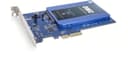
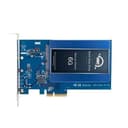

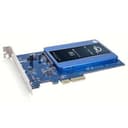
🚀 Upgrade your vintage rig to modern speed—because slow storage is so last decade!
The OWC Accelsior S PCIe Adapter transforms any PCIe x4 slot into a high-speed SATA 6G expansion port, enabling 2.5-inch SSDs or HDDs to run at up to 550 MB/s. Compatible with Mac Pro models from 2006 to 2012, the 2019 Mac Pro, Xserve Xeon, and standard PC towers, it offers a simple plug-and-play solution to dramatically boost boot times and application responsiveness. With no drivers required and a 3-year warranty, it’s the ultimate upgrade for professionals looking to extend the life and performance of their legacy systems.


| ASIN | B00WUZPMHE |
| Best Sellers Rank | #214 in Internal Computer Networking Cards #1,901 in Data Storage |
| Brand | OWC |
| Built-In Media | OWC Accelsior S |
| Compatible Devices | Mac Pro Mid 2006 - Mid 2012 (MacPro1,1 MacPro2,1 MacPro3,1 MacPro4,1 MacPro5,1) //Mac Pro and Mac Pro Rack Late 2019 (MacPro7,1), Xserve Xeon Late 2006-2009 (Xserve1,1 Xserve2,1 Xserve3,1) |
| Customer Reviews | 4.6 4.6 out of 5 stars (635) |
| Global Trade Identification Number | 00812437021035 |
| Hardware Interface | SATA 6.0 Gb/s |
| Item Dimensions L x W x H | 8.6"L x 6.3"W x 1.9"H |
| Item Weight | 0.3 Pounds |
| Manufacturer | Other World Computing |
| Model Number | SSDACL6G.S |
| Operating System | Mac OS |
| Style Name | PCIe Card |
| UPC | 812437021035 |
A**C
Installed in a MSI X58 Pro 1366 socket with tri-channel ...
Installed in a MSI X58 Pro 1366 socket with tri-channel memory, a system I built in 2009. This Motherboard/system was limited to SATA II (3Gbps) so after buying a Samsung 850 EVO SSD I wanted to get full speed. My system is dual boot (Win 10 & Fedora 25). I installed the card in a PCIe x16 slot that operated at a max of PCIe X4. Basically no issues. I was concern there was going to be an issue with the Samsung SSD being dual boot but definitely plug and play couldn't be easier. I noticed during boot that the PCIe bus speeds registers as PCIe 2.0 x2 and NOT PCIe 2.0 x4 but not an issue as both speeds are faster that SATA III (6Gbps). My speed measured using the Samsung Magician software went from approximate: (284 read, 271 write randoms; 52409 read, 41961 write IOPS on SATA II to 553 read, 526 write; 88649, 71680 respectively with the OWC adapter card). Yes I can tell the difference in boot to both Windows 10 and Fedora Linux is about half but it was very fast anyways after upgrading to SSD from Hard Drive. Windows 10 went from 15 seconds to 8 seconds on the boot while Linux went from 8 seconds to 5 seconds but in the Linux boot there is a program that is configured to take 6 seconds on boot so very fast if I was to turn it off or reduce it! Note: CPU i7 920 OC to 3GHz from 2.6GHz, OCZ DDR3 1333 ram OC from 1066 to 1500 MHz. Graphics is now Radeon RX 460 OC with 2GB Ram, 500W power supply, and 2 DVD drives, Creative XFi sound card and old Zoom modem 3025C that doesn't work with Windows 10. I have one PCIe x16 slot left and 1 old PCI slot left all in a ELITE Mid or Medium tower case. In all honesty I didn't need the upgrade as the system was very fast already for mainly browsing the internet but the OWC card performs as advertised. I would definitely rate this as a buy to extend the life of an older computer.
K**.
Mac Pro remarkable responsive to PCIe SSD adapter upgrade!!!
Added my SSD to the card and installed into my 2010 Mac Pro 5,1 single CPU upgrade from 2.8 GHz to 3.46 GHz and configured it to be the start up disc and worked very well. The instructions were simple and easy to follow. Very impressive and ordered another card for my 2009 Mac Pro 4,1 upgraded to the 5,1 model recently CPU upgrade from single 2.93 GHz to 3.46 GHz. It is performing exceptionally well with this card and SSD in the PCIe slot as the boot drive in my Mac Pro. The boot time has been exceptionally fast and application response time is much quicker than HDD and the computer is quieter and cooler than ever before. The card comes with the four screws to attach the SSD and instruction and requires no drivers and it’s just simple plug the card along with the SSD into PCIe slot and boot your Mac Pro as you see fit. You would actually see the results as it begins to boot up. Also, I do not use neither of my Mac Pros for gaming so I can not see fit to talk about that agenda.
A**.
Speed gain for certain on a Mac Pro 5.1 Desktop over using SATA drive bay/drawer and FAST order/shipping process by OWC ..again!
First to say I've purchased several times form OWC and never been disappointed. My last 3 orders are through their store-front and Amazon and all 3 orders got shipped within 4-5 hours of my order! Card went in fine and works immediately, Checking System Device information in the hardware section for this card confirmed all is well! I have a Mac Pro 5.1 2010+ desktop. I've used both a combo of SATA internal HDs, SSHDs and 1-2 SSDs as well. My current Sandisk 1 TB SSd has been in one of the drive drawers using an adapted and interfaced thoought the respective SATA connected for that drawer. I wanted this PCI3 2.5 adapter card primarily for adding another drive to drives that already occupty all 4 STAT drive drawers plus one in the optical bay on top. I always spec out drives (Blackmagic Speed Test App) when doing any upgrades, or moving things around or after a new erasing and/or partitioning or for general trouble-shooting. Well.big surprise in a big speed gain using this card over one of the SATA II drawers. Granted this card is rated SATA III so there may be a beny there in regards to the results. My speeds using this adapter card were 310 mbps write and 550 mbps read! My 1TB Sandisk SSD tested was tested both in HTF+ and then APFS partitions and either one did not impact speeds at all (were the same). So in summary, if I ever add or swap in a new SSD in my machine, I WILL be adding another one of these cards for sure!
D**A
UPDATE 14/05/2019 So i can confirm that these do in fact work in a PC. I recently put one of these into a PC with a Gigabyte Z390 UD motherboard, wanting to give it another chance despite when trying it in my dads PC and it didnt work. And with the Z390 UD it works flawlessly. So if you have this type of motherboard? I can say it at least works there both as a data storage device, and a boot device! ORIGINAL REVIEW BELOW: =================== I ordered 2 of these. One for me and my Mac Pro (from 2009) and one for my dad and his PC. On my Mac Pro this product works excellently, coupled with a Samsung EVO drive! Boots up in less than 15seconds (MacOS 10.13 + quite a few auto-running applications). However on PC? This thing does not work well. PC detected the card and that there was a drive plugged in however it was never accessible and there were alot of crashes. If attempting to use it as a main boot drive? Everything crashed, stating the boot volume was inaccessible. If trying to use just as a storage device? Crashes, freezing and in some cases totally inaccessible. The drive that was plugged into this was also fine and so not at fault. The requirements for use in a PC are very vague as well. Simply saying 'A PC with a PCIe x2 slot' does not help anyone. Their website wasnt much better either, touting the support for multiple Macs, but again when it came to PC it was a vague 1-2 lines. Nothing of use. In conclusion; Want to use this with a Mac Pro? Go for it! It should work perfectly fine, at least in 2009 Mac Pros so long as you put it in one of the 4x slots. Putting it in a 16x one seems a little wasteful especially when the graphics card is supposed to go there! Not sure which are the 16x and which are the 4x? If you look closely at the Logic Board of a Mac Pro (at least the 2009 ones) the PCIe slots are clearly marked 16x or 4x at the left-side end of the PCIe socket. Want to use this with a PC? Take caution! I dont deny that maybe my dads PC itself was a factor. The BIOS/Firmware on the motherboard does state that it supports PCIe booting, but it just didnt work, even as a storage device. So we had to return my dads one. I'll be keeping mine in my Mac though!
C**N
Con OWC non ci si sbaglia mai (a patto di sapere cosa si vuole :P )!!! Prodotto eccellente, che costa un po' ma che offre performance degne di tale nome. - Una cosa importante per chi vuole prendere questa scheda per il suo Mac Pro, il plus valore sta nel fatto che fa girare anche Windows in boot, cosa che altri adattatori di questo tipo non fanno!!! Se volete ravvivare (DI BRUTTO) le potenzialità del vostro vecchio Mac, quà andate sul sicuro!!! (L' ssd con attacco sata standard va comprato a parte, questa è solo la scheda che adatta il disco a stato solido) p.s. da le prestazioni migliori su Mac Pro 3,1 - 4,1 e 5,1, mentre per i Mac Pro 1,1 e 2,1 non viene sfruttata a pieno quindi non vale la spesa.
A**X
Ich habe die OWC Accelsior S als Erweiterung meines Apple Xserve 3,1 gekauft, um eine Transcend 256GB SSD als schnelles Startvolume verwenden zu können und noch dazu keinen der drei Festplatten Einschübe dafür ‘opfern’ zu müssen. Die OWC Accelsior S kommt sehr gut verpackt und ist meiner Meinung nach hervorragend verarbeitet. Der optische und haptische Eindruck ist sehr gut. Die Installation der SSD in der Accelsior Karte ist super einfach: SSD einstecken und die vier Schrauben von unten (nicht zu) fest schrauben. Danach wird die Accelsior Karte in einen freien PCIe Slot gesteckt. Der Xserve hat die SSD in der Accelsior Karte sofort nach dem Start von der System DVD Version 10.6.8 als bootbares Volume erkannt und ich konnte problemlos macOS darauf installieren. Seit dem läuft die Karte schnell und zuverlässig.
N**者
MacPro2010で使用するため購入した。 従前はx1接続であるが安価なSEDNA - PCI Express (PCIe) SATA III (6G) SSD Adapterを使っていたので、PCI-Ex1がボトルネックなり最高390MB/s程度が限界であったが、本製品を使用することにより、同じSSDが550MB/Sに向上したのでありがたい製品である。載せ替えの際も、従前のアダプターがSSDを外して当製品に取り付けるだけで、そのまま認識できたので、非常に簡単であった。
M**M
I just fit the SSD, put it in a PCI-E port, starting the Mac and got full read and write. The SSD is a Samsung 870 EVO, also works with Kingston and Intenso SSD. Great quality, and a cheap way to a get a faster Mac Pro
Trustpilot
Hace 2 semanas
Hace 3 días