
Descargar la aplicación


Soporte al cliente

Desert Online General Trading LLC
Warehouse # 7, 4th Street, Umm Ramool, Dubai, 30183, Dubai
Descargar la aplicación
Soporte al cliente
Desert Online General Trading LLC
Warehouse # 7, 4th Street, Umm Ramool, Dubai, 30183, Dubai




🚀 Elevate Your Pi Experience!
The 3.5 inch Touch Screen for Raspberry Pi 4 is a compact and efficient display solution, featuring a built-in fan for temperature control, a native resolution of 320x480 pixels, and a refresh rate of 50fps. Compatible with Raspberry Pi 4, 3 B+, and 2, this touchscreen monitor is perfect for gaming, programming, and multimedia projects.


| Number of Component Outputs | 1 |
| Total Number of HDMI Ports | 1 |
| Processor Count | 1 |
| Display Resolution Maximum | 480 x 320 Pixels |
| Native Resolution | 320 X 480 |
| Resolution | 320x480 |
| Hardware Connectivity | HDMI |
| Connectivity Technology | HDMI |
| Item Dimensions D x W x H | 3.15"D x 4.72"W x 1.57"H |
| Item Weight | 80 Grams |
| Screen Size | 3.5 Inches |
| Is Electric | Yes |
| Viewing Angle | 160 Degrees |
| Has Color Screen | Yes |
| Display Type | LCD |
| Display Technology | LCD |
| Aspect Ratio | 1.33:1 |
| Screen Finish | Glossy |
| Item Shape | Rectangular |
| Color | Grey |
| Mount Type | Wall Mount |
| Compatible Devices | Raspberry Pi 4, Pi 3 B+, Pi 2 |
| Special Features | Touchscreen |
| Specific Uses For Product | Video Editing, Education, Programming, Photo Editing, Gaming, Business |
P**M
Worked on the first try.
This little display is pretty impressive. Touch functions work great. You can drive your RPi 4 with the little stylus that is included in the kit. I had no issues installing the hardware or adding the drivers using the instructions on the Amazon product page for this little case/display combo. I'll be honest, unless you have a specific project in mind for this, like making a wee-television for LEGO people, or using it for a control box with touch screen for something else I'm not sure what real applications this would fill that you could not do with other devices like tablets. Having said that... it's incredibly fun and the fact that the display supports rotation at the HARDWARE level (meaning mounted physically upside down) you can see the power-on/boot messages correctly is VERY impressive. As you can see from my photo, I have power connected at the top and the display is oriented properly. Simply use the rotate.sh command in the /home/pi/LCD-show directory and it reboots with the orientation you choose and remembers it. Very cool attention to detail in my opinion. This function is specific to this display where you'd normally use a rotate command in your /boot/config.txt file, but doing that does NOT get you rotated text when booting up from power-off. In any event, this seems like a neat little device. The RPi runs pretty warm with this screen, even with the fan and heat sinks, so I'd probably say over-clocking your RPi 4 might not be the best idea. Update: 05/07/2020 - After reading some other reviews, I thought I'd also mention that the screen resolution is not ideal in certain applications. I had some issues with things like browsers getting clipped off-screen and had to do a little additional work to move the window so I could get at certain buttons for certain windows. I'm sure there are ways around that, but for a casual user it might be frustrating. Aside from that.. it's still humming along.
C**.
Small but functional screen
Took me a bit of tweaking (still need to adjust the screen) but got it working. Not for the faint of heart but does function. I then paired it with a battery. It preforms like a low quality smartphone.
B**O
Know what you are buying.
Keep in mind that this is a 3.5" screen that runs at a resolution of 320x480 pixels. You will not be able to see your entire desktop... applications will be cut off. If you remote desktop via VNC viewer, your window will mimic the 320x480 resolution when you connect. This means that any limitations on the physical screen will carry over to VNC viewer. You will need to switch back to HDMI to do anything that requires full desktop access. Also, when using the stylus the point of contact on the screen did not correspond with mouse movements for me. I still have not figured out how to fix that... but I am not using it as a touch screen and it's not a priority for my project. The enclosure does not appear to provide adequate cooling (even with the fan and heatsinks). I am only running a simple crypto coin ticker and the Pi is between 57 and 60 Celsius in an air conditioned environment at 22.22 Celsius. This is a handy little screen if you know its limitations; it works for me because I purpose built it to be a crypto/stock ticker. This screen may work well as a clock or some kind of home monitoring system if you can sort out the stylus to screen coordinates.
T**K
MAKE A BACKUP !!
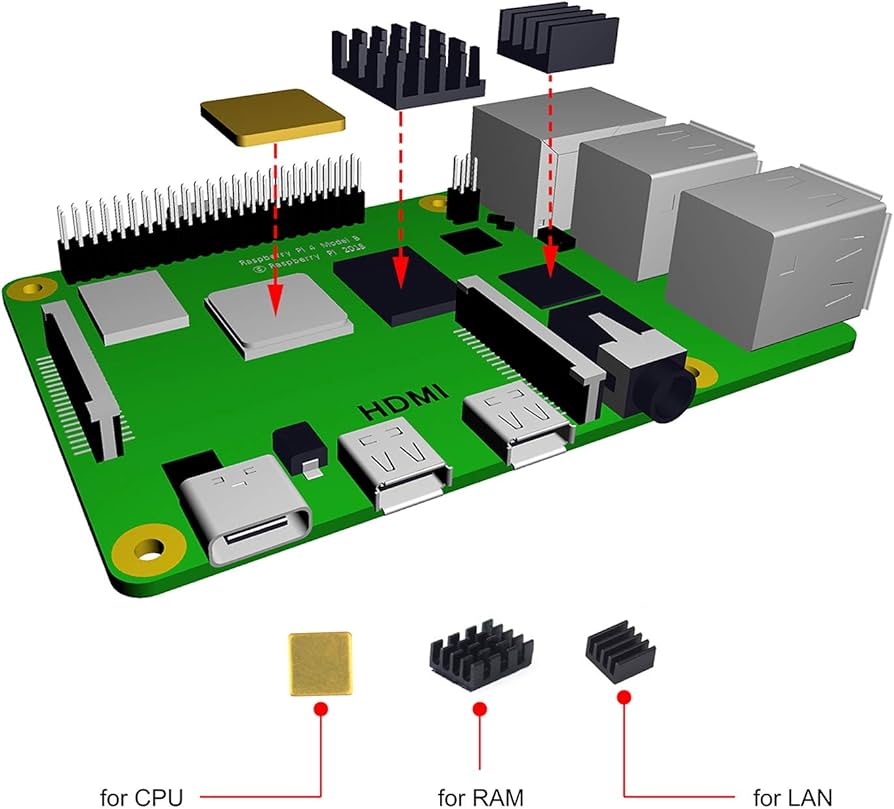
Yes that is in all caps. This product is very poorly made, in every possible way. I see all the other positive reviews, and it baffles me that people think this is a quality product. First of all, MAKE A BACKUP before you load the drivers. Read the listing carefully, the seller has indicated that this display driver is known to cause a total crash of your OS. Like, brick it, instantly. Their suggested fix? Reload it and try again. Well, I did that 3 times, and it bricked it every time. Suffice it to say I am returning this product for a refund. And before anyone says there is something wrong with my build, I have the same build running on the RPi “official” 7” touchscreen and it is running great. I am looking to make the whole thing smaller now. Second, the screen “hat” has no substantial support connections. It is held only by the connecting pins. It sits on top of the usb ports, and they give you a Small plastic spacer to put on top of the Ethernet port (which is not discussed in the instruction sheet). It wiggles and moves every time you tap it. Third, the heat sink for the cpu is a flat piece, with no fins for cooling. This is because the (noisy) fan is so close to the board that there’s no room to put one of the typical finned heat sinks. I found the processor tends to be much hotter than it should be, and there was hot air being pushed out of the usb and Ethernet ports, suggesting that airflow has zero thought in it. They probably only added the fan because it’s just barely enough to keep the thing from burning up. Very poor design. Fourth, the case is 2 pieces, and does not securely clip together. The side with the power and hdmi ports is loose. All things considered, this is a low-quality thing with bad driver code and little to no substantial support. Very disappointing but I guess not surprising in today’s unmoderated marketplace.
C**T
Less than thrilled, and Raspbian windows aren't fitting on screen
(1/1/20 Update) It actually runs a few degrees cooler without the screen/fan. Ventilation is simply too poor when the screen and fan are installed, either that or the screen itself is generating heat. On the plus side, the heat sinks definitely make it run cooler than the stock Pi. But I highly recommend drilling extra ventilation holes in the case for when the screen is installed. I'm also still not thrilled with screen itself and wishing I had bought something else. I don't think I'd recommend this for anyone planning to use it to interact with the desktop GUI. I had hoped to be able to use it that way when mobile and not using the HDMI port, but the GUI just doesn't fit well on this screen and not being able to flip between screens "on-the-go" is a dealbreaker for me. I could see this maybe being useful to someone developing specific applications for it, but it's simply not versatile enough or compatible with the GUI enough for my needs. (Original 12/27/19 post) Part of my dissatisfaction is my own fault, I didn't see that you can't have BOTH the touch screen AND an external HDMI monitor connected. But while it's my fault I failed to see that in the description and reviews, that limitation is not good. The touchscreen is so-so - you have to press firmly with the stylus to have your input registered, and it's not very accurate. Don't even bother using your finger. The case is OK, except they didn't provide enough ventilation for cooling. The heatsinks and fans aren't all that helpful when all the air remains trapped inside the case. I was hitting over 60°C with moderate loads on my Pi. To help resolve this problem, I drilled about a dozen small holes all around the outside of the case and running temperature dropped by about 5°-10°C. I'm getting in the low 50's now. I may drill some more, but I'm concerned about weakening or cracking the case. My biggest complaint, however, is that some of the windowed images are chopped off on the right side with the Raspbian GUI. Not because the case is blocking it, but because window sizes seems to be larger than the screen can accommodate. I haven't been able to find a way to resize the windows any smaller yet. This means that open windows will sometimes have buttons I can't see and/or access even when made to "fit the screen". This is made more frustrating by the fact I haven't been able to scroll around the window for apps like the VLC Media Player to be able to access controls. This may just be an issue of me needing to learn how to adjust things in Raspbian for this screen, BUT it seems to me they would have considered this problem and accommodated a fix in the drivers or something. Not sure if I'll continue using this setup or switch to a different product, unless I can figure out how to fix the screen chopping off part of the windows and/or easily scrolling around to reach the unseen areas. Even then, without being able to plug in HDMI on-the-fly, I'm not sure this will prove useful enough for my needs, I may have to switch to a 7" screen. (12/27 Edit: To clarify GUI problem better and mention cooling limitation)
T**T
Great buy for the case, fan, screen, and heat sinks
First of all, the screen is top notch and the fan is already mounted. I don't have to think about where and how. So already a plus for me. The case is well made and comes with a top cover. It's in my picture, but not in the listing. Another huge plus. Lets me remove the screen and have a 100% headless Pi and use the screen on another pi. That said, the fan is attached to the screen. It can be removed, but it's glued, and I don't be doing that. The drivers are also easy to install. They're standard touch screen LCD drivers and work with 3 commands. Brightness is good. Refresh is good. Fan is quiet. Pretty happy with the purchase.
A**A
Works fine with some caveats
Took minutes to assemble and works fine, and the driver was simple to install. My only issue with the included hardware is the fan, which after just a couple of days started making annoying noises. Either my specific fan was defective or it's just a low quality fan that doesn't last long. However it's not a big deal, and for the overall cost of this kit, the quality is great and I am very happy with it. The only way I'd improve this kit is double the resolution of the screen so the Raspbian UI can fit properly on the screen (right now some dialog boxes won't fit and you can't close them because the close button is outside of screen boundaries).
N**L
Easy to get it working, but runs very hot & may not work for many scenarios
It is not a great display, but it is workable for some scenarios, just make sure you understand what you are buying, and that the case is not well vented, so it will run very hot. I wanted this display case to play music and control it with my finger, but Kodi doesn’t work on it, so my project didn’t work out as expected. The good thing is that is works, so I have to start experimenting a bit until I find a new purpose. The pins are described on the manufacturer’s website, so I am considering detaching the display from the case & discard this case and just keep the display so the Pi will run cooler. Pros: • Easy to install driver (only tested it on Raspbian) • They even have OS images with the driver pre-installed if you prefer that option. • Hardware screen rotation support, using a very simple script provided Cons: • Runs very hot (too hot) • You cannot switch between HDMI and HAT. Not a surprise as it is clearly described by the vendor, but it is still something you have to consider when you purchase this product • Case lacks proper ventilation if you use the display HAT, and it will run very hot (about 25o C hotter than without using it) • Case quality is poor in general, for example, the screw holders on the top of the case intended to be used without the HAT broke down when I tried to add a fan. • Some applications will cause your Pi to crash hard. It crashed every time I tried to run Kodi on Raspbian • The resolution is very low, so it may be hard to read text/commands. Again not a surprise, but buyer beware • The heat sinks are a bit small so they can fit with the display HAT & the fan
Trustpilot
Hace 1 mes
Hace 2 semanas