We remain fully operational. Our teams are working around the clock to ensure your deliveries continue safely.

Descargar la aplicación


Servicios al cliente
Sobre nosotros
Copyright © 2025 Desertcart Holdings Limited
Descargar la aplicación

Buy anything from 5,000+ international stores. One checkout price. No surprise fees. Join 2M+ shoppers on Desertcart.
Desertcart purchases this item on your behalf and handles shipping, customs, and support to Uruguay.
🚀 Tiny Board, Massive Potential: Power Your Next Innovation!
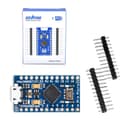
The OSOYOO Pro Micro 5V/16MHz Module Board is a compact, high-performance Arduino-compatible development board featuring an onboard micro-USB port, 16 flexible I/O pins (12 digital, 4 analog), and broad OS support. Its small footprint and reliable speed make it ideal for professional-grade embedded projects and creative DIY builds.


| ASIN | B012FOV17O |
| Best Sellers Rank | #3,534 in Single Board Computers (Computers & Accessories) |
| Brand | OSOYOO |
| Built-In Media | Pin Header |
| Connectivity Technology | USB |
| Customer Reviews | 4.5 out of 5 stars 337 Reviews |
| Included Components | Pin Header |
| Item Dimensions L x W x H | 3.2"L x 2.3"W x 0.2"H |
| Manufacturer | OSOYOO |
| Mfr Part Number | DBAD100200 |
| Model Number | DBAD100200 |
| Operating System | Linux, Ubuntu, Debian, or a real-time operating system such as FreeRTOS |
| Processor Count | 1 |
| Total USB Ports | 1 |
| Total Usb Ports | 1 |
| UPC | 700686900211 |
L**M
Exactly what was needed
Basic, small controller, works as it should without any real issues. About half the size of a standard lighter, allows it to be mounted in very small places. Mine was used for a custom Clone Hero guitar build, and worked great.
B**N
Yup, works with Mac OSX with the correct cable.
Initially, I was having a lot of trouble connecting to my Mac running Mojave. I tried all the instructions here that suggested installing new drivers. Turns out all that was not necessary. The culprit was THE CABLE! After losing an entire weekend day trying to get it to work, I stumbled across a post on an Arduino forum that suggested some micro USB cables are only wired for charging and do not have the data pins connected. None of the micro USB cables I had were working and I realized that yes, they all came into my possession because they were included with other devices for charging purposes. So I found an old box of cables in the garage and found an old Nokia micro USB cable and BAM, now my board was showing up on a port! So, if you're having trouble connecting to a mac, it could be that you are using a cheap cable that may not have data pins connected. Mine works great now and I built a very cool project with it that does exactly what it should. I'm very pleased. :)
T**S
Great little board but really check your cable is data as well as power
Making a jog dongle for my CNC, only need 10 keys and this board will handle that easily. My issue is I spent a full day trying to get it to connect to the Arduino app, first few hours to track down the driver I needed (no documents in the box and I am new to this) I finally got that working thanks to SparkFun's site. But with the correct drivers it still would not connect. I knew that some cables are power only so I tried 3 different ones with no luck (figured something beyond my abilities was set wrong or board was bad) but on day 2 I said what the heck, lets try a third cable and it worked!! No way to tell if a cable has data lines just by looking. Man I lost a bit of hair on that one. I left off 1 star for lack of any documentation. Heck they could have even just stuck a QR code sticker on the box to one of the sites with docs.
R**L
What is this? A microcontroller made for ants????
So far it works perfectly. Note that I have done a bunch of arduino stuff on my computer before this so I may already have drivers that other people don't have installed. Connected to my computer Opened Arduino IDE and loaded Blink sketch Set board to Leonardo and selected the appropriate COM port (It showed up in the list already identified as a Leonardo) Connected an LED to pin 9 and modified the sketch accordingly Hit upload and within a few seconds I had a blinking LED Note that for some reason the onboard red Rx LED keeps flashing even after the upload, not sure why. I unplugged it from the computer and connected to the battery pack I used for charging my phone on the go and it started back up with no issues and without the red light blinking. So it does appear to be getting some sort of continuous data signal when plugged into my computer which is odd, but doesn't seem to actually be a problem. The pinout appears to match the sparkfun pro micro board for which I've attached the diagram. EDIT: I just realized that the pins with the white circles around them are the PWM pins.
B**O
Excellent board copy of SparkFun Pro Micro - 5V/16MHz -- may wish to use different settings from OSOYOO's recommendation.
Board works great. I did not have any difficulties that I could not resolve. Changing my recommendation to use the "Leonardo" board definition. This avoids all problems I had, don't need to download new definition. Only missing 5 pins that are on the Leonardo -- so just don't use those. Also use the macros for RX and TX LED, as pin 13 is one of the missing pins and so is the extra (active high) LED. ----------- Original review: ------------- That said, I gave 4 stars only due to documentation short comings. This board is electrically a duplicate of the SparkFun Pro Micro - 5V/16MHz, except the RXLED and TXLED (at least on my board) are both red color, and the power LED is green. And the bootloader shows as an Arduino Mini -- which is confusing but works. I use the latest Arduino system on Windows 10, which seemed to then have all driver issues resolved and did not need to download any drivers. I did use the Arduino facility to download the SparkFun board definitions for the "Pro Micro" which has different pin definitions than the recommended Leonardo. (Leonardo should work, but has pin definition problems.) BE ESPECIALLY CAREFUL if you use the "Pro Micro" board setup that when selecting the board type YOU ALSO set the processor selection on a separate menu item to "ATmega32U4 (5V, 16MHz)". Failure to do so will make the board appear to stop working. (Then a complex and tricky sequence of resetting using reset pin and uploading with correct settings within the special 8 second window must be done to reload the board so it will work after the 8 second boot delay elapses.) Other issues are related to and similar to the same issues with the Pro Micro itself, and the Leonardo. This board has the special advantage that the user can feed very fast data through USB, and can simultaneously output data on the RX,TX serial port to another process. I found this especially useful in communicating with a different system using serial data.
J**.
Works great but...
As with most all clones these days you have to be prepared to work a little bit to get what you want. Frequently these will throw a "USB Device not found" error. Fire up your Arduino IDE, open any known good sketch, connect your board, select "Leonardo" in the IDE, put a jumper wire on pin RST and get ready. Click UPLOAD on the IDE, and when the program switches from COMPILING to UPLOADING, ground the jumper 3 times quickly. The IDE will see the board, assign the COM port and from there it works fine. If you get everything working and the red TX LED stays on, just put a "TEXLED0;" in your sketch, that turns off the LED. The photo is this exact board running a temperature gauge sketch.
C**G
I used this not for Arduino Leonardo related projects, ...
I used this not for Arduino Leonardo related projects, but instead flashed in concert with a CP2104 for use as a GIM-X adapter in order to use my Logitech G27 steering wheel peripheral on Playstation 4. In this regard, it worked perfectly. What I appreciated most is that this board comes with the headers unsoldered. As far as applications- beyond my specific use scenario, this is essentially a Pro Micro version of the Arduino Leonardo. The reason you would use this over a vanilla ATMEGA328P based Arduino Pro Micro or Uno R3 is because the 32U4 can act as a USB controller (whereas the 328P uses a separate ATMEGA16U2 chip as a USB-serial adapter... or even a CH340 in cheaper Chinese clones). So you would use this type of board if you wanted to make a USB input device for your computer, for example. If you are just doing Arduino based projects without needing this extra capability, 328P Arduinos can be found for much cheaper.
P**C
Great price! Un-soldered (as I wanted) A+
Works great. Functions as an Arduino Micro in my IDE. I purchased because it was unsoldered. I blew up my "brand-name" Micro trying to remove the pins. This one allowed me to put the 90-degree pins i needed. Worked straight out of the box with the same sketch I used on my last Micro. /* One little thing - no reset switch. Ground pin GND (3 down on the right, with the micro-USB on the top) and it will let you upload a new sketch. */ EDIT: Not true - it accepts a new sketch without a reset. This little guy is PERFECT!
Trustpilot
Hace 2 semanas
Hace 2 semanas