We remain fully operational. Our teams are working around the clock to ensure your deliveries continue safely.

Descargar la aplicación


Servicios al cliente
Sobre nosotros
Copyright © 2025 Desertcart Holdings Limited
Descargar la aplicación


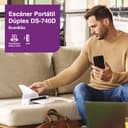
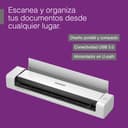

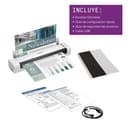

🚀 Scan smarter, not harder—your mobile office just got an upgrade!
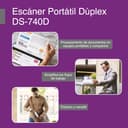
The Brother DS-740D is a compact, USB-powered duplex scanner that delivers fast 16 ppm single-pass scanning for both sides of documents. Designed for mobile professionals and small offices, it saves desk space with its ultra-compact footprint and supports Windows, Mac, and Linux platforms. Enhanced with automatic image optimization and OCR software, it streamlines document management on the go.


| ASIN | B083R3XYQN |
| Best Sellers Rank | #21,031 in Office Products ( See Top 100 in Office Products ) #22 in Document Scanners |
| Brand | Brother |
| Color Depth | 48, 24 |
| Connection Type | USB |
| Customer Reviews | 4.3 4.3 out of 5 stars (2,337) |
| Global Trade Identification Number | 00012502657484 |
| Greyscale Depth | 8-bit |
| Item Dimensions D x W x H | 11.85"D x 11.85"W x 1.78"H |
| Item Type Name | Mobile Scanner |
| Item Weight | 1.43 Pounds |
| Manufacturer | BROTHER |
| Media Type | Business Card, Embossed Card, Laminated Card, Plain Paper, Plastic Card, Receipt |
| Minimum System Requirements | Windows 7 |
| Model Name | Duplex Compact |
| Optical Sensor Technology | CCD |
| Paper Size | 3.40 x 72 Inches |
| Resolution | 300 |
| Scanner Type | Business Card, Document |
| Standard Sheet Capacity | 25 |
| UPC | 012502657484 |
| Unit Count | 1.0 Count |
| Warranty Description | 1-year limited warranty |
| Wattage | 3.3 watts |
J**B
Impressed!
Use for work on the go, super easy, user friendly, works way better than I expected it to.
D**.
Works with Linux (Fedora)
This is a nice little duplex scanner. I bought the factory refurbished model, and for a quick minute I thought that might have been a mistake. After every page, the scanner took 20+ seconds to be ready again. I'm using Linux (Fedora), so I thought maybe it was a driver problem. Or maybe I got a dud unit. I watched the udev monitor and realized the scanner seemed to be power-cycling after each page. Odd. Turns out, it was the port on my laptop. I plugged it into a different USB port ON THE SAME LAPTOP and the scanner works great! No long delay between scanning subsequent pages. No strange udev messages. Linux folks, Brother has Linux drives on their product support website (*.deb and *.rpm). Install is simple. I used Gnome's "Document Scanner" at first as the scanning front end. You have to select "All Pages From Feeder" (not "Single Page") in order for the two-sided (duplex) functionality of the 740D to work. You MUST ALSO select "Both" from the preferences dialogue. I eventually switched to "gscan2pdf", which is more flexible in terms of scan post-processing. In the "Scan" dialogue on the "Scan Options" tab, the "Scan Source" option allows you to perform two-sided (duplex) scanning. Select the option ending with "left aligned" for single-sided and "left aligned - duplex" for two-sided.
C**R
Got this to digitize old photos and scan some important documents without using a printer/combo
So I bought this (factory refurbished) because my dad passed earlier this year and he was a pack rat; one of those people who prints out bill payment confirmations and all kinds of random papers, not to mention the countless photos he had. Anyway, I figured this scanner would help with getting everything onto a computer much more efficiently than my printer/scanner combo. Here's what I found: -Brother has their own software to update the firmware and can manage your scans. This software does NOT work on my desktop however it DOES work on my laptop. My desktop is a high-end gaming machine that can run circles around my laptop without breaking a sweat, the difference is that my desktop has an AMD Ryzen 9 processor whereas my Dell G7 laptop has an Intel I7. My desktop just does not recognize the scanner when it's plugged in. So, I have to use 3rd party software, which I've managed to make work pretty well, but is disappointing that this is even an issue. -The top lid flips up so you can have photos/papers come out straight up instead of behind, however this does not work well with photos. While scanning pictures, the photos would move while going through the feeder causing a warped image being scanned in. So this feature works well for papers, just not for photos. -Portability? Yeah...not really. I had planned on taking this to my dad's house and scanning things there, but the issue is that you have to plug it into a computer. I desperately tried to use it on my android phone but there just aren't any apps that will recognize the scanner and not just use the phone's camera. The "portable" terms is just literally that you can pick it up and move it around, within the confines of the USB cable length - which what they give you is only 2ft long, so you're going to need to buy a longer cable yourself. Overall, I'd still recommend it for on-the-fly scanning, especially if you have a metric ton worth of things to scan. These things aren't exactly cheap but if I had to buy one again, I'd make sure to get one that is actually portable, one that has memory and a rechargeable battery.
S**E
Perfect for Working on the road
Excellent little addition to my Remote Office setup! Easy to use, plug it in and go. I highly recommend purchasing the carrying case to go along with it, perfect size for the scanner & cord and fits in a laptop bag easily.
B**A
Included software necessary
Really good scanner, fits up to pretty much exactly 8.5x11. we digitized like 25 huge photo albums in about 3 days. You really need to use the software on their website because it gives you a continuous feed option that saves so much time. Whatever the PPM listed on this page, it's wrong. This scanner scans much faster, provided you do three things: use continuous scan setting, close the tray so it's feeds out straight, and pull the pictures away so they don't cause a "jam". My only complaint is that it will "jam" because it thinks it's blocked, and instead of allowing you to continue after pulling the picture out and continuing scans, it aborts the scan (saving the pictures most of the time) and you have to restart continuous scan.
P**T
Scanning on the go!
Wow! I am impressed... as shown in my pictures, it came well protected and in perfect conditions. The right side seemed to be detachable but normal for this model. After reading the instructions probably this case design is also used for other portable models from Brother where you can change the battery. This model doesn't have a battery. I also bought the Hermitshell Travel Case and fits perfectly! Please, install the Brother software and drivers for this unit. And yes, even if you already have a laser printer from Brother. By installing the software you will be able to configure the connection settings for this scanner and once done, from the same Brother app you will be able to choose from this device or others. In my case now I can choose between this (USB) and my laser printer (wireless) for scanning purposes. I even tested the scanner connecting it to my BASEUS 7 in 1 port and worked perfectly. Is duplex and all documents scanned perfectly. Great product 👌🏼.
A**Y
I have good experience with previous Brother products, and this scanner, fortunately, was no exception. Decent quality of scanned documents, good scan speed, easy setup (macOS Catalina), and intuitive operation.
M**!
Muito fácil de instalar e muito prático de usar! 100% satisfeito!
K**K
Ya tengo más de 3 años y sigue operando muy bien
G**D
Easy to use and pretty fast scanning
E**A
El producto vino bien sellado y empacado. El tamaño me sorprendió pese a que sabía que era pequeño. Funciona muy bien, aunque de vez en cuando detecta que se ha atascado papel, pero con desconectar y volver a conectar se resuelve el problema. Excelente calidad de escaneado. Para el uso que yo le iba a dar, me parece adecuado: escaneo poco volumen de hojas en mi home office. Me encanta que por su tamaño, se puede llevar a cualquier lado donde pueda conectarlo a una laptop. Estoy muy contenta con mi compra. :)
Trustpilot
Hace 2 semanas
Hace 4 días