We remain fully operational. Our teams are working around the clock to ensure your deliveries continue safely.

Descargar la aplicación


Servicios al cliente
Sobre nosotros
Copyright © 2025 Desertcart Holdings Limited
Descargar la aplicación



Buy anything from 5,000+ international stores. One checkout price. No surprise fees. Join 2M+ shoppers on Desertcart.
Desertcart purchases this item on your behalf and handles shipping, customs, and support to Uruguay.
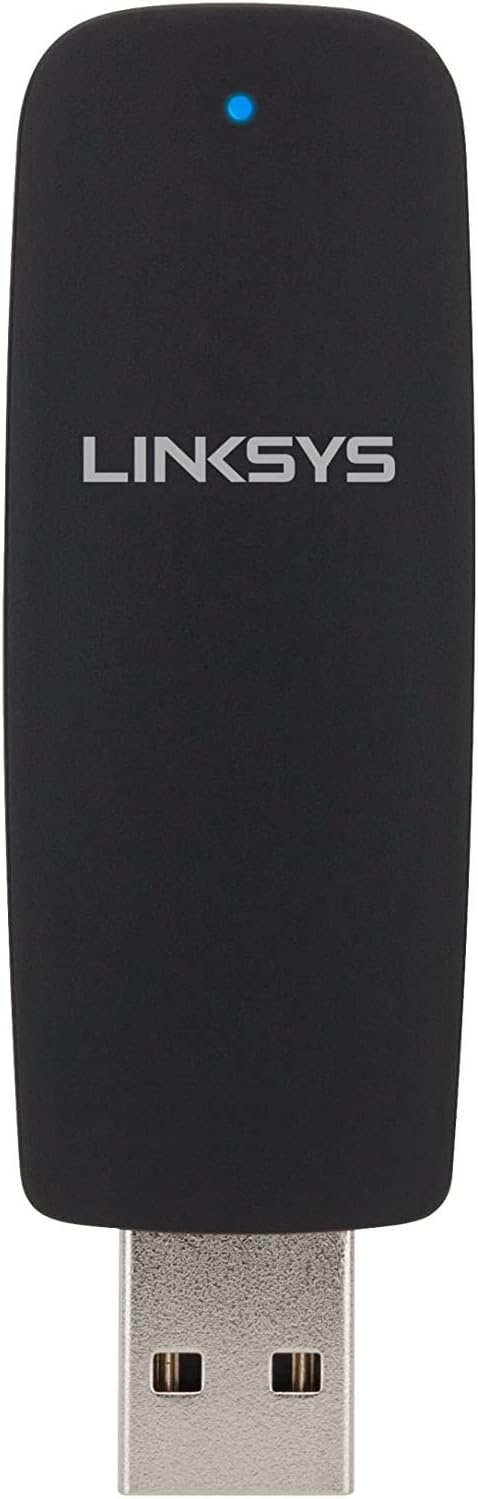
🚀 Upgrade your Wi-Fi game—fast, secure, and hassle-free!
The Linksys AE2500 Dual-Band Wireless-N USB Adapter delivers up to 300 Mbps wireless speed over dual 2.4 and 5 GHz bands, ensuring reliable, interference-free connectivity. Compatible with Windows 7, XP, and Vista, it features multiple MIMO antennas for enhanced signal strength and WPA2 security to safeguard your network. Its plug-and-play USB design makes it an effortless upgrade for desktops and laptops seeking faster, more stable Wi-Fi performance.


| ASIN | B0054YQO5C |
| Best Sellers Rank | #351 in USB Computer Network Adapters |
| Brand | Linksys |
| Color | Black |
| Compatible Devices | Desktop |
| Compatible Operating System Family | Windows |
| Customer Reviews | 4.3 4.3 out of 5 stars (2,795) |
| Data Link Protocol | IEEE 802.11b, IEEE 802.11g, IEEE 802.11n |
| Data Transfer Rate | 300 Megabytes Per Second |
| Global Trade Identification Number | 00745883596706 |
| Hardware Interface | USB |
| Item Weight | 0.02 Pounds |
| Manufacturer | Linksys |
| Mfr Part Number | AE2500-NP |
| Model Number | AE2500-NP |
| UPC | 121965581219 666674962459 745883598120 040411481883 745883596706 745883593262 803982740359 745883593293 |
| Warranty Description | 1 year limited warranty |
R**L
Good, small upgrade for wi-fi
Had my 3-computer (Win 8.1 desktop, Win8.1 laptop, and Win7 laptop) Wi-Fi set up on a good Linsys router (N600). Prevously, all was on an Ethernet tangle of wires which worked well, but wanted to move into the Wi-Fi world. Got set up with good speed, at 30 Mbps. Then my provider changed twice over a 1-year period, and the latest provider has done a good job generally. But while the Win7 laptop was still on Ethernet, the other two were Wi-Fi. I noted some speed loss, and ran my antivirus, ran a disc cleaner recommended by my IT pro son, made sure my disc was defragged, checked for disc problems, and damage to the platter. Very little improvement. Son then reminded me that Wi-Fi is generally slower than Ethernet, so if I wanted to return to 30+ Mbps from my current 4 to 15 Mbps, Ethernet was necessary, or try an (expensive) new router. Put the desktop back on Ethernet, and got my 30+ Mbps back. Hooray! How about the Win8.1 laptop? A wire across the desk (my setup) again? Again my son came to my rescue, noting the laptop had an Intel Wi-Fi from 2 years ago, before 20+ Mbps was common. Get a "dongle" instead that will handle the faster speed. Not sure I want something hanging off my USB 3.0 port, but ok. So ordered this (to match the router's capability) from Amazon, and when it came, installed it. Voila! back to 30 Mbps for the Wi-Fi laptop, bypassing the slower (obsolete?) Intel Wi-Fi. Me like a LOT. For the price, an inexpensive upgrade to stay near the (b)leading edge of computing. Amazon got it here in two working days, solving the issue. I am pleased with this item. Uploads remain at about 5 Mbps, but downloads are FAST. ADDENDUM: July 2015: Since then, the AC1200 dongle, together with a newer Linksys EA6350 will pull Charter's full 60+ Mbps Wi-Fi with no problems. The AC1200 says it will only handle up to N300 or AC867, the 60+ is well below capacity, and doesn't bottleneck at all. I don't have AC hardware OEM on either computer. This newer setup is "whizzbang" Wi-Fi. Windows 10 downloaded in just under 5 minutes (2.72 Gb) to both computers (desktop died), ready to install. I have put Win10 on the Win 7 Toshiba laptop, and am learning it. So far, no problems due to Wi-Fi. Plan to upgrade the Win 8.1 HP laptop in the next week or so. Both computers found no issues against updating (MS's compatibility wizard). ADDENDUM: 7/10/2015: Desktop died (not Wi-Fi), now only two laptops. Sudden failure of Wi-Fi a week ago, during research, found the basic dongle isn't supposed to work with Windows 8.1. Upgraded to Linksys AC1200+ (Model 6350 has N300+AC867, I have only N). Minor difficulty installing, but found thruput reduced. Got USB3.0 version (two blue lights rather than one) AC1200, and restored 60 Mbps (max so far has been 65 with Charter!), and for a week now, it's magnificent. Negative is that the dongle is slightly wider, so rubs against the USB plug for mouse on one side, power cord on the other, so no perfectly seated. But running fine. Still recommend for Win 8/8.1 with 6350 router.
J**K
Couldn't have been easier or more effective!
I have an OLD Dell laptop. And due to some unfortunate home network pre-planning on my part, my main internet connection port, and subsequently, my wireless router, is not exactly in an optimal spot for good wifi distribution throughout my home. For a long time I blamed that bad router placement for my experiencing so many connection drops on the laptop whenever I'd visit any kind of graphics-heavy website or attempt to download a file of more than about a megabyte in size. I even had a hard time transferring files from other computers on my home network to the laptop without losing the connection in the middle of the transfer. It was extremely frustrating. However I noticed that when my kids would come home with their newer, Windows Vista laptops, they had none of the same connection problems I did. So recently, I decided to upgrade the old laptop's OS from Win XP to Windows 7, thinking that might help the router and laptop work together a little better. Heh. Just my luck, the laptop's internal wifi adapter wasn't supported by Win 7. So I did a little research and decided on the Linksys AE2500 Dual-Band Wireless-N USB Adapter, which I purchased through Amazon. Wow. The installation could not have been simpler and the performance has been amazing. Now I get a strong, fast connection from anywhere in my house, all via the same router with no change to its setup or location. The problem was the laptop's old internal wifi adapter all the time! I'm extremely satisfied with the Linksys AE2500 adapter. It's fabulous and it just works! And at under $40 it's a great deal as well. My ONLY concern is for its seemingly flimsy construction, so I'd say that care should probably be taken that nothing touches or exerts any considerable downward pressure on the adapter body while it's inserted into your laptop's USB port. While I certainly haven't tested its tensile strength, the thing seems as though it might snap off fairly easily. But no other complaints! If you need a USB wifi adapter, this is a good one!
J**W
N-900 Adapter Compatible with Windows 8.1 and Install is Easy for Desktop Computer
I purchased this adapter to use in place of a built in "slow" single band built in adapter on my Samsung Desktop computer running Windows 8.1. I am using a Linksys E2500 Dual Band Router and the room where my computer is housed is quite far from the router. The wireless signal was usually about three bars and sporadically dropped the signal which caused me to have to reset the network card, etc. I read many articles giving suggestions as to how to improve wireless connectivity. Replacing the internal network card was not an option for me nor was moving the E2500 router to a new location so based on various recommendations I decided to go the USB wireless network adapter, ideally one with a cord that would allow me to move it around to get the best signal. The room the computer is housed in has an outside wall which may be a factor in why I was not able to get a great signal - I read that insulation with the foil backing can impede wireless signals. I looked at the Linksys website and it indicates that this adapter can be used for Windows 7 but doesn't mention Windows 8.1. I then looked at the Windows website which indicated this adapter would be compatible with 8.1. I figured I would take the risk and buy the adapter at Amazon, at a great price and give it a go. To install the driver, I used the disc provided in the package and within minutes, it found the adapter, and my router. I then disabled the internal network card on my computer and am pleased to report that this adapter is working well, giving me four bars consistently and has not dropped the connection after several hours of web-surfing. I am hopeful this adapter will continue to work just fine!!!
A**R
Started working instantly, the software was already installed on my computer as I was using the same model on this computer but my son needed it urgently for his older computer and he was using my older one and I used the new one here. Very good supplier, fast delivery.
M**D
منتج ممتاز
S**I
The Cisco AE2500 is a great adapter that features: 1. Awesome speed/throughput of 300 Mbps 2. Slim size which fits USB ports even in the nooks and crannies of a computer 3. Doesn't heat up like other adapters However, this is a product which works only and specifically on Windows. There is no official support for this adapter for Linux and Mac. However, Linux users may have some success with ndiswrapper. If you are a Windows user, especially into gaming, streaming and downloading, then this adapter is right for you. If you use Linux or own a Mac, stay away from this and buy something else.
T**T
Works well
J**O
Tengo un router Linksys (WRT 1900AC) y ,a pesar de ser la misma marca, no he tenido narices de hacer que funcione a 5 Ghz usando todas las prestaciones. La verdad es que me sorprende que Linksys saque un producto de tan baja calidad, no es comparable ni de cerca a la calidad de cualquiera de sus otros dispositivos de red.
Trustpilot
Hace 1 mes
Hace 3 semanas