We remain fully operational. Our teams are working around the clock to ensure your deliveries continue safely.

Descargar la aplicación


Servicios al cliente
Sobre nosotros
Copyright © 2025 Desertcart Holdings Limited
Descargar la aplicación

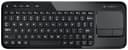
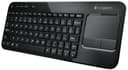
🛋️ Elevate your living room setup—type, swipe, and chill like a pro.
The Logitech Living-Room Keyboard K410 is a sleek, wireless keyboard with a built-in multi-touch touchpad designed for TV-connected PCs. Offering a 10-meter wireless range and up to one year of battery life, it enables comfortable couch control with plug-and-play simplicity. Its lightweight, ergonomic design and media-friendly keys make it the perfect companion for home theater PCs and casual typing sessions.
| ASIN | B00LBGUVU6 |
| Additional Features | Lightweight |
| Brand | Logitech |
| Built-In Media | keyboard^nano receiver^batteries |
| Button Quantity | 78 |
| Color | black |
| Compatible Devices | Laptop, PC |
| Connectivity Technology | wireless |
| Customer Reviews | 4.5 out of 5 stars 172 Reviews |
| Enclosure Material | Plastic |
| Global Trade Identification Number | 00097855104038 |
| Hand Orientation | Ambidextrous |
| Item Weight | 0.9 Pounds |
| Keyboard Description | Ergonomic |
| Keyboard Layout | QWERTY |
| Manufacturer | Logitech |
| Model Number | 920-006255 |
| Number of Keys | 104 |
| Power Source | Battery Powered |
| Special Feature | Lightweight |
| Style Name | Contemporary |
| Switch Type | Membrane |
| UPC | 097855104038 |
C**D
Great quality Logitech keyboard and touch pad wireless.
First I have to say, yes I am typing this review using the keyboard that I purchased. I loved that Logitech titled it a 'living room' keyboard because that is exactly what I wanted it for and where I am using it. I recently purchased a small slim line computer to attach to my HDTV. I did not want to use the wired mouse and keyboard that came with it while sitting on the couch. I also did not want to have a separate mouse and keyboard even if they were wireless. Using a mouse on the couch would be kind of clumsy. I did not want to have to grab a table every time I wanted to sit on the couch at the TV. Thus I came across this keyboard on a Daily Deal and I had to have it. Another Logitech product has made me very happy!. It really feels like a solid sturdy great quality keyboard. Now it is a little small. Think almost like a laptop keyboard. Still functional, but your fingers might be bumping into each other a little bit. And the function and setting keys are a bit smaller than they would normally be. The keyboard is pretty quiet which I was surprised about. It has a nice baffled click sound to it and I am very pleased with how it sounds as I type. That may sound funny, but for someone that types pretty fast having a loud keyboard is very annoying as I hate the old fashioned clicking noise the keys used to make. As far as the touch pad, it actually operates and performs just like a laptop touch pad. It has the typical gestures you would expect like double finger scrolling, double clicking, and double click and drag to scroll. I am very pleased with it. Lastly, it has an on off switch which will help conserve battery life. You literally just plug and play and it works right out of the box. It is a fantastic little keyboard and if you want to type while having it on your legs on the couch like I am literally doing right now then I think you will be happy. However, if you want to put it on a proper desk and expect to write back to back 50 page essays, then I do not think you will be happy.
B**E
One of a family of decent media / TV / troubleshooting keyboards.
How much you will like this keyboard depends on what you're using it for. For "real" keyboard use, I find it hard to use anything but mechanical keyswitches, with the Cherry brown switches being my favorite. The K410 would never replace a mechanical keyboard, but as an occasional keyboard for TV/media center computers it is great. It's very convenient to have the keyboard and touchpad in a single lightweight unit. Generally I'm using it for setup or troubleshooting duties on the TV computers, so I prefer the layout of the K410/K400r to the compacted arrow keys of the K400 Plus. All of them have the media and other shortcuts as the primary functions of the top row of keys, with the traditional F1-F12 keys accessed with the FN key. I wish that were reversed. When I'm trying to get into the BIOS of a PC I'd prefer to just hit F2 or F8 or whatever, instead of having to do FN-F2 to get there. Again, it depends on what you want. I'm sure most people like it the way it is. Owning all of the K400 family, here are the differences I see: K400r Black: My favorite. The FN key legends are in a fairly bright teal blue. Matte finished. Full size arrow keys. White base. K400r White: Identical to the black model, but FN legends are in a gray/blue that's impossible to tell from the main legends in low light. Gray base. K410: Black: matte black base, gloss black top. Fingerprint magnet. FN legends are light gray, better than the white model, but not as good as the blue legends on the black K400r. Otherwise identical. All three include a 1.75" USB port extender that can be handy on some computers. K400 Plus: A different keyboard. Compressed arrow keys, full size right shift key. Dedicated Volume Up / Down & Mute buttons. Missing the dedicated Music, Home, Lock and Power buttons from the K400r/K410. Smaller touchpad buttons. Left mouse button larger and yellow. F-key functions are different, F1-F12 still require the FN key. FN legends are in 3rd place for legibility, only ahead of the K400r white. No USB port extender. All of them have storage space for the Unifying receiver. All of them use 2 AA batteries. All have a power switch on the keyboard. Besides TV / media center computer duty, they are also handy for working on various computers that I need to troubleshoot from time to time. Again, it's very handy to have both "mouse" and keyboard in a single, portable package. I would also suggest looking at the Microsoft Wireless All-in-One Media Keyboard, Part #: N9Z-00001 Microsoft Wireless All-In-One Media Keyboard (N9Z-00001) It's a similar design, with a larger touchpad.
M**Y
Great for the price
I have one of those beastly 1st-gen MacPros, and I had wanted to move it to the spare bedroom as it was detracting from the space where we usually leave our laptops setup. I moved it up to the spare bedroom, but in that environment, the wireless keyboard and mouse (mostly the mouse) weren't really useable. So I bought this in order to solve that problem, and it works very well for the price. The sleep button is great, since the thing takes forever to boot even from an SSD I just use the sleep button and its ready to work within seconds. The power switch is a really nice feature (so the cats can't use the Internet unsupervised), and the keys feel like a nice laptop keyboard and are of a respectable size (unlike a lot of "mini" wireless keyboards). The track pad and buttons are usable, but I don't plan on using this for much more than dealing with the Plex server on this machine.
D**D
Logitech universal receivers are the best thing ever
Logitech universal receivers are the best thing ever. This keyboard is functional, but inadequate, and reminds me of a cheapie walmart model. It has stupid buttons that shut down or hybernate your computer every time your cat tries to lay on it. Also, not so great for movie-watching, since it has no lights and barely-noticeable home row bumps with smaller keys. The touch pad is awkward. Skip this in favor of the k830.
J**8
Touch Typists Beware
This would be a wonderful little media keyboard if not for one glaring oversight -- the up cursor key is where the right hand shift key could be. If you're a touch typist, you will find yourself accidentally hitting the up cursor at the start of every other sentence, with predictably annoying results -- the text you're typing text gets inserted in the line above before you realize what's happening and waste time fixing the mess. It would have made more sense to shift the up cursor to the right and the shift key to the left. The cursor key arrangement would then have been non-standard but that's much less of an issue than a mislocated shift key. A much lesser issue is that the media keys are the default for the function keys so if you have an app that requires you to use the function keys frequently you'll have to use the function key. Home, end, page up, and page down also require the use of the function key. But some compromises have to be made in a compact keyboard like this and these are hardly the worst. Too bad, because otherwise otherwise, this is a wonderful little media keyboard, with adequate touch, handy media keys, etc. It's still useful for something like surfing while you're watching TV or listening to music in the living room, just not for serious typing.
G**E
Mouse pad is a pain
The mouse pad is very difficult to use. Cheap product but I guess you get what you pay for.
J**N
Love this keyboard!
I love this keyboard!! My living room entertainment center is controlled by a home theater pc running Kodi (formerly XBMC), and my wife and I primarily control it with our phones. Every now and then Windows does something crazy, and I need to whip out a keyboard and mouse. I used to have a separate keyboard and mouse, but they kept getting misplaced, and the keyboard was always turned on so the pets or kids could bump it. Finally the mouse got lost (and hasn't turned up in a few months now), so I decided to try this thing out. It really has been great! I love that I can turn it off and on. It connects instantly when I turn it on, I haven't had to wait any time at all. I have never had issues with dropped signal or anything either, so it has been really positive. It is small enough that I can hide it away pretty easily, but large enough that it isn't hard to type on. Great product, and I haven't had any problems or complaints! If it dies on me someday, I plan to replace it with the same model!
D**R
great product, good build quality, linux supported!
excellent product, plain and simple. works on ubuntu (tested on 16.04/16.10/17.04) should work on pretty much any linux distro, logitech support is generally very good on linux even on much older kernels. trackpad works very good, keys are responsive, not too many shortcut keys up on top, but are easily reprogrammable. its nice to just have something that fulfills a niche, and this fits the bill. i like using it on my raspberry pi 3 so i dont have to lug around a hub for separate kb/m
Trustpilot
Hace 1 mes
Hace 2 semanas