Buy anything from 5,000+ international stores. One checkout price. No surprise fees. Join 2M+ shoppers on Desertcart.
Desertcart purchases this item on your behalf and handles shipping, customs, and support to Uruguay.
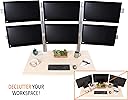
🖥️ Elevate Your Desk Game — Command Six Screens Like a Pro!
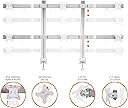
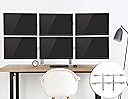
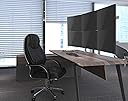
The Stand Steady 6 Monitor Mount is a robust, powder-coated steel stand designed to hold six monitors ranging from 17 to 32 inches and up to 17.6 pounds each. Featuring full-motion VESA mounts with 360° rotation, 34° tilt, and 17° swivel, it offers unparalleled ergonomic customization. Its heavy-duty clamp or grommet base ensures a stable, wobble-free setup, while built-in cable management keeps your workspace organized. Ideal for professionals seeking a sleek, multi-screen command center with effortless installation and durable construction.


| ASIN | B08BT7YF6D |
| Best Sellers Rank | #383 in Computer Monitor Arms |
| Brand | Stand Steady |
| Color | 6 Monitor Mount |
| Compatible Devices | Monitor |
| Customer Reviews | 4.4 4.4 out of 5 stars (253) |
| Enclosure Material | Powder-Coated Steel |
| Global Trade Identification Number | 00810965032585 |
| Item Weight | 30.75 Pounds |
| Manufacturer | Stand Steady |
| Maximum Tilt Angle | 34 Degrees |
| Maximum-Supported Screen Size | 32 Inches |
| Mfr Part Number | MM4CLBLMM4FSBLMM3CLBL6MM |
| Minimum-Supported Screen Size | 17 Inches |
| Model Number | MM4CLBLMM4FSBLMM3CLBL6MM |
| Mounting Type | Tabletop Mount |
| Movement Type | Articulating, Rotate, Swivel, Tilt |
| UPC | 810965032585 |
| Warranty Description | One Year |
0**Z
Strong Built Parts, Wide range of monitors supported, Assembly is not overly hard
The only negatives I have noticed with the assembly, is the monitor arm adjustments for the side monitors do not move very far due to the nubs on the bracket preventing some movement when trying to get the angle of the monitors setup. The tilting portion of the monitor brackets has to be tightened down extremely snug in order to get the monitors to hold in position without falling down. All 5 of my 6 monitors are all the same size and do not exceed the weight capacity for each mount since they are 23.6 inch monitors and my middle screen is a 32 inch which is under the rated weight capacity as well. The build quality for the parts is very good though and the whole assembly is very strong when clamped down the desk and I am happy that it allowed me to setup my screens in the best viewing orientation like I wanted. It does take a little bit of time to get the alignment for each screen setup. I have tried several monitor mounts that work well but this one does allow for a clean and nice setup. I would recommend it for anyone with multiple monitors
D**.
Best 6 monitor stand!
This works great! I tried 4 other models and had to return for different reasons seems one pole mounts can't hold the weight of 6 monitors even if they are light, was never able to be properly leveled.
M**E
Sturdy
Assembled yesterday. For me at least. Assembly was super easy. So far it seems stout enough. Currently I am running 3 x 32" 2k displays on the bottom. The middle is an LG ultragear the sides are AOC AOGs. The AOC displays are very heavy and I have them all the way out so you can't apply much more stress to these arms. They are not twisting or flexing "yet". Only minor issue is there is no single screen height adjustment. So if you don't have matching models you may run into alignment issues like mine has. Not sure if you can see it. Not a huge deal but may drive some people crazy. Just get matching screens and there is no issue. Also the range of motion on the side arms is minimal. Not a problem though. Take a small saw, or in my case I used my reciprocating saw with a steel blade and cut the small bump tabs off. Now I have full swing motion on the arms. But beware. Those bump stops are there to avoid extreme pressure that this setup wasn't designed for. You could run into a failure with the right conditions. But so far mine is holding up good. Overall I like it. Is clean. Strong and easy to assemble. Wish they offered a powder coated black versdion. I will end up painting mine black at some point. Good product
T**S
What you need to know
I am on my 3rd multi-monitor mount. This mount is number 3 What I like: If you are looking to get your monitors to 'line up' and get the seamless edges crispy flush, this is the best option I have found yet. The materials are ok. I had 1 threaded arm that would not take a bolt, fortunately, its non-load bearing and 2 other screws are sufficiently in place. Quick release vesa mounts. Easy assembly Very sturdy Holds monitors at the edges and does not move like gas spring monitors mounts What I don't like: See my pics. The mount that connects the monitor to the stand is WAY to big. This translates to your monitors coming closer to you. Another words, you are going to loose 10 inches of desk space. I have a relatively deep desk of 30" and this mount chews up 1/3 of my desk real estate most in part to the mount. (see my other pics with measurements). As a result, you will be moving your head more because the monitors are closer to you. I moved from a Chief quad arm with gas springs setup (pretty expensive too). They never would line up my monitors and would move around, even with the tension set high. The profile of the mount was only 4 inches, this mount is a whopping 10 inches !!! ouch! Get a hack saw or dremel. Why? Look at the pic of me pointing to a hinge. There was a nub of metal stopping the arm from swinging more than 15 or 20 degrees or whatever. I sawed that off. Pretty easy but super odd. Probably has something to do with weight distribution on the arms or something. Tilt up and down: This can be adjusted. Its friction based. No notches indexed into the metal. So you will really need to get some better allen wrenches and put some elbow grease to tighten them down. THe monitors will not move. I wish this had better mounting options for vertical monitors (see my pic) I really wanted 2 vertical monitors side by side. . Its just not possible to mount two vertical monitors without loosing the ability to mount 1 monitor above the lower vertical monitor. If you write code like I do, this in important. If you know, you know. Would I buy this again? - maybe, just make sure you have a desk thats a MINIMUM of 30" deep IE from your chair to the back of your desk. If its not that, you are probably going to be eating your monitors. for 200 or whatever its not bad compared what you will pay for other higher quality low profile monitor arms. Hope this helps you.
N**A
This is a very well built VESA system. I love it
This is a very well built VESA system. I love it. let me start by saying, I have Engineering background and it takes a lot to impress me with any product. My rules are Simple: 1- Does the product work as advertised 2- is it well built 3- is it smooth and easy to use 4- Do I have to tinker with it all the time to keep it working (which means, is it wasting my time or helping me) 5- Value, meaning did I get my money's worth This product answers all of them and works well. Room for improvements: Yes, Instruction manual is not easy to follow, I have to think hard to follow which screw to use and in what order. I think they combined too many steps in to one to make it look simple but it is not. In the, I figured it out but I had to plan the steps ahead of time. Note: DO NOT START assembly before you figure out ALL of the steps and you layout all of the parts on the floor and really make it look like a movie script. Note 2: You will end up with extra parts because they provide you with multiple solutions for VESA attachment based on your monitor type. (Nice touch) Note 3: All of the monitors on one row has to be on the same level, Same size. No mixing and matching (27 and 34 inch will not work) Note 4: I am using Dell 27 inch 4K monitors, perfect fit. Finally, they included a small leveler with the kit, Thank you , Nice touch>
P**G
It's the most sturdy monitor stand I have seen. It's well made and easy to put together. I did find that the vertical swivel joints were not strong enough for heavier 32" monitors. No matter how much I tighten the bolt on the joint the mounts droop and won't stay in position. The tools provided with the kit were not adequate for tightening these swivel joints. I had to use a 3/8" ratchet with an Allen key socket. I will try adding Star Washers to the joint replacing the smooth washers provided to see if that adds enough grip.
Trustpilot
Hace 1 mes
Hace 1 semana