We remain fully operational. Our teams are working around the clock to ensure your deliveries continue safely.

Descargar la aplicación


Servicios al cliente
Sobre nosotros
Copyright © 2025 Desertcart Holdings Limited
Descargar la aplicación


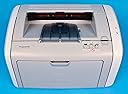
Buy anything from 5,000+ international stores. One checkout price. No surprise fees. Join 2M+ shoppers on Desertcart.
Desertcart purchases this item on your behalf and handles shipping, customs, and support to Uruguay.
Print Smart, Print Fast! 🏃♂️
The HP LaserJet 1020 Printer (Q5911A#ABA) is an affordable and reliable monochrome laser printer designed for efficiency. With a print speed of up to 15 pages per minute and a high-quality resolution of 1,200 dpi, it ensures crisp and clear documents. The 150-sheet input tray minimizes interruptions, while the manual duplexing feature allows for double-sided printing. Backed by a 1-year limited warranty, this printer is perfect for professionals seeking dependable performance in a compact design.
| ASIN | B0009EM13G |
| Additional Printer Functions | Print Only |
| B&W Pages per Minute | 15 ppm |
| Brand | HP |
| Built-In Media | Printer |
| Color | Light Gray |
| Control Method | App |
| Customer Reviews | 3.8 3.8 out of 5 stars (217) |
| Dual-sided printing | Yes |
| Duplex | Manual |
| Global Trade Identification Number | 00829160710440 |
| Hardware Interface | USB 2.0 |
| Ink Color | black |
| Item Weight | 7166.76 Grams |
| Manufacturer | Hewlett Packard |
| Maximum Copy Resolution Black and White | 1200 dpi |
| Maximum Copy Speed Black and White | 14 ppm |
| Maximum Media Size | 8.5 x 14 inch |
| Maximum Print Resolution Black and White | 1200 dpi |
| Maximum Sheet Capacity | 150 |
| Model Name | Q5911A ABA |
| Model Number | Q5911A#ABA |
| Model Series | Q5911A |
| Number of Trays | 1 |
| Other Special Features of the Product | Monochrome |
| Output sheet capacity | 150 |
| Paper Size | 8.5 inch x 14 Inches |
| Print media | Envelopes, Labels, Paper (plain), Transparencies |
| Printer Connectivity Type | USB |
| Printer Output Type | Monochrome |
| Printer Type | Laser |
| Processor Count | 1 |
| Resolution | 1200 x 1200 |
| Scanner Type | Sheetfed |
| Specific Uses For Product | business |
| Total USB 2.0 Ports | 1 |
| Total Usb Ports | 1 |
| UPC | 829160710440 |
| Warranty Description | 365 Labor/365 Parts |
| Warranty Type | Limited Warranty |
B**Y
Excellent Printer
I got tired of paying for ink cartridges for my injet printer, and also of waiting for it to slowly print my material, so I decided to replace it with a laser printer. Since I don't print pictures, a black and white printer is sufficient. I couldn't be happier with the HP 1020. It's very compact (actually smaller than my Epson), unbelievably fast (though it takes a little while to get going), and the result is crystal clear. One important note, though: I'm a Mac user and this printer isn't intended to support Macs. But I learned from other reviewers on this site that you can solve this problem by downloading the printer driver from HP for the HP Laserjet 1022, which does support Macs. I did this, but the other reviewers left out an important bit of information: the directions that come with the printer say to wait until instructed to plug in the computer and attach it to your computer via a USB cable. But this is NOT what you do in the case of using the 1022 driver for this machine. Instead, after downloading the driver from ther HP website (which you can do for free, afte going to their support page), connect the 1020 to the power source and to your computer; then go to Printer Utility, select Add Printer, and the Mac will do the rest (it automatically uses the 1022 driver to support the 1020). Once my partner did this (I was in a muddle until she did so!), it all went very smoothly. For the very low price that Amazon is asking, now even Mac users can enjoy this outstanding printer.
A**T
Finally!!! But with a caveat
During the past 2 years I've gone through 2 inkjet printers. One was a Canon that could never print an entire page aligned. It took me till after my warranty was out to realized that it wasn't me, it was the printer. Sadly, the other was the HP5650, which had terrible software issues and finally started misfeeding the paper. I didn't know what I was going to do for my next printer. I finally came to my senses and realized that since I hardly ever use color, I should start looking at LaserJets. Much to my surprise, I found this one for less than many of the photo-capable InkJets. Unfortunately, my computer became a little fussy during setup, but after that, it's worked like a charm. The pages come out extremely fast, the print is crisp and dark, and it's not too loud. None of the "cajunk, cajunk" sound you get with the ink jets either. Also, the footprint is smaller than the HP inkjet I am now going to smash to bits. It's like a little chunk on my desktop instead of a big long log! What more could you ask? I still think HP is a cheap, crappy company for making us buy our own USB cables, and for not supplying a manual, but until Canon and Epson get up to speed on reliability, I'll stay with HP anyway. June 2006 addition --- YES there IS a problem with this thing curling the paper. The lasers get the paper warm and then there are 2 plastic tabs the paper passes by on its way out, and they curl the paper. Downgrade this rating a full star!! This doesn't happen on my friend's older business HP laser model! I ordered this from Amazon for $130 after the discount for getting their credit card, of course with free shipping. I am extremely pleased with this printer all the way around: price, performance, and appearance on my desk.
T**Y
Don't buy if you want to network this! Decent laser quality.
Found out too late that this printer is host based. That means it has to be connected to a computer to print. You cannot use a network print server (wired or wireless). This is from HP's tech support web site.
R**Z
No Vista support!
I agree with the reviewer who said it was inexcusable that HP still has no Vista driver for this printer. It worked great when I had XP, but then I was forced to upgrade to Vista due to other issues and of course the printer has been sitting like a lump under my desk for two months now! I'm quite unhappy with HP's timetable of releasing a driver by JULY. Come on guys, Vista was in beta for how long? It's not as if you didn't know it was coming. And I tried using the original CD that came with the printer to install on Vista, the way another reviewer suggested. I couldn't get it to work no matter what. For that one week between getting the printer and installing Vista, it was great. I would have given it 4 stars out of 5.
R**D
No Driver for the Windows XP Pro x64 Operating System
The LaserJet 1020 is a fine printer for use with older operating systems. It produces high quality output when attached to my Windows 98SE box. But it doesn't print at all when attached to my new computer with its XP Pro x64 operating system. The problem is there's no compatible driver available, not on HP's LaserJet 1020 installation disk and not on the HP website. I emailed HP Tech Support about the problem and they suggested two workarounds, using x64 drivers for other HP printer models, but neither worked. Tech Support now says to try working the problem via online chat. I'll try that next time I have a block of several hours free, unless I give the printer away first.
S**A
Highly reliable product. I find it G ault free for personal office. very good results. Best with original toner and quality paper. Economic in use and low cost.Thanks HP
P**D
this product was a great disappointment. It worked once only and then the paper jammed.A second and third attempt failed also. I contacted the supplier whose reply only stated that it worked when it left them. I contacted Amazon whose advice was to approach the seller,which I did . The seller made three suggestions which were of no help. I asked the supplier to collect the machine and to return my money as the machine was of no use to me. Since then I have heard no more. One thing I have learned and that is never again to order a reconditioned product.
Trustpilot
Hace 3 semanas
Hace 2 semanas