Some deliveries may take a little longer than usual due to regional shipping conditions.

Descargar la aplicación


Servicios al cliente
Sobre nosotros
Copyright © 2025 Desertcart Holdings Limited
Descargar la aplicación

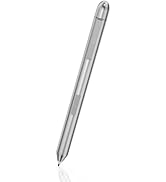
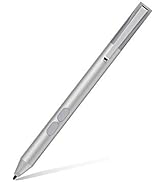
✒️ Elevate your ASUS touchscreen experience with precision and power in one sleek pen!
This active stylus pen offers 1024 levels of pressure sensitivity and palm rejection, matching ASUS original pen performance. Compatible with a broad range of ASUS touchscreen laptops, it features an ultra-fine tip for detailed drawing and writing. Powered by a AAAA battery, it requires no charging and includes an extra tip and clip for convenience, backed by 1-year service and 30-day returns.











| ASIN | B08FTFPJ58 |
| Batteries | 1 AAAA batteries required. |
| Best Sellers Rank | #14,633 in Cell Phones & Accessories ( See Top 100 in Cell Phones & Accessories ) #381 in Styluses |
| Customer Reviews | 4.4 4.4 out of 5 stars (1,246) |
| Date First Available | August 15, 2020 |
| Item Weight | 0.705 ounces |
| Item model number | ['tesha PEN'] |
| Manufacturer | tesha |
| Product Dimensions | 5.4 x 0.37 x 0.37 inches |
E**E
Responsive
Worked smoothly on my ASUS MB14 Zenscreen monitor. Responsive and precise. Palm rejection is just average. Overall, very satisfied.
R**S
Absolutely Fantastic! I also have an asus pen
This pen immediatly worked with my Asus Proart 16inch. I have an asus pen I paid $99 for and it's great but it needs recharging. I like having an extra. I am often switching between the stylus and regular pens and running around and I sometimes misplace my pen because my desk and floor is dark it's hard to see... I have since put a white band on it. I figured I would try this one because it's silver and easier to find and has the clip on it. The clip is a Godsend. I just ordered clips for my asus pen and huion tablet pens also.the clip is necessary for me. I cannot believe it needed no pairing. I popped in the battery and it was ready. It does everything I need, draw, erase and selects For the price it is a fantastic deal and doesn't need charging. I will take this one when I travel. It is so worthe the price!
M**E
Pen for laptop
Stil pen for computer works well
D**K
This pen also worked for my Q524UQ!!
I tend to see all my peers around me use a stylus pen for their iPads and laptops. My laptop is around 8 years old, so I never bothered to buy one, as I assumed it would not work. However, to my surprise, this pen works great with my laptop, even though it is not specifically stated to work for my model. The only downside is that it is a bit laggy sometimes. Overall though, great pen and saving of many many notebooks!!
D**F
Works
Works with my asus gv301q rog flow laptop. Couldn't get the pressure sensitivity to work right in gimp but didn't really care if it did or not so i just turned it off and it works great.
B**N
Stylus Digital Pen for ASUS Tablet
recently purchased the Stylus Digital Pen for my ASUS notebook Q405UA Q325UA, Q526, ASUS Vivobook UX560, J202n, ASUS Transformer Mini T102HA, and ASUS Zenbook UX580GD, hoping for a seamless and efficient writing and drawing experience. Unfortunately, my experience with this stylus fell short of expectations. While the pen was advertised as compatible with a wide range of ASUS touchscreen laptops, including the models I own, I found that its performance was inconsistent across devices. On some devices, it worked reasonably well, providing decent responsiveness and accuracy. However, on others, including my ASUS Vivobook UX560, the stylus frequently lagged behind, making precise tasks like note-taking and drawing frustrating and cumbersome. Additionally, the build quality of the stylus left much to be desired. The plastic construction felt cheap and flimsy, and the overall design lacked the ergonomic comfort I would expect from a stylus intended for prolonged use. Furthermore, the lack of pressure sensitivity was disappointing, especially considering the price of the stylus. Without this feature, it was challenging to achieve varying line thicknesses and shading effects in digital artwork. Overall, while the Stylus Digital Pen may work adequately for some ASUS touchscreen laptops, my experience with it was marred by inconsistency and subpar performance. For those seeking a reliable and high-quality stylus for their ASUS devices, I would recommend exploring alternative options.
J**N
Great alternative to the expensive ones
Works just fine with an ASUS ProArt 16 (2024 model), no setup or anything extra required even though my laptop isn't on the official list.
V**R
A Great Tool
I purchased an ASUS ROG gaming 2 in 1 laptop from Woot. I wanted a stylus to go with it and found this. It was easy to use and highly precise. It is a great tool, and it was way more affordable than what ASUS wanted for their stylus. I almost bought it, but I woke up quick.
R**A
Works on my daughters Asus computer well
M**A
I have VivoBook TP412FA
A**O
First, the pen works beautifully. I think I'll like it even more than the pen that came with when I bought my asus laptop. Second, the pen was advertised as having TWO side buttons, but it actually has only ONE, which made me doubt if it's ASUS stylus pen. However, it still supports the erase and right-click functions and works with my laptop. I just need to press the very back or front of the button to activate these functions, respectively. Last, it has 2 included stylus tips and 2 AAAA batteries so that's make it 5 stars.
E**.
i like this stylus it, works fine. it cames with 2 nibs, it also works with all types tablet & e ink ereader that support stylus ex: kobo libra color , onyx boox & kindle scribe .. etc and laptop that support touchscreen ( u can write , highlight & erasing ).
Y**A
It works without complaint
Trustpilot
Hace 2 meses
Hace 1 semana