We remain fully operational. Our teams are working around the clock to ensure your deliveries continue safely.

Descargar la aplicación


Servicios al cliente
Sobre nosotros
Copyright © 2025 Desertcart Holdings Limited
Descargar la aplicación
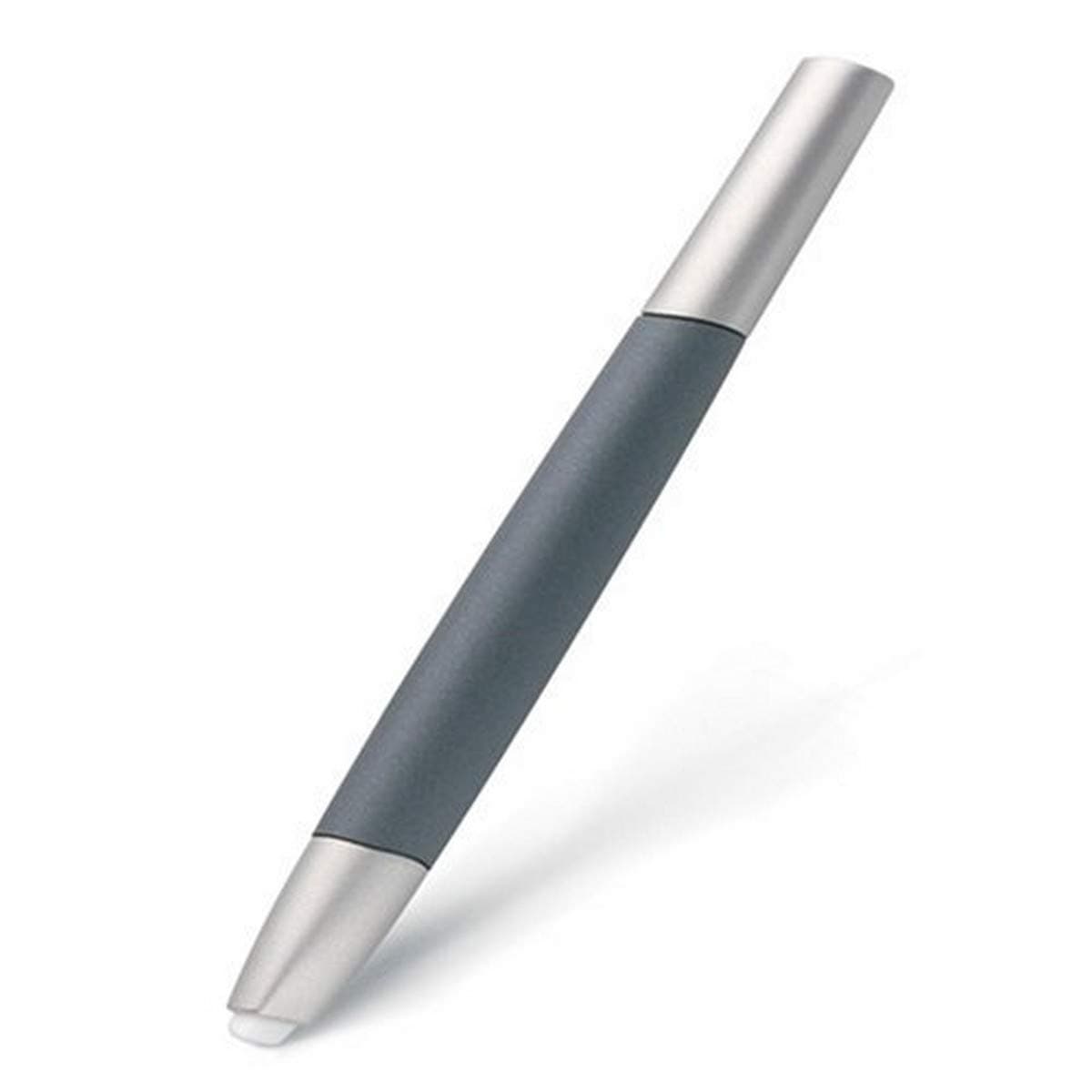
🎨 Elevate Your Artistry with Every Stroke!
The Wacom Cintiq 6D Art Pen (ZP-600) is a high-performance digitizer pen designed for professional artists. It features 360 degrees of barrel rotation, 1,024 levels of pressure sensitivity, and a choice of nibs for varied textures. With patented cordless, battery-free technology, it ensures reliable performance and is compatible with select Wacom tablets.
| ASIN | B00083Y86G |
| Are Batteries Included | No |
| Are Batteries Required | No |
| Brand | Wacom |
| Compatible Devices | Tablet |
| Customer Reviews | 4.1 4.1 out of 5 stars (45) |
| Enclosure Material | Plastic |
| Global Trade Identification Number | 00753218995117 |
| Item Dimensions | 10 x 3.5 x 2 inches |
| Item Weight | 0.25 Pounds |
| Manufacturer | Wacom |
| Mfr Part Number | ZP-600 |
| Model Number | ZP-600 |
| UPC | 069991941860 100177350851 083797533784 163120559169 753218995117 080050393246 172302693447 |
E**S
6D Art Pen: The Accessory So Essential It Should Be Standard!
The original stylus pen that comes with the Intuos3 is a pretty awesome tool but there are times when I just want something different for different tasks. It seems unnatural to be holding the same tool for countless hours each day and the 6D Art Pen is what the doctor ordered. The Cintiq 6D Art Pen has a unique feel; it's lighter and fatter than the original pen and the tip is wider much the same way some of our favorite graphic pens had in a generation past. Some other reviewers have complained about the pen being lightweight as if that's a drawback; once you get used to it you'll be able to fly though a lot of tasks as if you were only using your finger. The lightweight might seem like a drawback for other users but at the end of a long day it's almost soothing to use. For that reason alone I think the modest weight is intentional. Functionality speaking; After a couple of hours of using the 6D Art Pen you'll be wondering what you ever did without it especially when working with Photoshop/Illustrator brushes that rely on different angles and rotations to get the right look of a line that needs varying thicknesses. The "Inkwell" holder that's just like the original pen holder is a nice touch. There are only two detraction to this tool. First, the felt tip nibs: I love the fact that this pen feels almost exactly the way the felt tip graphic pens of long ago felt but the felt nib that replicates the felt-on-paper touch is a bit too far. I couldn't swap the original one installed fast enough and replaced it with the plastic nib that's similar to the plastic tip of the original pen. I have three felt-tip nibs but only one plastic one... not a big deal because I since I won't ever swap the tip out again. Second: While it's worth the little extra cabbage, I wish the 6D Art Pen was originally included with my Intuos3 tablet. Since it's so essential to my work now I can't help but wonder why this tool isn't standard. More importantly and as I wrote before, there are something that can be done with the 6D Art Pen that you can't do with the original pen - most notably the aforementioned rotations. You buy a tablet so you can do things that you can't do with a mouse; you are able to do even more with this 6D pen that you couldn't do without it on your Wacom. It seems so incredibly necessary for me that I wish I bought it sooner. Just like good cowbell, you're gonna want that 6D Art Pen!
R**N
Addresses lots of issues but not quite there yet
UPDATE: The Intous 3 (the generation of Wacom that this pen is for) is no longer the latest technology. However, it is still a fantastic tool that I use every time I'm in my studio. That said, I almost never use this particular pen anymore. It was very novel, but I just normally reach for the regular Intous 3 stylus. ___________________________________________________________ If you don't already own the regular Intuos 3 stylus, get it first. This adds lots of functionality, but it isn't the primary Wacom tool. That said, I've really been having a great time with this. Like anything involving a pen tablet there is a learning curve, but after you get it, its golden. Be warned, that although there is much added functionality with this pen it doesn't get the feel of a real marker (which is kind of what I was looking for with this). With practice and tweaking brush options in photoshop, Illustrator, and especially in Corel Painter you can come really close. My other complaint is the lack of buttons that come on the regular Intuos 3 stylus. Some people don't like the buttons anyway, so you may not mind. Over all, it is a big step in the right direction, but needs a few more tweaks to get it all the way there. In the mean time I applaud Wacom for this, because they are as of yet the only company to come out with anything like it at all.
N**T
Very close to real
This 'pen' is a BRUSH. Misleading to call it a 'pen' (the standard notation for this kind of device). If you have only 1 brush, have this one. I am too locked into oil to allow myself the mental latitude to let one 'pen' be all my brushes. This does that. I would like to pick up different (physical) brushes set to be different virtual brushes, so if somebody would make a SET of brushes (all preset to type) then I'll give the fifth star. Nobody comes close, right now. Very nice and if you have the Cintiq, how can you not have this?
M**D
6D and Air Brush does not work on new Cintiq
I ordered a new Cintiq and 6D Art pen and Air Brush at the same time from Amazon in the spring of 2010. I got the Pens right away but it took a couple months for the Cintiq to be shipped. I could not get the 6D or Airbrush to work with the Cintiq. The pen that came with it worked fine. I searched the net and could find nothing to help me get the pens to work including reading help threads on the Wacom website. Well, I finally found out the problem today. The "old" 6D art pen (the ZP-600) and airbrush (ZP-400E) don't work with the "newest" version of Cintiq. I'm now stuck with over $[...] worth of worthless plastic.
M**E
Only buy this for Painter
I bought this thinking that it sounded great, but what none of the product info tells you is that Photoshop doesn't really take advantage of the rotation like it should. There is no mechanism to keep a chisel shaped brush tip rotating at the same angle as the chisel shape of the pen. Seems almost pointless now. From what I have read, it works in Painter, just no luck for me.
A**Y
Feels nice in your hand.
I bought this pen as an addition to my Cintiq12WX arsenal. I really enjoyed using it.I especially liked how the pen fit in your hand and nice thick nib. Very much reminiscent of using a fat marker. I found this pen great for coloring but not so much for fine line work.
N**.
Bought it but I hardly use it.
I've had this pen for almost two years. I probably only use it on my Intuos about 15% of the time. The angle that this pen slopes at makes it very hard to use on an Intuos. I imagine it is better on the Cintiq. I would like it if the nibs came further out of the pen to combat this problem. I bought the art pen because I wanted something lighter and shorter than my stock pen. The no buttons thing are a real turn-off, as I use the buttons on my stock pen for things like color picker and brush resizing to add efficiency while I paint. This pen is almost too light and I agree with one reviewer who said it still does not feel like a marker. The added functions are useful sometimes but they are not worth the hassle of the harsh chisel on my Intuos. Oh well.
S**S
It's great for applying big brush-strokes and has a nice feeling for painting due to its big tip (I prefer it than the standard wacom pen with the small nib). Useful for digital painting (especially Photoshop & Painter).
M**Y
I am very pleased to have had the opportunity to purchase this WACOM art pen for the graphics tablet at such reasonable cost. The pen works perfectly and we may be considering a follow-up purchase of other models of this device.
G**A
It's not perfect but good enough. I doesn't work exactly as advertised. The sensitivity and tilting isn't reliable.
Trustpilot
Hace 2 semanas
Hace 1 día