
Descargar la aplicación


Servicios al cliente
Sobre nosotros
Copyright © 2025 Desertcart Holdings Limited
Descargar la aplicación

🎶 Elevate your Pi’s sound game—because your ears deserve the best.
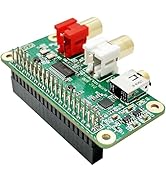
The InnoMaker HiFi DAC Hat is a premium audio expansion board for Raspberry Pi models with a 40-pin connector, featuring a high-performance PCM5122 DAC capable of 384kHz/32-bit playback. It offers plug-and-play installation with no soldering required, includes dual gold-plated RCA outputs and a 3.5mm headphone jack powered by a 138mW amplifier, and supports a wide range of popular Raspberry Pi music playback systems. Designed with dual low-jitter oscillators and ultra-low noise regulators, it delivers studio-quality sound with minimal distortion, making it the perfect upgrade for audiophiles and DIY music enthusiasts alike.




| ASIN | B07D13QWV9 |
| Are Batteries Included | No |
| Best Sellers Rank | #73,169 in Computers ( See Top 100 in Computers ) #1,073 in Single-Board Computers |
| Brand | innomaker |
| Color | HiFi DAC |
| Customer Reviews | 4.6 4.6 out of 5 stars (611) |
| Date First Available | 11 May 2018 |
| Hardware Platform | Personal Computer |
| Item Weight | 60 g |
| Item model number | InnoMaker Rasp Pi HiFi DAC Hat |
| Manufacturer | innomaker |
| Package Dimensions | 12.9 x 8.9 x 4.7 cm; 60 g |
| Series | InnoMaker Rasp Pi HiFi DAC Hat |
| Wireless Type | Infrared |
A**B
Perfect choice
Working well and im 100% satisfied
F**.
Utilisé avec Raspberry 4 et KODI, super pour la qualité du son et éviter le grésillement. Le volume des enceintes peut enfin être mis à fond sans distorsion (kit logitech THX 400w). Très satisfait de cet achat.
A**R
No problems at all, just as stated.
J**.
Mi primer dac ensamblado por mi, y que maravilla! Justo lo que esperaba, le instalé Volumio y funcionó perfecto
Ł**Z
Jestem bardzo zadowolony, nie ma porównania do wbudowanej karty dźwiękowej. Bez problemu integruje się z volumio.
V**M
I am using this dac hat on RPI 3b running Raspberry pi os Bullseyes. I have another RPI 3A+ running Raspberry pi os lite which installed Logitech Media Server for LAN devices playing music. I just installed squeezelite to play music. Setup as below 1. type "sudo nano /boot/config.txt" without "" , follow the manual instruction add a line at the end of the file dtoverlay=allo-boss-dac-pcm512x-audio 2. sudo reboot 3. right click on desktop volume icon there is "BossDAC" , you can change output from here 4. install squeezelite by typing " sudo apt update ; sudo apt install squeezelite" without "" 5. check the DAC by typing "aplay -L" without "" , should see hw:CARD=BossDAC,DEV=0 BossDAC, Boss DAC HiFi [Master] pcm512x-hifi-0 Direct hardware device without any conversions plughw:CARD=BossDAC,DEV=0 BossDAC, Boss DAC HiFi [Master] pcm512x-hifi-0 Hardware device with all software conversions sysdefault:CARD=BossDAC BossDAC, Boss DAC HiFi [Master] pcm512x-hifi-0 Default Audio Device dmix:CARD=BossDAC,DEV=0 BossDAC, Boss DAC HiFi [Master] pcm512x-hifi-0 Direct sample mixing device usbstream:CARD=BossDAC BossDAC USB Stream Output 6. connect to Logitech Media Server, type "squeezelite -o hw:CARD=BossDAC,DEV=0" without "" 7. open browser and type LMS IP change the player 8. enjoy. Sound quality is very good. It seems more musical and more power than my another DAT HAT Hifiberry DAC2 Pro, It is installed on RPI 3A+ powered by Hifiberry OS. Both of these DAC are using headphone jack as output. Highly recommanded RPI DAC hat, worth for every penny. The only complain is no stand provided with the DAC hat ======Update 04 May, 2025 ============== Change OS to MoodeAudio, still rock solid. My another dac hat hifiberry dac2 pro was not working any more. :( No sound & no lights, mostly damage
Trustpilot
Hace 1 mes
Hace 1 mes