We remain fully operational. Our teams are working around the clock to ensure your deliveries continue safely.

Descargar la aplicación


Servicios al cliente
Sobre nosotros
Copyright © 2025 Desertcart Holdings Limited
Descargar la aplicación
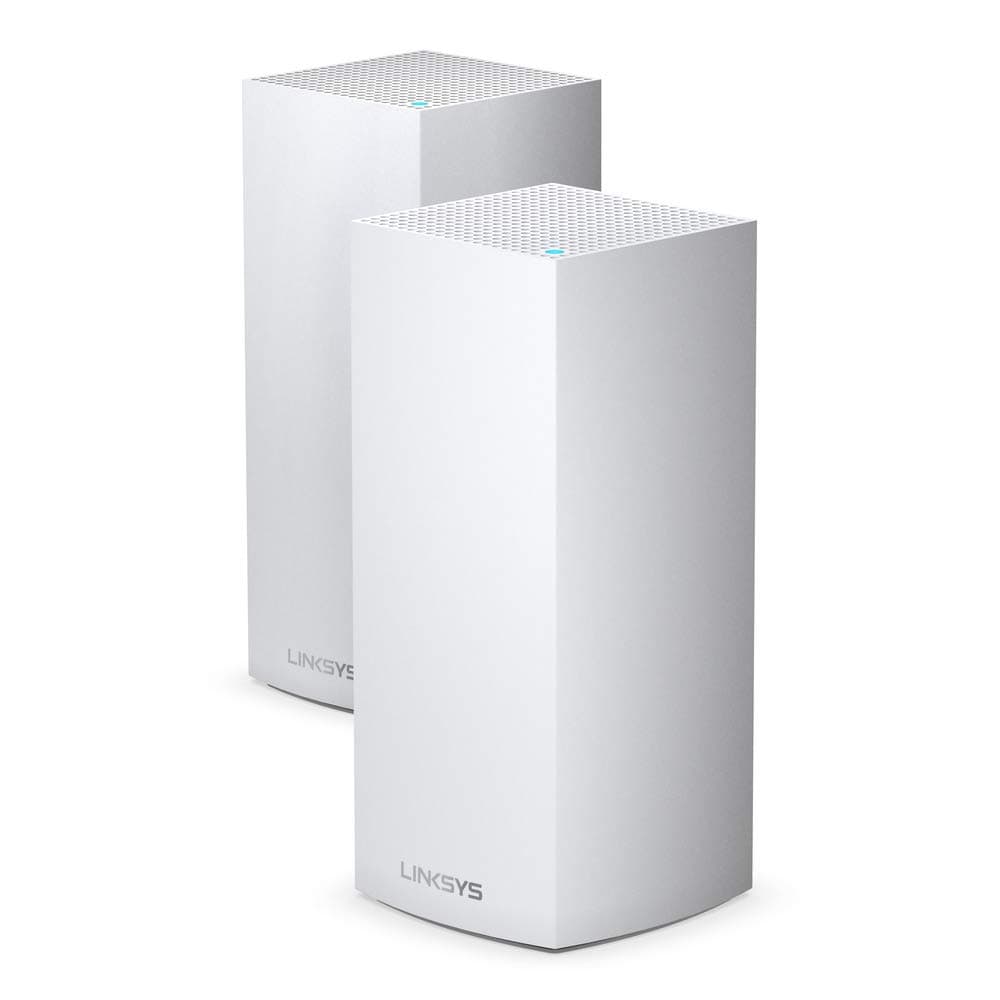
🚀 Elevate your home network—fast, smart, and secure WiFi for the modern professional.
The Linksys Velop MX8400 is a premium Tri-Band WiFi 6 mesh system designed to deliver ultra-fast 4.2 Gbps speeds and seamless coverage up to 6000 sq ft. Supporting over 80 devices with MU-MIMO technology, it ensures stable connections for work, streaming, and smart home control. Featuring easy app setup, advanced parental controls, and Apple HomeKit compatibility, it’s engineered for secure, hassle-free connectivity in any home.
| ASIN | B0074JKIDE |
| Antenna Location | Home |
| Antenna Type | Internal |
| Best Sellers Rank | #32,040 in Computers ( See Top 100 in Computers ) #116 in Whole Home & Mesh Wi-Fi Systems |
| Brand | Linksys |
| Built-In Media | • Linksy Velop WiFi 6 Tri-Band Series node (x2) • Ethernet cable • UK power adapter (x2) • Quick Start Guide • Printed Documentation |
| Color | White |
| Compatible Devices | Laptop, Personal Computer, Smart Television, Tablet |
| Connectivity Protocol | Wi-Fi |
| Connectivity Technology | Wi-Fi |
| Control Method | App |
| Controller Type | Control4 |
| Coverage | Up to 6000 sq ft |
| Customer Reviews | 3.9 3.9 out of 5 stars (789) |
| Data Transfer Rate | 4.2 Gigabits Per Second |
| Frequency Band Class | Tri-Band |
| Global Trade Identification Number | 00745883810031 |
| Is Modem Compatible | Yes |
| Item Dimensions L x W x H | 13.3L x 36.2W x 25.2H centimeters |
| Item Type Name | 1 |
| Item Weight | 6.57 Pounds |
| LAN Port Bandwidth | 1000 millimeters |
| Manufacturer | Linksys [UK] |
| Maximum Upstream Data Transfer Rate | 2100 Megabits Per Second |
| Mfr Part Number | MX8400-UK |
| Model Name | MX8400 |
| Model Number | MX8400-UK |
| Number of Ports | 3 |
| Operating System | RouterOS |
| Other Special Features of the Product | Parental Control, Seamless |
| Security Protocol | WPA2 |
| UPC | 745883810031 |
| Unit Count | 1 Count |
| Wireless Compability | 802.11ac, 802.11ax |
M**W
Good
Good Router. It solved my Internet speed and very good high frequency WiFi. I am happy with the Linksys MR9600 and it is a good buy.
E**N
Good product
Good coverage and very fast connection
C**R
Good
It works fine and is pleasant to look. I wish they had it in black
A**Y
Very bad product
This is very bad product, keep disconnecting and the devices range is not that big, Wishing if I could returned it, unfortunately bought it from UAE for my home outside the country Doesn't worse the money
W**S
good when they work
Bought it and 2 of the 3 nodes worked perfect, but unfortunately the last was stuck in bootup mode, so we returned the item. The two that were working provided good range and the speed was good as well
J**N
Werkt goed, eindelijk overal verbinding
W**Y
Easy to setup, and working well.
G**Y
I had opted for this Linksys MR7350 to future proof my setup, after a lot of research and two wrong purchases ( both returned ) I have got it right with this router. I have been using VM Hub3 with mixed results, I only had a drop-in wifi signal in the kitchen and a back bedroom upstairs, so not too bad. I ordered this router on its own to set up and see how many nodes I might have to purchase after, well the answer is I do not need any, I am getting over 200 Mbps in every room in a three-bedroom house, obviously pleased with that. The setup using the app was not as easy for me as I would have liked, but that was me getting frustrated and rushing. I put the Hub3 into Modem mode, but the router could not connect to the internet, so I changed the hub3 back to router mode, unticked both wifi settings to make sure there were no conflicts, later on, saved the settings, and turned it back to Modem mode, reset the Linksys back to factory setting and started again and that did the trick set up the first time of asking. I am very pleased with this router, wifi 6 for the future, at a decent price. I would recommend you do as I did, do not order any nodes until you see how this performs on its own, it could potentially save you a lot of money. Quick update, I prioritised Shield TV, my mobile and a tablet, and I immediately noticed a drop in WiFi speed, so unprioritised them and my Mbps went back to over 200 again so will not be bothering prioritising anything again, just my observation, does not mean that it will have a negative impact on your setup.
G**.
Well.. first of all I need to mention my provider is Virgin Media and I'm having the 500Mbps package. I live in a two floors standard UK house and I always struggled with the connection. My VM router is placed on the ground floor, in the first room - living room. Before, I used one of the TP Link mesh wifi system with 3 nodes - AC1200 if I remember right. At the beginning it was alright but in time I installed multiple smart light bulbs, cameras, wi-fi connected appliances, etc. Unfortunately, I couldn't get more than 200Mbps in other rooms with TP Link. Initially, I went for the Aeero system from Amazon with 3 nodes, wifi 6, but I couldn't get better results - actually the connection was even worse - approximately 100Mbps speed both upstairs and downstairs. I also forgot to mentioned.. all the nodes (apart from the main one obviously) were connected wirelessly. After a long, looong research, I decided to spend more than I ever thought and purchase the Linksys mesh WiFi - 3 nodes - Atlas Pro 6. As per the previous reviews, their app is not the best one out there, that's for sure, and it was quite painful to set up the mesh, but it was really worth it in the end. For a better understanding.. I installed the main mesh into the first room, downstairs. The second node installed it was on the upstairs room, exactly on top of the main node. The 3rd node has been installed in the kitchen, second room on the ground floor. I'm not longer facing any connection issues.. on both floors, no matter the room, I'm getting no less than 400Mbps. Most of the times, it reaches the top speed, 550Mbps. Even in the very back room, the bathroom, I'm getting at least 350Mbps. Also, in the garden I'm getting around 250Mbps, where I didn't had any connection at all previously, with both TP Link and Aeero. I know.. this is an expensive system, and as I mentioned before, I never thought I will spend that much money on a WiFi system.. do i regret it? Absolutely not. Also, just to mention again.. the main node is connected to VM router by an Ethernet cable. The other 2 nodes are connected wirelessly. Long story short.. if you're looking to get the best out of your money and to have a superb internet connection, go for Linksys, you won't regret it.
A**W
Intro - Setting up this device was a very straight forward. Turn it on, download an app, follow the guide and you're online. Obviously being a WiFi 6 (AX) device there is plenty to talk about when it comes to it's coverage and speed. To give a quick caveat, I'm sure this device could achieve much faster speeds with purely WiFi 6 clients. There are not many available so these tests were performed in a mixed environment. From a Apple Watch Series 3 (2.4Ghz WiFi 4 N standard) to an iPhone 11 (5Ghz WiFi 6 AX standard) and a couple of AC WiFi 5 standard laptops. Testing - when my iPhone 11 is in the same room as the Velop router it gets 705Mbps, a Lenovo laptop with an AC wifi adapter I get 866Mbps. Further away on the ground floor my iPhone gets 300-400Mbps on average, the laptop gets 400-700Mbps. The WiFi signal barely manages to go beyond our outer house walls. I am certain this is because our house is made of traditional stone on the outside and pretty solid masonry on the ground floor between rooms. Explains the above speed drop off for the iPhone. So I'll likely need a second device in/or near our conservatory to get garden WiFi. As a baseline reference; with an older Asus RT68U AC router this is significantly better coverage for a single router. Overall I am very impressed. Device Management - is a different kettle of fish. You can use a web browser and login to it. However, it's very keen you use the Linksys App instead. The app does it's job well. It's geared towards novice users who just want to set it up. Speaking of which the app device setup flow was a piece of cake. Very simple UI with minor user input, it's impressive how things have changed. The apps main purpose seems to be more about current status and info, than making any significant change to its operation. It does lack information on device connectivity speed (I had to use a separate app for testing mobile to router connection speeds). It is also missing control which of the tri-bands have specific WiFi traffic on. For instance I'd like my iPhone on one 5Ghz band at WiFi 6 speeds, the other 5Ghz band in mixed mode for WiFi 4 + 5 speeds. 2.4Ghz for any device that needs to defer to it for better range. This is technically managed by the routers own algorithms as is the channel selection for each to be broadcast. I appreciate that is a selling point of this device - self management be it a mesh setup or a single node. I just like to make my own technical decisions. Ultimately for the price of the device it does give you a very technically sophisticated device that operates very effectively. For said price, I'd have expected an expert mode, allowing me to change what I want though. Summary - I think the product itself is excellent and does exactly what I needed it to do; make sure all our devices get WiFi and the router has plenty of resources in reserve to manage all the traffic we throw at it. I did originally have the Velop WHW0303 3 pack (WiFi 5 AC Tri-band version) but wanted more wired ports for our Hive, office desktop computer etc. WiFi 6 also future proofed us and because it's physically bigger allows for more antennas for each one of the three WiFi bands. I'd like to see Apple Homekit support as the cheaper WHW0303 has it advertised as 'Coming Soon'. So I'd hope that extends to their top product too. Also expose more control in the app for the routers features.
Trustpilot
Hace 1 mes
Hace 3 días