We remain fully operational. Our teams are working around the clock to ensure your deliveries continue safely.

Descargar la aplicación


Servicios al cliente
Sobre nosotros
Copyright © 2025 Desertcart Holdings Limited
Descargar la aplicación



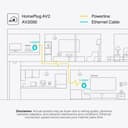

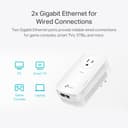
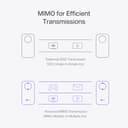



⚡ Power your home network like a pro—fast, stable, and effortlessly wired!
The TP-Link AV2000 Powerline Ethernet Adapter TL-PA9020P KIT transforms your home’s electrical wiring into a high-speed wired network, delivering up to 2000 Mbps with 2x2 MIMO and beamforming technology. Featuring dual Gigabit Ethernet ports and an integrated power passthrough socket, it offers reliable, plug-and-play connectivity ideal for multi-story homes and hard-to-wire spaces. With advanced security compliance and an energy-saving mode, it’s the smart, efficient solution for extending your Ethernet network without drilling or new cables.













| ASIN | B01H74VKZU |
| Best Sellers Rank | #4 in Powerline Network Adapters |
| Brand | TP-Link |
| Built-In Media | 2-meter RJ-45 Ethernet Cable * 2, AV2000 2-port Gigabit Passthrough Powerline Adapter, TL-PA9020P * 2, Quick Installation Guide |
| Color | White |
| Compatible Devices | Powerline adapters |
| Compatible Operating System Family | Linux, Windows |
| Customer Reviews | 4.2 4.2 out of 5 stars (8,788) |
| Data Link Protocol | Gigabit Ethernet |
| Data Transfer Rate | 2000 Megabits Per Second |
| External Testing Certification | CE |
| Global Trade Identification Number | 00845973094805 |
| Hardware Interface | Ethernet |
| Item Dimensions L x W x H | 2.8"L x 1.7"W x 5.2"H |
| Manufacturer | TP-LINK |
| Mfr Part Number | TL-PA9020P KIT |
| Model Number | TL-PA9020P KIT |
| UPC | 840460604741 845973094805 |
| Warranty Description | 2-Year Warranty |
B**Y
Great performance and a snap to set up
I purchased these powerline adapters after our development ditched DSL for AT&T Fiber. Now that I had 1 GB of speed, I wanted to improve the throughput of the older TP-Link powerline adapters I'd been using for over 12 years! They worked pretty well, but tose were limited to 200 Mbps (TP-Link AV200) and sometimes had to be reset to regain connectivity. The AV2000 is a major upgrade. They have a maximum speed of 2 Gbps, MIMO, an additional Ethernet port on the bottom of the unit and a passthrough AC in the unit itself. They have never disconnected from each other and provide a fast, stable way to distribute a signal to an area that can't receive wireless or that would benefit from the higher bandwidth of aa wired connection. As an example, I use them to connect a TV to an Apple TV 4K on our patio where wireless isn't strong enough for a reliable connection. The difference in performance over the AV200 is night and day. These are a major upgrade from what I was using, but then again, the ones I had were purchased in 2013. If I have a criticism, it's that they are twice as large as the AV200's I was using. If you plug a device into the AC passthrough, it becomes pretty bulky. It makes hiding the device a bit more challenging and requires at least a few inches of depth to hide it behind a piece of furniture. In exchange for the drawback, the performace of the AV2000 is sensational and makes extending your network a very simple chore!
C**S
Great Alternative to Running Ethernet – High-Speed, Plug-and-Play Simplicity
Don’t let the name "AV2000" mislead you—while it implies gigabit or even 2-gigabit speeds, you won’t quite reach those numbers in real-world conditions. However, the Ethernet speeds are still very fast and more than capable of handling streaming, gaming, and general connectivity needs across your home. What makes these powerline adapters shine is their convenience. Running dedicated Ethernet cables through ceilings, floors, or multiple walls is often impractical. These devices let you set up a high-performance wired network without cutting drywall or making permanent changes to your home. It's a clean, non-invasive solution that just works. Setup is completely plug-and-play. You don’t need to install any software or configure settings. Simply plug one unit into a wall outlet near your router and connect it via Ethernet. Then, plug the other unit into an outlet near the device you want to connect—whether that’s a smart TV, game console, or printer—and you’re done. It's that easy. There is a basic utility provided that lets you monitor the adapters, check firmware versions, and update them if needed, but it’s not required for setup or everyday use. Overall, I’m very pleased with the TP-Link AV2000 kit. It’s reliable, fast, and makes extending wired connections in your home incredibly easy. I’d absolutely recommend it to anyone who needs better connectivity without the hassle of physical network cabling.
A**N
Better than wifi
Purchased product to provide internet access to devices in remote areas without fishing ethernet lines through walls by utilizing electrical outlets. Internet will still work if one adapter is on the 1st floor and the 2nd adapter is plugged in the 2nd floor on separate circuits, just remember to press the pair button on both devices (one adapter must ethernet cable to device providing internet). Adapter speed is limited by buyers internet plan and has max speed cap of 2000mbps i.e. adapter will not magically provide 2k speed if internet plan is only for 300mbps. Personally only got around 100+ mbps steadily (which mirrors other reviewers' results) which is much better than 20 mbps wireless and 1000 latency. Downloads, home and security devices function surprisingly well at 100mbps. Tried shielded and unshielded cable with no speed change. Despite product marketing, it's unlikely adapter will ever reach max advertised speed based on testing info found online. Even with ideal conditions the experiment was unable to reach highr speeds. An "explanation of powerline rate" and how to calculate "actual speed" to expect is on TP-Link's website with some digging (copypaste support/faq/2928/ in address field at main webpage). Device is just tall enough to make the 2nd receptacle in an electrical outlet unusable for standard 3 prong plugs (obstructs ground port) but skinny/slim 3 prong type plugs will fit. 15 amp outlet is built into the adapter's face but prefer not using it because the device is hot to the touch. Be aware the two included ethernet cables are only 6ft. Tl;dr - 100mbps avg, easy plug and use adapter. Those who want to fully utilize their high speed internet plan should look into different technology like MOCA otherwise commit to opening up the walls and fish ethernet cables properly or be okay with looking at cables running along the walls/floor. Update: If you want to know what warranty replacement is like, 1 of 2 adapters abruptly stopped working after about 7 months of use. There was a low whining sound when plugged in but none of the led lights lit up. TpLink customer service is helpful, once you connect with a human, but it's a waste of time. They'll ask for your info, device details, and device issue then send you an email to submit a ticket online with all the info you told the agent, again. So skip the phone call and go straight to writing a ticket online. I shouldered cost of shipping the rma to them but they paid to ship the replacement to me. If it's a kit, you must send back both devices to recieve a replacement. Paid $11 x2 at usps due to this mistake. The agent kept me updated on the status of the rma the whole time.
S**8
First, I bought this for a unique situation, where a garage has been converted to a living space. It had been rewired professionally, which means...it's not on the same mast/circuit as the one where the modem is connected in the house. So this did not work for that scenario. But fast forward a few months... Different location, big house, modem is in a room upstairs for a work from home situation, and that is a significant distance from 4 other bedrooms, tvs in each one, 9 wifi security cameras, multiple phones, etc. The main adapter is connected next to the modem, directly in the outlet (cannot be installed in power bars or extension cords, MUST be in the outlet). The 2nd one is on the other side of the house, downstairs, quite a ways off, behind a brick fireplace where wifi was a challenge. It connected without ANY issues whatsover. And it works great! Don't expect to get gig speeds out of it but it's definitely handling the demand for streaming, phones, tvs, cameras, etc. And it's hardwired to a laptop in addition to wifi output, which is a difficult combination to find, it seems. Most comparable products are hardwire only, NO wifi. There's a good possibility that we could add a few more of these to the arsenal to fill in gaps for the cameras on the opposite side of the house, too. They ARE large, but the pass thru outlet on these makes that less of an issue, too. I have used other brands that disconnected...yet these have been connected since December and do not appear to have dropped at all. Good quality and reliable product, I would not hesitate to recommend!
T**N
I bought this pair to add onto my existing pair that has been working effortlessly, seamlessly for over 2 years. The new units connected to the LAN easily, without a hitch and the best part is that I can take any of the units and connect it to where I need the fast connection most, like in my detached garage which I converted into a home gym to endure the continuing COVID-19 lock-down period. Having this fast connection in my home gym meant that I can watch my favorite online shows whilst walking on my treadmill for an hour or so. It's all good.
A**H
أنصحكم فيه بشدة بشدة بشدة بشدة بعد النت أسطوري الحمد لله بس المشكلة لازم تشتروا إذا كنتوا في الدولة خليج او شي كذا نفس الإمارات لازم تشترون محول جهد بس بدال هذا أنصحكم فيه بشدة بشدة كنت تعاني من النت بس الحين الحمد لله ما أعاني أنصحكم فيه أنصحكم
J**G
This product works with 220v even though the device label indicated that the input is 100-120v. I have checked with TP-Link support and confirmed that i can be used with 220v. I also checked with Amazon Support and they assure me that should there be issue on 220v, I can still have it returned without charges. So if you are looking for a US plug powerline that can be used on 220v, this one does!
R**R
Ya había tenido antes unos Powerline, y ahora me anime a cambiarlos porque mi conexión es de 200Mb, y los anteriores solo me daban 100Mb, en general llevo más de 1 año y sin ningún fallo. Son excelentes para pasar la red entre cuartos y no he notado degradación considerable (me entrega 190MB) en una distancia de 15m. Obviamente no sirven si vives en departamento y tampoco debes de ponerlos cerca de electrodomésticos que consumen mucha energía (microondas,refrigerados). De igual forma tienes que cuidar conectarlo directo al enchufe y no en algún regulador o regleta. Todo eso viene especificado claramente en el manual y si lo sigues al pie de la letra y tienes en cuenta estas consideraciones son un elemento perfecto para no tener que andar pasando metros de cable por toda la casa
Trustpilot
Hace 2 semanas
Hace 2 días