
Descargar la aplicación


Servicios al cliente
Sobre nosotros
Copyright © 2025 Desertcart Holdings Limited
Descargar la aplicación


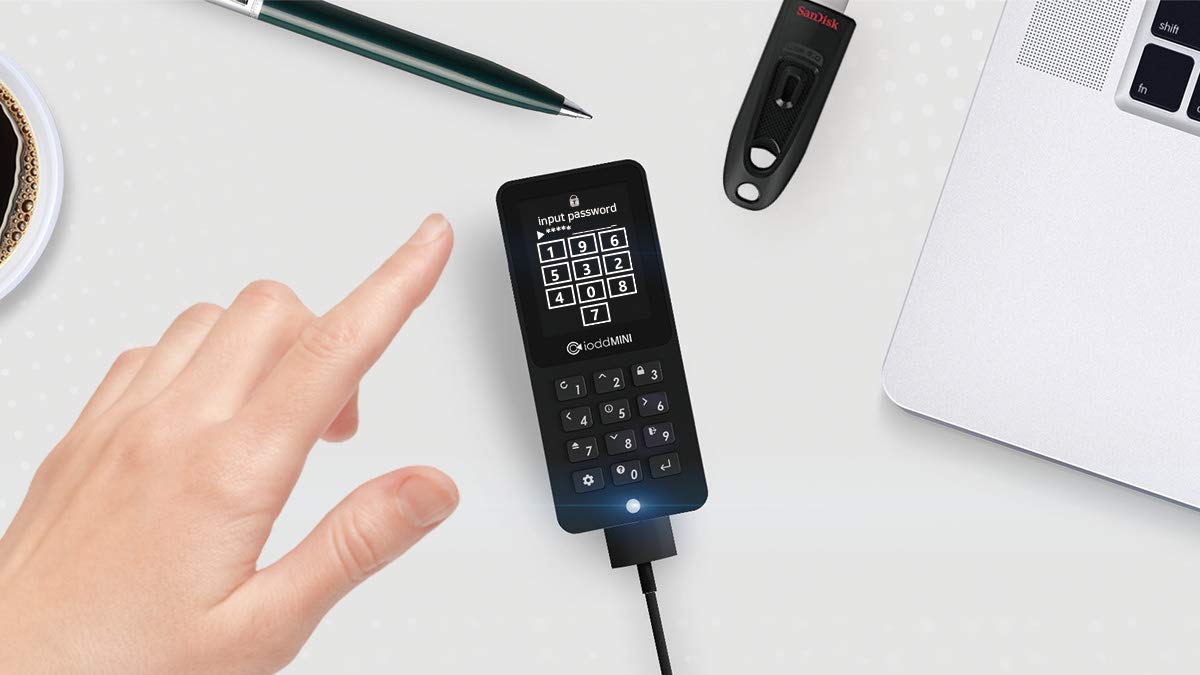
🔐 Unlock ultimate portable security & speed — your data’s new best friend!
The IODD Mini USB 3.0 1TB SSD drive combines military-grade 256-bit AES-XTS encryption with ultra-fast USB 3.0 speeds in a compact 1.8-inch form factor. Designed for professionals, it supports booting multiple OSes from ISO or VHD files without software installation, featuring a user-friendly TFT LCD interface and multi-LUN functionality. Lightweight and durable, it’s the go-to encrypted external drive for secure, versatile, and portable data management.
| ASIN | B07Y464WWN |
| Are Batteries Included | No |
| Best Sellers Rank | #83,657 in Computers ( See Top 100 in Computers ) #1,643 in USB Flash Drives |
| Brand | IODD |
| Color | multi |
| Customer Reviews | 4.6 4.6 out of 5 stars (454) |
| Date First Available | 6 November 2019 |
| Form Factor | 1.8-inch |
| Hard Disk Description | Solid State Drive |
| Hard Drive Interface | USB 3.0 |
| Hard Drive Size | 1 TB |
| Item Weight | 85 g |
| Item model number | IODD_MINI |
| Manufacturer | IODD |
| Product Dimensions | 9 x 4 x 0.9 cm; 85 g |
| Series | IODD_MINI |
R**.
This tiny device is the perfect illustration of the saying “strong essences are kept in small bottles”. It definitely is the Swiss army knife of any external boot media. It does everything you could want when it comes to external boot devices. I personally use it to boot from ISO images without the hassle of creating bootable USB drives, and find it a great improvement over my old Zalman ZM-VE300/iODD 2531 which had an 1 TB HDD installed within. I remember that one time while using my old Zalman, it just fell off the table and the HDD inside died instantly. Surely now this is a thing of the past with the iODD mini since it is very small and featherlike. Also the control button on ZM-VE300 was quite complicated to use and was not very responsive. The new keyboard on the iODD mini works flawlessly. The big display showing the full name of the files while selecting your ISO is a major upgrade from my old device, where you needed to rename the files so the names will be easy to fit and read on the tiny monochrome display. There are some downsides too, and the obvious one that bothers me the most is the lack of a USB type C connector in favor of the older USB 3.1 type 1, which is a bit obsolete in 2022 if you ask me. But let’s hope there will be a hardware revision which will use the new USB type C and this little thingy will be almost perfect. The other thing that’s bothering me is that they do not provide the option to simply purchase the SSD enclosure, just like with the old iODD 2531 and install your own SSD inside. But this is a compromise I can live with. Definitely recommended to all the sysadmins out there and to every power-user that frequently deals with the task of booting from install or recovery media.
F**P
Honestly, I'm very happy with this purchase. My IODD Mini came with two USB cables, a nice and sturdy pouch for carrying it, good instructions and a little sleeve too. In my totally-not-methodical testing, I got 200 MB/s when copying two ISOs to it. Just gave it a quick whirl: mounted a Linux distro ISO to a virtual DVD drive and my laptop happily booted from it very fast. What I do not like (I ran the firmware update tool on the IODD site before writing these gripes; JFTR, my Mini was showing 1_1_68 before I ran iodd_firm_upd-0.1.0.13 and it was showing the same afterwards): * The insanely bright LED light. For such an advanced device with a fair few configuration options, I do find it kinda baffling that there's no option to turn it off * The available standby time settings jump from 1 minute to 15. I'm a little confused as to why there's no setting that's in-between...
C**G
Die Lieferung war sehr schnell. Weniger als 24 Stunden und ich hielt das Paket in meinen Händen. Der IODD hält, was er verspricht. Man muss sich die Anleitungen für die verschiedenen Funktionen ein wenig zusammensuchen, aber das ist innerhalb einer Stunde erledigt. Schön wäre es, wenn ein Handbuch gäbe, in dem alle Funktionen ausführlich erklärt wären. Aber abgesehen davon, ein wirklich nützliches Gerät. Man kann alle USB-Sticks, die man als Admin sonst so mit sich herumträgt, auf dem IODD Mini einrichten und spart sich so einen ganzen Haufen an Sticks, die man sonst mit sich herumschleppen müsste.
W**U
Puedes meter isos, velocidad de escritura de 200MB/s, se puede remover el ssd y cambiarlo, el ssd es del tamaño 2242. Es como un mp3, todo compacto y me vino con una funda, todo perfecto, es una maravilla para usar isos por usb con sistema uefi.
R**I
Lo iodd mini è il successore diretto degli iodd 2531 e 2541, finalmente arrivato in Europa dopo una campagna di crowdfunding iniziata nel 2017. Rispetto ai predecessori, enclosure (con cifratura opzionale) per SSD da 2.5 pollici lo iodd mini supporta gli SSD M.2 (quelli a stick di gomma per intendersi). Il vero punto di forza degli iodd sta nel firmware del dispositivo, che permette di virtualizzare al volo immagini ISO per emulare USB/CD/DVD/Blu Ray senza doverli effettivamente scrivere su supporto ottico o chiavetta USB: basta scaricare l'immagine sul dispositivo, scegliere l'immagine da montare con la tastiera (tasti di gomma con feedback meccanico) e automaticamente verrà virtualizzato e riconosciuto dal PC come disco. Indispensabile per chi gira spesso con strumenti di analisi forensica o manutenzione come gparted e clonezilla per non doversi trovare senza il supporto USB corretto o per doverlo riscrivere in caso di aggiornamento. I dispositivi iodd sono costantemente mantenuti con aggiornamenti firmware quindi nessun rischio di obsolescenza. Assolutamente fondamentale per qualsiasi tecnico o smanettone, e il rapporto qualità/prezzo è inarrivabile. NB: a differenza dei modelli precedenti lo iodd mini viene venduto precaricato con uno di tre tagli possibili di SSD: 256GB, 512GB e 1TB. È possibile sostituire il disco all'interno ma così facendo ne verrà invalidata la garanzia di un anno del produttore. EDIT: allego di seguito una lista di immagini ISO per analisi/manutenzione/recupero dati che mi trovo ad utilizzare quotidianamente e che funzionano perfettamente con i dispositivi iodd: BitDefender Rescue CD boot-repair-disk CAINE Live Clonezilla Live (32bit/64bit) Darik's Boot and Nuke - DBAN ESET SysRescue Live GParted Live (32bit/64bit) Hiren's BootCD (PE/15.2) Kali Linux Live Opcrack (XP/Vista e successivi) SystemRescueCd Tails
Trustpilot
Hace 3 semanas
Hace 4 días