We remain fully operational. Our teams are working around the clock to ensure your deliveries continue safely.

Descargar la aplicación


Servicios al cliente
Sobre nosotros
Copyright © 2025 Desertcart Holdings Limited
Descargar la aplicación
Buy anything from 5,000+ international stores. One checkout price. No surprise fees. Join 2M+ shoppers on Desertcart.
Desertcart purchases this item on your behalf and handles shipping, customs, and support to Uruguay.
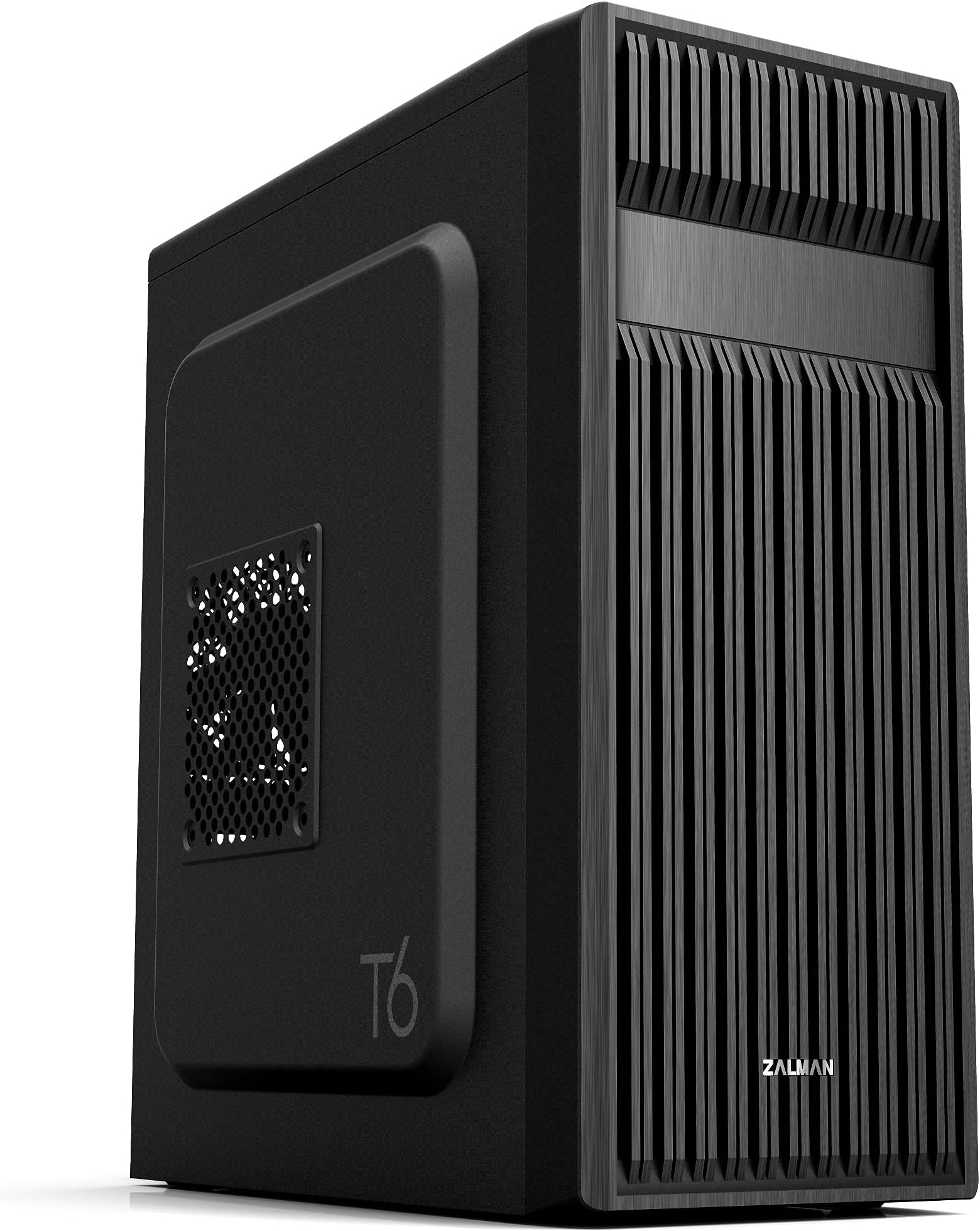
🔥 Build Bold, Stay Cool, Connect Fast!
The Zalman T6 ATX Mid Tower PC Case combines a stylish patterned mesh design with a pre-installed 120mm fan to deliver superior airflow. Its powder-coated steel chassis offers durability and corrosion resistance while supporting ATX, mATX, and mini-ITX motherboards. Equipped with versatile drive bays and front USB 3.0 ports, it’s engineered for professionals and gamers seeking a compact yet powerful workstation chassis.



| ASIN | B07R2JBTDR |
| Additional Features | Built-In Fan, Dust Filter, USB 3.0 |
| Aspect Ratio | 16:9 |
| Best Sellers Rank | #107 in Computer Cases |
| Brand | Zalman |
| Built-In Media | Contents: 1 piece |
| CPU Model Number | T6 |
| Color | Black |
| Compatible Devices | ATX, mATX, Mini-ITX |
| Connectivity Technology | USB |
| Cooling Method | Air |
| Customer Reviews | 4.3 4.3 out of 5 stars (904) |
| Display Resolution Maximum | 1920x1080 |
| Display Type | HDMI (FHD) |
| EU Spare Part Availability Duration | 5 Years |
| Global Trade Identification Number | 08809213769429 |
| Graphics Card Interface | PCI Express |
| Graphics Coprocessor | Integrated Graphics |
| Graphics Description | Dedicated |
| Graphics Ram Type | DDR4 SDRAM |
| Hard Disk Description | SSD |
| Hard Disk Interface | USB 3.0 |
| Hardware Interface | USB 2.0, USB 3.0 |
| Human-Interface Input | Keyboard, Mouse |
| Item Dimensions | 7.87 x 16.93 x 14.84 inches |
| Item Type Name | ATX Computer Case |
| Item Weight | 8 Pounds |
| Keyboard Description | Standard wired keyboard |
| Keyboard Layout | QWERTY |
| Manufacturer | Zalman |
| Memory Slots Available | 4 |
| Model Name | T6 |
| Model Number | T6 |
| Model Year | 2026 |
| Native Resolution | 1920 x 1080 |
| Operating System | Windows 10 Pro |
| Personal Computer Design Type | Computer Tower |
| Power Plug Type | No Plug |
| Processor Count | 1 |
| RAM Memory Technology | DDR4 |
| RAM Type | DDR4 SDRAM |
| Resolution | 1920 x 1080 |
| Speaker Type | External Speakers Required |
| Specific Uses For Product | Gaming, Multimedia, Personal |
| Style Name | T6 |
| Total Expansion Slots Quantity | 7 |
| Total Usb Ports | 3 |
| UPC | 823884209099 |
| Video Output | HDMI |
| Video Output Interface | HDMI |
| Warranty Description | 1 Year |
~**~
Great for what it is
This is a great case as long as you know what you are in for. Can you build a gaming pc in it, yes. Should you, no. Mainly due to cooling potential. This is, however, an ideal case for a workstation. I will be using it to build a new pc for my senior-citizen relatives. Pros: low cost, lightweight, has a 5.25inch bay for optical drive, surprisingly small for an ATX mid-tower case (fits a full size ATX motherboard easily). Meh: metal is thin (contributes to both light-weightedness and top-heaviness). No venting on the top or bottom (good or bad is use-case dependent). Finally a very minor issue, IF you are using this case for ATX build, be aware only 6 of the 9 necessary motherboard standoffs are pre-installed, the remainders/extra are included with the other hardware but must be installed yourself. Cons: Biggest issue for me is the mount for the power supply is at the top and makes it very top heavy, definitely would have preferred psu mounting on the bottom for such a lightweight case. Might not be ideal for beginners as the case is very tight with ATX build and can be difficult to work in, let alone cable manage. No USB-C on the front I/O panel. All the screws come together in one bag with no separation, 3 types of screws, 4 if you include mb standoffs, all in one non-ziplock bag... irritating. Personal: Zalman is a trusted brand. In the last 22 years I've had 3 pc cases and 2 were Zalman, which lasted about 18-19 of those years. Overall, this case is great. But again, it depends on your what you'll use it for. I am using integrated graphics from cpu and a low profile cooler which means there is a lot of empty space in the case, which likely contributes to the top-heavy nature I previously mentioned. That being the case, I wish there was a version where it is half the width and the spot for the optical drive was rotated 90 degrees to remain included, a bottom mounted psu, and perhaps more venting on top to compensate for the smaller size and fan size.
C**T
Very Good Case at my Price Point
I needed an inexpensive mid-sized case for an ATX MoBO build which I was transferring from a much larger case. I needed this case to fit under a particular piece of furniture. Bottom line, this fit the bill nicely. Couple points: Metal sheet is pretty thin, which makes for a light case, but it's not real heavy duty. I used (and recommend) at least one aftermarket fan in the front to pull air in to the case (I used two). These need to be installed before anything else (another buyer noted that same point) particularly if putting in a full ATX MoBo. You will not have the room after the board is in to get the fan screws in place. The front plastic panel is most easily pulled off from the bottom. Just be gentle and firm and it will pop right off. Goes back on easy as well. Recommend removing the enclosed exhaust fan prior to mounting the MoBo. You'll need some maneuver space. I had 2 SSD's for this build, a 500 GB and 250 GB. These are mounted outside the main part of the case, which takes a little consideration for cabling. Easily done though. ATX MoBo is s tight fight, but it fits. Don't forget your standoff nuts, these are not all in place for the ATX board. I also used aftermarket cooling. The tower is too high to allow for a side mount fan in this case. Back panel is a little loosey-goosey. This is where the thin metal sheet is most evident. To allow for the GPU to seat one must pop out the panels. They will be destroyed doing this so make sure you line up your cards correctly. It looked wonky initially, but once the GPU was in place everything locked down tight, no issues. Power supply mounts on top, which I was initially a little concerned about but it worked out nicely. This particular power supply is not modular, so it's a bit of beast in terms of excess cables, but there was more than sufficient space to store them away. Since this isn't a display build I did not concern myself with fancy cable management, a few enclosed zip ties to keep things tidy was about it. So again, good case for the money. Not sure I would use it for my first build though. I'd recommend laying out a little more to get a more modular and flexible case, something with a bit more room and more heavy duty. However if you've got a build or two under your belt, and you aren't concerned with being the Michelangelo of PC building, this will work fine.
W**R
Inexpensive and Lightweight and just perfect for my build.
The case is inexpensive but sturdy, especially once you start mounting stuff in it. Removing the metal punch-outs for Optical drive and Video Card requires in addition to pushing the with your fingers bending the metal with a pair of pliers and then using a small file (and a paper or tissue underneath to catch the filings) to remove the resulting sharp metal jagged edges. There are about a dozen motherboard stand-offs included, which require a 3/16" or 5mm socket to screw into the case. I used a flat tip medium size screwdriver to start to pry the front panel, after which it came off easily. I removed two adjacent rear punch outs and also the thin section between them (which bent easily) to mount the double width video graphics card. And of course using a small file (and a paper or tissue underneath to catch the filings) to remove the resulting sharp metal jagged edges. I mounted a single 120mm fan blowing air in the front. You have to mount the front panel and then insert the optical drive from the front, and then screw in the drive mounting screws. Tight fit with the power supply and optical drive up top, and tucking in and using cable ties to secure the cables somewhat so they don't fall down or wind up hitting the CPU fan blades. I took some pictures and captioned some of them to hopefully help other people see what could be involved in using this case. I like that this inexpensive case has an option for mounting an optical drive. Some of use still use CDs and DVDs for software and video and music. It took some time to get everything in and doesn't look the neatest, but the result is a small compact unit.
か**に
ATX対応を謳うケースとして再廉価クラスの同社ZALMAN T8の後継か アマゾンの説明によると T8 奥行39.5cm x 幅20cm x 高さ42.3cm T6 奥行37.7cm x 幅20cm x 高さ43.0cm 実測すると本体部分18cmで、サイドパネルに張り出し(バルジ(bulge)とでも言うか)がついてる感じT8 は1cm位(計20cm)だが、T6は1.5cm位ある(計21cm)。 奥行についても、フロントパネルを省くと両者34cm。 高さもT8はフロントパネル上部にあったスイッチ類が、T6は本体上部の膨らんだところに移動しているのでそれを省くと本体は41cmでほぼ共通である。 ただサイドパネルはT6は高41cmだが、T8は天面より少し下の高39.5cmまでであり小さい。 謎のLEDが設置されたり、くの字に変に出っ張ってて光学ドライブのトレイが使いにくいフロントパネルを、メッシュで吸気し易そうなものに換装。T8では「R」となっているスイッチはRESETではなく、フロントパネルのLEDをコントロールする「RGB Lightingスイッチ」でRESETスイッチは省略されていたが、T6では天面のパネルにちゃんとある。この辺りは実用的になった。 残念な点は、 1)3.5インチHDDをケース底面に設置するブラケットを廃止。 マニュアルには、3.5インチドライブの設置場所として、フロントファンの裏と底面上直付けが例示されている。SATAドライブの使用頻度が減っているという判断なのか? M.2 NVMe SSD をCドライブ、データ保管場所としてのDドライブをSATA HDDで運用しているので、別売か、同等品の入手先を記載しておいて欲しかった。 2)サイドフロー型全高154mmのCPUクーラー ID-COOLING SE-610-XT BASICを使っているが、サイドパネルの開口メッシュの位置が上に上がって、メッシュ部分に通常の厚25mmのファンを設置しようとすると干渉する。厚15mmのスリムタイプは設置できるが、スチールのファンガードは干渉してしまうので付加できない。トップフロー型のCPUクーラーなら丁度いいのかもしれないが T8からケースの主たる部分は変わってないので共通の改善要望だが、トップのATX電源とマザーボードとの間にCPU給電用の8pinコネクタが通る穴を作ってくれれば、裏配線できるのになと思う。 T8は、2025年7月注文時は¥6,436であったが、本稿投稿時点で¥3,280になってたりする。 終息モデルの処分価格なのかな?
M**L
La tour bien qu'assez light dans sa conception est très bien conçue et accueille sans problème CPU + Ventilateur assez imposant, dans mon cas un "Noctua NH-D15 Chromax Black 140mm" sur un processeur Ryzen 7 + 2 ventilateurs de 120mm supplémentaires en façade. Le nombre suffisant d'ouvertures permet une gestion des câbles assez efficace (*). Autre point positif, la baie 5,25", pour installer un lecteur/graveur Bluray ou DVD, chose assez rare qui mérite d'être mentionnée ! (*) Par contre vu la taille de la tour, je ne saurais que conseiller de prendre une alimentation modulaire. Avec une alimentation standard, vous risquez de galérer pour placer tous les câble inutiles. Sinon, très content de mon achat.
M**A
I bought this case from Amazon and I’m honestly very disappointed. The metal is so thin that it literally bends and shakes like paper! The build quality is terrible, and with such flimsy materials, the product’s lifespan is extremely short — which means more waste and harm to the environment. I really wish I had spent a bit more on a better-quality case. I do not recommend this product at all.
B**A
Good price and arrived on time. Well made for a simple case. No bracket for hanging 3.5" HD, though screw holes on bottom to bolt one down. 3 attachment points for 2.5" ssd which seemed a bit odd. Hole in case front if you want it for 5.25" disk drive BUT no structure to hang it on. No issue for me. Plenty of screws included including mounts for motherboards as the case side is not flat so they are needed if you have an ATX motherboard. Single small fan on rear (80mm) but vent holes for 120mm fan on side. Does what I need so a good purchasae for me.
A**E
Voilà un boitier qui ne paye pas de mine mais est excellent pour construire un PC. La peinture est de bonne qualité, il y a de la place pour une carte ATX et un ventirad Pure Rock. On peut faire du cable management mais c'est mieux avec une alimentation modulaire. J'ai monté 2 ventilateurs silencieux de 120 mm en façade sans problèmes et j'ai remplacé le 120 à l'arrière par le même modèle. Montage d'un SSD, d'un disque dur 3.5 et d'un graveur DVD, c'est juste mais ça rentre. La visserie, les colliers de serrage et les équerres sont fournis et c'est parfait pour le prix.
Trustpilot
Hace 5 días
Hace 1 mes