We remain fully operational. Our teams are working around the clock to ensure your deliveries continue safely.

Descargar la aplicación


Servicios al cliente
Sobre nosotros
Copyright © 2025 Desertcart Holdings Limited
Descargar la aplicación


🚀 Upgrade your WiFi game with Linux-friendly speed & range!
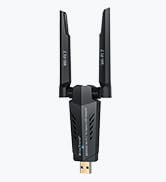
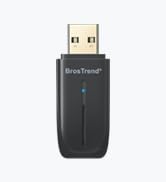
The BrosTrend 650Mbps Dual Band USB WiFi Adapter is engineered for professionals who demand reliable, high-speed wireless connectivity across multiple Linux distributions and Windows. Featuring a powerful 5dBi adjustable antenna, it delivers extended range and stable connections, while supporting the latest WPA3 security protocols. Perfect for revitalizing older hardware or enhancing new setups, this adapter ensures seamless compatibility with modern and legacy routers, making it a must-have for tech-savvy multitaskers.






| ASIN | B01GC8XH0S |
| Best Sellers Rank | #131 in USB Computer Network Adapters |
| Customer Reviews | 4.3 4.3 out of 5 stars (2,095) |
| Date First Available | May 30, 2016 |
| Is Discontinued By Manufacturer | No |
| Item Weight | 0.16 ounces |
| Item model number | AC5L-Linux-Upgraded |
| Manufacturer | BrosTrend |
| Product Dimensions | 1.97 x 0.75 x 0.28 inches |
M**E
Gave an old computer a new life
I was very skeptical about this being a plug and play internet solution for my WiFi-less Dell 7040 mini PC running an old copy of Windows 10. It arrived at my house and I literally plugged it in, and my house network popped up. I connected to the internet with zero problems. I was then able to install Zorin OS with no issues whatsoever. It works great! This is worth every penny for those looking to repurpose a computer they already have but are skeptical like I was. I'm completely happy about this product and I would recommend it.
R**Y
Yes, it works with Windows 11 and Debian Linux
I don't usually write product reviews but this BrosTrends wifi adaptor deserves one. I am assembling a new desktop computer to dual boot Win11 and Linux Debian. A new motherboard with a Wifi-7 chip on board. Works great for Win but no drivers available for Linux. Thus the need for a USB wifi adaptor. This is the fourth usb adaptor I purchased. The other three....no Linux drivers. So, I selected this AC5L adaptor because the description said it "works with Linux". If you are considering one of these because of the "works with Linux", go to BrosTrends website to verify that your particular Linux distribution is shown as compatible. Most are but there are some aren't yet compatible. As these drivers make it into more kernels, I believe more and more distributions will work with this adapter. So, I received this late Friday afternoon and began the installation and testing. Win11 setup was easy and it connected to my router. In Linux it was not immediately recognized. After doing all that I knew how to do, I decided to contact their Customer Service. This was about 10:00 pm Friday evening. I expected to get a response Monday or Tuesday. I got a response in about 10 minutes! I followed their instructions, we emailed back and forth a few times and by Saturday noon it was working just like I wanted. BrosTrend Customer Service is the best I have ever worked with. Now, for you guys who bought an 870e Crosshair Hero motherboard and are finding out the wifi-7 onboard will not work with Linux, this adapter is a nice workaround. By the way, my installation is working fine with Secure Boot and Fast Boot enabled. A big THANK YOU to the BrosTrend customer service team that helped me!
B**N
Works on Fedora
Product works well. Was plug and play for Fedora 43. Connections have been stable so far and price is at a good range in my opinion.
L**Y
better have wifi to set it up. No Plug and Play. Drivers needed. Im on Linux Mint UPDATE AT END
UPDATE AT BOTTOM: Only issue i have is that it only folds a certain way so the antenna extends only a certain direction when plugged in ( bends to the right when plugged in, not mulitdirectional) . other than that, AFTER INSTALLING THE DRIVERS, it worked fine. No plug and play, you have to go to the site and download the drivers (meaning you need wifi prior to getting it set up). 100% after that. 4 stars because i went from a tiny edemax usb wifi dongle that was 10 years old. UPDATE: great upgrade from a small usb wifi dongle that i had for almost a decade. i was looking to update as components got better. This antenna will get some nice speeds for my starlink. its just heavy on the usb port and i was having connection issues so i pulled out an old usb dongle with a ribbon cable connection. puts out 200mbs upload handing in the position. im happy. old connector with a new antenna... cant argue. starlink as well so its all comparable. .
Y**S
Plug and play on Linux
This device worked seamlessly out of the box on an older Dell Micro PC running Zorin OS 18, with no configuration required. Installation was truly plug-and-play, and the compatibility with a Linux-based operating system was excellent. Overall, it delivered exactly as advertised and effectively extended the useful life of my desktop system. A solid, reliable product that I would recommend.
M**L
Works great
Great WiFi antenna! Needed this and a larger power supply for my raspberry pi 4. It now works great and connects to the WiFi in a basement.
K**H
AC5L: Overall good, but doesn't meet spec
Install procedure for Desktop Linux (Linux Mint) was straightforward, just run the installer from the website. However, the installer is missing one critical step for Raspberry Pi (Raspian OS): `sudo apt full-upgrade` to upgrade the Kernel after the installer installs new Linux headers. Reboot and re-install the driver and it should be working. Reached out to `trend-tech.net.cn` customer service and they replied quickly and were technical. Quite surprised! (-1 star): Advertised speeds (433 Mbps on 5Ghz, 200 Mbps on 2.4Ghz) do not meet specs. I tested on Desktop on a USB 3.0 port: 2.4Ghz iperf3 speed test: I was able to achieve roughly 50Mbps up/down. 2018 Macbook Pro's internal WiFi was also able to reach 50Mbps up/down, from the same location. My 2.4Ghz's channel width on the Access Point is set to 20Mhz, so this is the limiting factor here. So in this case, I would say my AP is the limitation here, not the AC5L. 5Ghz iperf3 speed test: I was able to achieve roughly 200Mbps up/down. 2018 MBP internal WiFi: 450Mbps up/down. My 5Ghz channel width on the AP is 80Mhz, so the AP is not the limitation here. I ran the speed test several times and with parallel connections, but it still limited to ~200Mbps. Looks like this is a hardware limitation of the AC5L, so they should advertise it as maybe a 200Mbps capable unit, not 433Mbps. (I have not tested with 160Mhz channel width, but it's likely not the limitation here) (-1 star): The antenna does not rotate. It's fixed in place/glued down. If you're using it on a Desktop computer with vertical USB ports, then it's probably OK. But if you're using it on a laptop or a Raspberry Pi with horizontal USB ports, know that the antenna will be horizontal. This is especially an issue because the Raspberry Pi has the power connection on the side, so you can't even place the Pi sideways (antenna would be pointing down). Overall, I bought this to extend the signal strength/attenuation of 5Ghz network to my Raspberry Pi. For that, it works perfectly. I only need about a stable ~100Mbps connection to stream uncompressed video from the Raspberry Pi. But if you're buying to use for 200-400Mbps, you'll be disappointed.
F**O
La BrosTrend Linux Chiavetta WiFi USB AC650 è davvero un ottimo dispositivo di rete. La utilizzo su un PC dedicato a Linux e riesce a captare segnali anche piuttosto lontani, con velocità e potenza molto buone. L’installazione su Linux è semplice grazie al comando fornito dai produttori, mentre su Windows tutto avviene automaticamente, senza complicazioni. L'antenna della chiavetta forse è un pò troppo lunga, ma comoda da usare e costruita con materiali di buona qualità. In generale, offre prestazioni affidabili sia per Linux che per Windows, rendendola una scelta consigliata per chi cerca una soluzione versatile e funzionale.
J**N
Después de probar otros 2 adaptadores con diferentes inconvenientes con mi Linux Ubuntu, este funcionó a la primer y sin necesidad de configurar nada ( solo la contraseña del wifi obviamente) Muy recomendado
K**S
I needed wpa3 on my old 2015 MBP running Linux Mint so I purchased this adaptor. Linux Mint recognised it, installed the drivers automatically and connected to the wpa3 wifi straight away. Amazing !!!!
N**S
Nice
C**R
Absolutely great product for Windows 11 and LINUX. The antenna is double normal size and penetrates signal through my three layers of bricks over a twenty foot area. Installation was easy and up and running on both system types after you have entered router passkey. You might have to restart the computer before WIFI is connected . I’ve tried cheaper standard dongles with LINUX and it’s a pain to set them up. Good value for money item, sturdy and comes with installation cd and instructions. but I didn’t need them.
Trustpilot
Hace 1 mes
Hace 1 semana