
Descargar la aplicación


Servicios al cliente
Sobre nosotros
Copyright © 2025 Desertcart Holdings Limited
Descargar la aplicación


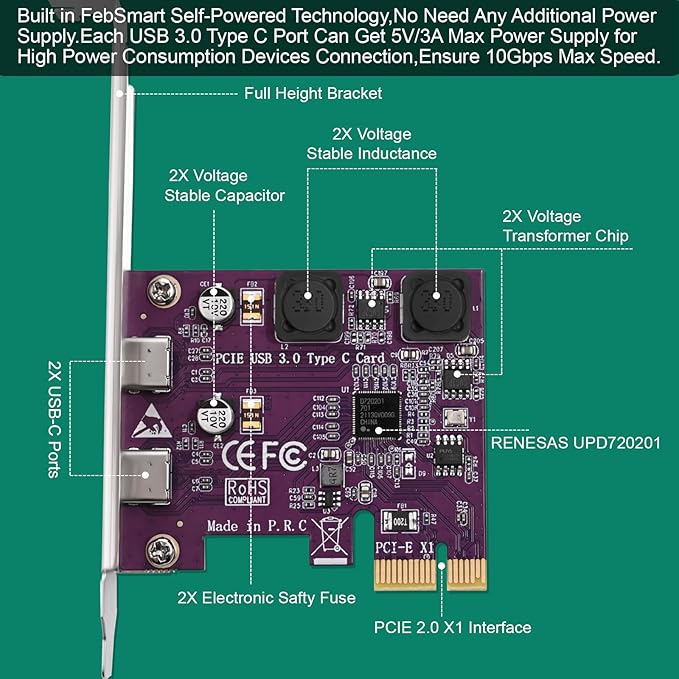


🚀 Upgrade your desktop with lightning-fast USB-C power — don’t get left behind!
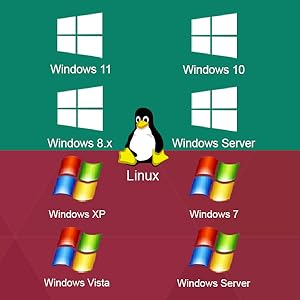
The FebSmart FS-U302C-Pro PCIe expansion card adds two 5Gbps USB 3.0 Type-C ports to your desktop or workstation via a PCIe x1 slot. Featuring built-in self-powered technology, it eliminates the need for additional power cables while delivering up to 5V/3A per port to support high-power USB-C devices. Compatible with a wide range of Windows and Linux systems, and designed with advanced voltage protection, this card is ideal for professionals demanding reliable, high-speed connectivity for data centers, gaming rigs, and creative workstations.




| Brand | FebSmart |
| Manufacturer | FebSmart Co,.Ltd |
| Model | FS-U302C-Pro |
| Model Name | PCIE X1 to 2X USB 3.0 Type-C Expansion Card |
| Product Dimensions | 11.99 x 6.71 x 1.8 cm; 85.05 g |
| Item model number | FS-U302C-Pro |
| Operating System | 8 . 1,Vista,Windows |
| Hardware Interface | PCIE x 1 |
| Graphics Card Interface | PCI Express |
| Compatible Devices | USB-C Keyboard, USB-C Mouse, USB-C Speaker, USB-C KVM Switch, USB-C HUB, USB-C Flash Drive, USB-C Printer, USB-C Gaming Pad, USB-C Smartphone, USB-C Tablet, USB-C Industrial Camera, USB-C VR System, USB-C NVME Enclosure, USB-C SATA HDD/SSD Enclosure, USB-C Live Broadcast Device, USB-C Video Adapter, USB-C Universal Docking Station |
| Number of items | 1 |
| Batteries Included | No |
| Batteries Required | No |
| Manufacturer | FebSmart Co,.Ltd |
| Country of Origin | USA |
| Item Weight | 84.9 g |
A**S
I needed to add a USB C port to an old Dell to interface a RODE podcast mixer for a friend, and so far this card was plug and play, and Windows 10 allows uninterrupted audio streaming from the microphones and devices plugged in through the mixer and USB C card. No signs of any undesired operation. I plugged in the card and turned on the computer, and the driver was installed before I had all the screws in the side cover. I plugged the mixer into the USB C port and it instantly detected the mixer and has been operating perfectly for over 6 weeks, so far. I did have to switch to the low profile bracket, but switching was a breeze with the two screws being reused. The low profile bracket is included. If I need to add USB C ports or if I needed to add more, this card definitely gets the job done in the future.
M**W
Worked out of the box. Linux didn't balk and this form factor fit my case, PCI slot, and left plenty of room for proper airflow. For me it was plug and play and allowed me to test out a few UBC devices like my Quest 2, drives, and cables.
A**R
Works as advertised. Good product. Reasonable price. Speedy delivery. Overall good vendor experience.
S**N
I tried this in two different desktops. Both supported USB-2 and had PCIe slots of course but I simply could not get it to work. In one, it would not even allow the desktop to even power up. I tried it in a PCIe 1x slot as well as a PCIe 16x slot but it just would not power up the motherboard. I already had an older USB-3 card in the desktop and even removed that and tried it but no matter what I tried no power up. At that point, rather than just send it back, I had a second Desktop which also had the same older USB-3 card in and I though I could both the older styles into on desktop and this new one alone in the other dekstop. It installed and the desktop powered up but gave me an error saying it could not find the driver. So being a computer specialist I went into Windows-7 and pointed it to the actual directory on the CD but it still came back with "No driver found....". This was disappointing as it simply would not work with either older motherboard so I had to return it. If you are wondering why I needed a second USB-3 card to start with..... On one server I have USB Drives for a media center (works great) as well as internal SATA but when I try to backup all my drives onto 8TB external USB drives, those that are internal SATA backup perfect but those on the existing USB-3 card will stall/timeout. I felt the problem was the USB hub and having a second card with one or 2 ports (I'd only use one) that I can backup to would be my answer. This was a cheaper solution than simply buying all new larger Internal SATA drives. Bottom line, my problem may be the old motherboards (both different manufacturers) I'm using but then that's what people sell USB-3 cards for isn't it.... Besides, the frustration of my second server telling me there was no driver on the CD was a huge disappointment.
M**M
Installed easily and Windows noticed it and installed all needed drives automatically. The easy upgrade to USB-C for an older PC.
Trustpilot
Hace 1 mes
Hace 2 meses