We remain fully operational. Our teams are working around the clock to ensure your deliveries continue safely.

Descargar la aplicación


Servicios al cliente
Sobre nosotros
Copyright © 2025 Desertcart Holdings Limited
Descargar la aplicación


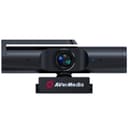


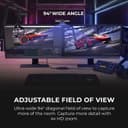




🎬 Elevate your stream game with crystal-clear 4K and privacy-first design!
The AverMedia Live Streamer Cam 513 (PW513) is a compact, professional-grade webcam delivering stunning 4K UHD video with a wide-angle lens. Featuring AI-Framing, noise cancellation, and a convenient swivel-arm privacy shutter, it ensures both superior image quality and user privacy. Compatible with Windows and Mac via USB 3.0, it’s optimized for low-light conditions and perfect for high-level streaming, conferencing, and content creation.


| ASIN | B08LZVCCGZ |
| Are Batteries Included | No |
| Best Sellers Rank | #165,721 in Computers ( See Top 100 in Computers ) #862 in Webcams |
| Brand | AVerMedia |
| Built-In Media | USB Cable |
| Camcorder Type | Video Camera |
| Color | Black |
| Compatible Devices | Personal Computer, Laptop, Tablet, Smartphone |
| Connectivity Technology | USB |
| Customer Reviews | 3.9 3.9 out of 5 stars (538) |
| Display Resolution Maximum | UHD |
| Effective Video Resolution | 4 Kilopixels |
| Exposure Control Type | Manual |
| Features | Low Light |
| File Format | MP4 |
| Flash Memory Speed Class | C6 |
| Flash Memory Type | CompactFlash |
| Flash Memory Video Speed Class | V60 |
| Focus Type | Fixed Focus |
| Form Factor | Compact |
| Has Image Stabilization | No |
| Image Aspect Ratio | 16:9 |
| Item Weight | 13.8 Ounces |
| Lens Type | Wide Angle |
| Manufacturer | AverMedia |
| Maximum Aperture | 2 f |
| Minimum Aperture | 2.8 Millimeters |
| Model Name | PW513 |
| Model Number | PW513 |
| Operating System | Windows 10 |
| Screen Size | 3.5 Inches |
| Sensor Type | CMOS |
| Shooting Modes | Automatic, Low light, Night mode |
| Style Name | 4K30 Fixed Focus |
| Supported Audio Format | MP3, WAV, AAC, FLAC, or others |
| UPC | 795522966735 |
| Unit Count | 1 Count |
| Video Capture Format | MP4 |
| Video Resolution | 4K |
M**.
Funciona sin problema siempre y cuando no se conecte por usb C, ya que no lo reconocen los equipos a los que los he conectado, la calidad de imagen es muy buena y el ángulo de captura es amplio
S**T
I was looking for a camera to use for conferencing with friends and students and for potential Vlog use. Yes this is at the high end of video cameras for general use however the picture quality is extraordinarily sharp. I can see however that I am also going to have to invest in added lighting to experience the full advantages of its potential. Yes there is a need for additional free software to control the brightness and coloration however well within the technical abilities of most people as I myself am no tech wiz and find it well within my capacities. I bought this after considerable investigation and researching reviews from different sources. I find that I can easily concur with the positive findings of other reviewers after purchasing this camera and, if you can afford the added cost which I myself strongly scrutinised before purchasing, this is a very good buy...
W**.
Easy to setup and install and the video quality is far and above any I've ever used. The CamEngine software works great for fine tuning image and the virtual cam is awesome for Zoom calls, Streaming and video recording. I was looking at this vs. another major brand with a higher end webcam with a "920" in the name, glad I went with the AverMedia 513 instead! Yes, you will be better served by having some external light sources as it does make a big difference in image quality, but that is not the fault of the camera, just the price of raising your game.
N**H
This product for me was not to my expectations .Afer 5 minutes of isuage it stop working the camera was so laggy and gets stuck at some point of time I had to turn of my pc or unplug the webcam camera and plug it back.Price range is very high such low end item.
R**J
This is a very high quality webcam that gets about as close as you can get to a DSLR while still having the simplicity and affordability of a webcam. Some early negative reviews were due to the fact that the early firmware in this camera required studio lighting to get a good quality picture. Recent firmware updates have dramatically improved camera performance in more typical lighting conditions although lighting can significantly improve picture quality like is the case for all cameras. I purchased this to run on my Linux system running PopOS 20.10, a derivative of Ubuntu. While you'll want access to Windows or MacOS to run the firmware update utility since the recent firmware updates profoundly improve the camera's performance and picture quality, the camera works flawlessly in Linux and is plug and play with no driver installation or special setup required. I would highly recommend this camera for people wanting a webcam capable of top tier image quality. I had also considered the logitech brio and the razor kiyo pro. While I haven't tried these other options, from what I gather reading and watching reviews, this camera is sharper and crisper than the brio although the brio has better color accuracy so consider which is better for your use case. The kiyo pro provides the best performance in lower lighting conditions. Additionally the kiyo pro reports a slightly wider viewing angle but suffers from a fisheye effect making rhe AVerMedia more desirable at a wide field of view. The AVerMedia does not have autofocus, which makes for a better experience for presenting so long as you're staying a normal distance from the camera. The logitech autofocus performs reasonably well although any autofocus can be annoying for typical use cases. The Kiyo Pro has terrible autofocus at time of release, but it can be disabled. The microphone quality on all of these seems reasonable, but I don't see the point of putting a microphone in a high-end webcam. I can't imagine that anyone would spend over $100 on a webcam and not use an external microphone.
Trustpilot
Hace 1 mes
Hace 1 semana