We remain fully operational. Our teams are working around the clock to ensure your deliveries continue safely.

Descargar la aplicación


Servicios al cliente
Sobre nosotros
Copyright © 2025 Desertcart Holdings Limited
Descargar la aplicación


Buy anything from 5,000+ international stores. One checkout price. No surprise fees. Join 2M+ shoppers on Desertcart.
Desertcart purchases this item on your behalf and handles shipping, customs, and support to Uruguay.
🎨 Elevate your digital canvas — create like a pro, stand out like never before!
The XPPen Artist 22 2nd is a 21.5-inch pen display tablet featuring a vibrant 122% sRGB color gamut, 8192 levels of pen pressure sensitivity with tilt support, and a full HD 1920x1080 resolution. Designed for professionals and creatives, it offers seamless USB-C connectivity, an adjustable ergonomic stand, and broad compatibility across Windows, Mac, and Linux platforms. Perfect for digital artists, illustrators, and remote professionals seeking precision and vivid color in one sleek package.






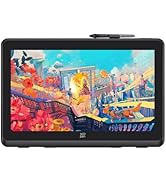







| ASIN | B08X46P868 |
| Active Surface Area | 476.064 x 267.786mm |
| Additional Features | Drawing/learning/working |
| Best Sellers Rank | #60 in Computer Graphics Tablets |
| Brand | XPPen |
| Built-In Media | 1 x 21.5” Graphics Display, 1 x Black Drawing Glove, 1 x PA6 Battery-free Stylus,1 x Pen Holder (comes with 8 pen nibs), 1 x Quick Guide,1 x Cleaning Cloth, 1 x USB-A to USB-C Cable,1 x HDMI Cable,1 x Power Adapter,1 x USB-C to USB-C Cable,1 x Power Cord |
| Compatible Devices | Linux, Mac OS X 10.10 (and higher), Windows 7 and above |
| Connectivity Technology | HDMI, USB |
| Customer Reviews | 4.4 4.4 out of 5 stars (165) |
| Display Type | LCD |
| Item Dimensions L x W | 13.07"L x 21.18"W |
| Manufacturer | XP-PEN |
| Model Name | ArtistCD220F_US |
| Model Number | ArtistCD220F_US |
| Native Resolution | 1920x1080 |
| Operating System | Windows 7 and above, Mac OS X 10.10 (and higher), and Linux |
| Pressure Sensitivity | 8192 Levels |
| Screen Size | 21.5 Inches |
| Specific Uses For Product | Online Teaching/E-Learning/Remote working/Digital drawing/Web-conference |
| Target Audience | Artist, Illustator, Student, Teacher |
J**1
Better and Cheaper Than Wacom!
The Best! This is by far the best tablet I've ever owned. It's even better than the top of the line Wacom 22" that I had when they first came out. Came really well packed with everything that you need to get started. I have a Mac 21" with Clip Studio Paint for software. I already had my old table hooked up so all I did was just plug the new one in and I was ready to go. No driver installations or any weird stuff like that. No issues! I do work for G.I. Joe, so I can't have any problems going on while I'm working. The graphics are super clean and I have no lag problems with my pen and the computer, which means I can draw like I do on paper. For the price you can't beat this. You do have to have a good running computer and software to be able to use this. I highly recommend this to anyone who loves to digitally draw, is a professional artist, or someone serious about their work and is tired of looking at a small 11" screen and not be able to read any of the tools that you're looking for because it's to small to see. I'll be keeping this tablet for a long time! Thank you XP-Pen you guys have made an amazing product!
C**A
Impressive!
Off and on through out my years of using Huion, Wacom, and now XPpen. I have to say, I'm super impressed with XPpen! I recently bought a wacom one. Quickly regretted it. I had returned it. It's response time was horrible, and wasn't worth $300. I was about to buy a huion again (had one many years ago) and saw reviews that within 3 years, the display would stop working. Then I found x pen, and this model. The reviews seemed amazing but I didn't get to hopeful. However, I'm glad I bought this! It's response time is amazing. Easy to use. The size of the screen is perfect and the colors are beautiful. The pens are super comfortable to use. It came with a handful of nibs, and two pens that I flip between. I'm still getting used to the keypad as I never used one until I bought this. Software installation was easy! Wacom was a nightmare. Overall, I'm very happy with my purchase of this display. The price, seems fair. I bought it while on sale for black Friday. As a graphic editor, I appreciate this display and will stick with XPpen from now on. So long as they keep making quality products, I'll keep coming back to buy from them.
F**E
Wacom on a budget get it!!
I couldn't afford a wacom cintiq 22 since i wanted a bigger interface screen and almost the same size of an A4 paper under the CSP interface. I started with wacom one display and i did enjoy that tablet for a few weeks until my friend talked to me about xp pen products. After doin tons of research about this company finally pull the trigger on getting the artist 22 2nd gen series And my oh my.. where do i begin? The quality of the display is amazing its simillar to my lg qhd 32 and the tablet capabilities itself is really simillar to wacom one that i used before only difference is the i have a bigger display 21.5 compare to 11.3 but there is a little janky about the pen cursor whenever i put my stabilization on higher side there's like a input delay thats kinda funny to look at cuz it looks like the lines were chasing up to the pen,never had that kind of quirk on wacom one that i used before but it doesen't really affect me since ive got used to it after few art the ive finished with this tablet and the stylus is battery free so it aint a hassle unlike apple pencils😂.so if ur on the market looking for a bigg ahh display tablet i highly recommend this tablet for ya'll whether ur starting out on digital nooblet like me or wanted an alternetive for wacom cintiq series without breaking the bank then get this one.
D**N
Very good competitor to other brands :)
Very sharp image and quality pen, colors are accurate and all the good stuff. It’s surprisingly not too heavy and doesn’t strain my desk which is already holding many displays. I would give this a full five stars but I cannot because a few things that bother me are still present in this product. Such as, the shortcut remote can sometimes end up spamming whatever shortcut what last pressed to where I have to restart my pc or remove the usb connector for the remote. The other downside to this tablet is the tilt being slightly offset. It isn’t enough to be a horrible nuisance and you can work around it. Just after using a huion I find myself having to take into account the tilt not being 100% accurate on the xp pen. Overall really good I love this thing and especially for the price. Setup was quite easy as well.
A**R
Great Drawing Tablet
Easy to set up, very responsive display, amazing customer service. I'm a first time owner of a drawing tablet the set up was quick and easy, using the tablet is easy and the stylus is very responsive. I'm very impressed with this drawing tablet. I emailed the customer service when my display was randomly turning off, the representative was very knowledgeable and help me diagnose and fix the issue.
H**Y
XPPEN Artist 22 Gen 2
Works awesome looks great . Display came really packed great exp-pen does a great job. It works smooth I’m using the open canvas because the free program I choose ain’t for Mac because it’s on the bottom of page after you select then it says not for Mac. Set it next to my 4K monitor don’t look much different. I posted a video also. This is for the artist22 I was going to get the 22 plus but I wanted a different express keys than xp-pen so I couldn’t justify the extra 150 basically for HDq but it’s 1080p natively so didn’t make much sense to Me.
D**A
Un excelente producto, lo he estado utilizando unas semanas, trabaja de forma fluida y se adapta a varios tipos de softwares para dibujo, en mi caso uso Paint Tool Sai 2 y Clip Studio, y he trabajado muy bien con ambos en la tableta. muy recomendable. Como recomendación sugiero que se compren una manga larga para cubrir su brazo y de esta manera tengan mejor movilidad al momento de estar dibujando en la pantalla.
M**.
Excelente. Dibujo, animación y lo que se te ocurra crear.
J**S
Sin duda la me sorprendió, la uso diario como por 10 hrs y ni un rasguño, tiene buena calidad y no se calienta de más, recomiendo comprar un stand aparte porque las patitas que traen no deja la tableta en una posición que sea ergonomica, muy buena opción económica con muy buena calidad
O**.
Excelente tablet muy recomendable.
A**S
10/10 tamaño ideal para escritorio mediano, se siente increíble el lápiz y el color e imagen de la pantalla es increíble
Trustpilot
Hace 1 mes
Hace 1 semana