We remain fully operational. Our teams are working around the clock to ensure your deliveries continue safely.

Descargar la aplicación


Servicios al cliente
Sobre nosotros
Copyright © 2025 Desertcart Holdings Limited
Descargar la aplicación



Buy anything from 5,000+ international stores. One checkout price. No surprise fees. Join 2M+ shoppers on Desertcart.
Desertcart purchases this item on your behalf and handles shipping, customs, and support to Uruguay.
🎨 Elevate your color grading game—compact, precise, and ready to roll!
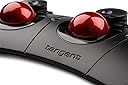
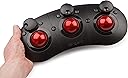
The Tangent Ripple Grading Panel is a lightweight, USB-powered color grading controller featuring three high-resolution optical trackerballs with dials. Designed for occasional colorists, editors, and students, it offers essential primary grading controls in a compact form factor. Compatible out-of-the-box with major software like DaVinci Resolve and Premiere Pro via Tangent Hub, Ripple supports customizable layouts through Tangent Mapper and can be expanded with Element series panels. Its portability and professional-grade precision make it an ideal entry-level tool for on-the-go creatives.
| ASIN | B01EYZO01Q |
| Are Batteries Included | No |
| Brand | tangent |
| Color | Black |
| Customer Reviews | 4.1 4.1 out of 5 stars (51) |
| Date First Available | 19 March 2021 |
| Hardware Platform | Tablet |
| Item Weight | 600 g |
| Item model number | FBA_RIPPLE |
| Manufacturer | tangent |
| Power Source | Corded Electric |
| Product Dimensions | 32.5 x 14.8 x 5.2 cm; 600 g |
| Series | FBA_RIPPLE |
G**Y
Couplé avec DaVinci Resolve, cette surface accessible permet de faire des merveilles en un rien de temps. C'est cependant très limité aux primaries & log (Wheels) du software et les boutons ne sont pas customizables, un choix de Black Magic de limiter l'accès aux surfaces externes surtout bas marché. Pour d'autres logiciels (type Premiere) l'utilisation est beaucoup plus large et ravira les amateurs d'étalonnage. Attention cependant les boules ne sont pas fixées et tombent très facilement lorsque l'on manipule la tablette, rien de grave mais tout de même à noter pour certains. Son grand avantage en revanche c'est sa portabilité qui rendra heureux les grands voyageurs nécessitant un outil rapide et professionnel partout où ils vont. J'enlève une étoile car malgré le fait que ce soit du solide, j'ai peur que la tablette ne soit pas à l'épreuve du temps si l'on voyage avec et aussi pour le manque de customisation global mais bon, pour le prix il n'y a pas de quoi vraiment se plaindre !
V**A
De plástico bastante resistente. Las bolas podrían tener un mecanismo de sujeción para que no se caigan si lo mueves.
A**N
I use this with FCPX's Color Finale Pro plugin. Works pretty well, in general. Sometimes it is sluggish in response time, but that is most likely my computer (MacBook Pro 13" 2017 2.0 ghz with 8 gb ram). Since I am starting to take color correction seriously, this is a must to speed things up. Now it is apparently compatible with FCPX 10.4 and its Color Wheels, but I have not tried this yet. Should also work fine in Premiere and Da Vinci.
A**D
One of the new features in Phase One's latest version of Capture One, version 10, is the facility to work with control surfaces from Tangent. As a prolific photographer, and having recently upgraded to C1 V10 I decided to give Tangent's entry level control surface, the Ripple, a whirl. This review of the Ripple is with respect to ONLY Capture One. As you can see, it features three trackballs, three dials, and 8 buttons. There are two main buttons, one between each pair of trackballs, and pairs of secondary buttons, situated either side of each dial. For a start, it's a lovely bit of equipment, about 13 inches wide, and the trackballs are big, over an inch in diameter, and satisfyingly heavy and smooth to turn. The dials turn infinitely, and the buttons depress with a satisfying clack. C1 recognises the Ripple instantly, and there are various default mappings, but using the Ripple mapping software you can assign just about any editing activity to the controls. Each control, be it dial or ball, can have two functions, main and alternate. Pressing and holding the left main button gives the alternate function of each control. But let's get one negative out of the way right now - the pairs of buttons each side of the dials are NOT programmable; one of each pair does nothing, while the other one simply resets whatever value has been set with its associated dial to out-of-camera default. It's likely that these buttons have more functions with other software, don't know. The Ripple is not going to replace your mouse entirely, but you can set it up to handle what you think are your most-used adjustments. I've set mine up as follows: Dials, from the left: exposure / Kelvin / clarity Dials, alternate functiona: highlights / shadows / sharpening The three trackballs are as per defaults, and match the 3-way colour wheels under Color Balance, with the main function of each ball moving the little central marker in each wheel - very logical. The alternate function of each ball adjusts the lightness level of each colour wheel, ie, the vertical indicator to the right of each colour wheel. If you forget which wheel controls your Clarity, no problem. Just touch any of the 6 main controls and a small HUD pops up on your screen showing labels associated with each control. The HUD disappears after 3 seconds of no Ripple use. Finally, the left main button provides the alternate functions, and I've programmed the right-hand main button to Process. In use, of course it's going to take some getting used to, but in no time you'll be turning and tracking like mad. It's great fun to use, but you'll be going back to the mapping software quite a bit initially. One thing you'll fiddle with is that each dial can be adjusted for sensitivity so, eg, a one-stop change in exposure can be set to need a half turn or several full turns.
A**N
Kinda hard to install, but otherwise, good product and great seller.
Trustpilot
Hace 1 mes
Hace 3 semanas