We remain fully operational. Our teams are working around the clock to ensure your deliveries continue safely.

Descargar la aplicación


Servicios al cliente
Sobre nosotros
Copyright © 2025 Desertcart Holdings Limited
Descargar la aplicación
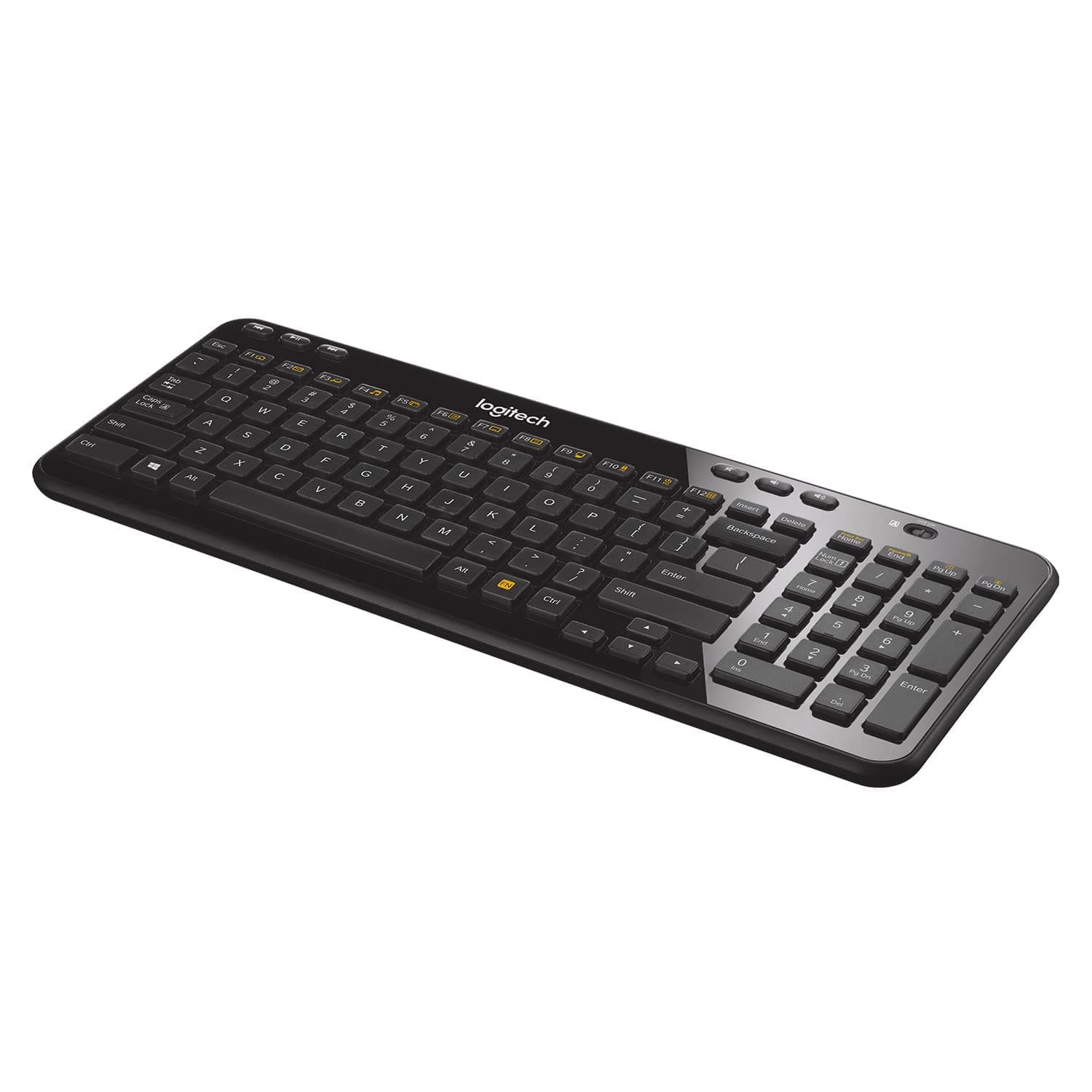
⌨️ Compact. Secure. Endurance that keeps up with your hustle.
The Logitech K360 Wireless USB Keyboard is a sleek, space-saving full keyboard designed for professionals who demand efficiency and reliability. Featuring a 20% smaller size than standard keyboards, a robust 3-year battery life, and secure 128-bit AES encryption, it offers lag-free wireless connectivity with programmable hotkeys to streamline your daily tasks. Compatible with Windows and Mac, it’s the perfect blend of compact convenience and professional-grade performance.





| ASIN | B007PJ4PN2 |
| Batteries | 2 C batteries required. (included) |
| Battery Type | 2 x AA (included) |
| Best Sellers Rank | #770 in Computer Keyboards |
| Brand | Logitech |
| Color | Black |
| Customer Reviews | 4.4 4.4 out of 5 stars (8,753) |
| Date First Available | March 22, 2012 |
| Department | keyboard |
| Hardware Platform | PC |
| Is Discontinued By Manufacturer | No |
| Item Dimensions LxWxH | 15.56 x 6.5 x 1.75 inches |
| Item Weight | 1.06 pounds |
| Item model number | 920-004088 |
| Language | English |
| Manufacturer | Logitech |
| Operating System | 10,11 or later |
| Power Source | Battery Powered |
| Product Dimensions | 15.56 x 6.5 x 1.75 inches |
| Series | K360 Wireless Keyboard |
| Wireless Type | 2.4 GHz Radio Frequency |
M**T
A Perfect Size -- Compact With Everything I Need
I have purchased this Logitech wireless keyboard (K360) several times for my Windows desktop. It is perfect, compact, easy to use, and has all of the keys and features I need. I work in the tech field and especially love, and use every single day, multiple times a day to take screenshots, the gold function (FN) key with black letters by pressing it, then the Print Scr (Home) key. That combination takes a screenshot of whatever is visible on the page. Then I paste it (Ctrl-V) into one of my two image editors and crop it to my needs. I have tried many keyboard types, and not every style has that the FN key/feature. Since I can't live without it, I don't waste my time or money buying other models. Also, many other keyboard types and styles are either too large or have a curved bottom edge for "wrist support" that is uncomfortable, or they have too many other features I don't need and will never use. For that reason, I have worn out this particular model (Logitech K360) more than once by using it so often that portions of the white letters for capital N and capital M are not fully visible. Two other benefits of this keyboard are that it has an On/Off slider button you can turn off to save battery power, or as a convenience when traveling and packing it in a suitcase or shoulder bag. Another feature I appreciate is the Windows key (bottom left) between Ctrl and Alt. Every night, I put my computer to sleep (Start - Sleep), and in the morning, I press the Windows key to wake it up to enter my password. I highly recommend this product and will continue using it until it is no longer compatible with Windows.
A**E
Another Solid Performer from Logitech! (...and some help with Unifying receiver setup.)
As a data systems analyst, I use a laptop at work for a solid 8-10 hours a day. My laptop doesn't have a dedicated numeric keypad, so I was relegated to using the wired USB keyboard that came with the setup. My laptop is usually latched into the dock when at my desk, and I have an additional 22" monitor attached. One of the problems I encountered with my stock setup was the wire on the keyboard kept getting in the way and moving my keyboard out of the way when I had to review paper documentation was a real pain. I have several full-sized wireless Logitech keyboards (the Wave being my favorite!), but they are too bulky for my particular application and workspace limitations. I saw this keyboard while shopping on Amazon and thought I would give it a try. I liked the fact that it has a small form-factor for a keyboard with a numeric keypad and it also utilizes Logitech's Unifying receiver so I could use my Logitech M510 mouse with this keyboard and only take up one USB port on my PC. I am used to full sized keys on a standard keyboard so I wasn't too sure about how well I could type with the "chicklet" keys on this keyboard. I must say that this is a GREAT keyboard and it hasn't slowed me down one bit while typing. I have owned this keyboard for almost a year now without any problems and, like I said before, in using it for 8-10 hours a day, 5 and 6 days a week, I have only changed the batteries in it one time. I would offer a bit of advice for those who don't have administrator rights to your work computer and want to use multiple Logitech devices on a single Unifying receiver. The keyboard will come already synced with it's own Unifying receiver, so you can use it right out of the box. But, like I mentioned earlier, I also have a wireless Logitech mouse that had it's own Unifying receiver, but I was unable to pair them to one receiver on my PC at work since I don't have admin rights. What I did to overcome this obstacle was to bring my devices home with me one day and pair them to one Unifying receiver on my PC at home using Logitech's Unifying software. I then took them to work the next day and plugged in the single Unifying receiver and was up and running instantly with both keyboard and mouse on one receiver. So, if you're looking for a compact full-sized keyboard for your PC, look no further and get this one. I'm certainly glad I did!
D**N
Ideal keyboard on many levels, for both PC and Mac
I work from home and this is my primary keyboard. I am a minimalist, so I don't like cords and I don't like "stuff" on my desk. This is perfect for me. I was first drawn to the small size. I can shift the keyboard anywhere on my desk or hold it in my lap if I wanted. It leaves plenty of room for my mouse to roam. I was skeptical about the feel and the battery life. I use Mac and PC laptops as well as a PC desktop. I have always been most comfortable on a full size PC keyboard - the key spacing, the feel, the general ergonomics. Laptops always feel cramped and some of the keys are often in the "wrong" location compared to a desktop keyboard. That is the one downside of this keyboard. A couple of common keys are moved to save space - namely the page up and page down, which I use heavily to switch browser windows or Excel sheets. Everything else is decent as far as location. I was really afraid of how the keys would feel coming from full size desktop keyboards. If I had it my way, they would bring back the mechanical click keyboards from the 80's and 90's PC's. This actually feels pretty good. It is a solid click and feel when buttons are depressed, great feedback. These don't feel anything like laptops with the mushy key strokes. This feels solid. I've had it for months, and I always leave it on. It is smart enough not to drain the battery when not actually being typed on. It may be a small inconvenience to some to simply switch it on and off, but the convenience of not thinking about it is great. In this way, it functions like a wired keyboard without the unsightly cords. I always prefer corded peripherals because I hate thinking about charging devices. We all have enough rechargeable products to think about. With this, it's not an issue at all. I have no problem charging or replacing the batteries once or twice a year when I use this device for most of the day, every day. Aside from feel and battery life, this has a couple more things going for it. It looks real nice with the piano black color. It's small and the back is adjustable. I leave it flat for my preference, but maybe not for everyone. Also, the media keys are quite helpful. It's clumsy to click through to volume on the screen. This is much more intuitive. A lot like a laptop in that respect. Speaking of which, the function keys are useful as well. I haven't messed around too much with the programming as I don't need the function keys too much, but I do use some of them. This is easily used on both PC and Mac. This is a natural PC keyboard, but you can customize for a Mac when you first pair it. I didn't do any customization and use it just fine with the Mac. I use both OS's pretty heavily and use the same desktop setup (monitor, mouse, keyboard, etc.) on both of them pretty seamlessly. Finally, this is a great value. I was willing to spend much more on a keyboard because I spend so much time and make my living on the computer. I wasn't convinced I would like this but gave it a try because it was only about $23. For that price, I expected it to be low quality and disposable, and I would simply try another if it didn't work out. Looks like I found what I was looking for and will be keeping it for a while.
M**E
Keys are very loud so keep that in mind if you zoom a lot! But I like the classic "click clack" (it's so satisfying!) and the spring response of the keys feels nice for a fast typer like me. The keys themselves are slightly rounded at the edges with dips in the middle to nest your fingers. The texture of the plastic for the keys is just rough enough so your fingers don't slip. The frame is a shiny though so it's still very sleek looking (I've kept the protective film on it and will only remove once it starts to peel away on its own!). So far battery life is good...I sometimes forget to turn it off! Batteries are included which is fantastic! But if you're looking for a more eco friendly option buy rechargable AA batteries when the ones it comes with are drained (I'll be doing this for sure!) I tried connecting with other universal Logitech connectors and it paired pretty easily following the steps! The dedicated volume keys work with my laptop sound and the play/pause works when watching YouTube. I haven't tried with Netflix or other video apps but I imagine it would work too. You can use all the keyboard shortcuts you normally use on a PC (ex. CTRL+C to copy etc.) It has little feet on the back top corners to elevate the keyboard if you don't like typing on a flat surface. Overall I love this keyboard and you get a great price for a great product. Do not opt for a cheaper random unknown brand- you won't know what you're getting!! Whereas this keyboard is made really well and Logitech put a lot of thought into this for a classic wireless keyboard. Would definitely recommend!
A**R
評価★3.5と微妙な商品ですけど、使った感じ、自分的には★5でした。とくに不満等ありません。ちょい小型で、ワイヤレス接続で、US配列で、テンキー付き。まさに自分にはピッタリの良い商品でした。
P**T
I love the Logitech K360 keyboard and have done since it first came out although I appreciate it might be a tad too compact for some. It’s size and layout are perfect for me but finding new ones as the old ones wear out is becoming harder and harder so you can imagine my joy at finding a seller who lists new units. Even though the asking price is quite high I nevertheless ordered one but when it failed to arrive after a week I contacted the seller and they replied in less than an hour. After a few messages back and forth that same day the matter was sorted and they advised that a new one was being posted. It arrived by Royal Mail four days later with batteries already fitted and, after locating the dongle in the lid of the box, it was up and running with no problems (for me). There was one slight issue in that 5 of the keys are mislabelled and that is why I have dropped a star: - number 2 key shows (@) but shift produces (“) - number 3 key shows (#) but shift produces (£) - the apostrophe key (‘) is normal but shift produces (@) - the strange looking key below the backspace button is for (#) and shift for (~) - below Esc the key shows ( ` ) and (~) but the shift actually produces (¬) The listing’s images are true and clearly show that the keys are not where they would be expected to be however such basic errors does suggest that the keyboard hasn’t actually come from Logitech. Other than that all else seems fine and the typing is as smooth and quiet as expected. As I’ve been using the correct layout for years I automatically go to the correct key so can live with the errors although I imagine new users might consider it a deal breaker. The level of service I experienced from reApp was exemplary and despite the cost (£55) I intended ordering a few more mislabelled units in the coming days. Update: I will unfortunately not be ordering any more because the day after writing my review the cost shot up to £70 and they have therefore priced themselves out of the market. Shame.
B**T
Excellent for a small space
O**Z
Esto es lo que andaba buscado, perfeto para cargarlo dentro del backpack, estaba usando otro teclado que apenas cabia dento de la mochila, ojo el teclado estaen ingles, asi que la letra ñ no existe en el teclado, pero eso no me afecta en lo personal. Tengo varios teclados de la marca y siempre me han gustado
Trustpilot
Hace 3 días
Hace 2 semanas