We remain fully operational. Our teams are working around the clock to ensure your deliveries continue safely.

Descargar la aplicación


Servicios al cliente
Sobre nosotros
Copyright © 2025 Desertcart Holdings Limited
Descargar la aplicación



Buy anything from 5,000+ international stores. One checkout price. No surprise fees. Join 2M+ shoppers on Desertcart.
Desertcart purchases this item on your behalf and handles shipping, customs, and support to Uruguay.
📸 Elevate your shoot—wireless freedom, flawless focus.
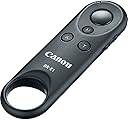
The Canon Wireless Remote Control BR-E1 is a Bluetooth-enabled remote designed for select Canon EOS and PowerShot cameras, offering up to 16 feet of wireless control for shutter release, autofocus, video recording, and zoom with the Power Zoom Adapter PZ-E1. Compact and easy to pair, it enhances photo and video shoots by eliminating camera shake and enabling remote operation, making it an essential tool for professionals and content creators seeking precision and convenience.


| ASIN | B06WGM914S |
| Additional Features | Controls camera through Bluetooth |
| Battery Type | Lithium |
| Best Sellers Rank | #83 in Camera & Camcorder Remote Controls |
| Brand | Canon |
| Built-In Media | Wireless Remote Control BR-E1,Printed Matter Unit |
| Button Quantity | 3 |
| Color | Black |
| Compatible Devices | Camera |
| Connectivity Technology | Bluetooth, wireless |
| Controller Type | Remote Control |
| Customer Reviews | 4.5 4.5 out of 5 stars (1,688) |
| Global Trade Identification Number | 00013803288254 |
| Item Dimensions L x W x H | 3.6"L x 1.1"W x 0.5"H |
| Item Type Name | Canon Cameras US Wireless Remote Control Br-E1 Wireless Camera Remote Control, Black (2140C001) |
| Item Weight | 0.03 Pounds |
| Manufacturer | Canon Cameras US |
| Maximum Number of Supported Devices | 1 |
| Maximum Range | 10 Meters |
| Mfr Part Number | 2140C001 |
| Model Name | Wireless Remote Control BR-E1 |
| Model Number | 2140C001 |
| Number of Batteries | 1 Lithium Ion batteries required. (included) |
| UPC | 013803288254 |
| Unit Count | 1.00 Count |
| Warranty Description | 1 Year Limited Warranty |
B**E
Works Perfectly with the EOS R50
Finally had an opportunity to use this with my EOS R50. The set up was simple and quick and it integrated right into my camera without further adjustments. The only thing I still haven’t figured out yet is how the AF button works. I’m sure I have to adjust a setting there but that’s just me. It is small and so can easily fit in a pocket for quick access in your camera bag. I am using it currently to take aquarium photography so I can snap from a distance to capture those fish that run to the back of the tank when I’m near! As long as I have a focus point and the camera is on my tripod, I just sit and wait and snap away. Really glad I invested in this tool!
P**Y
Great for video bloggers and as a sub for a cable release
I wanted a Bluetooth remote for my EOS 6D MKII so I bought the Canon Wireless Remote Control BR-E1. The BR-E1 is functionally similar to the RC-1 and RC-6 remotes but uses Bluetooth instead of IR to trigger the camera. Why Use the BR-E1? The BR-E1 helps eliminates camera shake in photos using slow shutter speeds by remotely triggering the shutter and/or AF. Plus, the BR-E1 can trip the shutter from 16.4 feet above, below, behind or to the side of the camera so it makes a great substitute for a cable release. The BR-E1 also allows video start/stop and focus without touching the camera. In the past I used the RC-1 and RC-6 IR remotes to record most of the videos on my YouTube channel: sit in chair with guitar, press remote button and rock! Unfortunately, video lights are extremely bright and overwhelm the IR signal if not pointed exactly at the camera’s IR sensor. With the BR-E1, the radio signal over Bluetooth means I don’t have to maintain line of sight or worry about bright lights: press and it triggers no matter what. It’s also able to control the zoom function for the Canon Power Zoom Adapter PZ-E1, a function I couldn’t test since I don’t own a PZ-E1. Pairing the BR-E1 For triggering stills and video with Bluetooth equipped EOS cameras, you need to pair the BR-E1 with your camera. Each EOS model is a little different but this is the basic procedure for the 6D MK II: • Enable Bluetooth in camera menus • Select “pairing” • Hold down both zoom buttons on the remote • When the camera asks if you’d like to pair with the BR-E1, tap "yes" Once paired, put the camera in self-timer/remote mode and press the big round button on the BR-E1 to take a picture. That's it. There's a three-way switch on the side to toggle between immediate release, 2-second delay and video release. If you disable Bluetooth and enable Bluetooth at a later date, the camera remembers the paired BR-E1. In other words, pairing is a one time only operation for each device. Bulb Use For bulb exposures, fire the BR-E1 once to open the shutter and again to close it. If the BR-E1 is set to 2-second delay, there will be a 2-second delay before the shutter first opens. MLU The BR-E1 can be used with mirror lockup (MLU): enable MLU in camera menu, enable self-timer/remote mode, set 2-second delay on the BR-E1 and, finally, press the big button on the BR-E1. The mirror will swing up and the shutter opens two seconds later. Sleep Mode The default sleep mode setting for most EOS cameras is 60 seconds. With the RC-1/RC-6 that meant you had to trigger within 60 seconds or the camera timed out. However, with the BR-E1, if the camera sleeps, you can wake it with a single press and trigger with a second press. Good show Canon! Gotchas Not many gotchas other than a steep price and incompatibility with older EOS. The BR-E1 Wireless Remote Controller only works with recent Bluetooth equipped EOS such as the 6D MKII, SL2, T7i, 77D, etc. So no support for a M3 or 80D from only a couple years back. Last Blurb The BR-E1 is a easy to use and somewhat pricey accessory but has proven to be an essential tool in my studio, making my one man production solo guitar and duet video shoots easier. It's also ideal to control vibration during long exposures and, of course, to trigger selfies and group photos.
P**S
Great design and performance
Works like a treat. You always need one of these in your camera bag if you shoot Canon.
L**N
Works Well, but Overpriced for What It Is
The Canon Wireless Remote Control BR-E1 does exactly what it promises. It’s reliable, easy to pair, and offers seamless wireless control for capturing photos and videos. The compact size and straightforward functionality make it a handy tool for any photographer. However, the price feels steep for such a simple device. While the quality is solid and it integrates perfectly with Canon cameras, it’s hard to justify the cost compared to more affordable third-party options. Great product, but a better value would make it perfect.
A**N
Nice to have.
Works well for our Canon camera. Easy to set up and use and will make taking family photos just a little bit easier.
S**S
Canon Remote
I recently bought the Canon remote controller, and it has completely changed the way I take photos, especially when I’m shooting solo content or need stability for long exposures. It’s one of those small accessories that ends up becoming absolutely essential once you’ve used it a few times. Setting it up was super easy just point and click. It connected instantly with my Canon camera, no complex setup or pairing needed. I mainly use it to take my own pictures when I’m traveling or creating content outdoors, and it gives me the freedom to frame my shot perfectly, step into the scene, and take the photo exactly when I’m ready no more rushing or awkward timer runs. The response is quick and accurate. I never have to worry about delays or missed shots. It’s also great for group photos where I want to be in the picture without having to depend on someone else to take it. I also use it for time-lapses and long exposure photography at night no need to touch the camera and risk shaking the image. It’s super lightweight and compact, so I just keep it in my camera bag or even my pocket. The battery life has been excellent I’ve used it for weeks without needing to change the battery. The range is surprisingly good too; I’ve triggered the shutter from several feet away with no problem. If you love taking your own photos, want more control in your shoots, or just want to avoid touching the camera during delicate shots, this little remote is a total game-changer. Definitely one of the best and most useful purchases I’ve made for my Canon gear.
D**.
Super easy set up works great
I’m not technically inclined this married to my canon R6 mark two super easy works great. God bless you all.
D**.
Wasted my money
I wasted my money: Initially, it paired fine and worked on my first outing with it. Then every time I pulled it out it wouldn't work at all - as if the battery was dead. Replaced the battery several times and it might work for one shot but not the next. There is no on-off switch to protect the battery from discharging while stored in a camera bag. I don't think that was the problem though - I would test it before heading out and it worked. Then I would try to use it to shoot in the field and it was dead.
V**N
The product works pretty well with Canon EOS M50 Mark 2, The delivery took 12 days to complete from the Ordering date for international shipping which can be improved.
M**N
Produit canon de qualité, fonctionne très bien, bon achat.
C**N
Perfetto
W**R
Gute Qualität und Funktion.
J**4
Had this a couple of months now no issues whatsoever works perfectly with my canon 77D
Trustpilot
Hace 1 mes
Hace 3 semanas