We remain fully operational. Our teams are working around the clock to ensure your deliveries continue safely.

Descargar la aplicación


Servicios al cliente
Sobre nosotros
Copyright © 2025 Desertcart Holdings Limited
Descargar la aplicación





Buy anything from 5,000+ international stores. One checkout price. No surprise fees. Join 2M+ shoppers on Desertcart.
Desertcart purchases this item on your behalf and handles shipping, customs, and support to Uruguay.
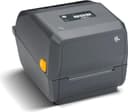
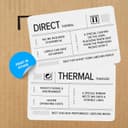
ZEBRA ZD421 Thermal Transfer Desktop Printer 203 dpi Print Width 4-inch Wired USB and Ethernet Connectivity ZD4A042-301E00EZ Review: Great label printer! - This is probably the most versatile label printer I have ever used. The fact it can print both with the ink ribbon for tough labels to just thermal printing for shipping labels, this printer does not disappoint. This printer does not come with labels or the ink ribbon since most users of this printer are going to be businesses not the home user, and they're printing needs and label size needs are going to very greatly. With that said, this printer can print on just about any size of roll labels, just tell the software what label your using and your ready to go! Need to change sizes? No problem, again just tell the software what label size your using, if this is for a business, the printer will spit a few labels out to adjust to the size. Go Zebra! I like most of your products, and I know you cater to businesses, so your products are built to commercial/industrial spec, and that does come with a big price tag, but in the long run I know what I bought is going to last me as a home user indefinitely. Review: Not user friendly in the least. - If I’m able to get ahold of Zebra and get it working I’ll update my review accordingly. After considerable research I purchased this printer as it’s was listed as one of the best for the price. To connect, setup, and ultimately print with this printer is a ($*#& nighmare. The installation/setup guide (of which there are many) is 362 pages long!!!! Tell me your product is not user friendly without telling me your product isn’t user friendly. They claim it’s Android and IOS compatible… the IOS app is non-functional out of the gate as it can’t even find a printer (it won’t let you). The only device I semi got working was on a PC with Windows. It required me to download and install three separate applications in a very specific order. After this I was able to connect to the printer and set the default label size since the printers auto sense isn’t sensing. After setting this default and confirming I tried several test prints (the label is 2 x 0.5” thermal transfer). The quality of print was great… the size of the label was pathetic. I printed on 9 labels partially, skipped 22 labels entirely, then printed on three more. I cannot say enough terrible things about this. I’m sure once it’s working it’s great, I don’t think I can digest 362 G-D&%* pages to figure it out and get it working. Update, upon checking they claim this is BLE enabled but it's only for setup (which doesn't work) and if you want WiFi or BLE in actuality you have to have $180 more for a plugin chip that costs them ~$5.00. Terrible Chinese company at their finest. Also, if you look up this specific printer in their store they are selling 7 versions that go by the same name with no discernable differences. Apparently farming for reviews and dropping the ones that don't take.
| ASIN | B09BXVDHYN |
| Additional Printer Functions | Print Only |
| B&W Pages per Minute | 25.33 ppm |
| Best Sellers Rank | #43,426 in Office Products ( See Top 100 in Office Products ) #118 in Desktop Label Printers |
| Brand | Zebra Technologies |
| Built-In Media | Printer |
| Color | black |
| Color Depth | 1 bpp |
| Compatible Devices | PC |
| Control Method | Remote |
| Controller Type | Bluetooth |
| Customer Reviews | 3.8 3.8 out of 5 stars (44) |
| Dual-sided printing | Yes |
| Duplex | Automatic |
| Hardware Interface | USB |
| Ink Color | Black |
| Item Dimensions D x W x H | 11.18"D x 13.98"W x 10.39"H |
| Manufacturer | ZEBRA TECHNOLOGIES VTI, INC. |
| Maximum Copy Resolution Black and White | 203 dpi |
| Maximum Copy Speed Black and White | 25.33 ppm |
| Maximum Media Size | 4 inches |
| Maximum Print Resolution Black and White | 203 dpi |
| Maximum Sheet Capacity | 100 |
| Model Name | ZD421 |
| Model Number | ZD4A042-301M00EZ |
| Model Series | ZD |
| Number of Drivers | 3 |
| Number of Ethernet Ports | 1 |
| Number of Trays | 2 |
| Other Special Features of the Product | Bluetooth |
| Output sheet capacity | 100 |
| Paper Size | 4 inches |
| Print media | Labels |
| Printer Connectivity Type | Bluetooth, USB |
| Printer Output Type | Monochrome |
| Printer Type | Thermal |
| Processor Count | 1 |
| Resolution | 203 x 203 DPI |
| Series Number | 421 |
| Specific Uses For Product | Office |
| Total USB 2.0 Ports | 1 |
| Total Usb Ports | 1 |
| Unit Count | 1.0 Count |
| Warranty Type | limited warranty |
M**S
Great label printer!
This is probably the most versatile label printer I have ever used. The fact it can print both with the ink ribbon for tough labels to just thermal printing for shipping labels, this printer does not disappoint. This printer does not come with labels or the ink ribbon since most users of this printer are going to be businesses not the home user, and they're printing needs and label size needs are going to very greatly. With that said, this printer can print on just about any size of roll labels, just tell the software what label your using and your ready to go! Need to change sizes? No problem, again just tell the software what label size your using, if this is for a business, the printer will spit a few labels out to adjust to the size. Go Zebra! I like most of your products, and I know you cater to businesses, so your products are built to commercial/industrial spec, and that does come with a big price tag, but in the long run I know what I bought is going to last me as a home user indefinitely.
R**.
Not user friendly in the least.
If I’m able to get ahold of Zebra and get it working I’ll update my review accordingly. After considerable research I purchased this printer as it’s was listed as one of the best for the price. To connect, setup, and ultimately print with this printer is a ($*#& nighmare. The installation/setup guide (of which there are many) is 362 pages long!!!! Tell me your product is not user friendly without telling me your product isn’t user friendly. They claim it’s Android and IOS compatible… the IOS app is non-functional out of the gate as it can’t even find a printer (it won’t let you). The only device I semi got working was on a PC with Windows. It required me to download and install three separate applications in a very specific order. After this I was able to connect to the printer and set the default label size since the printers auto sense isn’t sensing. After setting this default and confirming I tried several test prints (the label is 2 x 0.5” thermal transfer). The quality of print was great… the size of the label was pathetic. I printed on 9 labels partially, skipped 22 labels entirely, then printed on three more. I cannot say enough terrible things about this. I’m sure once it’s working it’s great, I don’t think I can digest 362 G-D&%* pages to figure it out and get it working. Update, upon checking they claim this is BLE enabled but it's only for setup (which doesn't work) and if you want WiFi or BLE in actuality you have to have $180 more for a plugin chip that costs them ~$5.00. Terrible Chinese company at their finest. Also, if you look up this specific printer in their store they are selling 7 versions that go by the same name with no discernable differences. Apparently farming for reviews and dropping the ones that don't take.
A**N
good little label printer
needed quickly in a pinch for printing labels. Price was fair, quality is good though
A**3
Reliable Printer
Zebra's always been a good brand and after trying some off-shelf brands I returned to Zebra.
M**L
Can't go wrong with this printer.
This printer is very easy to set up and use. It is basically plug and play. It is easy to change the ribbon and labels too which is a big plus. It is less expensive and far superior to other bands we have tried.
S**N
This printer is manufactured to be used inside China region only.
DO NOT BUY - unit sold to us was per the manufacture "This printer is manufactured to be used inside China region only. " It does not work on our system and the seller will not take it back.
E**.
Love It and Hate It!
I got this printer to replace my old jewelry labels that were not waterproof or UV proof. My old labels were deteriorating off of my jewelry from doing outside events. After tons of research, I came across thermal transfer printing for the best weather resistance. The wax ribbon (that you have to buy separately) is used in place of ink, and can lasts 2+years. When I received the printer, it was absolutely terrible setting up. You have to go under zebra website find the model and download the driver software and a separate software called zebra setup utilities. The instructions that come in the box were very confusing and I ended up watching a YouTube video. For example if you plug in the USB port before you download the drivers you have to start over. Terrible. I made that mistake. Once I finally got it set up over USB, I tried to set it up through Wi-Fi.. I spent 4 hours watching YouTube videos and researching on Google only to find out THIS PRINTER DOES NOT COME WITH A WI-FI ADAPTER.. IT'S CAPABLE OF WI-FI PRINTING BUT YOU HAVE TO ORDER THAT SEPARATELY. ANOTHER $200!!! They call it the Wi-Fi upgrade card. And it plugs into a port underneath the printer. lastly, once you get everything up and running...changing the labels and setting them up in the design software is a NIGHTMARE! thus printer should be way more technologically upto date. We are in 2025, and this printer is analog. You have to know the size of all of the labels, The margins, The indentations for what side of the label you want to print on and you have to enter all of that in manually into the zebra setup utilities software.. personally if you're looking for something that's plug and play, I would not get this printer.. It is not for the faint of heart. You need a lot of patience in order to learn this machine.. On a positive note once you get everything figured out the print quality is exceptional! I'm not going to return it, But if you haven't bought it yet.. I'd keep looking. maybe spend the extra money for something easier to use.
R**D
Perfect Printer!
Took about 15 minutes to download drivers and setting it up, but after it worked perfectly. Printer does not come with labels or thermal ribbons, but Zebra printers never do. So if you buy this don’t forget to buy thermal labels and ribbon with either a 0.5 or 1’ core.
M**N
Excelente Impresora de etiquetas, trabajando al 100% Espero dure tanto como su antecesora.
C**R
The printer was delivered in a timely manner but the model received appears to be for China. The Ethernet port was missing and the power adapter does not fit the north-american outlets. The seller is sending me a replacement power adapter and an Ethernet card for it and provided tracking. The seller responds quickly to my inquiries. I will update this review once I have all the parts needed to use this printer and when I am able to confirm that it all works in good order. EDIT: The replacement parts took much longer than anticipated. I ordered in Nov 2023 and now is June 2024. Finally we can make use of this printer on the network as intended. Due to long delay I give only 4 stars.
Y**E
Le port Ethernet était manquant et pas fourni sais une de basse il mon dit qui vont changer l annonce avec amazone imprimante fonctionne très bien
C**E
Je n’ai pas reçu le bon modèle. C’est la même imprimante mais ce n’est pas le modèle avec le port ethernet je ne peux donc pas l’utiliser en réseau. La part number n’est pas identique à celle annoncée
A**.
I bought this one to replace my Zebra GK420, it works great so far. I use it to print small price tags with barcode for jewellery
Trustpilot
Hace 1 mes
Hace 5 días