We remain fully operational. Our teams are working around the clock to ensure your deliveries continue safely.

Descargar la aplicación


Servicios al cliente
Sobre nosotros
Copyright © 2025 Desertcart Holdings Limited
Descargar la aplicación




Buy anything from 5,000+ international stores. One checkout price. No surprise fees. Join 2M+ shoppers on Desertcart.
Desertcart purchases this item on your behalf and handles shipping, customs, and support to Uruguay.
🚀 Print smarter, scan faster, secure tighter — the ultimate all-in-one powerhouse for the modern office.
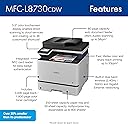
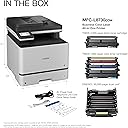
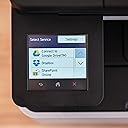
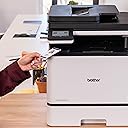
The Brother MFC-L8730CDW is a compact yet powerful business color laser all-in-one printer designed for high-demand professional environments. It delivers fast 33 ppm print and copy speeds with sharp 2400x600 dpi resolution, advanced duplex scanning at 104 ipm, and robust triple layer security including NFC authentication. Featuring dual-band wireless and Gigabit Ethernet, a user-friendly 3.5” touchscreen, and cost-efficient high-yield toner cartridges, it maximizes productivity while minimizing operational costs. EPEAT Silver and ENERGY STAR certified, it also supports eco-conscious offices.


| ASIN | B0FR9M9X6S |
| Additional Printer Functions | All In One, Copy, Scan |
| B&W Pages per Minute | 33 ppm |
| Best Sellers Rank | #28,409 in Office Products ( See Top 100 in Office Products ) #38 in Laser Computer Printers |
| Brand | Brother |
| Built-In Media | Toner Cartridges |
| Color | White |
| Color Pages per Minute | 33 ppm |
| Compatible Cartridge | TN635 Standard Yield, TN635XL High Yield, |
| Compatible Devices | Laptops, PC, Smartphones, Tablets |
| Customer Reviews | 4.1 4.1 out of 5 stars (697) |
| Dual-sided printing | Yes |
| Duplex | Automatic |
| Hardware Interface | Ethernet, USB 2.0 |
| Initial Page Print Time | 9.9 Seconds |
| Item Dimensions D x W x H | 20.7"D x 16.1"W x 21"H |
| Item Type Name | Color Laser Printer |
| Item Weight | 67.9 Pounds |
| Manufacturer | Brother |
| Maximum Copy Speed Black and White | 33 Pages per second |
| Maximum Media Size | Legal (8.5 x 14 inches) |
| Maximum Print Resolution Black and White | 2400 x 600 dpi Dots Per Inch |
| Maximum Sheet Capacity | 800 |
| Maximum print Resolution Color | 2400 x 600 dpi Dots Per Inch |
| Model Name | MFC-L8730CDW |
| Model Number | MFCL8730CDW |
| Other Special Features of the Product | Auto Document Feeder, Auto-Duplex, Double Sided Scanning, Energy Star, Epeat Qualified, Network-Ready, Scan To E-Mail, Touch Screen |
| Paper Size | 8.5" x 14" Inches |
| Power Consumption | 630 Watts |
| Print media | Card stock, Envelopes, Glossy photo paper, Labels, Paper (plain) |
| Printer Connectivity Type | Ethernet, USB, Wi-Fi |
| Printer Output Type | Color |
| Printer Type | Laser |
| Scanner Type | Flatbed, Sheetfed |
| Specific Uses For Product | Enterprise, Office, School |
| UPC | 012502676713 |
| Warranty Description | 1-Year Limited Warranty with Exchange Service |
S**V
High-quality printer, for personal or enterprise use. Still working and supported after six years!
I'm posting this as a preliminary review, since I have only owned this printer/scanner/FAX for a few weeks. I'll post a followup once I've had it long enough to put it through its paces, see how often jams happen (and how difficult they are to clear), see if any other usability or maintenance issues arise, and see how long the supplies last. INITIAL IMPRESSIONS: First of all, this model seems to be VERY NEW, so much so that Amazon Dash Replenishment hasn't been integrated yet -- though Brother promises that it will be soon. Nevertheless, there was a firmware update available when I finished configuring the device. Also, for a SOHO or small-workgroup printer, it is BIG and HEAVY, though relatively quiet. You WILL want two people to lift it out of the crate, which is of the same kind that heavy servers are shipped in: removing four retaining clips allows the box (top 90%) to be lifted straight off the base (bottom 10%), in order to get hands under the device easily. Other than this the heavy lift, basic setup was a breeze. In terms of hardware, there were a lot of tape, clips, and other protection to remove, but instructions point out the location of each. Despite the plastic exterior chassis, the build quality was very high. For example, the pull-out tray (actually the drum unit) containing the toner cartridges, and providing easy access to the other replaceable components, is one of the cleanest designs I've seen outside of datacenter equipment. Additionally, the various trays, flaps, rollers, and access doors involved in the printing and scanning paper paths move smoothly and engage/disengage with a positive audible and tactile "click". In terms of software, one of the biggest pains in the neck for new devices is usually joining the local WiFi. Here, Brother made the process easy, in the same way the Google does with their Chromecasts: the device advertises a peer-to-peer WiFi network which the manufacturer's software can use to connect to the device and upload the correct network settings from the computer. After that, local install of drivers etc, was fairly painless. And that's as far as most SOHO users need to go. For those with more complex requirements, it is worth noting that in almost every instance Brother did The Right Thing with the firmware on this device. For example, EVERYTHING can be configured through an embedded webserver, which also supports HTTPS, and allows the admin to create and upload REAL certificates if they choose. It supports just about every local and remote printing protocol imaginable, from the old BSD lpd protocols to AirPrint and Google Cloud Print, and everything in between, along with a full suite of file-transfer and network management protocols... all individually disableable, of course. The WiFi can operate in the "personal" (same password for everyone) or "enterprise" (EAP) modes, and IPV6 is supported but can be disabled. The device can update its own firmware over the network, and the process was basically painless. It was great to see a multi-function laser printer that was as easy to set up as a consumer device (and easier than many cheap inkjets) while having the configuration flexibility, protocol flexibility, and "enterprise" options to meet the needs of a more secure (or more complicated) network environment. In terms of the desktop software, I have only tried the MacOS version. They got the job done, but were not actually as polished as the printer's firmware. For example, the network-install wizard, which connects to the printer's ad-hoc WiFi network to transfer WiFi credentials and parameters, claimed to have failed with a timeout, despite having successfully configured the printer's network interface. The rest of the computer-side install worked well, and it was nice to see that the print drivers use CUPS rather than some weird proprietary interface. The only other gotcha was in the Control Center application, setting up the presets for scanning. This application controls the presets (for example, resolution, file format, destination directory) both for "pull" scanning (initiated by the computer) and "push" scanning (initiated by the printer), but it was difficult to figure out how to configure the latter. The program provides buttons for "Image", "OCR" (which is integrated, fast, and reasonably accurate), "email" and "file", but clicking these configures (and initiates) a "pull" scan. A net nearch revealed that to configure the presents for "push" scanning, in is necessary to hold the "control" key while clicking one of these buttons.. this worked fine, but was counterintuitive and not well documented. These were really the only troubles with the MacOS desktop software. Again, I can't comment on the Windows software as I haven't used it, but the MacOS software has all the necessary features, and gets the job done. It just lacks the level of user-friendliness and polish that I would expect given both the excellent firmware on the device and the high build quality. OVERALL ASSESSMENT: Brother did a really good job with this device, especially for less than $500. The model seems very new, with room to improve via software and firmware updates. I hope that future versions of the MacOS desktop software will smooth out some of the rough edges, and future versions of the device firmware will integrate Amazon Dash Replenishment as well as additional web services for print sources and scan targets.
J**S
Best business printer
Had the previous model of this printer… this is definitely the best printer I’ve purchased. The printing is more precise and better placed on the page. No blurry edges. Print quality is great. Set up was easy
M**L
BEAST OF A PRINTER WITH THREE FATAL FLAWS.
BEAST OF A PRINTER WITH THREE FATAL FLAWS. This is a review of the new printer version. This is a beast of a printer. It prints, copies, scans great and stays connected to the Wi-Fi network. Unfortunately, it is held back by three fatal flaws common to now all major printer companies including HP and Cannon. FIRST, based on my past experience and the dozens of reviews I have read, it appears Brother and all other major printer companies chip the toner cartridges so you can not use reasonable priced third party toners and must use their more outrageously expensive ones or the printer will not function (Toner cost: standard $432, high yield $750 and super high yield $1,000). SECOND, all brother printers I owned previously had the option to continue printing after the machine said toner was low instead of Brother stopping the printer from functioning until toner is replaced. They have removed this option for this printer. These algorithms that determine if the toner is low (based on pages printed not toner used) are notoriously inaccurate resulting in lots of left over toner in the cartridge that the customer financially loses while the company requires a new purchase and financially gains. THIRD, while trying to figure all this out I called brother support which was non existent. I was told I would have to wait over three hours for a support technician. I was given the option for a call back and the tech called back it rang once and we got disconnected or the tech hung up. I tried support again later and was told wait time was over two hours. I was not given option for callback and hung up. Brother's moto is "by your side". A more accurate moto would be "no were to be found"! IF ANYONE FROM BROTHER READS THIS PLEASE CONSIDER THIS ANALOGY. Imagine if you bought a car and the manufacture put a chip in it so you could not fill up your car at any gas station ($3 a gallon) other then Brother's outrageously more expensive stations ($10 a gallon). If that was not bad enough then imagine your car would cease to operate if the car determined your gas had run out using an algorithm that was total inaccurate when you still had a quarter tank of gas left. Your car would then stop running and you would then be required to throw away all the remaining gas and refill only at the Brother gas station. WOULD YOU EVER AGAIN BUY ANOTHER CAR FROM THIS COMPANY? NO, AND NEITHER WILL I. All the while the company gas lights us and insults our intelligence by saying these are good things! These are the kind of outrageous, greedy, out of touch and anti consumer practices that put companies out of business. Brother please lead not follow and reconsider your decisions to chip your toners, not let the customer continue printing until prints fades and the customer knows the toner is used up and fix your customer service.
W**S
Fast, quiet, never clogs.
This is a great multifunction printer/copier/scanner. I don't like inkjet machines because they are constantly coughing, the ink tends to run and the ink is expensive. This printer runs on color toner so no matter how long it did unused, it always works first time. I found the printing speed to be much faster than my previous color printers. It's almost as fast as my previous high speed brother black printer. The colors are reasonably true. Installation was much simpler than the hp MFC printer it replaced and connecting to my cell phones was a breeze. It is very quiet, I sometimes think it failed because I couldn't hear it printing from another room.
M**S
Chegou antes do previsto. Atende super bem e tem ótima qualidade de impressão. Fácil conexão via wifi.
A**R
Best Printer that I could have ever gotten.
A**R
I'm very happy with my new printer. It's very easy to set up and to use.
T**A
Impressora bastante interessante. Pensei que na foto sairia muito boa. Mas não foi o que esperava. Mas atende 80% no que preciso !
N**L
This machine doesn’t do duplex scanning or duplex copying. Now Amazon and Brother both report we are stuck with it and can’t return. Misleading product descriptions were provided and other model still is not corrected. Beware buyers. This is not reasonable in my view. We should be able to return for full refund.
Trustpilot
Hace 2 semanas
Hace 3 semanas