We remain fully operational. Our teams are working around the clock to ensure your deliveries continue safely.

Descargar la aplicación


Servicios al cliente
Sobre nosotros
Copyright © 2025 Desertcart Holdings Limited
Descargar la aplicación

Buy anything from 5,000+ international stores. One checkout price. No surprise fees. Join 2M+ shoppers on Desertcart.
Desertcart purchases this item on your behalf and handles shipping, customs, and support to Uruguay.
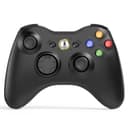
🎯 Elevate your game with wireless precision and comfort—because winning never felt this free.
The W&O Wireless Controller offers a reliable 2.4GHz wireless connection with up to 30 feet of range, compatible with Xbox 360 and PC Windows 7 through 11. Featuring an ergonomic asymmetrical grip, dual vibration motors, pressure-sensitive triggers, and an 8-way directional pad, it delivers immersive, responsive gameplay. The included receiver enables easy plug-and-play setup, making it a versatile and affordable choice for casual and dedicated gamers alike.


| ASIN | B09WQGQ6D2 |
| Additional Features | Wireless |
| Brand Name | W&O |
| Button Quantity | 1 |
| Color | Black |
| Compatible Devices | PC |
| Connectivity Technology | wireless |
| Controller Type | Gamepad |
| Customer Reviews | 4.2 4.2 out of 5 stars (4,888) |
| Hardware Platform | Desktop, Gaming Console |
| Item Weight | 299 Grams |
| Manufacturer | W&O |
| Package Quantity | 1 |
| Power Source | Battery Powered |
M**S
Great Quality and Easy to Use
I really liked this controller. It was very easy to connect, and it works perfectly on both my Xbox and my PC. The buttons feel smooth, the grip is comfortable, and the connection has been stable with no lag. I was honestly surprised by the quality for the price. Definitely a great purchase and very reliable so far.
R**E
Surprisingly decent
Bought to replace the controller for my Shield TV as the original had packed up and the replacement is hard to find and overpriced. I tried another bluetooth controller, which paired up OK but had terrible input lag making it unusable. This works fine. Just plug the dongle into the USB port, pop a couple batteries in the controller (2x AA's, it works fine with rechargeables), and it instantly paired up and worked exactly as expected. No detectable lag, and the Shield recognizes it as a Xbox controller, so games configure correctly and show the right buttons. Note- don't use the dongle with a USB hub. For some reason, pairing then is unreliable. Sometimes it works, sometimes it just refuses to pair. But plugged directly into the Shield, it always works fine. Feel is surprisingly decent. The sticks are smooth, the buttons aren't mushy or sticky. It's not as nice as a first party controller, but for the price it's not bad, definitely seen a lot worse. For casual or occasional use, it's perfectly usable with Shield TV.
A**R
Really good!
Works awesome on the Xbox. One draw back is you can’t use the controller to turn the console on.
P**P
Looks and feels like the real thing!
Pros: - Feels and looks almost exactly like the official controllers. Willing to wager the build quality is similar because of how similar they feel. - Connects faster than official controllers and easily syncs to your console by just plugging in the USB dongle. There is a sync button on the controller, but I'm pretty sure it does nothing. - Price. Great for the price. Cons: - Biggest con is that if the batteries die, the console does NOT detect it. So it won't pause the game automatically. There also isn't a battery level indicator when you press the Xbox Guide button. I assume this is because it's connected to the console via the USB dongle, so the console treats it like a wired controller and only detects the dongle being plugged in or not. - The controller cannot be used to turn on the console because the USB dongle turns off when the console is off. - Batteries are NOT included and it's a standard AA battery pack. Fortunately, they're compatible with any rechargeable battery packs the official controllers can use. - There is no port for headsets, but that's only for voice chat anyway.
M**T
Yep, it works
Works like it should. Only difference is the usb transceiver, but plug it in, no big deal.
I**.
Xbox 360 controller replacement
Works with Xbox 360. It has an adapter that you plug into one of the USB ports. You then need to turn on your Xbox and it will automatically connect. Just for info if thinking about purchasing this; you won't be able to turn on the Xbox with the home button, which is not a big deal. You will need to turn on the Xbox from the power button; you can however turn off the console with the home button. Overall, I would recommend if looking for a replacement controller.
D**.
works good, minor issues with joystick
works nicely, though the joystick deadzone in one of the corners is really high making my movements sluggish.
T**R
No problem on Linux PC (POP!_OS)
Normally I just play Virtual Reality (VR) games. Then I accidentally bought a game (Fugl) that wasn't VR. Around same time I needed to get a gaming monitor to diagnose an issue I was having when setting up for virtual reality. So I bought a monitor from Amazon. I played the non VR game on it using mouse and keyboard. I had never used a gamepad/game controller before. But as I discovered other non VR games - like the brand new game Stray and another game The Pedestrian - I realized that maybe a gamepad might be easier. But I didn't want to make a big investment, since my main interest is VR games. I also thought there might be a problem getting a gamepad that worked with Linux. I knew that Xbox One controllers were known to work with Linux on Steam and that there was software I could get. This gamepad being made to work with Xbox and at such a reasonable price and pretty good (for the most part) reviews, I ordered this gamepad. I was somewhat dismayed when it was delivered to discover there were no instructions! I had no idea what the buttons and knobs did! But I was thrilled that it worked just by plugging in the USB Wireless Receiver, I guess Steam took care of the rest. I didn't have to do anything else. The good news is that I saw the beginning of a gameplay on The Pedestrian game and realized that just playing that game I would have the opportunity to figure out how to use the gamepad. So I started the game and figured out by trial and error how to maneuver. Some help was given by the game, which was a pure puzzle game - no rush, no accuracy needed, perfect for learning. I can not evaluate accuracy, drift, etc. since I have no prior experience and am still learning how to use it myself. I still don't know what some of the buttons and knobs do. I will wait until I have more experience before I play Stray - I don't want to keep killing the cat! But I will say I am glad I bought this wireless controller. And I will add that I did not write this review in order to get another one - I only need one. This is a honest review written from my personal perspective.
P**A
This controller feels great on your hands, it's really easy to use and the buttons feel really good. You just basically plug and play. It uses batteries, but it has a power saving mode that turns off the controller if you don't use it for a while, saving a lot of energy. Fully recommended if you want to emulate games or if you want to play with native input from several games who don't accept Bluetooth controllers
L**A
Muitas bom não e recarregável vem com entrada para colocar pilhas
A**D
Great
X**X
It keeps disconnecting
K**N
It is wired, it is NOT wireless!!!! And it DOESNT work on top of it! Such a scam!!!!!
Trustpilot
Hace 2 semanas
Hace 1 mes