We remain fully operational. Our teams are working around the clock to ensure your deliveries continue safely.

Descargar la aplicación


Servicios al cliente
Sobre nosotros
Copyright © 2025 Desertcart Holdings Limited
Descargar la aplicación
Buy anything from 5,000+ international stores. One checkout price. No surprise fees. Join 2M+ shoppers on Desertcart.
Desertcart purchases this item on your behalf and handles shipping, customs, and support to Uruguay.
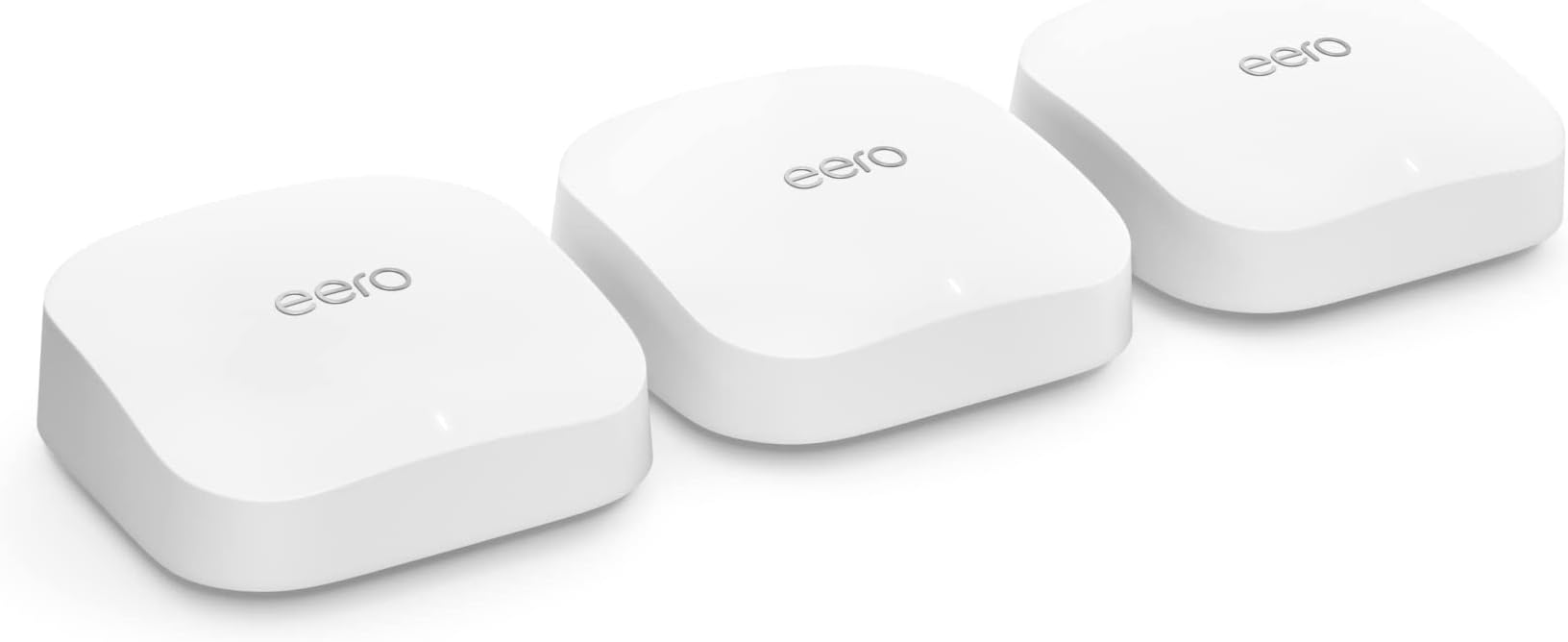
🚀 Elevate your home network to pro-level speed and coverage—because buffering is so last decade.
The Amazon eero Pro 6E mesh Wi-Fi system delivers tri-band Wi-Fi 6E technology supporting internet plans up to 2.5 Gbps. With coverage spanning up to 6,000 sq. ft. and the ability to connect over 100 devices, it ensures ultra-fast, low-latency connectivity across your entire home. Featuring patented TrueMesh technology for optimized traffic routing and an easy app-guided setup, this 3-pack system is designed for modern smart homes and demanding professional environments.
| Wifi coverage | Covers up to 6,000 sq. ft. |
| Type | Router (connects to modem as primary router) |
| Supported speeds | Supports network speeds up to 2.3 Gbps — including wired speeds of up to a gigabit and wireless speeds of up to 1.6 Gbps. Ideal for gigabit+ internet plans (up to 2.5 Gbps using the 2.5Gb Ethernet port). |
| Wi-Fi connectivity | Wi-Fi 6E tri-band concurrent 2:2:2 (802.11ax); compatible with older Wi-Fi standards |
| Wired connectivity | One auto-sensing 2.5 gigabit Ethernet port and one auto-sensing 1 gigabit Ethernet port |
| Speed Rating | AX5400 |
| Smart Home Connectivity | Works with Alexa, Amazon Frustration Free Setup, 802.15.4 radio (Zigbee, Thread), Bluetooth Low Energy 5.0 |
| Electrical Rating | 100-240V AC, 50-60 Hz |
| Processor, memory and storage | 1 GHz dual-core processor, 1024MB RAM, 4GB flash storage |
| Network Security and Services | Profiles, WPA3 (eero Labs feature), WPA2, TLS v1.2+, VPN passthrough, IPv6, NAT, UPnP, port forwarding, DHCP, static IP, and cloud connectivity. |
| Required for setup | Supported iOS or Android device and internet service (with cable or DSL modem, if required). See requirements. |
| Temperature Rating | Operating: 32˚F-104˚F (0˚C-40˚C) Storage: -13˚F-140˚F (-25˚C-60˚C) Operating humidity: 0%-90%, non-condensing Operating altitude: <3000m |
| Dimensions | 5.6 in x 5.4 in x 2.0 in (142mm x 138mm x 51mm) Actual size and weight may vary by manufacturing process. |
| Warranty and Support | 1-year limited warranty. Free customer support is available 7 days a week. Learn more about warranty and support. |
| Software Security Updates | This device receives guaranteed software security updates until at least five years after the device is last available for purchase as a new unit on our websites. Learn more about these software security updates. |
| Subscription | 30-day eero Plus trial is limit one per new eero customer account. Additional terms apply, see the eero Plus Terms of Service for more details. eero Internet Backup performance will vary and you are responsible for data charges with backup connection providers. Learn more about eero Internet Backup requirements, performance, and compatibility here. |
| Legal Disclaimer | Some features require linking your Amazon account, and downloading the Alexa application or using a compatible Alexa device. Internet connection speeds and availability depend on your internet service provider; if your internet service provider does not provide you with the maximum supported speed, you will not experience that maximum speed. Maximum network speeds, if applicable, reflect combined supported speeds across wired and wireless clients. Maximum wireless signal rates are derived from IEEE 802.11 standard. Specifications assume wired Ethernet connection; your experienced speed may vary when connected to an eero device that is configured as a wireless extender. Coverage estimates are based on normal use conditions. Actual range and performance can vary, and maximum supported speeds may not be available to all customers, due to factors such as local regulations (including power limits), network configuration, interference, connected devices, device usage, building materials, and obstructions. Specifications are based on use of a Wi-Fi 6 or later generation client device that supports 160 MHz. For more information about eero performance, visit support.eero.com. Combining eero Pro 6E devices with older generation eero devices on the same network may result in reduced performance across the network. *“Wired speeds, without the wires” assumes a benchmark of 1 Gbps wired port speed, and use of either i) 6 GHz on mesh backhaul and use of a client device that supports 160 MHz, and/or ii) a Wi-Fi 6E or later generation client device that supports 160 MHz. |
H**N
Impressive solution for the price
I'm a network engineer snob who won't hesitate a single second to give most of the home router and wifi junk sold today a terrible review when it's warranted. After having two router/wifi solutions made by that company that starts with Net and ends with Gear fail on me in less than 6 months, I was about ready to spend a few grand on a Ubiquiti solution and wire up my home for access points and cameras. Then a colleague and friend of mine suggested this eero mesh system as a lower cost/effort option. I'm not a fan of plug and play stuff and was skeptical but figured I could return it if not happy. I have to say I'm pretty impressed. The set up was almost too easy. Just download the eero app to your phone, plug a device in and connect the 2.5g port to your router and the app will walk you through it all. Most importantly, it worked really well when solutions like this from other vendors don't forcing you to connect a cable and manually set up. At first I didn't like that there isn't any ability to give the 2.4ghz and 5ghz networks different SSIDs (I had my previous router set up this way and changing this would have meant climbing up a ladder and reconfiguring several Ring cameras) but eero let's you change the name of the Guest Network to anything you want so this was an easy work around. As others have mentioned download the Wifiman app and shortcut and start scanning your house after you install the main router/wifi device. When you find spots that the signal drops below GOOD quality (-70dbm) drop another unit in between the first and where the signal dropped to poor quality. I bought the 3 pack thinking I'd need it to cover a 6,000 sq ft home. However one device was provided good coverage for most of my house and two provided either excellent or good signal strength everywhere inside and even outside on my patio and driveway. I only have one device on the first and second floors and both floors as well as the basement are all receiving good/excellent signal quality. I could have definitely saved $100 and gone with a two pack but I'm ok with having an extra device as a back up or if someone else in the family needs it (keep in mind any of these devices can act as a standalone router/wifi solution) or even to temporarily extend WiFi farther out into my yard in fair weather for outdoor gatherings etc.. Overall I'm impressed. The dashboard and tools/analytics included with the app are more than adequate for home users. You can even set up alerts for new devices connecting to your network. The GUI is modern and responsive and not like some of the traditional router vendors who still support an antiquated web login that takes forever to connect, lags between function and times out frequently. Time will tell if this is reliable but as mentioned a friend and colleague who owns his own network solution business told me he installs these in homes where the cost and wiring of a Ubiquiti or similar solution is prohibitive and he's never had an issue with their performance and reliability.
D**.
Bomb.com
Not sure why this doesn’t have 5 stars from everyone! Got the three device set up and man this couldn’t have been easier to set up. This system is bomb, like I’m not sure how much easier of a setup people even want. Everything was basically plug-and-play, and the app walks you through it so smoothly it almost feels too easy. Performance-wise, it’s been amazing. The coverage is solid throughout the whole house, and the speeds are not just fast—they’re consistent everywhere on Wi-Fi, not just when you’re hardwired. I haven’t had any random drops or dead zones like I used to deal with. Compared to the Cox gateway, it’s not even close. They charge $15 a month to rent that thing and it doesn’t hold a candle to this setup—honestly kind of ridiculous. And the quality? Top tier. It honestly feels like an Apple product. From the packaging to the devices themselves, even the cords and the app—everything just feels super polished and premium. I’m actually glad Amazon acquired eero because you can see that level of refinement in the whole experience. My only complaint is the price tag. $400 is definitely not cheap. But when you break it down, Cox charges $15 a month to rent their gateway—that’s $180 a year. In just about two years, this system basically pays for itself, and you’re getting way better performance the whole time. Overall, 110% happy with this purchase.
V**.
Great Upgrade — Worth Every Penny
We previously used the dual‑band eero 2 model, and it served us fairly well. After doing some research (and getting a little help from Copilot), we upgraded to the eero Pro 6E — and the difference has been incredible. We bought the 3‑pack, but quickly realized that 2 units easily covered our entire home (~2,000 sq ft). It’s not a loss, though; we’ll leave 2 behind for the family when we move and bring the extra 1 with us and we can buy another single unit later if needed. For context, we pay for 800 Mbps, but with our old modem/router combo we were only getting 70–150 Mbps in most rooms. Zoom calls were hit‑or‑miss, and the layout of our house doesn’t help — the modem is stuck in the far right corner of the house, and moving the line would require some construction/rewiring = $$$. After installing the eero Pro 6E, we’re now consistently getting 350–680 Mbps in every room, and even our garage pulls around 300 Mbps. That’s roughly an 80% improvement without touching any wiring. Setup was straightforward. Since we have a modem/router combo, the only tricky part was remembering to turn off the router portion. Once the main eero was connected, our devices automatically joined the new network since we kept the same Wi‑Fi name and password. From there, placing the second unit halfway through the house filled in the weak spots that we use to have. The speed and stability have been game‑changing for our hybrid/WFH household. We run Ring cameras, smart plugs, a MyQ garage opener, Google devices, and smart lights. For the smart lights, garage and smart locks, I had to manually reset the wifi though and 2 out of 7 of the ring cameras. Pros - Very easy to set up, especially if you’ve used eero before - The app makes managing devices, checking status, and updating Wi‑Fi info simple - Excellent coverage for homes with dead zones or awkward layouts - Truly plug‑and‑play — anyone can get this running Cons - It’s definitely pricey (we were lucky to have a gift card that covered most of it) - Much larger than the older eero 2 units — about 2.5× the size - Works best elevated on a table, so don’t leave it on the floor Overall, if you’re struggling with weak speeds, dead spots, or a modem stuck in a bad corner of the house, the eero Pro 6E is absolutely worth considering. It made a dramatic difference for us.
Trustpilot
Hace 1 mes
Hace 2 meses