We remain fully operational. Our teams are working around the clock to ensure your deliveries continue safely.

Descargar la aplicación


Servicios al cliente
Sobre nosotros
Copyright © 2025 Desertcart Holdings Limited
Descargar la aplicación


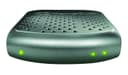
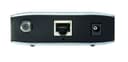
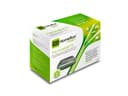

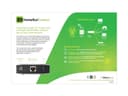

📡 Elevate Your Viewing Experience - Cut the Cable, Not the Quality!
The SiliconDust HDHomeRun Connect is a cutting-edge digital tuner that allows you to watch live HDTV on up to two devices simultaneously, all while eliminating monthly cable fees. With support for 1080p resolution and compatibility with DLNA devices, this product is perfect for tech-savvy users looking to enhance their home entertainment setup.


| ASIN | B00GY0UB54 |
| AntennaDescription | Television |
| Best Sellers Rank | #159 in External TV Tuners |
| Brand | SiliconDust |
| Color | Grey |
| Compatible Devices | Computers, Smart TVs, games consoles, Blu-ray players, Tablets, Smartphones |
| Connectivity Technology | No Wi-Fi |
| Connector Type | RJ45 |
| Customer Reviews | 4.0 4.0 out of 5 stars (731) |
| Global Trade Identification Number | 00857799005002 |
| Includes Remote | No |
| Item Weight | 1 Pounds |
| Manufacturer | SiliconDust USA, Inc |
| Mfr Part Number | 4112049 |
| Model Number | HDHR4-2US |
| Tuner Type | Digital |
| UPC | 094922394576 857799005002 |
| Warranty Description | 2 years warranty |
J**T
A critical and reliable component in my Home Theatre
After "cutting the cable," I still needed a way to record all of the programs that my wife and I like to watch. I considered many options including the Channel Master DVR+ and a dedicated home theatre PC with multiple TV tuner cards. Eventually I ended up with a something that includes the best of both worlds, with this unit acting as the tuner. The requirements for the tuner were simple: at least two tuners, HD output, nothing obscure, and good support for the various Linux-based PVR solutions out there. This fit the bill. Setup was simple. Plug in the antenna, ethernet and power cables. The tuner was immediately given an IP address by DHCP, but I changed it to a static IP. All of this was done using a web browser and following the included instructions. Out of the box, the tuner broadcast all of its channels as a uPNP device, which meant I was able to watch them on my PS3, Smart TV and computers simply by opening the channel "file." Since this device outputs raw MPEG2, a fast ethernet or wifi connection is necessary - I measured 16MB/s from the HD channels. There is also an app that lets you watch the channels on an iPhone or iPad, but it has some limitations. First off, it choked on the HD channels - sound was in realtime, but the video was slow and would jump forward once in a while to resync with the audio. Second, many stations broadcast in AC3 (5.1 surround) which the free version of the app will not decode - that costs extra. My suggestion is that if you're planning to watch a lot of realtime TV on your mobile device, get the next better version of this tuner. It can output in MP4, which is not so taxing when it comes with bandwidth. I finished building my PVR system this weekend. In addition to this tuner I built a small Linux computer running MythTV. I used a Zotac "mini PC" and outfitted it with a terabyte hard drive and 4GB of RAM. The computer runs a MythTV backend, and automatically launches xbmc on boot. Since the computer has an HDMI output, I can connect it directly to my home theatre. With this setup, I have the following features: - watch live TV - view a program guide - set up recording on my TV, with rules such as "all new episodes" - set up recording from any computer in the house via a web interface - watch recorded programs on the TV or on any computer in the house - watch movies stored on my network file server - control the xbmc interface using my iPod/iPhone, iPad, computer, or remote (using a USB IR receiver) Pretty good setup, for less than the cost of a DVR+! This tuner has been extremely reliable so far, with no downtime that I've ever noticed. It pulls in more channels than my Samsung smart TV; I get all the networks so I'm satisfied. And it really is full quality HD on channels broadcasting in HD. They look great. I do recommend this model or any of the higher-end versions.
T**M
Awesome. Works great with Comcast in North LA. Was easy to set up. Seriously, it was.
Installed Comcast today. Technician said they(field technicians) don't work with cable cards much anymore, simply because they are usually installing their equipment which has cards already installed and registered. He was very helpful, however. First he set up our internet. ( Used a Arris TM822G-NA purchased on Amazon ) That was the longest part of the whole install by far. After setting up the internet and phone through the Arris TM822, he started the process for the Silicon Dust HDHomerun Prime. I ran the Silicon Dust setup program. He had written the numbers from the Cable card down. There is 1 code on it that he will give to the tech people over the phone 1st in the registration part of the set up. After that, he read them the Cable Card ID and Host ID numbers generated by the HDHomerun Setup program. This is the part where we both found you just have to be patient. It can take 1-30 minutes for the card to be validated after he gives the tech people these two sets of numbers. It took maybe 5-10 minutes tops. When you have the HDHomerun Prime install page up, just refresh it every couple minutes. You will know when it is ready. I ran the channel scan and it took about 10-15 minutes. After that, I did the set up in WMC. It was straight forward and painless. No more calls required either. Wow!!! This thing is awesome. We have a HTPC in the living room and a PC for each of my two children plus one in our bedroom. 4 displays ( TV's ) I also have the Silicon Dust HDHomerun Dual and a Hauppage 2250 dual tuner card. 7 tuners available. 4 over the air and 3 for Comcast. All accessible on any computer at anytime. I used My Channel Logos to populate the channel logos and do some adjustments of the WMC guide. Simply awesome. I recommend a set up like mine. It is as follows. Modem(Arris TM822G-NA) connected to router(Netgear Nighthawk 3200). Router connected to 8 port gigabit switch. Each computer in house connected to switch via ethernet cable. The Silicon Dust HDHomerun Prime and Homerun Dual are connected to switch as well. Absolutely flawless so far in quality. Again, we have the 50Mbps internet plan from Comcast. In Media center it shows all the channels, even the ones we don't subscribe to. It won't let you view the ones we don't subscribe to however. Also, you will not have the ability to do pay-per-view, on demand purchases. Otherwise you get a super nice 3 tuner cable box/dvr !!!
C**I
Decent, affordable network tuner
I bought this to replace a HDHR3-US network tuner (previous model, it was 11 years old, so it had a long life). I sort of knew what I was getting into and this model shares many of the same traits as its predecessor and it's a bit cheaper too. After a few weeks of recording shows, it seems to be working well. Configuration: Configuration is close to plug and play as you can get. Plug it into your router, a power source and an antenna and maybe do a scan with their software and boom you're watching tv. The app will quickly find the device on your network and display any channels it can lock onto. Channels are displayed in the app with their local call sign and logo. Picture is very clear depending on what your stations are broadcasting, everything from 480P to 1080i where I am. Thanks to my antena, also from Amazon, I get ~33 channels, the same as my previous model. I use it in a home theater pc setup to record local shows with MythTV. Shipping: Box is a bit dinged up (bought from Techmazen Goods) and may or may not have been opened previously. But everything was inside and looked undamaged and unused. Build: Simple plastic shell over a circuit board. Pros: Easy to setup, configure and use. At ~$60 very affordable. Cons: High bandwidth usage. Because this takes whatever is over the air and throws it onto the network, it becomes a bit of a network hog. Watching over wireless is spotty, but usable. Wired connections are recommended, maybe even a Gigabit switch if you don't have one. I usually watch transcoded recordings, so bandwidth is not a concern. If you want a cheap way to watch/record tv over your network (recommend wired as much as possible) this will probably work for you. Thanks for reading.
Trustpilot
Hace 2 semanas
Hace 1 mes