
Descargar la aplicación


Servicios al cliente
Sobre nosotros
Copyright © 2025 Desertcart Holdings Limited
Descargar la aplicación
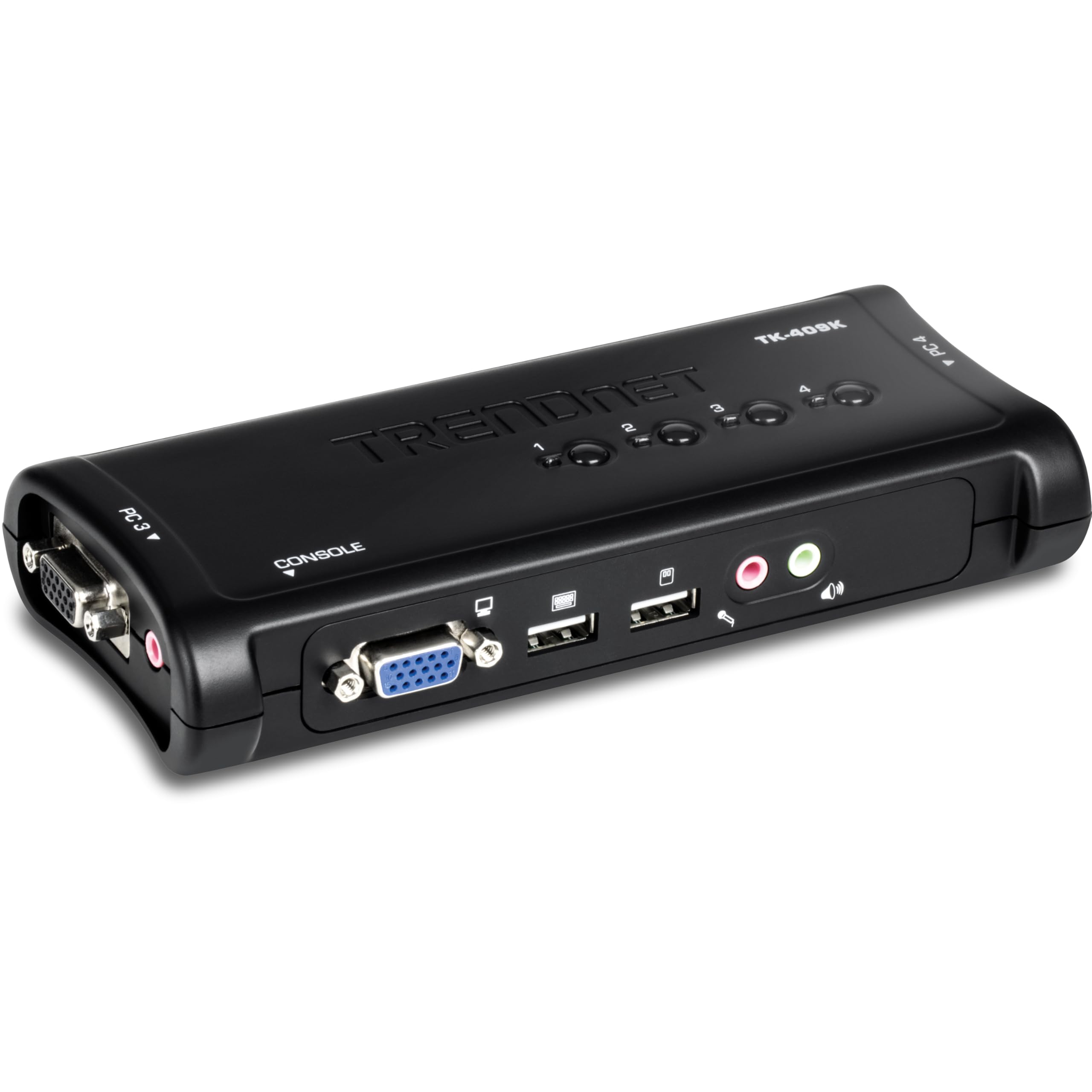
🖥️🔄 One Console to Rule Them All: Effortless Multi-PC Mastery
The TRENDnet TK-409K 4-Port USB KVM Switch lets professionals control up to four computers using a single keyboard, mouse, and monitor with VGA resolution up to 2048 x 1536. It includes all necessary KVM cables, supports audio input/output switching, and is USB-powered, eliminating the need for external power adapters. NDAA & TAA compliant, it’s ideal for secure, efficient multi-device management across Windows, Linux, and Mac OS environments.


R**.
It works fine so far, has ScrLk keyboard shortcut.
Devices connected and working:- MS Natural Keyboard Elite, connected via USB using a PS/2 port to USB adapter.- Logitech LX7 Wireless mouse.- HP LA1951G monitor, using VGA.- HP business class laptop, with Win7 Enterprise 64bit- Dell desktop with Win7 Home Premium 64bit----------------------------Device is working fine so far - no issues configuring it or installing it. Disclaimer; I work in the IT field and have previous KVM experience. I also have administrator rights on both computers.***************************************************************************************To install:1. I powered down both devices.2. I connected the cables going in to the device, vga, usb keyboard and usb mouse.3. I connected the outgoing cables to PC #1, then PC #2.4. I powered up PC #1, waited approx a min and then logged in and confirmed mouse and keyboard.5. I powered up PC #2, waited approx 10 seconds then hit ScrLk hotkey to switch over, I then waited another min and then logged in and confirmed mouse and keyboard.***************************************************************************************I don't use the buttons on the device, it is kept hidden behind my desk - I rely solely on the keyboard hotkey of ScrLk+ScrLk which is a standard hotkey combo for KVM's in my experience. I was previously using the IoGear GCS632U which gave out after about 5yrs of use, so I can't fault it too much. It had always been a bit flaky though, and I had to fiddle with it a couple times a year to get USB devices to respond. It finally died completely about a week ago and I decided to go KVM hunting again.I picked this KVM primarily based on the price of around 20 dollars and its mostly positive reviews. It feels a bit cheaper than the IoGear device I was using but I like that the cables are able to be disconnected. I do not use it for audio, so I can not comment on that portion.I also disabled the KVM switching beeps by opening Sound via the Control Panel and under the Sounds tab setting the Device Connect, and Device Disconnect to (None) - keep in mind though this will disable all beep sounds for connecting/disconnecting devices such as cameras, mice, gps etc ...If I remember I will update this again later.
B**Y
Works Great
I had a IOGear USB KVM for years and it was great; worked like a charm. That is until I my MS keyboard fried and I bought a Logitech MK550 Wireless Mouse/Keyboard combo (Wave keyboard and M510 mouse). As it turns out, the IOG KVM didn't like the Logitech Unifying Receiver (1 receiver shared by the mouse and keyboard) and it would not play nicely at all. So, based on other Amazon reviews and the low price-point, I took a chance on the TrendNet KVM. I am glad I did.Honestly, all I did was connect the darn thing up and it worked. I didn't even install the software that came with it. I popped the Logitech Unifying receiver into the KVM's Mouse USB port, connected the cables and viola' (I also tried the receiver in the Keyboard port and it worked there as well).The first time I used it however, it took a few moments for my laptop and PC to recognize the new USB device, but once that happened things are great. I am able to switch back and forth between the two machines using the buttons on the KVM or using the softswitch (Scroll Lock 2x). Logitech keyboards don't have a scroll lock key any more, but rather you must press Fn+Pause/Break instead. This KVM recognized the softswitch perfectly. There is a very minor lag when switching, but it's nothing to write home about IMHO.FYI: I did not hook up the audio and I manually switch my video because my PC is DVI and my laptop is VGA. However I did test the video and it works as expected.The KVM came with everything you'd expect. Two sets of video/USB combo cables and two sets of audio cables. The KVM itself is very compact (about 4" x 2.5" x 1") and weighs next to nothing.
G**S
Works good, with minor annoyances
Purchased this switch to replace an old Belkin PS/2 unit. I was not sure about this switch when ordering, as many other reviewers have reported serious problems getting it to work. But, this unit has one of the best ratings I found and I took a chance.I did have some issues getting it to work, but relatively minor ones. Of the three machines (2 Win XP, 1 Win 2003 server) I've attached to it so far they have all worked. The 2003 Server machine loaded a couple of drivers upon logging in, but worked fine. One of the XP machines worked perfectly (didn't even have to load any drivers). The other XP box didn't work at all initially (no keyboard, no mouse). I plugged in an old PS/2 keyboard (also leaving the USB plugged in through the switch). I was able to use the PS/2 keyboard to log in once the login screen came up. Windows then proceeded to load about 20 drivers and then both keyboards were working. I then unplugged the PS/2 keyboard and the USB works fine.Once I got past that, the switch has worked very well. Just a couple of minor annoyances. I'll just list out the pros and cons:Pros:-----* No transformer to plug in. The unit is powered via the USB port, and this means there is one less boxy transformer to find a space for. Haven't had any problems with this.* The included cables are nice. The keyboard/mouse both go through a single USB port on the computer, and there is just a single plug at the switch end.* The keyboard switching works great (ScrLk, ScrLk) and switches only between active ports (ie if the computer on port 3 is not on, it will not stop at that port when switching). On my Belkin switch the key sequence was much more complicated (Ctrl-Shift-Alt, Port#, <enter>).* No drivers required. They do include a CD that has a program you can optionally install. This allows the use of alternate key sequences to switch ports and also allows you lock the audio to a specified port.* Four separate buttons on top of the unit to switch immediately to any port. My Belkin unit had a single button, and if you wanted to go from port 1 to 4 you had to skip over 2 and 3 (or use the keyboard shortcut). I like the four separate buttons a little better, but it is harder to locate the button you want without looking directly at it (I have it on a shelf under the desk and seeing the buttons isn't easy) or feeling for it.Cons:-----* The biggest thing I don't like about this switch is its physical layout. Who thought it was a good idea to have cables sticking out of four sides of it? They certainly didn't do it to save space. My old Belkin switch had all the cable connections in the back of the unit and a single button on the front (a much sleeker setup). The switch itself is a little bigger than this unit, but actually uses less space due to the cable configuration on this one. The one possible upside to this setup is that the console cables (the cables from the keyboard, mouse and monitor) are located on the front of the switch. Since USB keyboard/mouse are hot swappable (don't try that with PS/2), I suppose you can more easily change your keyboard/mouse. Even given that, it still would have been better to put all four computer cables on the back of the unit.* This is a very minor thing, but occasionally when switching between ports (or at Windows startup) the keyboard/mouse will take several seconds to start working.* Another minor thing: The audio cables are separate from the KVM cable, and I would have liked it better if they had been molded all into the same cable. I suppose this way is more flexible if you're not using the audio feature of switch, and a few zip ties work to accomplish almost the same result.
Trustpilot
Hace 2 meses
Hace 1 semana