We remain fully operational. Our teams are working around the clock to ensure your deliveries continue safely.

Descargar la aplicación


Servicios al cliente
Sobre nosotros
Copyright © 2025 Desertcart Holdings Limited
Descargar la aplicación


Buy anything from 5,000+ international stores. One checkout price. No surprise fees. Join 2M+ shoppers on Desertcart.
Desertcart purchases this item on your behalf and handles shipping, customs, and support to Uruguay.
🖨️ Bridge the gap between classic tech and today’s USB world—print without limits!
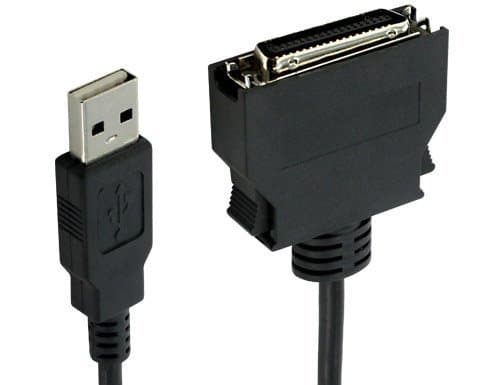
The Sewell USB to Mini Centronics Cable (5 ft) is a specialized adapter set that enables seamless connection of older HP printers with mini-Centronics ports to modern computers via USB. Supporting IEEE 1284 printing standards and including a driver CD for legacy Windows versions, it ensures reliable printing functionality—perfect for professionals preserving trusted hardware in a USB-only environment.
| ASIN | B004U6JNX0 |
| Best Sellers Rank | #29,595 in USB Cables |
| Brand Name | Sewell |
| Cable Type | USB |
| Color | Black |
| Compatible Devices | PC, Printer |
| Connector Gender | Male-to-Female |
| Connector Type | USB Type A |
| Customer Package Type | Standard Packaging |
| Customer Reviews | 4.4 4.4 out of 5 stars (251) |
| Indoor Outdoor Usage | Indoor |
| Item Shape | Round |
| Item Weight | 0.15 Pounds |
| Manufacturer | Sewell |
| Maximum Voltage | 5 Volts (DC) |
| Model | SW-7383 |
| Number of Items | 1 |
| Number of Pins | 4 |
| Recommended Uses For Product | Connecting printers and personal computers |
| Specification Met | IEEE |
| UPC | 685289738303 685289073831 |
| Unit Count | 1 Count |
G**N
Attaching old HP Color Laserjet 4500 DN to newer computers that do not have parallel ports
I purchased Sewell USB to Mini Centronics Combo Cable Set, 5 ft. to attache an old HP Color Laserjet Printer to newer computers that do not have parallel port capabilities. This cable works. The printer was recognized and setup on the laptop computer during startup. After making the necessary adjustments to the printer configuration, a test sheet printed properly. A word of caution--make sure you know whether your older printer has a standard 36-pin Centronics connector or a mini-Centronics 36-pin connector. They look very similar in pictures, but size does make a big difference. Before I discovered this fact, which is probably obvious to many people, I purchased two different standard 36-pin centronic to USB adapter cables C2G / Cables to Go 16899 USB To DB25 IEEE-1284 Parallel Printer Adapter Cable, 6 Feet C2G / Cables to Go 16898 USB IEEE-1284 Parallel Printer Adapter Cable, Beige 6 Feet neither of which could fit the mini-centronics connector on the HP 4500DN printer. I then tried solving the problem by purchasing two Centronics (Cen36) Female to Mini-Centronics (HPCen36) Male IEEE1284 Parallel Printer Adapters Centronics (Cen36) Female to Mini-Centronics (HPCen36) Male IEEE1284 Parallel Printer Adapter . When I hooked the HP 4500DN printer using either cable in combination with either converter, the computer would find the printer and add it to the list of printers available, but I could not get a test page to print no matter what I tried!
R**K
Saved my HP 1100 from the junk pile.
I used it to access my old HP1100 back up printer on two lap tops one XP Pro and the other Win 7. Worked flawlessly on both. Here are my steps (others experiencing problems I suspect are not following this procedure) 1. fully boot up computer with up-to-date windows, 2. Power on the HP1100 with paper and cable attached to it, 3. Connect the USB to Mini Centronics cable to the computer. 4. The desktop screen should after few moments indicate installing and recognizing the cable THEN finding the correct HP driver in the operating system OR automatically searching on line at Microsoft. 5. Driver installs, 6. Check by going to CONTROL PANEL, Printers and see if listed as an installed printer, if yes print away. Of course you can select which printer as Default or make the selection when you do your print. Note also that HP Support site has drivers for the HP1100 on line to install in the rare event you experience difficulties. I went to this cable because my antique rock solid HP 4L is out of ink and the carts are no longer made, drats! This cable saved the day and my back up HP1100 is now my wife's go-to printer. So well worth it after reading about other unsuccessful methods to overcome the mini-to USB problems.
S**.
Works great with ONE issue.
The device works very well. I am using it on Win7-64bit and an old LaserJet 1100 that is still going strong. The software for the cable installed automatically and after updating the driver list in Windows, a generic LaserJet driver showed up. All-in-all very easy and working correctly. Then I tried to put my printer where I needed it - necessitating a USB extension cable. I grabbed the closest one I had (10 feet long). The cable no longer worked. I bought several more cables from monoprice in 6, 3, and 1.5 feet lengths (all cables tested and working on other devices). The 1.5 foot cable is the only one that works. It was long enough for me with some creative reorganizing but may not be in your application. I'm not sure if an active extension cable would have helped or not. I am not deducting a star because the cable is probably long enough for most people, works well once setup, AND Sewell's customer support was very responsive when contacted.
A**T
Finicky connection
Finally a cable that fit my old printer. Only problem is that it doesn't always print. I set it up correctly in my print devices, and even made a 2nd copy with a different setting or two that worked better for a while. But every time I try to send a print job to it, it either just doesn't send, or it gives an error. I hooked my original printer back up with the traditional printer cable port and it prints instantly every time! The old printer worked fine when attached to my dads old Dell with the original printer cable. So I can only deduce that it's this cable.
R**J
Worked for Windows 8.1 and Windows 7
Despite description ... no CD with drivers was provided.Before getting the cable I had to keep my old Dell with an LPT port turned on and wirelessly connected to the network to print from every computer in the house. I thought the price was a little high considering I bought a whole laser printer on amazon for $20 but I figured it was worth a try. Received the cable and plugged my old HP 1100 in via USB. It was immediately recognized and was doing a test print in under a minute. For windows 7 I had to uninstall and reinstall the drivers ...but it also was printing in no time. Now just need to find an Ipad app.
S**H
Perfect Adapter
I recently purchased a USB to Mini Centronics Combo Cable so that I could use my older model laser printer with my new netbook. I searched everywhere trying to find the right connection and found this device on Amazon. Some reviews said it might not work, but it worked perfectly from the the first hook-up. I am so pleased with this product which was very easy to install and use. It saves so much money being able to print with laser rather than inkjet. I highly recommed this cable for anyone looking to do the same. The seller was great--advertising something that was a perfect solution to adapting an older printer to a netbook, and in delivering the product very quickly. Thank you! USB to Mini Centronics Combo Cable Set, 5 Ft
J**D
Fonctionne parfaitement a fait revivre une hp laserjet 1100 sous windows 10 Depuis la dernière mise a jour il ne fonctionne plus..
M**O
Funcionó perfectamente, era justo lo que necesitaba. Pude utilizar mi impresora a la usb y los drivers se instalaron al momento.
C**S
Exactly what I needed. Couldn't find this anywhere else. Arrived in a timely manner and was what I was expecting
A**K
Didn't work for me-PC would not recognize
S**G
it serves the need.
Trustpilot
Hace 2 meses
Hace 3 días