We remain fully operational. Our teams are working around the clock to ensure your deliveries continue safely.

Descargar la aplicación


Servicios al cliente
Sobre nosotros
Copyright © 2025 Desertcart Holdings Limited
Descargar la aplicación

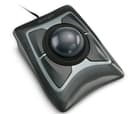
🎯 Roll into precision, scroll with ease, work in comfort — the Expert Mouse revolutionizes your desk game.
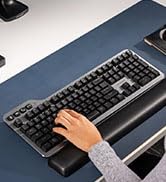
The Kensington Expert Trackball Mouse (K64325) is a wired, ambidextrous input device featuring a large 55mm ball with DiamondEye optical tracking for precise cursor control. It includes a patented scroll ring for smooth navigation, a detachable ergonomic wrist rest for comfort, and four customizable buttons configurable via KensingtonKonnect software. Compatible with most major OS except Windows ARM, it connects via USB-A for reliable performance and is backed by a 5-year warranty, making it a top-tier choice for professionals seeking enhanced productivity and ergonomic design.









| ASIN | B00009KH63 |
| Additional Features | Ergonomic Design |
| Antenna Location | Office |
| Are Batteries Included | Yes |
| Are Batteries Required | Yes |
| Best Sellers Rank | #2 in Computer Trackballs |
| Brand | Kensington |
| Built-In Media | Detachable Wrist Rest, Kensington Trackball 4-Button Usb Expert Mouse |
| Button Quantity | 3 |
| Color | Black Silver |
| Compatible Devices | Surface Laptop 1st Edition 13", Windows 7, Windows 8, Windows 8.1, macOS 10.8, Windows 10, macOS X 10.11, macOS 10.10 or above, Chrome OS 44 or above, macOS 10.9, macOS Sierra 10.12, macOS 10.13 or above |
| Connectivity Technology | USB |
| Customer Reviews | 4.3 4.3 out of 5 stars (4,424) |
| Embellishment Feature | Crystal |
| Enclosure Material | Plastic |
| Finish | Matte |
| Global Trade Identification Number | 00085896643258, 50085896643253 |
| Hand Orientation | Ambidextrous |
| Hardware Platform | PC |
| Item Dimensions L x W | 9.75"L x 3.5"W |
| Item Weight | 0.34 Kilograms |
| Manufacturer | Kensington |
| Model Name | K64325 |
| Model Number | 64325 |
| Movement Detection | Optical |
| Number of Batteries | 1 12V batteries required. (included) |
| Operating System | Windows 10, Windows 7 |
| Power Source | Corded Electric |
| Range | feet |
| Style Name | Wired |
| UPC | 638458744902 085896643258 809385141014 666669843022 803982736673 |
| Unit Count | 1.0 Count |
| Warranty Description | 5 Year Warranty |
J**S
Computer navigation the way it should be!
After having read several reviews around the web and being aware of the potential downsides as well as the upsides, I decided to buy myself one of these. Boy, am I glad I did. Admittedly, I'm the kind of person who's not satisfied with the typical mousing solution (I have really big hands and I do a lot of delicate work) and likes to try new things, so if that's not you then you may want to try one out before you buy if possible, or at least get one with a return policy. Caveat emptor. That being said, short of building a custom one myself, the Kensington Expert Mouse is pretty much what I want in a trackball, and having used it for awhile any regular mouse feels foreign and less-than-intuitive. First, the cons, in order of greatest to least issue (and they're all minor issues to me anyway). :: It does have a bit of a backward slope to it, probably about 10-15 degrees, which my large hands and already-tilted desk find mildly awkward. If you have a desk that's fairly high above your lap, then that backward slant will probably match the angle your arms are already at and this won't be an issue. :: The scroll wheel, as has been mentioned elsewhere, does feel a little scratchy, like a plastic-on-plastic sort of texture. It's not quite the buttery-smooth, gliding motion you expect after using the ball itself (more on that later) - it feels more like the back of a plastic spoon sliding across a Formica counter. That said, mine wasn't that bad, and probably would go away with a bit of silicone oil, but other reviews range from "not a problem at all" to "nasty-feeling deal breaker" so I suspect that Kensington's quality control could use a bit of tightening up. Again, get one with a return policy in case you don't like it. Common sense. I find myself using the scroll wheel less than I would otherwise anyway, as I've mapped one of the buttons to middle-click and I use that in web browsers to scroll up and down by moving the cursor. Smoother and easier than the scroll wheel. :: Occasionally, a button click won't register if you press the button on the corner or edge - you have to get closer to the middle. Rarely an issue unless I'm gaming, because my hands have a large span and I may physically miss the button at a critical moment when I'm not paying attention. It'll come with practice, I'm sure, just something to be aware of if you have palm-a-basketball-sized hands like me. Now, to the pros! Whee! :: Yes, it's got a pretty big footprint - it's about 5.5" by 9" with the included stiff-foam wrist rest (which I do recommend using, because of the aforementioned back angle) - but it doesn't move around. It takes up about 60% of the desk space that you'd dedicate to a typical mouse pad. Especially on those pull-out keyboard trays, there isn't enough room to use a mouse, but since the Kensington Expert trackball is under six inches wide it'll fit in a nice little rectangle next to the keyboard. Height is another matter, since the ball itself sticks out pretty high, but I don't personally find it to be too much of an issue. YMMV. :: The four large, programmable buttons. I'm not a lefty, but I mouse left-handed, so being able to map the buttons to essentially whatever I want with Kensington's free software is absolutely a blessing. In addition, different people will prefer to use different fingers for tasks of varying frequency, so whereas I don't right-click much and map it to where my ring finger sits, someone else may put it under their index finger or thumb. The software in general is pretty easy to use, and has enough functionality to feel nicely customizable without being so in-depth that only an advanced power user can take advantage of its potential. :: The trackball. Oh, that trackball. Smoother than a greased Fonzie on a Teflon-coated ice rink. Right out of the package it actually feels slightly rough or not as free-spinning, because the ball and its three contact points are completely pristine. Once you get some skin oils on it through use, it's like buttah. Gross-sounding, I know, but pretty much everything you touch gets skin oil on it. Speaking of which, the ball is just dropped into its socket, so to clean out the inevitable gunk that will accumulate in any trackball assembly you just have to turn it upside down and the ball falls out. No disassembly required. The inside of the socket is smooth plastic, so you just wipe it out and get back to work. The ball itself has a nice bit of weight to it, and is positively pleasurable to the hands in use. It's got a solid feel and has some inertia when you move it, which brings me to the next point... :: It has an infinite range of very smooth motion. I currently have a dual-monitor setup, and (besides being very awkward and un-ergonomic) I despise having to pick up a mouse, move it back to the other side of my mouse pad and continue my motion across the screen. DESPISSSSSE. It makes my fingers recoil just thinking about it... Ahem. Anyways. A quick flick of the ball will send the cursor moving across the screen, and the ball's inertia will continue the motion. It doesn't jump around or go crazy, it just follows the ball like it's supposed to. I have the acceleration parameter in the software set to maximum, so a fast motion of the ball will cover lots of ground quickly, but slow motions will still allow fine, precise positioning of the mouse. This becomes an even greater blessing with triple- or quad-monitor setups, and once again, this trackball takes up less desk space than an ordinary mouse. You don't have to have a huge screen to need this, either... for extra-fine work like Photoshop or video editing, you may want to slow the cursor speed down, which effectively makes the screen much larger relative to the motion of the mouse. There is no picking up and putting down with the Kensington Expert trackball - you just keep rolling. If you're not there yet... keep rolling. It feels natural, the way navigating a computer should. So, to sum it all up, I guess I could say that I love my Kensington Expert Mouse because it feels right. It's intuitive to use, customizable, ergonomic, and it just works. There are a couple little niggles, but in my humble opinion they are far outweighed by how they make my computing experience easier and more natural. Because everyone has different needs for their computing experience, not everyone will want or need one of these. If I was just an occasional casual computer user that isn't concerned with ergonomics or ease of use, I would absolutely think twice about spending $75 on a mouse I'm not sure I'll like when the one I have mostly does what I need it to. But that's probably not Kensington's primary market here. For me, and people like me, it's worth the money to make my interface with my computer feel good, because I use it every day.
L**S
Best trackball I've ever found, period
UPDATE: MAY 2017 I continue to LOVE this trackball. It's smooth, functional and lets me do everything I need in my graphic design/marketing studio. Of the 4 in the shop, one has developed some gravelly sound in the scroll ring and so it will need to be replaced, but the others are all working just fine years after purchase. I've used every version of this 4-button trackball since 1989, and it's been universally wonderful. Disregard the drama queens to who bitch about this product. They either got a defective unit or messed it up themselves, because I've had 29 years of personal experience that proves that Kensington has a SUPERIOR product in this trackball. NOTE TO ANYONE WHOSE TRACKBALL ISN'T WORKING PROPERLY: You have a defective unit! Tell Amazon or Kensington about it and arrange to have them send you a replacement unit. In any run of mass-produced products you'll always get a small few that are defective. Call customer support and get it replaced. UPDATE: OCT/2016: I LOVE this trackball (even though they call it the Expert Mouse). I've used my current model for over 4 years without a single problem. It's fast and does not stress my wrist at all because I control it with my fingers. Every couple of months I take the ball out and turn the unit upside down to dump out any dust and hair that have accumulated in the ball cavity. It's a good idea to take a tissue and gently wipe off the 3 sensor points so they're not clogged with dirt and skin oils. Maintenance is a snap. If your hands/fingers are really oily you might have to occasionally take out the ball and wash it with soap and water, but that's about it. I work for 8-10 hours every single day at my computer with Photoshop, InDesign, Illustrator and Muse (all from Adobe Systems) and it lets me be very fast. I set the Trackballworks software so that the cursor flies around the screen with the flick of my fingers. I simply wouldn't work without it. The big ball rolls easily and is essential to my workflow.; DEC 1/2014: The Kensington Expert Mouse is actually not a mouse at all, but a trackball that is well-made and very durable. I've used Kensington's Turbo Mouse, an earlier version of this product, starting in 1989 and its various iterations ever since. It connects via USB 2 to either Mac or Windows, and replaces the standard mouse that comes with your computer. Software drivers for Mac and Windows are available on Kensington's site. Why should you replace your mouse with this product? The Expert Mouse has a large ball about the size of a pool ball that you move with your fingertips. You can rocket the cursor quickly to any part of your monitor with a simple flick of your fingers, instead of having to move your whole arm with a regular mouse. I often work 8-10 hours a day at my computer and a 30" monitor doing graphic design work, and the Expert Mouse prevents stress on my arm and hand. For right handers, left-clicking is done with your thumb on the lower left button. Right-clicking is done with your little finger on the lower right button. However, you can program any of the 4 buttons to do any of these two actions, and custom-program other actions with the remaining 2 buttons. Speaking frankly, I LOVE this trackball, as it keeps me productive and speeds my work immensely. New users may notice the ball may move a tad sluggishly when they first unpack the trackball, but this quickly goes away with a few minutes of use. The speed of the cursor can be easily adjusted with the supplied driver/software to your liking. The trackball takes up very little desk room. It's only 5" x 6" and no mouse pad is required. Around the ball is a scroll ring that allows you to quickly scroll around your documents and web pages in a flash. I could never go back to a mouse. The Kensington Expert Mouse is absolutely the best trackball product I've ever used, and I've been using it or its direct ancestors for 23 years! It may take a day or two to get used to it, but when you do you'll never want to use a regular mouse again. It's really that good. Cleaning is easy. I recommend that about once a month that you simply pick up the unit, hold your hand over the ball and turn it over. The ball will fall into your hand. Tap gently on the bottom of the unit to release dust, food particles, hair, dead skin cells and other gunk that's built up. You may have to use a tissue to wipe out the ball cavity and polish up the ball itself to remove any grime or skin oils from your hand. You can even wash the ball in mild, soapy water if you have excessively oily fingers. It's advisable to use a tissue to remove the gunk that builds up over the 3 tiny balls inside the ball cavity, as these can build up with dirt, fuzz and grime over time. It usually takes only a few seconds to do this every month or so, so it's not a bother. Your trackball should last you for many years of lightning-fast, smooth cursor action if you do this. My current Expert Mouse is over 5 years old and going strong, without a single problem in that time. UPDATE: JUNE 10, 2013 These trackballs last a LONG time! I'm buying a new Kensington Expert Mouse to replace one I bought over 4 years ago. I must have had something on my fingers that has caused the scroll ring rubber to start breaking down and get sticky (possibly bug spray). I'm putting in my order for a new Expert Mouse in the exact same model because it's the best computer trackball I've ever used--and I've been using the various versions of this product since 1990! There's just no other trackball that works as well and is so durable. I use mine with a Mac Pro at work and an iMac at home, and sometimes even take it along on the road to use on my MacBook Pro 17" when I travel. Simply the best! I give it another 5 stars.
M**Y
This product has found its home in almost every professional recording studio in the world. It is extremely dextrous and such a comfort to the wrist. Long hours at the studio don't seem so long anymore! The only issue I have noticed is with the scroll wheel not performing smoothly, but it still works. The trackball is weighted and has sufficient momentum to sen e cursor flying to the other end of the wide screen display. Integrates very well with Pro Tools, and general workflow. I am yet to try out the customisable top keys to instantiate macros. Very satisfied with the product finish and quality.
B**E
UPDATE 24 FEB 2011 Here is an update to my original review. I just as keen on this excellent input device as I was a year ago when I bought it. It has been in constant use and it really is imho the best input device I have ever used. I use it for graphics, mostly in Adobe Illustrator for example and there is so much control and it is precise. Equally it can go very quickly across screens so I can get across my two screens easily. I also use it for editing video in Final Cut Pro and here, it is really superb. It's great big trackball makes it very easy to just creep forward and back a frame at a time. I really do think that people may overlook this terrific input device because it is not slick and cool, but it is very much the best possible thing for the job. My only comment that could be negative, but isn't, is that using it exclusively may risk RSI problems with you shoulder. I think this is true of any mouse of this sort. That is why I also use the Contour RollerMouse Free. This I use for scrolling around word processing documents and that kind of thing. ORIGINAL REVIEW MARCH 2010 I bought mine on 30 January so I've had it for six weeks now. I absolutely love it! I do not use it exclusively, I use it in conjunction with a Contour RollerMouse Free. However I use the Kensington Expert Mouse for graphics. I recently just finished doing a lot of editing of a video with Final Cut Express and the Expert Mouse is superb for this kind of thing. Many years ago I used a Kensington trackball, I think in about 1995, and I really like that one, but this is so much better because it has such a large trackball. The negative things about this trackball are that it feels a bit cheap in construction compared with say, a Logitech or Microsoft mouse at this price, however I think it is well constructed nevertheless. It looks rather 70s to me but I don't mind this. In actual use the feel is very good. The scroll wheel bearing surface is noisy in a plasticy way but there is no problem with this in use. From time to time it is a good idea to remove a build up of gunge on the three little ball bearings. I keep an old toothbrush nearby for this purpose. It's also quite good to take the ball out and polish it, perhaps with your shirt :) Any of these small negatives are hugely outweighed by the fact that the level of control over the cursor is superb. That is what an input device like this is for and that is what it does so well. Before I got this I tried the most expensive Logitech mouse, however the software for that on my Mac was a disaster so I had to send it back. IMHO the Kensington Expert Mouse is a far better buy than that more expensive Logitech mouse. The level of control over the cursor is much better. The software for the Kensington Expert Mouse works very well indeed on my Mac. I use it with the default settings and it is fine. The scroll direction can be switched with a menu in the menu bar at the top of the Mac OS screen and this is very handy. If you buy this you will be initially disappointed when you take it out of the packaging. You will think it is a prop from the Star Wars movie. When you first use it you will think it is a bit weird if you have not used a trackball before. You will still be having doubts. After a week of using it you will never want to use a "normal" mouse again!
C**R
Top class, fine control and has a serious pphysical presence but also a serious function. IF you like trackballs, this is IT!
O**2
Ich wollte schon immer mal einen Trackball haben und hatte leider verpasst mir bei Neuerscheinung einen MS Trackball Explorer zu kaufen (Die Mutter aller Trackballs!). Die Verarbeitungsqualität ist tadellos. Alles ist sauber eingepasst und es knarzt nichts. Die Tasten, der Trackball an sich und auch das Scrollrad sind bequem mit der Hand zu erreichen. Zudem steht der Trackball absolut rutschsicher auf dem Schreibtisch. Die 4 Tasten haben einen guten satten Druckpunkt und das Scrollrad eine leichte Rasterung. Die Software erlaubt die Belegung der Tasten und Einstellung der Geschwindigkeit von Trackball und Scrollrad. Ich kann damit die Geschwindigkeit so einstellen, dass ich mit einer "Drehbewegung" den ganzen Bildschirm abfahre, die Auflösung / Genauigkeit aber sehr hoch bleibt. Die Genauigkeit ist generell sehr hoch. Man kann extrem feine punktgenaue Bewegungen ausführen, was auch an der ziemlich großen Kugel liegt und natürlich an der optischen Abtastung. Durch die sehr reibungsarme 3 Punkt Lagerung der Kugel, ihr stattliches Gewicht und die Größe, kann man zum einen die Kugel regelrecht "anschupsen", zum anderen sehr genaue Bewegungen mit der Maus ausführen, wichtig z.B. bei pixelgenauen Zeichnungen. Die Genauigkeit leidet nur dann etwas, wenn ich Bewegung und Tasten drücken gleichzeitig ausführe. Das ist auch der Grund, warum der Trackball für Games, insbesondere Shooter nur eingeschränkt benutzbar ist. Ausnahme ist vielleicht Portal, das konnte ich mit dem Trackball perfekt spielen. Die Kensington Expert Mouse sollte eigentlich nur als Ergänzung zur Maus dienen, doch hat diese mittlerweile fast ganz abgelöst. Unverzichtbar ist sie auch z.B. in Elite Dangerous, wo mein Schreibtisch mit Stick, Schubregler und Spacemouse kaum noch Platz läßt und der "stationäre" Trackball perfekt für die Mausbedienung ist. Im Prinzip fallen mri nur zwei Sachen ein, die man verbessern könte: Das Scrollrad funktioniert an sich super, hat aber irgendwie eine komische Lagerung. Es wirkt, als würde irgendwo etwas schleifen, es läßt sich aber trotzdem leicht bewegen. Ausserdem sind die Einrastpunkte mit der Scrollfunktion nicht immer synchron. Der Anstellwinkel ist insgesamt etwas zu steil. Der Trackball müsste flacher sein, damit die Hand weniger stark abgewinkelt ist. Hierfür liegt zwar eine Handballenauflage bei, die auch ihren Zweck erfüllt, damit vergrößert sich aber wieder die Stellfläche. Kurz und gut: Das Preisleistungsverhältnis ist sehr gut, viele Alternativen gibt es auf dem Markt eh nicht mehr. Mir fallen hier nur noch die Trackballs von Clearly Superior Products ein und die kosten gerne mal das doppelte. Von daher 5 Sterne und absolute Kaufempfehlung
M**M
Très agréable pour travailler avec fusion 360, il est grand je ne le conseille pas a se petites main, la boule est très fluide, et grâce au coussin je fatigue beaucoup moins vite et surtout le canal carpien lui dit merci un très bon achat, ha oui la boule n'est pas fixée et elle est lourde ça fait au doigt de pied
Trustpilot
Hace 3 días
Hace 1 día