We remain fully operational. Our teams are working around the clock to ensure your deliveries continue safely.

Descargar la aplicación


Servicios al cliente
Sobre nosotros
Copyright © 2025 Desertcart Holdings Limited
Descargar la aplicación
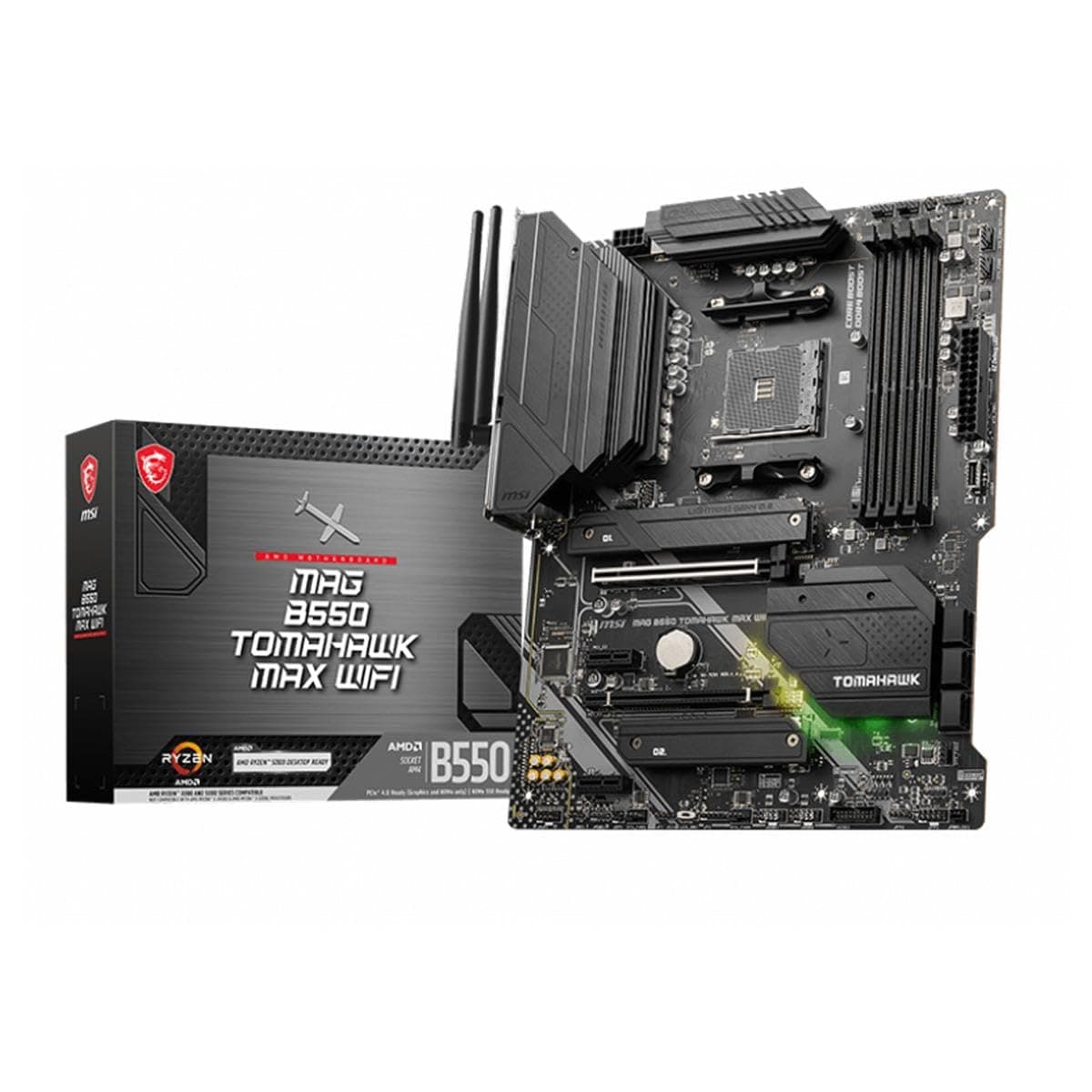
🔥 Power your play, stay cool, and connect faster than ever!
The MSI MAG B550 Tomahawk MAX WiFi motherboard is a robust ATX platform designed for AMD Ryzen 3000 to 5000 series processors. It features PCIe 4.0 support, DDR4 memory up to 4400MHz (OC), advanced thermal solutions, and cutting-edge connectivity including Wi-Fi 6E, Bluetooth 5.2, and 2.5Gbps LAN. With easy installation and extensive compatibility, it delivers a premium gaming and professional experience with stable, high-speed performance.


| ASIN | B09ZJ73LDY |
| Best Sellers Rank | #24 in Computer Motherboards |
| Brand | msi |
| CPU Model | AMD Ryzen 7 |
| Chipset Type | AMD B550 |
| Compatible Devices | Personal Computer |
| Compatible Processors | AMD Ryzen 5000 Series, 5000-G Series, 4000-G Series and 3000 Series |
| Customer Reviews | 4.6 4.6 out of 5 stars (970) |
| Graphics Card Interface | PCI Express |
| Item Dimensions L x W x H | 13.5"L x 10.71"W x 2.99"H |
| Item Type Name | Desktop Motherboard |
| Item Weight | 3.8 Pounds |
| Main Power Connector Type | ATX |
| Manufacturer | MSI |
| Memory Clock Speed | 6 GHz |
| Memory Slots Available | 4 |
| Memory Storage Capacity | 128 GB |
| Model Name | MAG |
| Model Number | B550 Tomahawk MAX WiFi |
| Number of Ethernet Ports | 1 |
| Number of Ports | 13 |
| Platform | Windows 11 |
| Processor Socket | Socket AM4 |
| RAM Memory Technology | DDR4 |
| Ram Memory Maximum Size | 128 GB |
| S/PDIF Connector Type | Optical |
| System Bus Standard Supported | Serial ATA/600 |
| Total Number of HDMI Ports | 1 |
| Total PCIe Ports | 4 |
| Total SATA Ports | 6 |
| Total Usb Ports | 6 |
| UPC | 824142286685 |
| USB 2.0 | 6 |
| Unit Count | 1.0 Count |
| Warranty Description | 3 Years |
X**G
Works perfectly out of the box
I had a great experience using this motherboard to upgrade an older system. Everything works out of the box using Windows 10. I didn't have to install any extra drivers or bloatware from the manufacturer. Setup and configuration was easy. All the connectors are accessible and nothing is placed in a weird spot, so cable routing was a snap. You should be aware that that there are a limited number of PCI lanes shared between the PCI-E connectors and the M.2 slots. It's not a big deal but read the motherboard manual for a complete description of all the PCI-E slot and M.2 slot configurations to understand how many lanes you can have accessible. For me, other than a video card I used one M.2 and a bunch of PCI-E x1 cards so the limited lanes wasn't an issue for me. The M.2 slot connected directly to the CPU is also right next to the CPU socket so be aware that there will be limited space around it for a large M.2 drive cooler with the CPU cooler next to it. I'd plan for that accordingly. You'll want to use that for your boot drive because it's the fastest M.2 slot on the board and doesn't waste any PCI-E lanes like the others do. I had to do a BIOS update and it was a little tricky; the MSI BIOS has no problem detecting USB thumb drives but the BIOS updater mode only supports specific USB thumb drives. So you will be able to see your USB drive easily in the MSI "Board Explorer" display, but still have the BIOS update tool be unable to detect it. I happened to have a bunch of old random USB thumb drives from 512MB to 8GB and just tried different ones until it worked. So if you have issues updating the BIOS it isn't you: it's the thumb drive and you'll just want to try a few. Not a big deal but this isn't clearly explained in the motherboard manual. The motherboard has HDMI and DisplayPort outputs but there is no onboard video; this only works if you have a CPU with integrated graphics. I didn't, I used a Ryzen 5900X so you'll need a PCI-E video card for most kinds of CPUs. The built-in WiFi works great. I didn't like the included antennas but it uses a standard WiFi antenna connector so you can put on other ones. So overall this is a great motherboard. Everything works, there's no hidden gotchas, and it is quite stable. Performance is exceptional. Since I had a lot of DDR4 RAM this was the newest motherboard I could get without having to dump the old RAM and buy a lot of DDR5 so I'm quite happy with it.
M**.
Great motherboard
I did need an ethernet connection or a thumb drive with the downloaded Wi-Fi drivers to get the Wi-Fi started but it's a great motherboard. Very durable and works as intended. There are plenty of USB, video and audio ports. The price was right too.
R**R
Rock-Solid Motherboard with Everything You Need! 🛡️⚡
⭐️⭐️⭐️⭐️⭐️ Rock-Solid Motherboard with Everything You Need! 🛡️⚡ The MSI MAG B550 Tomahawk MAX WiFi is a powerhouse for its price. Stable, reliable, and packed with features — excellent VRM cooling, solid build quality, and fast WiFi connectivity. Perfect for gaming or heavy multitasking. BIOS is intuitive, installation was a breeze, and it just works flawlessly. If you want a dependable, high-performance B550 board, this one is a no-brainer. 💯
M**S
Great motherboard, easy to set up, good performance
This was my first PC build in more than 20 years. This motherboard is great. Its one downfall in my eyes, it could use a couple more USB ports in the back (competitor ASUS does better here.) But I have no complaints. I don't use any LED stuff, so you're on your own there, can't tell ya.
P**T
Five stars on this board.
Had a gigabyte 450 go bad after 4 years of use, a computer tech guy mentioned he only uses MSI boards as the quality seems above average compared to other brands. I had never used a MSI board, but this board is really great out of the box. Updating bios was a snap, the system went together very easy. Was able to keep my win 11 in place and change drivers without much trouble. In other words no fresh install of windows. The wifi runs really good. In the future if I upgrade I will only be looking at MSI. l was looking at upgrading and spending 1500 after my old board died. For the 170 bucks on this MSI board; my computer with AMD Ryzen 7 5800X3D 64 megs of ram,,, running pretty strong. I could not be any happier!!!!!!!!!!!!
P**L
Great Motherboard For The Most Part
I had no issues installing my AMD hardware (Ryzen 7 5700X and Radeon RX 6700XT), in fact everything worked like a charm. My only concern was the Wi-Fi/Bluetooth adapters, since many other reviewers have encountered issues with them. Additionally, I have read from other reviewers that they have encountered LAN Ethernet problems, but fortunately I have yet to see an issue with that so far. From time to time I use Bluetooth on my PC for my phone or speaker, so I asked myself "what could go wrong"? I never use Wi-Fi as an internet option since wired LAN via Ethernet is my go-to. The motherboard already offered other great features and they were the main focus anyway so I went for it anyways thinking it wouldn't be a big deal. Upon first use of Bluetooth I didn't face any problems, and I figured it was because I installed the latest Bluetooth drivers from the MSI driver website. It was a little finicky until it got worse overtime. 2 months in, and the Bluetooth drivers refuse to function correctly. All I wanted to do was connect my JBL Flip 5 for some music, and although it would connect it just would not play any audio. At first I thought it was my wireless speaker, so I did some factory resetting to it and not even that did the trick. I got fed up and looked through my garage for old hardware and found my ASUS BT500. It's an old USB Bluetooth adapter dongle I had for some time and claims to have Bluetooth 5.0 but I remember it working in the past. I disabled my motherboard's Bluetooth Adapter Driver, plugged in the USB Bluetooth adapter dongle and VIOLA my speaker finally connects properly and actually plays audio! So yeah the B550 Tomahawk advertises that they have Wi-Fi and Bluetooth, but don't expect them to function properly in the long-run. This motherboard would have been perfect if they actually had fully functioning wireless connection, but it seems like this is the one thing it fails at. If you depend on Wi-Fi or Bluetooth connections I highly recommend purchasing third-party dongles just in case. Does this make the B550 Tomahawk an inferior motherboard? Of course not. It is a great motherboard that offers a lot of features, just be aware that the Wi-Fi/Bluetooth capabilities they advertise may not be as great as they sound.
A**R
Brilliant Motherboard, no trouble , easy to build on
D**N
Installed this a week ago and it went flawless. Ordering, delivery and installation went issue free. Would order again or recommend.
J**A
Me tardó 1 semana en llegar por la importación a México, pero la caja y el contenido llegaron intactos. Al principio pensé que llegó defectuosa la tarjeta en los slots de ram porque solo tienen una pestaña para poder sacar la memoria, pero es un nuevo diseño y no afecta al funcionamiento. Luego procedí a instalar todos los componentes y al encender la PC me marcaba un error de CPU en el led EZ Debug, así que actualicé el BIOS a la versión más reciente mediante el botón flashback y fue de modo que arrancó sin problemas. La BIOS y la instalación de Windows no requirieron de mucha configuración para poder obtener un buen rendimiento, el wifi y bluetooth funcionaron a la primera al instalar Windows 11. Estos son los componentes que utilicé en conjunto con la tarjeta: -Ryzen 7 5700x -GPU RX 7600 MSI Mech -32GB CL16 3600MHz 4x8, Kingston Fury Renegate RGB -Nvme Kingston NV2 1TB -Nvme Crucial P2 256GB -2 HDD Western Digital Blue 1TB -2 kits de 3 ventiladores Thermalright ARGB La tarjeta cuenta con 6 conectores para ventilador PWM sin contar el del cpu o para refrigeración liquida. 2 conectores ARGB 5V y 2 para RGB 12v, 6 puertos sata, 2 M.2 uno es PCI 4.0 y otro a 3.0 La tarjeta también tiene un switch muy práctico para apagar todo el RGB e iluminación.
F**A
I got this to replace a b550 tomahawk well worth the upgrade
C**O
ottimo prodotto e venditore veloce
Trustpilot
Hace 3 días
Hace 1 semana