We remain fully operational. Our teams are working around the clock to ensure your deliveries continue safely.

Descargar la aplicación


Servicios al cliente
Sobre nosotros
Copyright © 2025 Desertcart Holdings Limited
Descargar la aplicación

Buy anything from 5,000+ international stores. One checkout price. No surprise fees. Join 2M+ shoppers on Desertcart.
Desertcart purchases this item on your behalf and handles shipping, customs, and support to Uruguay.
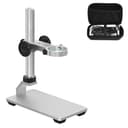
🔬 Elevate your microscope game with pro-level stability and style!
The Ninyoon Universal Microscope Stand Pro is a premium aluminum alloy base designed for maximum stability and precision. Compatible with most USB, digital, wireless, and WiFi microscopes up to 3.5cm diameter, it features smooth height adjustment up to 7.5 inches for optimal focus. Lightweight yet sturdy, it includes a convenient carrying case and lifetime customer support, making it the essential accessory for professionals and enthusiasts seeking flawless magnification and portability.


| ASIN | B0B37F21Z4 |
| Best Sellers Rank | 1,536 in Business, Industry & Science ( See Top 100 in Business, Industry & Science ) 4 in Lab Handheld Digital Microscopes |
| Box Contents | Microscope Stand |
| Brand Name | Ninyoon |
| Colour | Silver |
| Compatible Devices | Digital Microscope, LCD Microscope, USB Microscope, WiFi Microscope, Wireless Microscope |
| Country of Origin | China |
| Customer Reviews | 4.2 out of 5 stars 3,068 Reviews |
| Digital Magnification Measured in Multiples (Digital Zoom) | 1000 x |
| Enclosure Material | Aluminum Alloy |
| Item Dimensions L x W x H | 14.8L x 7.6W x 19H centimetres |
| Item Weight | 330 Grams |
| Light Source Type | LED |
| Light source type | LED |
| Magnification maximum | 1000 x |
| Manufacturer | Ninyoon |
| Manufacturer Part Number | Ninyoon |
| Material | Aluminum Alloy |
| Model Number | Ninyoon |
| Objective Lens Description | High quality lens |
| Power Source | Battery operated or USB rechargeable |
| Product Warranty | Lifetime Warranty |
| Product dimensions | 14.8L x 7.6W x 19H centimetres |
| Real Angle Of View | 120 Degrees |
| Real angle of view | 120 Degrees |
| UPC | 748521050011 |
R**L
Excellent for portable use, connecting by WiFi to a phone or tablet.
I’ve tried this microscope on various phones using its WiFi connection and various computers using USB, with the phones, it is excellent, easy to connect so long as you follow the instructions, remove the lens cover, (it's clear plastic so easy to forget), turn on microscope, connect to its WiFi then launch the WiFi check app. Connection is limited to one device at a time, I have tried it on Android 13, Android 9 and iOS 15.7.3 and it worked flawlessly, the zoom buttons and photo button on the microscope responded as they should, the image was sharp and it was easy to focus, here I will say that the supplied stand is poor and I would recommend getting a better stand, there are some available on Amazon and they do improve the ease of use of the microscope. Now to using it with a computer, first thing to mention is that you cannot connect to a computer using WiFi you have to use a USB cable, I tried the microscope on three windows 11 desktops, one windows 10 desktop and one windows 10 laptop, it worked okay on two of the windows 11 desktops and both the windows 10 computers, when connected to the other windows 11 desktop it caused the AMD graphics drivers to crash after a few minutes of use, the same AMD graphics drivers were on two of the other desktops that had no driver issues but all have different graphics cards, the highest end one being the one giving the problem, here I’ve got to say the support from the seller was excellent, emails were replied to within 24 hours and although no solution has been found yet the support is excellent. The reason I say it only worked okay on the computers is because the image had a tendency to freeze at regular intervals on all the windows systems I used, not a major issue if you're looking at coins or stamps and such like because changing the focus unfreezes the image until next time but not good if you’re going to be using it for soldering circuit boards, I tested them all using the windows camera app that is the recommended app to use. Another thing to bear in mind when using it connected to a computer is that the buttons on the microscope don’t work. Other things maybe worth a mention is that the USB lead is also used to charge the microscope battery, there is a wheel on the side to change the brightness of the light. To sum up, excellent for portable use, connecting by WiFi to a phone or tablet, okay for occasional use connected to a computer but if you’re going to be using it solely for connecting to a computer then I’d say get a USB microscope. Excellent and quick support available from the suppliers if it’s required.
A**C
Simple and very effective
I’ve previously bought a wired digital microscope for a family member and was so impressed with it I decided to take the plunge and buy this wireless version. First impressions are amazing, the microscope is super simple to use and charges quickly. The microscope generates its own local WiFi which your device (I’m using an iPad and Android phone) connects to easily. Once connected run the WiFi Check App and the screen fills with the microscope image. The microscope has its own lights which can be dimmed by a small rotary switch. Twist the body to adjust focus, further twisting will take you between the 2 magnification levels. The power button can be used to take a picture which avoids having to touch the iPad/phone while also holding the microscope. The included stand is fairly lightweight and depending on your intended use you may be better using an additional sturdy stand with rotary height selection, I bought one of these stands for the wired microscope and it really did make a huge difference. I must ‘borrow’ that stand back as I’m sure it fits this wireless version! The picture I’ve attached is of a gold stripe on a cushion cover, the detail is so clear! If you’re in the market for a cheap wireless microscope I don’t think you’ll be disappointed with this one.
A**E
Great little unit, terrible stand
The microscope itself is good value. The stand is useless. Unit is easy to setup and use and gives good results ( I use it for PC repairs mainly) in termss of clarity of the picture, focus, zoom and brightness. The stand it comes with is quite frankly a waste of materials. It barely holds the microscope and offers completely inadequate adjustment or positioning. If you need a stand, you wont be using this one, so be prepared to get something else to use with it.
J**Y
Easy to set up WiFi microscope with a clear visual image and nice build quality
I bought this 4K WiFi microscope after also previously purchasing a 2K wired microscope - both to be used with my Google Pixel 7 Android phone. The set up was very simple and took no time at all without any issues whatsoever, I charged the device for 2 hours as advised with a 5V 1A charger until the red LED turned off then downloaded the "WiFi Check" app from the Google Play app store. After holding the power button for a few seconds the microscope went into connection syncing mode and I connected to the microscope through my phone's WiFi settings and it was done. You open the "WiFi Check" app up whilst it's connected and can see on the screen what the microscope is being pointed at (take the lens protector cap off first), the focus wheel is really smooth and a big improvement from my previous 2K wired microscope model but the biggest standout feature to me was the image quality. The image quality looks so clear and sharp with plenty of detail for even the tiniest of objects and the clear plastic "cap" at the lens end of the scope allows you to actually stand the microscope up on a table or such hands-free with an object under it like a coin or tiny part of a plant without having to set up the provided stand and still get a stable view. This microscope works with Android, iPhone, PC and Mac which is a good news for many iPhone owners out there who couldn't use previous wired microscopes. The only downside is if you're using it with a computer the zoom function can be restricted but this wasn't an issue for me solely as a phone user. Overall I highly recommend this 4K microscope with the only downside to it being the provided metal stand which isn't very stable - but the seller also has a significantly better one for sale in their store for around £20 which I also own and is a massive improvement on the one provided.
C**E
Good image but poor focusing control
Bought with the recommended robust desk stand - essential if you want to make full use of this! That did come in a nice carry case though enabling the camera to be stashed inside too. Set up was quite easy whether using an Android phone (via WiFi) or on a windows PC (via wired USB) - (there's even an MS windows camera app already on the PC I didn't previously know about!) As I work with SMD components from time to time I added this to my inspection kit. Overall the picture quality when physically zoomed in is impressive and adequate for the task. However, a couple of things let this down: 1. There's a notable amount of hysteresis on the focus control. Sure the focusing ring feels adequately firm but if you overshoot (easy to do at this level of magnification and the narrow depth of field) you've got to reverse the focus ring a fair amount before any change is applied to the focus (and if you're not careful - overshoot again) 2. More generally with the high resolution this can provide, there's a notable delay from movement in front of the camera to seeing that on screen (which further exaggerates the first point). 3. Already mentioned - the narrow depth of field. Adjusting focus for different height components will be required - hampered by (1) of course. 4. The built in LED lights are quite effective but moving an external light from the side can reveal detail not noticeable from just the built in LEDs lighting from above. The el-cheapo stand that comes with the camera turned out just right for holding my LED torch! I don't want to be too negative about the camera - for the money it's great value for a hobbyist on a budget. Easy to set up and use (save 1 above). Do consider the recommended stand (it helps dealing with the focus issue)
K**H
A Review of 4K Digital WiFi USB Microscope
The Ninyoon “4K Digital WiFi USB Microscope” offers greater "real life" magnification than many of the earlier so-called 'USB Microscopes' because it has a higher resolution image sensor. That sensor seems to be about 6mm (1/4 inch ?) wide and has 3840 pixels across that axis. ( So this digital microscope device should more properly be described as a “3.8k” (pixels) device [or more precisely as “3.75K”, since technically 1K = 1024 ] ) It is easy to connect and use with an MS/Windows PC when connected via USB cable (supplied) or with an Android or Apple Tablet or Phone via WiFi (which is generated by the ‘4K’ itself). This “4K Digital Microscope” is a cylinder shaped object, about 112mm long with a diameter of 33mm. That contrasts with the F210 (1M pixel microscope) which is slightly shorter at about 110mm and a diameter of 37mm. The 4K unit is decently engineered, providing a smoothly operated focussing ‘barrel’ ring, together with a power on/off button and a ‘star-wheel’ to adjust the brightness of the incorporated LED sample illumination. I strongly recommend the use of the sturdy, decent quality, adjustable metal stand and holder (see photo) which is available from Ninyoon (gratis, if one asks nicely !). The rather flimsy “articulated” holder which has recently been supplied, in a cardboard box alongside the 4K unit, is really rather unstable and difficult to manoeuvre securely. The much better Aluminium alloy ‘ring holder’ clamp and stand permits reasonably fine and stable adjustment of microscope focus and height above the item being examined. Even if you have to pay extra for that ‘Ali’ metal stand, do so. As with *all* digital Microscopes, the size of the image actually observed is dependent on the parameters of the (digital) display screen used - the viewed image size depends on the physical size and the pixel resolution of that screen. Like all modest quality “USB Digital Microscopes” the “4K Microscope” is essentially a “WebCam” with a "Macro" lens system together with an extended (order of 100+ mm) barrel to allow close-up focussing of the object’s image onto a conventional microchip sensor. The higher the quality of the image sensor, the better (within limits). The images observed onscreen (using the recommended software App (‘xploview’) on a MS/Windows PC) can be captured as 'snapshot(s)' or video files, of up to the ‘native’ image sensor capability of 3840 x 2160 pixels. Other software systems (such as Windows 'native' camera software, or other USB camera packages) can also be used with a PC, but with different manipulation and filing capabilities. The images shown via WiFi on an Android or Apple Tablet or Phone (using the recommended ‘WiFi Check’ software App) adopt something of a “trick” whereby the images actually displayed are a subset ‘block’ of the actual scope’s sensor image. Specifically, it displays just a little under half of the sensor capture, presenting images onscreen of 1600 x 1200 pixels (vs. the 3840 x 2160 of the sensor itself). This is to correctly present a high level of magnification on the physically smaller (albeit high resolution) screens of typical Android or Apple handheld devices. But it is also the case that the images (photo or video) that can be filed from these ‘host’ devices are only available as 1600 x 1200 pixels (or, as a ‘WiFi Check’ menu choice, as 1280 x 720 pixels). The 'DM WiFi' software App also works OK via WiFi with the ‘4K’ microscope on my Android Tab, but offers rather lower resolution and is a bit 'picky' about saving images (as ‘jpg’ files falsely labelled as ‘png’ !). In any case, it seems that the 4K scope is not “USB OTG compliant” (or else not “UVC compliant”) and does not support USB connection to Android at all (even if the attached screen devices do themselves support “USB On-The-Go” ). You *must* use the scope’s inbuilt WiFi to connect this digital microscope to Android or Apple Tablet or Phone devices. It is also important to ensure that the 4K Microscopes internal battery is well charged (via the supplied USB cable) before and during use via WiFi connection to a Tablet or Phone. Failure to do so will lead to the onscreen image(s) ‘freezing’ or to losing WiFi connection altogether. A maximum "real world" magnification of about 370 can be obtained (for the image observed on a 61cm (24inch) PC screen of 1920 x 1080 pixels which has a pixel pitch = 0.2745mm ), with the bottom end of the scope unit's ‘barrel’ set at about 20mm from the object being examined. That is to say with the plastic lens ‘hood’ attached and with the focus ring set almost to its max limit, so that the lens assembly projects beyond the bottom of the scope ‘barrel’. At maximum magnification, the 'Field of View’ (FoV) is about 2.8mm. This is really very good – rather more than 3 times the magnification of the earlier F210 scope (which had an image sensor of only about 1 MB). See the attached image xxx_0001 where the dark lines are 1mm apart (images of the markings on a metric Vernier gauge). The maximum *optical* magnification (alone) of the 4K scope seems to be just over 2 (recall that at max magnification the FoV=2.8 mm whilst the image sensor is about 6mm wide). But remember that the image is captured digitally by the "camera sensor" (probably a CMOS 'chip') within the unit, and that digital image is then transmitted to the computer or Tablet or smart Phone to be viewed on a (separate) digital display monitor. Hence the practically achievable overall magnification that is seen, on a digital display screen, of well over 300. When set to its maximum magnification, the 4K microscope has an image resolution of about 1 micrometre (actually about 0.75 micrometre at best), being (FoV=2.8mm) / (3840 pixels). The small, relatively simple optics (about 2mm in diameter with an effective focal length of about 12mm) seem to be good enough to not adversely impact (reduce) that electronics imposed resolution. Except that when set very close to maximum magnification a yellowish colour cast chromatic aberration does seem to intrude slightly. The focussing ring provides about 30mm ‘travel’ of the microscope’s lens system, allowing for the focussing distance from the sample being examined to range from about 15mm beyond the end of the unit’s ‘barrel’ (hence the benefit of the ‘lens hood’) to well over a metre (indeed, almost to infinity! ). That will allow for examination of larger objects some distance from the actual microscope unit. Increasing distance from the ‘sample’ to the microscope body will however (inevitably) result in reduced observable magnification. The third image (xxx_0002) shows the result when the scope ‘barrel’ end is set about 60mm above the sample, giving an effective magnification then of about 40. The fourth image (xxx_0005) shows the magnified view (6mm wide onscreen) of a couple of strands of human hair (brown & grey – mine!), which have a nominal diameter of 50-70 micrometres and thus are seen at a magnification of about 100. The final image (xxx_0006) shows the pistil, stamens and petals of a Common Bluebell, with acceptable ‘depth of focus’, at a magnification of about 65.
S**D
WARNING: Mount is extremely low quality and not suitable for mounting the microscope..!
Microscope is pretty good, but let down horribly by a cheap and nasty mount... The screw holding the clamp does not fit the stand. It seems to bottom out before it is tight and the result is a wobbly clamp; no use for a microscope mount. Even trying to loosen the screw is very difficult and I do not want to push it as the screw metal feels very soft. So, avoid unless you have an alternative mount...
H**R
Really useful and easy to use
This is the second of these microscopes I have purchased (one for work and one for home) My previous model was standard definition and fully wired. This model is an improvement in many ways. The quality of the image is fantastic, really gets a sharp image. Being wireless, provides a great deal of freedom that the wired unit can't give you (sometimes I would find the wire would pull the unit out of alignment). It does require a cable connected when using with a Mac/PC but this isn't too much of an issue as this cable is a lighter build than the cabled unit and the LED output control is on the body of the microscope and not the cable. Connecting to IOS device is fairly straight forward and even easier on Mac/PC. Overall it's great value and very well put together. The supplied stand isn't ideal but the company are currently offering a free stand upgrade and case on their website and as I have it with my older unit, I can confirm it is worth getting. Overall, a fantastic piece of kit.
Trustpilot
Hace 3 semanas
Hace 1 mes