We remain fully operational. Our teams are working around the clock to ensure your deliveries continue safely.

Descargar la aplicación


Servicios al cliente
Sobre nosotros
Copyright © 2025 Desertcart Holdings Limited
Descargar la aplicación

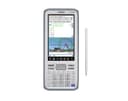
📊 Elevate your math game with Casio’s touchscreen powerhouse!
The Casio fx-CG500 is a cutting-edge graphing calculator featuring a 4.8-inch color touchscreen with stylus input, advanced CAS functionality for symbolic math, and intuitive drag-and-drop capabilities. Its natural textbook display and versatile design make it ideal for high school, college, and professional use in advanced math, calculus, and engineering fields.


| ASIN | B0727XX94K |
| Best Sellers Rank | #324,581 in Office Products ( See Top 100 in Office Products ) #102 in Graphing Office Calculators |
| Brand | Casio |
| Built-In Media | Four AAA Batteries, Protective Hard Case, Quick Start Guide, Stylus, USB Cable |
| Calculator Type | Graphing |
| Color | Gray |
| Compatible Devices | USB compatible |
| Customer Reviews | 4.6 4.6 out of 5 stars (498) |
| Display Type | Touchscreen LCD |
| Enclosure Material | Plastic |
| Global Trade Identification Number | 00889232600758 |
| Item Dimensions L x W | 11.14"L x 7.21"W |
| Item Weight | 0.71 Pounds |
| Manufacturer | Casio Office Products |
| Mfr Part Number | fx-CG500 |
| Model Name | Fx CG500 |
| Model Number | fx-CG500 |
| Number of Batteries | 4 AAA batteries required. (included) |
| Power Source | Battery Powered |
| Screen Size | 4.8 Inches |
| UPC | 889232600758 |
| Unit Count | 1.0 Count |
| Warranty Description | 1 year limited warranty |
H**N
Nice calculator when you need a calculator
Its pretty good. I only need it for classes where phones are still a nono in the big 25. Sucks, but this calculator has made quick work of my problems so that i may understand them faster and uncover my mistakes. Its speed, copy paste works awesome. Im still learning how to use it. Battery life has been nice, no issues, outlives my t84 twice and still full charger. Screen is awesome. Would be awesome if certain keyboard keys triggered the alternative options that seems to be exclusive to the touch keyboard. Oh well, win some lose some
T**N
Excellent calculator
Excellent calculator. I'm well into my career and reviewing my college math and bringing those hard won skills up to date. Specifically calculus, linear algebra, and statistics. To add some fun, I decided to try out all the latest graphing calculators from Ti Casio and hp. So far, this one is coming out on top. Works great, easy to use. Though the pencil is a little awkward, it's functions are straight forward and accessible and it has a nice big screen. I like being able to replace the batteries instead of having to recharge it. And it has lots and lots of functionality and helpful built in memory cues. Somebody put a lot of love into making this machine and it really shows. With that said, I don't like not being able to make the font smaller so I can fit more stuff on the screen. Maybe that's a software thing they'll fix some day. Who knows. And, the use manual is kind of quirky having the examples cross referenced in a separate PDF (though, to be fair, they're really good). But, these are pretty minor complaints compared to the utility and ease of use. Great calculator Casio. Way to go.
J**J
Casio FX - CG500
Good Calculator. One of the better devices. Four AAA batteries required. Received in good condition from the US to India.
T**S
If you care about CAS capability, this is your choice
Casio, Texas Instrument, and HP each have a CAS (Computer Algebra System) graphing calculator model. I've used all three in calculus classes. My experience is as follows: 1) HP Prime - algorithms produced wrong results in calc II class. Notified HP and sold the calculator. 2) TI Nspire CX II CAS - I will admit up front that I am not a fan of the document-centric features of the Nspire series. The latest model is faster but eats up battery charge twice as fast, and has 10mb less user memory available. 3) Casio fx-CG500 - radically different user interface using a much larger screen. However, what really matters is the functionality. If you are taking calculus classes or above, you pretty much need a CAS graphing calculator. Here, the Casio fx-CG500 is a clear winner. It has more capability and features for higher math, and the user interface allows for much faster user input and all around ease of use. If you are a TI-Nspire fan, go to YouTube and search on Charlie Watson. You'll find a complete "course" on using the Casio (he uses the classpad 400 which is the same). His videos are just of couple of minutes each, and you will see for yourself in the first dozen or so videos just how much easier it is to do math on the Casio than the TI. If you keep watching, you also will see what the Casio can do that TI and HP cannot. Just so you know - I teach elementary and intermediate algebra at my local community college. I've used TI calculators since the very early 70's when they were red LEDs and used a 9-volt battery. I still have a TI-83 Plus Silver Edition, TI-84 Plus CE, TI-92 Plus, TI-Voyage 200, TI-89 Titanium, and TI-Nspire CX II CAS. As you can see, I am not a TI Nay-sayer, but in side by side comparisons with competing Casio models, Casio keeps coming out on top. I am not so sure that is surprising, since TI seems to have changed its focus from the end user to the education administrative policy makers.
B**.
Either wait for the next iteration, or wait for a sale...
Disclaimer: I am by no means a wiz at math and I can totally appreciate that in the right/gifted hands, this calculator could be played like a violin by a virtuoso and do miraculous stuff. :) That said, for mere mortals looking to get a graphing calculator, if you're interested in the fx-CG500, I'd suggest either waiting for a sale, getting it used, or if possible, holding out for the next generation. After all, this device has been out for many years now, and as far as I can tell, Casio has made nary a tweak to the firmware. I didn't investigate, but a new one be just around the corner. What don't I like? So far, several little things. First, yes, that big screen is sweet, but it sacrifices a comfortable physical button pad. I initially though the cursor button on my unit was defective, but I've found that you really have to hit it right to navigate with it, especially when pushing in the "down" direction. It's sluggish, and it's easy to hit the Variable keys directly below it. Second, I know this probably isn't a big deal to a lot of people, but entering a mixed number on this thing is way clunkier than it needs to be! Heck, most budget high school calculators now have a dedicated mixed number template button. The fx-CG500 has several tabs worth of soft keyboard shortcuts/templates for just about any kind of numeric expression you need to enter, and yeah, there's a fraction soft key template, but NO mixed number template. And if you figure you could simply enter a whole number followed immediately by a fraction, you'd be wrong! This was driving me nuts until I watched a YouTube video by Charlie Watson on "simple calculations" on the the Casio ClassPad II (which is basically the same device as the CG500). Eureka! Which brings me to the next point. There's a 300+ page downloadable manual for this device on Casio's website, but Casio's own support videos are pretty poorly produced. There's good information there, but the lady narrating the videos sounds like she was walking back and forth from where the microphone was, and sometimes what she's saying is indecipherable. Again, thank goodness for Charlie Watson (whoever he is!). If you do get this calculator, you'll most likely find his videos (on the ClassPad II) a godsend. Lastly, as far as I can tell, while you CAN rotate the screen (for many but not all operations), you CAN'T resize the text/font size for the data line displays on this device, which is a real shame, 'cos I'd love to be able to bump up the display size on equations! I'm keeping mine because it is outstanding in many ways, and I did get it at a great price, but had I paid typical retail on this, it would probably be going back... :)
Z**N
good
B**T
I had the casio classpad, which is exactly tge same calculator as this one. The same manufacturer, the same design, the same hardware, the same firmware, the same size, the same everything, but different name. I barely used it. Maybe just ounce or twice. Still 100% new in its box, but its keyboard stopped working completely. Niy a single key works. I googled this issue to find out how it could be fixed, unfortunately I found out that several people have the same issue. This is an inherent fault with this calculator. I bought this machine, but I had to return it back because of this fault.
V**A
slightly slow
J**Y
This is superb piece of kit which combines ease of use with a vast array of features accesssible through the pull-down touch-screen menus. A "must-have" for every self-respecting mathematician.
E**E
Me gustó mucho el detalle de las pilas incluidas, aunque no tenga el teclado QERTY es perfecta para lo que se necesita y como plus es permitido llevarla en exámenes avanzados.
Trustpilot
Hace 1 mes
Hace 3 semanas