
Descargar la aplicación


Soporte al cliente

Desert Online General Trading LLC
Warehouse # 7, 4th Street, Umm Ramool, Dubai, 30183, Dubai
Descargar la aplicación
Soporte al cliente
Desert Online General Trading LLC
Warehouse # 7, 4th Street, Umm Ramool, Dubai, 30183, Dubai


🚀 Elevate Your Storage Game!
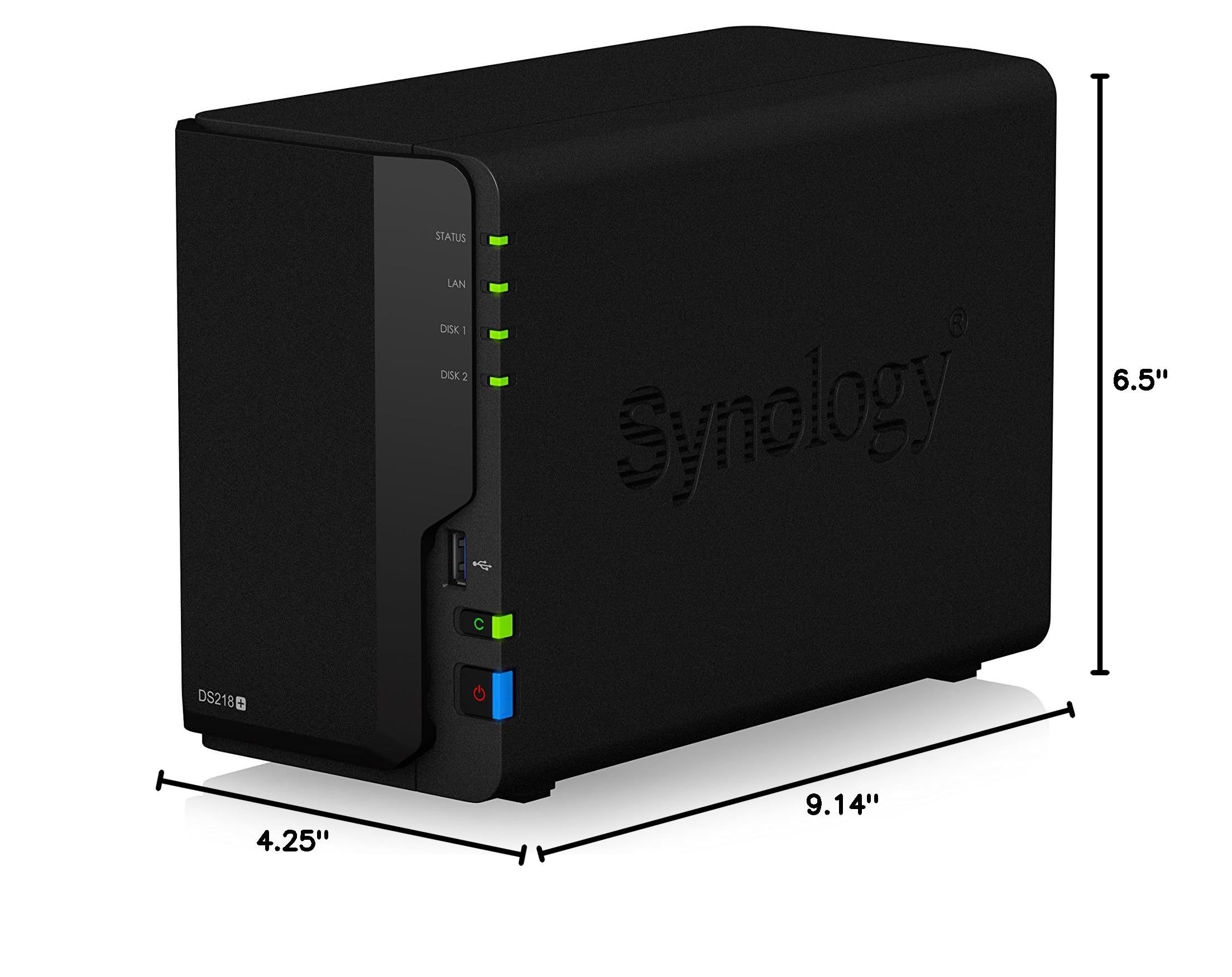
The Synology 2 bay NAS DiskStation DS218+ (Diskless) is a powerful and versatile network-attached storage solution designed for both home and small business use. With impressive encrypted throughput performance, expandable memory, and advanced snapshot capabilities, it ensures your data is secure and easily accessible. Perfect for media streaming and surveillance, this NAS is a must-have for the modern professional.




| RAM | 2 GB |
| Hard Drive | 20 TB |
| Brand | Synology |
| Series | DiskStation Value |
| Item model number | DS218+ |
| Item Weight | 2.87 pounds |
| Product Dimensions | 9.14 x 4.25 x 6.5 inches |
| Item Dimensions LxWxH | 9.14 x 4.25 x 6.5 inches |
| Color | Black |
| Manufacturer | Synology America Corp |
| ASIN | B075N1BYWX |
| Is Discontinued By Manufacturer | No |
| Date First Available | September 15, 2017 |
T**T
I'm a Big Fan
My review of the DS918+ on Amazon.I'm a big fan of Synology. Every 2-3 years, I buy a newer one, and sell the old one on Ebay. I've had the 1-bay DS109, the 2-bay DS211, the DS713+ and a few others in between, that I returned when I realized that the cheaper NAS sometimes don't cut it. Most recently, I traded up from the DS716+ii to this new DS918+. I am very impressed.In the old days, like 2005-2010, consumer NAS was starting to become a thing, but they were barely fast enough. They made them with cheaper slower chips and barely any RAM. My first NAS was a D-link DNS-323 in 2007! It could barely push 1 MB/sec doing rsync. It was seriously slow, even crippled. But it's shared storage! Cheap, easy, reliable, and is low-power so you can run it 24x7. Synology has taken that idea, and pushed it to amazing new heights.With NAS, I learned that it's all about the CPU: you need a decent chip to push data through gigabit Ethernet at full speed. And these days, NAS is all about being a general-purpose server, especially for Multimedia, and that means you need a fast chip and plenty of RAM. The first time I tried to run a media server on the Synology DS411j, I realized that tiny cheap CPU could not cut it, and 128MB of memory was simply not enough. So sent it back, and get the DS411. Even that was barely adequate, and I realized I had to drop the $ on the "plus" series Synology NAS. With the dual-core Intel chip at 2.13Ghz and 1GB of RAM in the DS713+ I had finally found the right one.With the DS918+, I moved up to 4-bay nas on RAID-5, giving 18TB and 1-disk redundancy. A big feature of these new NAS is having two M.2 slots for SSD cache. This is not for everyone - because the first access is slower, and caching will slowly improve things over time, so it works well with certain types of data-access, but for sequential or random type of access that doesn't hit the cache as much, and Gigabit limits, don't be fooled into thinking an SSD cache will make a NAS perform like your C-drive.The great thing about nas is reliability. My DS713+ and DS716+ ran 24x7 year after year, and i never had a single problem with it. Can't say that about Windows. Yes, you can build a DIY NAS, with Windoze-server or Linux, but it's a lot of work to set it up, and reliability depends on your admin skills. And I doubt you can build it for less than a Synology, unless you're using recycled hardware. Synology hardware is reliable, and the softare has amazing features, that are updated all the time, and just get better. Don't worry, Synology has your back.I tended to avoid doing updates to the DSM. I had problems on several occasions, so I rarely took updates, and things just worked. Sometimes, after an update, the network stack gets messed up, and things get weird. Usually, it's necessary to reinstall the DSM (data is preserved) to get around these issues.Within a few years, I hope my next Synology NAS features Thunderbolt conectivity. They are just starting to appear with the DS1817t, and QNap already has them. Thunderbolt runs at 40 Gigabit! They are now starting to figure out how to build a NAS that also allows several users to access it at way faster speeds than Gigabit or even 10 Gigabit ethernet - but still making it a multi-user enterprise server - with Thunderbolt over an Ethernet type protocol.NAS is not for everyone. I'm a computer geek, and you need some computergeekery skills to really embrace and love NAS. But it's here to stay, and I'm so pleased with the great work Synology is doing to bring NAS to more and more users. Ultimately, everyone really needs NAS, even if it's just Dropbox over the internet. The more we become reliant on our computers, the more we need Enterprise shared storage that's reliable and backed-up. Synology can take us all down that road.
J**E
Great Entry-Level NAS
I’m not really a networking hardware guy – nothing much beyond a simple Windows home domain/network. As one’s digital life can be long, one day I woke up and realized that the recycled workstation from a decade ago, currently serving as my file/backup server, had more USB external storage drives attached to it than the iconic A Christmas Story power outlet. My subsequent research led me to the Synology DS918+ NAS as my answer.In full disclosure, I did not have expectations on using the NAS as much more than a NAS – I didn’t want it for a media server, NVR, SQL server, web host, etc. – just a NAS. Also, coming from a Windows environment, and after reading up on NAS’, I also decided to go with NAS-grade HHDs, maxed out the ram, and added 2 GB SSD Cache for performance. After pricing NAS HHDs, I went with 4x8TB drives.First off, setup was a breeze. I opted for a hunt and peck approach to learning the environment. Only took about 15 minutes to get comfortable with the whole thing. From there, only about a day of really playing around to understand how to get it to talk to my Windows Domain Controller, create/use shares in a similar way to Windows Server Shares, and then 36 hours to migrate my data over, have the NAS get that data organized, and otherwise really get started. I did find that getting Windows Computer accounts access to the NAS shares took a bit longer and wasn’t clear, but once resolved, no issues.I’m around 3 months into constant use with it, and although 99% positive, I have a few minor grumbles. The cons are around some of the things that others have cited: like having to pay for access to exFAT devices you plug in, and (if I were to go that direction) pay for more than 2 IP cameras I already own. These things just come down to money grubbing and are otherwise sad. There is also a few backup utilities you can add for free, but all significantly lack in granularity and options and make other, external solutions better. That said, the NAS is quiet, responsive, no hiccups or outages, quick with the I/O, self-maintaining, etc. What I am even more happy about is the ability to use BTRFS as the file system (in conjunction with a RAID5 configuration). Wow – that file system is incredibly more space efficient than NTFS; my resultant 12.7TB storage capacity manages to store everything I had in 40% of the space it took on NTFS.This is a great entry NAS.
Trustpilot
Hace 1 mes
Hace 2 semanas