We remain fully operational. Our teams are working around the clock to ensure your deliveries continue safely.

Descargar la aplicación


Servicios al cliente
Sobre nosotros
Copyright © 2025 Desertcart Holdings Limited
Descargar la aplicación

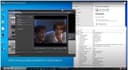
🎞️ Unlock your vintage vault: Digitize, edit, and share your memories like a pro!
The Video-2-PC USB Capture Kit by TIMRUS CREATIONS transforms your old VHS, MiniDV, Hi8, and Betamax tapes into high-quality 720x576 DVD resolution MP4 or DVD files. Compatible with Windows 7 through 11 (32 & 64 bit), it includes all necessary cables, user-friendly capture/edit software, and UK-based support. Perfect for professionals and enthusiasts eager to preserve and share legacy footage with crystal-clear stereo audio and flawless sync.

| ASIN | B0049BE3TA |
| Best Sellers Rank | 46,753 in Electronics & Photo ( See Top 100 in Electronics & Photo ) 446 in Video Converters |
| Brand | TIMRUS CREATIONS |
| Customer Reviews | 4.2 4.2 out of 5 stars (1,854) |
| Date First Available | 26 Oct. 2010 |
| Guaranteed software updates until | unknown |
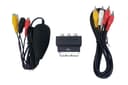
| Included components | USB video capture device, One metre RCA phono lead, Scart-out adapter for VCRs |
| Item Weight | 249 Grams |
| Item model number | Video-2-PC Deluxe |
| Package Dimensions L x W x H | 15.4 x 14.1 x 4.7 centimetres |
| Package Weight | 0.26 Kilograms |
| Part number | ckspwvmdyw1126t |
| Product Dimensions L x W x H | 15.5 x 13.7 x 4.5 centimetres |
| Warranty description | 1 Year Warranty On Parts |
M**M
Excellent Solution For Webcam Transfer To PC
I am not connected in any way to the developer of this Video-2-PC Transfer Kit. This is the first time I have ever tried using one of these video transfer kits. Prior to purchasing this kit, I had spent over a week of trying to transfer mini DV tapes from my Sony TRV33E to my Windows 11 PC using Sony's original firewire, USB streaming and just about everything else I could try without success, I found this 'Video-2-PC Transfer Kit. It did the job first time with perfect high quality results. Very impressive. This kit is more expensive than several other kits on amazon but this kit is of high quality and produces perfect results with clear, rock solid captures. It really is worth paying for this kind of quality and not the less expensive kits out there. The kit included cables to use with this device, necessary USB drivers, clear instructions and a support email address to contact the developer should any further issues arise and VHS video capture software. I used OBS studio on my Windows PC and the clear instructions supplied were needed for this. Very important is that anyone using this kit must have the original camcorder output cable supplied by the manufacturer, (in my case Sony), or, if this is lost, be able to acquire one matching it before using this kit. I'm sure this is the same for all video capture devices and not just this 'Video-2-PC' kit. From my experience, I would advice taking 10 to 15 minutes or so to read carefully the excellent instructions given and to follow these to the letter. This really is time worth spent and will result in perfect results first time. I highly recommend this video transfer kit and it came as a relief that it enabled me to download all my mini DV tapes to my Windows computer for both safe-keeping and editing.
L**M
Works well - Cheap way to convert old format videos to DVD / MP4
This product works well. I converted a raft of old family videos to digital formats using it. I was able to connect a standard VCR player and an old hi8 camcorder via the device straight into the laptop using the ArcSoft software in the bundle. There are enough cables for most occasions I would have thought. The ArcSoft software may look a bit old-fashioned these days but I don’t mind that because it speaks to me of something very tried and very tested. You can perform some basic editing if you require. The process is Capture (your video footage); Edit (the footage into a storyboard); Produce (write storyboard to a DVD or MP4 file). When you capture your films using the software it creates MPEG2 files initially. This is the format I chose to create DVDs to be played in a standard DVD player. Not all DVD players like RW discs though, so if it doesn’t work it may be that you haven’t done anything wrong. It’s worth checking this first, find out if your DVD doesn’t play RW Discs. These MPEG2 files can then be converted to MP4 files, again using ArcSoft. I then uploaded these mp4s to my cloud platform so they could be shared around the family (can highly recommend pCloud BTW). I was able to create DVDs for those in the family who don’t use the internet and mp4s for those who do. It is a very simple process once you are familiar with it. The instructions that come with it are very thorough but read them carefully and take your time. They are written to cover pretty much every eventuality – you can almost feel the writer’s pain as he draws upon the experiences of many questions asked over the years!! But he shares that with us to make this a very smooth experience. For the price, if you have the time to spare, you can’t go wrong. I would estimate that for every hour of footage you have on video allow 2-3 hours to convert, edit and produce. And remember, the quality of your VCR / camcorder is a critical factor. If yours isn’t great then invest in another one, they are cheap as chips these days.
J**G
Better than many others, and worth the slightly higher price.
I used ths product to capture analogue video from an old Sony Handycam. Compared to other similar products that come with very brief instructions in poor English, this is a breath of fresh air. The supplier has clearly gone to a great deal of trouble to prepare documentation, and he also includes an email address and phone number if any extra help is needed. Video capture is an unexpectedly complex art, and the supplied instructions make it a lot easier. The bundled ArcSoft ShowBiz software worked, albeit with some limitations. In my case there was no preview display, and the captured video was distorted to a 5:4 aspect ratio instead of the original 4:3, although this is easily fixed using other software. VirtualDub is also included, although a later version is now available from SourceForge - it's free. It's more of a challenge to set up, but it gives better results if you work carefully through the supplied instructions, but beware of using the uncompressed AVI format unless the video clips are very short, or you have huge amounts of free disk space. The x264vfw codec recommended in the documentation solves the problem, but you need to check the settings carefully to ensure audio and video synchronisation. Again the preview function didn't work for me, but the resulting video was OK. The adapter also works with other applications. I found that the best compromise between quality and ease of use was with Nero Video 2016 (and presumably the later versions) which gave a functioning preview and good quality capture with the correct display aspect ratio. I used VSO Software's ConvertXtoVideo app to do do the fine tuning and conversion to MP4 format. Overall, I recommend this product, but some patience and study is necessary if you are to get the best results from it. It also works with Skype, but not with the Windows 10 "Camera" app, which claims that no camera is attached.
T**A
El sistema en si es como cualquier otra capturadora mas económica, el software que incorpora es precario i complicado, aconsejo comprar cualquier otra capturadora mucho mas económica y utilizar un software gratuito (que los hay) que son mas eficaces y fáciles de manejar
M**G
This is a pretty nice product. I used it on a Toshiba Satellite Core i3 laptop to produce flawless transfers - something I have not seen reliably from other products. A word of caution: the driver/software installation is kind of a pain in the neck. The registration key is printed in a font that is somewhat difficult to read. They even give you a reference to their website to translate that font into something more readable. It took me 4 attempts to activate the software, but it was worth it. If you purchase this, you might as well look up that link in the instructions and go look at it, because you'll probably need it. In fact, I would suggest you read the entire installation guide before getting started. I ran across a problem with audio distortion on the first try, but the correction was mentioned in the documentation. My laptop is running Windows 10 and Video-2-PC works fine with it. It is purportedly compatible back to XP, but I didn't try that. Their suggestion to use a PC less than 6 years old makes some sense, although the analog to digital transfer occurs in the "dongle" that goes between the video source and your PC. If your PC is too slow to keep up with the transfer rate (or other things are running that make it too slow to keep up), you'll probably drop frames or wind up with video and audio that are out of sync. I also have access to Windows 7 and Windows 8.0, but I didn't try them either. I found a convenient, working solution and left it at that. I can say that the information they provided in the included documentation is accurate and the advertising seems to be truthful. If you're looking for such a solution and your equipment is match for what they state as requirements, you should come out just fine.
C**N
Cdr non d'origine, manque un cordon avec la poire. renvoyé à l'expéditeur pour remboursement
C**N
This absolutely converts your VHS to DVD, and it's easy to install and use. They provide a "code" to override a copyright error. I suggest you use that code at the outset and save yourself the trouble of having to backtrack. I'm halfway through my collection of VHS and I'm so glad I purchased this kit.
D**J
Well after literally searching Amazon for any product that would let me digitize old VHS tapes AND work with windows 10, I settled on this product. Its publisher says yes it works on Windows 10, and it does. Many of the products available are old, with drivers written for older versions of Windows, and more importantly don't work in Windows 10. My system runs Windows 10 64-bit with 32 Gigs of RAM, and this video-2-PC digitizer product works extremely well on it. You WILL have trouble entering the serial number into the Arcsoft software, as the font used to print the serial number is, to be nice, less than helpful. After a solid 5 minutes of trying I noticed that the "U" in the printed serial number was a single pixel from looking like a "V", so not having much to lose I tried "V", and it worked. The serial is printed on the back of the install DVD's sleeve. It came with an unmarked DVD, just like what you'd use on your own pc. Pop it into your drive and a menu pops up. Regardless of your skill level the video they have is very helpful, as it goes into both the installation process and how to use the enclosed software. They did though have what I thought was a very unnecessary statement that you needed to unplug all USB devices before doing the install, then plug them in when done. I followed their 'request' anyway and it installed without issue. The unit itself is small, and without any markings. Yes it does get warm while plugged in, and one half of it glows a soft blue. it comes in a small white box with their logo stuck on top. Windows 7 users may have an issue during driver installation, but if they do the documentation AND the video both tell you how to fix that, should it come up. The software, Arcsoft Showbiz does the job, but it is a beginners package. It detected the digitizer and captured fine. I tried using the digitizer with my copy of Cyberlink PowerDirector 14, and it wasn't recognize. So you'll need to use Arcsoft for capturing. The file it saves is in MPEG format, so it was easily opened by PowerDirector. Beginners in video editing should do fine, while more advanced folks will likely just use Arcsoft for video capture, then use their chosen video editor to turn it into a DVD. The DVD also comes with a more advanced capture program, but it isn't the most user friendly. It also captures in uncompressed AVI format, so the capture file is gigantic. In short it works fine and is highly recommended. It is inexpensive and fairly problem free, other than the serial number readability issue. It pays to read their short 4 page instructions first, including the FAQ's at the end. Among other things it shows you how to fix Arcsoft's little issue of saying your home recorded video is copy protected. It is fixed with a one line edit of Arcsoft's config file via Notepad. The only issue I've had so far during capture was when I was fiddling with the screensaver settings while a capture was running. Windows had a momentary brain fart when I saved the screensaver settings, with the result being a momentary glitch in the video capture preview screen. Outwardly Arcsoft seemed fine, but when I viewed the capture file later it was missing all the captured date before the brain fart. I redid the capture of the first part of the video, then pasted them together flawlessly in Arcsoft. In short it pays to leave your pc alone while the capture is running. No biggie. I'm just happy the device works. Oh it also comes with all cables needed to attach the unit to your VHS recorder. Lastly the delivery estimates quoted by Amazon on this product are way off. Mine arrived from England about a week after ordering. Amazon quoted the delivery date 19 days after I got it. it comes registers mail so a signature is required for delivery.
Trustpilot
Hace 2 semanas
Hace 3 días