We remain fully operational. Our teams are working around the clock to ensure your deliveries continue safely.

Descargar la aplicación


Servicios al cliente
Sobre nosotros
Copyright © 2025 Desertcart Holdings Limited
Descargar la aplicación

🖨️ Print Smart, Travel Light, Stay Ahead.
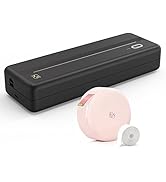
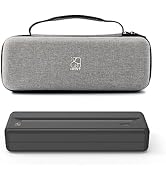
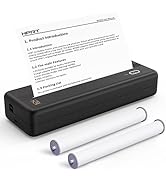
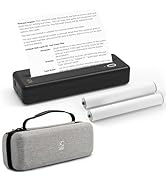
The HPRT MT810 Wireless Portable Printer is a compact, inkless thermal printer designed for professionals on the move. Supporting A4 and A5 print sizes with 300 dpi resolution, it connects effortlessly via Bluetooth to iOS, Android, Windows, and macOS devices. Its durable metal build and powerful 2500mAh battery enable up to 4 days of use or 1600 inches of printing without recharging. Ideal for mobile offices, travel, and quick document needs, it offers cost-effective, mess-free printing in black and white, making it a must-have for the modern professional seeking convenience and reliability.








| ASIN | B0BGXT89D6 |
| Additional Printer functions | Print Only |
| Batteries | 1 Lithium Ion batteries required. (included) |
| Best Sellers Rank | #69,418 in Office Products ( See Top 100 in Office Products ) #26 in Receipt Printers #537 in Computer Printers |
| Compatible Devices | Laptops, PC, Smartphones, Tablets |
| Control Method | App |
| Controller Type | Android, iOS, ipadOS, Windows, Macbook |
| Customer Reviews | 4.2 4.2 out of 5 stars (1,049) |
| Date First Available | November 10, 2022 |
| Dual-sided printing | No |
| Duplex | Simplex |
| Hardware Interface | Bluetooth |
| Included Components | 1 x Portable Printer, 1 x USB-C Cable, 1 x User Manual, Paper |
| Ink Color | Black |
| Item Weight | 1.65 pounds |
| Item model number | MT810 |
| Manufacturer | HPRT |
| Manufacturer Part Number | MT810 |
| Max Copy Speed (Black & White) | 30 ppm |
| Max Input Sheet Capacity | 10 |
| Max copy resolution black-white | 300 dpi |
| Maximum Black and White Print Resolution | 300 dpi |
| Maximum Media Size | 8-inch/4-inch wide roll paper |
| Memory Storage Capacity | 64 MB |
| Model Series | MT810 |
| Number of Items | 1 |
| Print media | Thermal Paper |
| Printer Ink Type | No Ink |
| Product Dimensions | 2.5 x 12.22 x 1.56 inches |
| Scanner Type | Portable |
| Sheet Size | 8 Inches |
| Specific Uses For Product | Home, Office, Outdoor |
| Supported Media Sizes | A4, A5 |
E**H
A Traveler's Best Friend for On-the-Go Printing
I recently added the HPRT Portable Printer MT810 to my travel gear and it has been a game-changer. Here's my take on its pros and cons: Pros: 1. Truly Portable: This printer is compact and lightweight, making it incredibly easy to pack into a backpack or carry-on. 2. Wireless Convenience: The Bluetooth functionality allows for quick and hassle-free printing directly from my iPhone, Android, and laptop. 3. Inkless Printing: The thermal inkless technology is not only environmentally friendly but also eliminates the need to carry around ink cartridges or toners, making it even more travel-friendly. 4. Quick Setup: It was pretty straightforward to set up. The manual is clear, and I was up and running in no time. 5. Versatile: I’ve used it for printing out invoices, tickets, and even quick snapshots while on the road. It’s proven to be extremely versatile. 6. Good Battery Life: I was pleasantly surprised by how long the battery lasts. It's sufficient for multiple printing sessions without needing a recharge. 7. Quality Output: The print quality is quite good for a portable printer, especially for text and simple graphics. Cons: 1. Paper Size Limitations: The paper roll sizes are smaller than standard paper, so it’s not ideal for larger documents. 2. Price of Paper Rolls: While the printer itself is cost-effective, the specialized paper rolls can be a bit pricey. 3. Monochrome Only: It only prints in black and white, which is fine for most of my needs but may not be suitable for those requiring color prints. In my opinion, the HPRT Portable Printer MT810 is an excellent investment for anyone who frequently travels for business or leisure and needs the ability to print on the go. Its ease of use, compact size, and inkless technology make it incredibly convenient, and the quality is more than satisfactory for most tasks. Although it has some limitations like paper size and monochrome printing, these are minor trade-offs for the portability and convenience it offers. Highly recommended for the modern traveler.
V**L
Awesome little printer
It’s my first day, but so far I love this thing. I’m an independent field tech who gets work from a platform. This means as work orders are posted or routed to me, I either request or accept the work. There are many different companies that assign me work and they all require different paperwork. They also require me to print a badge for each work order. This thing is handy because not only do I sometimes forget to grab pre-printed work orders and badges, but sometimes I get assigned a work order while I’m already in the field and have no way of printing out the necessary documents. This printer gives me the ability to be ready for any paperwork regardless of the situation. Right out of the box it was already at 89% battery charge, so if needed it was ready for me. It comes with a simple but informative instructional booklet with a QR code for the app of using on the mobile device. While the instructions didn’t specify how to put the printer in pairing mode (BT), it wasn’t hard for me to figure it out, as most devices use the same process. Once the app was downloaded and the printer was paired, test printing was a breeze. As many have mentioned, the print quality is compatible to a fax machine, but in my personal opinion, it is a higher quality than any fax machine we had in the house when I was growing up. Regardless of opinion, it works perfect for printing the documents I need for work. It is dark and very legible, and the paper is definitely thicker than the fax paper I’ve seen in the past. So far I’ve only seen two down sides to using this printer: I sometimes get an error about parsing the document when I try to open a document from the app. More importantly, I can’t print a document directly from its source, such as my work portal or website. I have to save the document to a folder on my phone, open the print app, and then search for the document. While it’s not terrible, it’s a little inconvenient. I don’t know if the issue is with the app or with the iOS, because the printer doesn’t show up in the list of available printers when trying to print from source. If that changes I think I won’t have any issues, but again, it’s too early to tell. Lastly, there is a travel/storage case available for the printer. I’ve made a separate review for that, so I won’t repeat it here. But I do recommend getting it. I believe I paid $15 for it. Hopefully this review helps you decide, if you’re on the fence about it. There may be printers out there with more convenient features or better quality -idk, but if like me, you’re on a budget and just need something simple for quick prints or on the go stuff, I highly recommend this product. One last thing - for the manufacturers: I work with cables all the time and have to seldomly print labels. My label maker kind of sucks and I see that there are wrap-around label paper for printers. The issue is they’re mostly for laser printers and some inkjet. For my work, I don’t always know the specific label titles that are required until after I arrive. If someone could develop these wrap-around style label paper for this type of thermal printer, that would be amazing. Just putting it out there.
A**R
Worth the money
Was easy to set up. Initially had difficulty printing but troubleshooted and reinstalled the software and reconnected to the computer and works as expected EVERY time. Had to get used to the device but once I got a feel for it, works great!!! I purchased this device to avoid trips to Office Depot for printing. I merely send my document to Adobe Acrobat is what I choose to do, open up the app on my cell, from the app touch DOCUMENTS, locate my document in Acrobat. I can print all pages or a range of pages or one page at a time. Within the app I can also select my paper size and margins. For this printer I find A4 paper with thin margins printing one page at a time is perfect. One page at a time allows me to catch any user errors. After each page I tear off using the included perforation bar. Easy peezy. GREAT INVESTMENT and I can find more A4 thermal paper on Amazon.
J**R
Handy Printer to Have for Smaller Print Jobs
Good quality for the price. Does not print pictures well, but is fine for print documents. Set up was pretty easy. The only issue I had is that after you go to the companies website to download the printer software, you have to make sure to install it after download. Otherwise you will see it in the list of printers to add to your selection, but it will say device not found. I went back and clicked on the download and then my laptop sort of crashed! Everything went black. So that was scary. I just did a restart on my laptop then installed the software and then was able to use it to print. One other item is after a page prints it has teeth on the edge to tear the paper. They are so small and the paper is pretty thick. I did not trust myself to tear the paper because I know I will jam the paper roll! I use scissors to cut each page after it prints.
Trustpilot
Hace 5 días
Hace 1 mes