We remain fully operational. Our teams are working around the clock to ensure your deliveries continue safely.

Descargar la aplicación


Servicios al cliente
Sobre nosotros
Copyright © 2025 Desertcart Holdings Limited
Descargar la aplicación


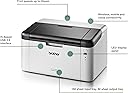
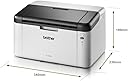
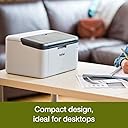



🖨️ Print smart, print fast — your compact office MVP!
The Brother HL-1210W is a compact, monochrome laser printer designed for home and small office use. Featuring wireless and USB 2.0 connectivity, it delivers sharp black-and-white prints at speeds up to 20 pages per minute. With a 150-sheet paper capacity and genuine Brother toner included, it offers reliable, cost-effective printing with minimal maintenance. Its sleek design and network-ready functionality make it an essential productivity booster for the modern professional.


| ASIN | B00NUB8J3Q |
| Additional Printer Functions | Print Only |
| B&W Pages per Minute | 20 ppm |
| Best Sellers Rank | 3,857 in Computers & Accessories ( See Top 100 in Computers & Accessories ) 8 in Laser Printers |
| Box Contents | Brother HL-1210W |
| Brand Name | Brother |
| Color Depth | 1 bits_per_pixel |
| Colour | Black |
| Compatible Cartridge | HL-1210W |
| Compatible Devices | Laptops, Smartphones, Tablets |
| Control Method | Touch |
| Customer Reviews | 4.1 4.1 out of 5 stars (1,404) |
| Display Type | LCD |
| Dual-sided printing | No |
| Duplex | Automatic |
| Global Trade Identification Number | 04977766742221 |
| Hardware Interface | 802.11 b/g |
| Initial Page Print Time | ~5 seconds |
| Ink Colour | black |
| Is Electric | Yes |
| Item Dimensions D x W x H | 29D x 31W x 41H centimetres |
| Item Type Name | Laser Printer |
| Item Weight | 4600 Grams |
| Manufacturer | Brother |
| Maximum Copies Per Run | 20 |
| Maximum Copy Resolution Black and White | 600 dpi |
| Maximum Copy Speed Black and White | 20 ppm |
| Maximum Print Resolution Black and White | 600 dots_per_inch |
| Maximum Sheet Capacity | 250 |
| Maximum Supported Paper Size | A0 |
| Maximum print Resolution Color | 2400 x 600 DPI |
| Model Name | HL1210WRF1 |
| Model Number | HL1210W |
| Model Series | HL-1210 |
| Network Connectivity Technology | USB, Wi-Fi |
| Number of Drivers | 1 |
| Number of Trays | 1 |
| Other Special Features of the Product | Internal Memory(Internal Memory), Paper tray media types: Plain paper,Recycled paper |
| Output sheet capacity | 250 |
| Paper Size | 210 x 297 Millimetres |
| Power Consumption Size | 380 Watts |
| Print media | Unknown |
| Printer Output Type | Monochrome |
| Printer Resolution Horizontal in Black and White | 60.96 Centimeters |
| Printer Type | Laser |
| Processor Count | 1 |
| Product Warranty | 1 Year Manufacturer |
| Resolution | 600 x 600 |
| Scanner Type | Flatbed |
| Series Number | 1200 |
| Specific Uses For Product | Home, Office |
| Total USB Ports | 1 |
| Unit Count | 1.00 ct |
| Warranty Type | Limited Warranty |
| Wattage | 380 watts |
J**R
Excellent little printer for the price
I bought this laser printer because I print very infrequently. My last printer, which I had for a decade, was an inkjet printer. I got sick and tired of going to print a letter or a label, only to find the ink cartridges had dried up. A new black cartridge was about £25. The next time I'd come to use the printer, that had dried out too. Laser printers have nothing to dry up, working in a very different way to your typical inkjet printer. It made sense to buy this, and save a lot of money in the long run. The printer itself is remarkably compact, but feels very solidly built. It came with everything I needed to get it set up. The only snag I encountered was connecting it to my wireless network. I have a Vodafone router, which just would not accept the WPS connection. This isn't the fault of the printer, but necessitated me borrowing a Windows laptop from a friend to get it set up. This was a breeze, but how about some Linux support? With that, I could have used my own laptop. In any case, the printer is greyscale, and produces excellent quality prints. Everything is absolutely razor-sharp with the black text being really black and very legible. It's quiet in operation, jobs spool from my phone, tablet and laptop (Linux sees the wireless printer and just works) and print just as quickly. I've not printed a lot on it, so I can't comment on how long a toner cartridge or a drum last. I did buy both spares so I wouldn't be stuck, and they were very reasonable in cost. Crucially, I used the printer for the first time in a year today. It pinged to life and printed my letter without any fuss. An inkjet printer would have had me down at Tesco buying an expensive cartridge just for a single letter. If you need a compact printer, or if you print very infrequently, you simply can't go wrong with this one. EDIT - I can now confirm that this printer is more than happy with high-quality paper. I'm using it with some really smooth, sleek, white 120gsm paper, and it feeds and prints no bother at all. If you want your letters looking and feeling sharp, this printer allows it.
T**P
Use a PC to set up the wireless connection!
The printer is great. Small footprint, quiet and good quality print. I’d certainly recommend it. However….. Unless you have a computer, setting up a wireless connection via the Brother app, I found nigh on impossible. I used the app on an iPad but it simply wouldn’t detect my home network (WPS was active). Tried manually entering the IP address but that didn’t work either. I gave up after numerous attempts (if you have put paper in the printer, it gives you a report of the failure and some hints - not that they worked for me. I then installed the drivers from the supplied disc on to my (Windows 11) laptop having loaded. You do need a cd/dvd drive but if one isn’t built in they’re cheap enough to by on Amazon. You also need a usb cable as this isn’t supplied. Again very cheap and given the amount you’ll save in toner compared to other makes, worth the investment! The install was flawless and even gave the option to download the latest drivers. Once completed, the printer automatically appeared in the app on my iPad (and myAndroid phone).
D**H
Easy step - easy to work out
Read the comments about people getting a euro plug. mine came with uk plug. so not sure whats that is about, maybe because i brought mine new. They don't include the USB cable any more with printers, but i was aware of this and had one just incase i needed it. But i was plan to set it up as a wireless printer, it was very easy setup. There printer has a WPS button on it, just hold it for about 10 seconds, press the WPS button on your router and the wifi light will stop blinking when you have been successful. if it still blinks hold it on the printer for another 10 secs or more. should work. (i did it from the web page of the router that had more options to make it easier. (it will do a print giving your wifi settings if it worked, so make sure you have paper and the starter toner installed before you do this.) So no needed for a USB cable just to set it up on the wifi if, provided your router has a WPS button on it. once the printer was connected to my wifi, i downloaded the full brother drivers from there web site, installed, setup detected the printer on the next work and installed. and I printed something from MS word to test it and it worked fine. The brother full drivers/software includes a little icon to allow you to see the toner levels which is nice. Prints are crisp and clean, I did have trouble working out how to install the Starter toner that came with it. had to find a youtube video show me. Turns out i was trying to install it back to front, remember when you remove the protective cap, that that part goes in head first. The instructions that it came with was no that clear in the diagram about that bit. I love this printer, simple, fast so i order 2 more toners. should last for years now. I believe the printer only has 38mbs of ram. meaning it might have problem printing large PDF files. there is an option in PDF viewers to "print as image" that should get around this problem, I have not tried this out yet, but bare that in mind. otherwise its perfect for all the simple excel and word documents i print out. there is lots of videos online showing you how to do anything with it so easy to find a solution
B**Y
Not compatible with MacOS 11.5.2
This may be a good printer but DO NOT buy if you have a Mac. This quote from Brother's IT support "From MacOS 11 and above, Brother printers no longer use our own drivers but Apple's inbuilt AirPrint, your printer unfortunately does not support AirPrint so you will not be able to use the printer on that computer and would have to get a newer printer that will support AirPrint" This applies, not only to wireless printing but also even to connecting with a cable. It will not work, AT ALL. 1 star given because the of the ease of return from Amazon. Brother - it is extremely unprofessional to not make this lack of compatibility completely clear for potential buyers.
T**V
Der Drucker ist nun ca .1/2 Jahr im Einsatz. Er ist über WLAN eingebunden - das funktioniert so einfach wie man sich das nur vorstellen kann. Auch ein Linux-Rechner druckr auf ihm... Es gibt eine Staus-LEDs und eine Taste, wenn man zB Papier aufgefüllt hat um die Fehlermeldung zu löschen. Der Drucker ist außen aus robustem Plastik. Im Innenteil merkt man, dass die Führungen etwas weniger stabil sind. Die Tonereinheit ist auch nicht so wuchtig wie bei anderen Druckern - eher schlicht und filigran. Auch das Anschlusskabel ist fest angebracht und nicht als Buchse in die man das Kabel einsteckt. => Es wurde also konsequent gespart, aber ohne Einbußen in der Funktionalität. Cooler Drucker, der wirklich schnell arbeitet.
I**R
In cerca di una nuova stampante, ho deciso di indirizzarmi verso il marchio Brother, in quanto avevo già avuto modo di utilizzare i suoi prodotti, anche se di alto livello, ma non ne avevo mai acquistato uno. Attratto da questo brand, decido di non spendere molto, cerco una stampante economica, ma che stampi bene, la stampante la uso poco e non ho bisogno di stampe a colori, cerco una stampante con la comodità del Wi-Fi in quanto non la voglio sopra la scrivania, la cerco che abbia toner incluso e che in caso di sostituzione sia economico nel prezzo al momento opportuno, la voglio inoltre che sia compatta, in modo da poterla posizionare sopra una mensola della mia camera e la scelta alla fine ricade su questa Brother HL-1210W. Questa stampante essendo dotata di Wi-Fi è comodissima, i pochi euro in più rispetto alla versione con solo collegamento USB li valgono tutti. Si può posizionare la stampante in un angolo della stanza e li vi rimarrà, senza cavi collegati al PC o necessità di trasferire la stampante da un punto a un altro. L'unico cavo che si dovrà usare, sarà quello dell'alimentazione con presa schuko e nel caso con relativo adattatore. L'installazione è semplice, in quanto viene fornita di CD d'installazione, che purtroppo però non ho mai potuto usare in quanto il mio lettore CD/DVD non so perchè ma non è più riconosciuto dal PC. Mi sono così recato sul sito della Brother e ho scaricato il software d'installazione, dotato di tutti i driver e programmi aggiuntivi per un corretto funzionamento della stampante. Pochi minuti e si procede con l'installazione del software, che può essere fatta sia con il cavo USB collegato (non in dotazione) e sia direttamente in Wi-Fi. Io ho usato il primo metodo in questo modo la stampante viene riconosciuta sia con il cavo USB che via Wi-Fi, ma l'installazione può essere fatta volendo senza usare cavi USB ma solo con la rete wireless. L'installazione è abbastanza semplice, richiede pochi minuti e per il wireless, si aggancia al nome della propria rete, quindi è già pronta a essere utilizzata. L'invio dei dati per la stampa è abbastanza veloce, pochi secondi e si mette in funzione e inizia la fase di stampa. I fogli non mostrano segni di rulli o escono ondulati, ma rimangono sempre piatti e il colore della stampa è bella impressa, la stampa è veramente ottima. Altra cosa molto positiva di questa stampante è il fatto che si può stampare via smartphone. Ho un Android e mi è bastato scaricare l'applicazione dal Google Play, configurarla in un minuto per poi ritrovarmi subito a stampare dal telefono, una cosa molto utile se si riceve qualche email o documento e si vuole stampare senza dover per forza accedere al PC. In conclusione consiglio vivamente questa stampante Brother HL-1210W in quanto è compatta, i toner costano veramente poco, ha la comodità del Wi-Fi ed è possibile stampare anche da smartphone, essendo poi compatta si può posizionare senza occupare troppo spazio in un angolo della camera o dell'ufficio senza ingombrare troppo spazio.
Y**E
Très bon
C**O
good
R**.
C'est une petite imprimante qui prend peu de place, et ça fait bien l'affaire pour un particulier qui n'imprime pas tous les jours. L'impression est de qualité correcte pour de la bureautique. Je ne suis pas sous windows, je suis sous linux/ubuntu, je me suis fais aider par chatgpt pour la connecter au wifi car le mode d'emploi n'est que pour windows, mais je m'y attendais. Et ça marche bien.
Trustpilot
Hace 1 mes
Hace 1 mes