We remain fully operational. Our teams are working around the clock to ensure your deliveries continue safely.

Descargar la aplicación


Servicios al cliente
Sobre nosotros
Copyright © 2025 Desertcart Holdings Limited
Descargar la aplicación

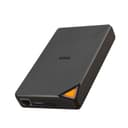


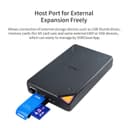


🚀 Elevate your data game with SSK’s smart, speedy, and secure portable NAS!
The SSK 1TB Portable NAS External SSD combines high-capacity solid-state storage with wireless freedom, delivering up to 300Mbps speed and robust P2P encryption. Designed for professionals on the move, it supports multi-platform access via a smart app, enabling seamless file sharing and one-click backups. Its compact form factor fits in your pocket, while flexible USB 3.0 and wireless modes ensure versatile connectivity. Perfect for centralizing and securing your digital life anytime, anywhere.


| ASIN | B0C7ZFJYMH |
| Are Batteries Included | Yes |
| Batteries | 1 Lithium Polymer batteries required. (included) |
| Best Sellers Rank | 68,422 in Computers & Accessories ( See Top 100 in Computers & Accessories ) 202 in External Solid State Drives |
| Brand | SSK |
| Colour | black |
| Customer Reviews | 3.3 3.3 out of 5 stars (262) |
| Date First Available | 14 Jun. 2023 |
| Form Factor | Portable |
| Guaranteed software updates until | unknown |
| Hard Disk Description | Solid State Hard Drive |
| Hard Drive Interface | USB 3.0 |
| Hard Drive Size | 1 TB |
| Item Weight | 260 g |
| Item model number | SSM-F200 |
| Lithium Battery Energy Content | 14 Watt Hours |
| Lithium Battery Packaging | Batteries contained in equipment |
| Lithium Battery Weight | 0.06 Kilograms |
| Manufacturer | SSK Corporation |
| Number Of Lithium Ion Cells | 1 |
| Product Dimensions | 13 x 8 x 2 cm; 260 g |
| Series | SSM-F200 |
J**J
Backing Up Drive
It certainly works as expected, although setting it up to be fully functional you need a bit of technical knowledge as I had to work out what to do. Once sorted, it does what I expected.
L**O
Awful barely working chinese product
I bought this hoping to get an easy to set up network drive. Here's the issues: 1. Terrible poorly translated instructions 2. Requires a poorly made app to set up No matter what I do the app (which by the way is REQUIRED) to connect to your network keeps saying my Wifi password is wrong. I've connected it to other wifis no problem, just won't work with mine specifically. Since the company is chinese there's barely any info on how to troubleshoot it, and whatever there is is very poorly explained. Do not waste your money on this.
S**R
Long Geekish Review
Bought this as i liked the idea of using the wireless feature and go watch movies round friends houses without the faff of plugging in a usb into a tv and eventually forgetting to take it home becuase its stuck behind a massive tv, anyway. I went for the SSD over the HDD knowing that transfering movies to it would be quicker and hoping it will play movies over network. conclusion. will work but bit faffy. music played good. 1080p works with enough buffer time. slow overall. loading pictures onto phones tablets from the device stuggles after 7mb file sizes, few images past the 12mb size wont open or show preview, however you can download them to device with no issues then open. over wifi is expectidly slower. so for example i tried transfering a 4GB file from phone to device via wifi and it estimated between 4 and 5 hours, tried instead plugging phone and drive into a computer and the file transfered in less than 5 minutes. so yea wont be using this for transfering large files via wifi. the softwere that comes with it, will not work. phone, tablet, pc, mac. will not work. but not the end of the world as you can use the samba protocol to map the drive, on pc, phones and tvs if you can download the correct softwere for example kodi player, im not going into detail but will list the nessacery details you will need to log in. on the phone i could use mx player to stream from the drive to the phone via wifi, and access the file system through cx file explorer. so how did i use it without the softwere, first i connected the device to the local wifi, i did this by holding power button for several seconds untill turned on and flashs, now gte your phone out and connect to it via wifi, mine was called F200-07-10, it will connect and say there is no internet what do you want to do and you say stay connected anyway, now open a browser goto 10.10.10.254 it will ask for user name and password they are both admin, now under the network tab in this webpage you can search hotspot find your local wifi and put your details in then the device is connected to the wifi. now using the app cx file explorer we can find its address on our network. so in the app goto network, +new location, remote tab, local netwrok, and here it will scan and show you your wifi drive as an address (you need this) mine is 192.168.1.30 with this address you can connect it to your devices you will also need to know the share path, which is: /share_sda1/ (this is your main drive) /usbsdb1/ (this is if you have anything plugged into the usb) so e.g. goto local netwrok find add new server and in the server box put smb://192.168.1.30/share_sda1/ untick log in automatically and put admin as username and password and your in on a pc right click network and click map drive and in folder box put \\192.168.1.30\share_sda1\ tick connect using different credentials and finsh, it will now ask for user name password (admin) hope this helps any one who has bought this and anyone whos tech savy wanting to use this to watch movies from im thinking i should have made me own nas drive from a rpi4, but after saying all that im keeping this as its compact and light and i can get it work if i keep away from 4k movies
P**N
Its a really neat device
I think it is a very good idea and compact multipurpose device however,I could not get it to work. Its not very user friendly. Plus consider where you are ordering from. It costed 40CAD in dutie fees and another 40CAD to send it back to Scotland.
T**Y
Great for travelling
Excellent addition to travelling on the bike. With days of GoPro footage , it’s small enough to carry rather than have multiple sd cards. Should of bought way sooner
R**N
Don’t buy this.
Ok - buy it if you want to use a cable connection only. Documentation is terrible - even if you forgive it being written in Chinglish. The IOS App is a bit clunky, but just manages a “pass”. My windows 10 PC took 12 hours to make a copy of 22 GB - on a wired network connection! The PC software crashed in mid backup, but recovered nicely on a boot. Scrolling down the progress of the backup is painfully slow and hard to find exactly what is the next file to be backed up. Those readers who are used to a NAS service on their work network will be disappointed with what they have just spent good money on.
C**K
Good hardrive
Good portable drive, takes a little getting used to setting up with devices & using the wireless functions with apps.
W**N
Exactly what I needed. A brilliant concept...
Re the SDD version. Exactly what I needed, a small self contained backup drive, with the added bonuses of being both self driven and Wi-fi connectable, what a brilliant concept. I found the instructions to be an utter failure, an English speaker as I am, they might as well have been written in Chinese for all the sense they made. I tried and tried but I could not configure the unit in any useful let alone meaningful way. Within twenty four hours of delivery, it was in the post on its way back to Amazon. A brilliant concept ruined by the lack of an intelligible set up guide, which incidentally is miniature, my sight being what it is added to the difficulty. IMPORTANT NOTE: I imagine, if you are conversant with the technical terms the guide talks about, that you are conversant with the technology the unit utilises and interfaces with, then this would be a lightweight, self driven powerful piece of kit, that I would purchase in an instant (if it wasn't for the set-up/guide book).
B**É
Je souhaitais l'utiliser comme stockage mais utilisation mal aisé
M**D
Svår att installera, för många moment.
W**S
Tutto bene => 5*
X**O
Buenas, funciona bien pero tiene limitaciones no te dice nivel de batería y no se sabe lo que tarda en la copia de datos
N**A
Salvo un pequeño error en la app que no permite navegar por el sistema de archivos, aunque se pueden buscar archivos y carpetas, la solución es muy práctica. Yo la estoy usando para tener almacenamiento en línea remoto e inalámbrico a través de wifi. La configuración es sencilla. Hice preguntas a soporte y siempre respondieron ágilmente, aunque al final no lograron solucionar el problema, siempre estuvieron buscando soluciones.
Trustpilot
Hace 2 meses
Hace 5 días