We remain fully operational. Our teams are working around the clock to ensure your deliveries continue safely.

Descargar la aplicación


Servicios al cliente
Sobre nosotros
Copyright © 2025 Desertcart Holdings Limited
Descargar la aplicación


Buy anything from 5,000+ international stores. One checkout price. No surprise fees. Join 2M+ shoppers on Desertcart.
Desertcart purchases this item on your behalf and handles shipping, customs, and support to Uruguay.
💡 Light up your life smarter, not harder.
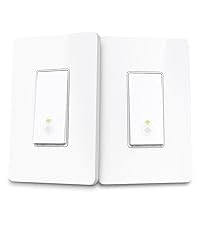
The Kasa Smart 3 Way Switch HS210 KIT is a UL-certified, Wi-Fi enabled smart switch set designed for easy replacement of traditional 3-way switches. Compatible with Alexa and Google Home, it offers app-guided installation, remote control, voice commands, and customizable scheduling. Ideal for multi-location light control, it supports 2.4GHz networks and requires a neutral wire, delivering reliable performance trusted by millions.




| ASIN | B07724HNTX |
| Actuator Type | Push Button |
| Best Sellers Rank | #2,706 in Tools & Home Improvement ( See Top 100 in Tools & Home Improvement ) #10 in Electrical Light Switches |
| Brand | Kasa Smart |
| Brand Name | Kasa Smart |
| Circuit Type | 1-way, 3-way |
| Color | Original Version |
| Connectivity Protocol | Wi-Fi |
| Connector Type | Plug In |
| Contact Material | Copper, Brass |
| Contact Type | Normally Open |
| Control Method | App |
| Controller Type | Amazon Alexa, Android, Google Assistant, IFTTT, iOS |
| Current Rating | 15 Amps |
| Customer Reviews | 4.6 out of 5 stars 19,779 Reviews |
| Global Trade Identification Number | 00845973083113 |
| Included Components | HS210 (2) |
| International Protection Rating | IP54 |
| Item Dimensions | 5.1 x 2.76 x 6.3 inches |
| Item Type Name | TPL-HS210 KIT |
| Item Weight | 0.22 Kilograms |
| Lower Temperature Rating | 32 Degrees Fahrenheit |
| Manufacturer | TP-Link |
| Material Type | Polycarbonate |
| Model | HS210 KIT |
| Mounting Type | Wall Mount |
| Number of Items | 1 |
| Number of Positions | 2 |
| Operating Voltage | 120 Volts |
| Operation Mode | ON-OFF-ON |
| Specification Met | UL |
| Switch Type | Toggle |
| Terminal | Spst |
| UPC | 845973083113 |
| Unit Count | 2.0 Count |
| Upper Temperature Rating | 104 Degrees Fahrenheit |
| Warranty Description | 2 years |
| Wattage | 1800 watts |
G**G
Works great for both three way dimmer and four way configurations
This smart switch comes with two sets of switches. Each set includes two wire nuts, two mounting screws, snap-on face plate, wire labeling stickers, and the switch itself. Install is relatively straightforward. I was able to install these in a 3 way dimmer switch configuration and a 3 way configuration. For both, I made sure to install the smart switch at the switch with the hot wire from the main home circuit, rather than any hot wires coming from other switches in the setup. If you install in any of the switches after this first switch then I believe it won't work. Only one switch is needed - the other switches can stay dumb. This also works for a single pole switch (just wire one of the travellers). For the 3 way dimmer, the other switch is the dumb dimmer switch. It works fine after the install. For the 4 way switch, the intermediate switch is the four way and the last switch is another 3 way switch. I also didn't touch these and they worked fine. To find which switch is the first switch, I voltage tested the common wire on the switch (usually has a black screw, bottom right side of the switch when facing it) while operating the switches. The common wire for the first switch will never go to zero (when measuring between it and ground or using a line tester). In my house, this first switch was also usually in the largest gang outlets or near areas with lots of wiring. If your old switch has the wires inserted into a hole in the switch rather than screwed on the side, you have to find a small paperclip and stick it in the even smaller hole next to it. Then you can pull the wire out. The neutral and ground wires in the smart switch are permanently fixed to the smart switch. They can be wired into any existing bundles of neutral (white) and ground (exposed copper) wires in the outlet box. My outlet box had these already bundled together and secured using a wire nut. I just unscrewed the wire nut and added the cables from the switch. The remaining line/hot wire (black) and traveller wire connections are screwed onto the smart switch. There are no wires coming off the smart switch itself for these. I do not believe it matters which traveller wire goes to which terminal. Typically the traveller wires will be bundled into one sheathed wire in the outlet box, while the line/hot wire will be separate. My traveller wires were colored red and black. The traveller wires are screwed onto the top of the switch, and the line wire to the right side. I found the smart switches to be a lot larger than the dumb switches, but they do just barely fit into the outlet box. I had to chip away some drywall compound from my outlet boxes to get them to fit. If your outlet box is metal, you might want to insulate the traveller wire terminals, as I think they could contact the metal box. Setup is very easy with the app. No QR codes to scan. Just go near the switch and follow the instructions in the app. It does not use Bluetooth either. It seems to search for a Wifi broadcast from the switch. For some of my switches I had trouble connecting the first time, but a retry, or reset of the switch (using a small button on the front of the switch) would allow it to work. Alexa integration is automatic once you link the Kasa phone app. The switch itself is not a toggle like a normal switch, but simply a clicky button. When off, a dim white ring lights up the switch. Below the switch are very small reset and restart buttons. Although I only have one switch per three way or four way setup, the app can still tell if my light is on or off. Finally, these have no delay. I have some Kasa smart plugs plugged into switched outlets. With these smart plugs, there is a slight delay when turning on the switch and waiting for the lights to come on. However, with the smart switches, there is no delay. I assume this is because the smart plugs actually lose power while the switch doesn't. I am very happy with these switches. The setup and use is very easy. Install was very straightforward, even though I had not done any switch installs before. These are one of the cheapest smart switches on the market, but they perform excellently.
J**T
These Just Work
These 3 Way work. Now, I learned you don't "have" to put each one on the same circuit, so if you are okay going against the TP Link recommendation, since they come in pairs, you can put 1 on a plug and have it work, and put the other one on a different plug and name it separately, and BAM you have two 3 way circuits that are on your Alexa control (and Kasa App control etc). I do have some "4 way" switches.....and they area PAIN. I thought they were 3 way, and one of them I got to work (don't ask me how, ha) but the other I cannot. They have an extra wire, and it's a huge pain in the rump. In general, it's awesome though. I copied the review from the "smart plugs" as well, because all of the information is essentially the same, except for the install which for the switch you have to put in the wall switch (TURN OFF BREAKER< HA) and the plugs are just plug in and then the lamp or whatever goes in the plug. The switches you have to know how to wire in a replacement switch in the wall. I will say, these switches are much bigger than just a switch (inside the wall box). I've done other timer switch replacement, and that's the norm. The problem is a lot of these boxes have TONS of wiring stuffed into them. On a few, especially ones that have 3 or more switches in one long box, I've had to pull all of them and trim wires to make them fit. I didn't trim where they weren't workable, but I did get a ton of the excess removed. These plugs work....that’s it, they work. All of the TP Link smart home plugs and Switches work, and work flawlessly that I can see. The Kasa app is great, works flawlessly as well. I have 8 of these so far, and they are mixed in my home with wall switches (TP Link switch and 3 way switches) to all run with Kasa app that is TP link that then works with the Alexa Amazon Echo's throughout the home. These things are truly plug and play. You plug them in, open the Kasa App, and "add device" and bam, it's super easy to follow the directions and add to WiFi in the home. Then open Alexa App on the phone and all of these TP Link items are there in the Smart Home section. It just works, and works flawlessly. The entire system, I add "Routines and Scenes" and you can do all kinds of cool things. In the Alexa App the Routines, I can turn on lights and play the weather on the Echo and then have it start music. I can say "Alexa, turn on the Accent Lighting" and it turns OFF the ones that I want off and don't think are accent, and turns on the ones I say to turn on, and it is super easy. The Kasa app also has timers as much as you want. You can set "turn on" and the time, and create as many as you want, and turn off the same. My Christmas lights indoor and outdoor were all on these indoors and the plugs for outdoors are on switches, so bam those all worked on timers there. Same with my patio outdoor lights. The "only" glitch I've had in the months of using these......I switched Broadband Providers from Uverse to Spectrum. The new WiFi router, I set up the SSID to the exact same, same password, and it "should" have all just connected and never had a glitch. After 2 hours of weirdness, and trying to reset one of them, and get the TP Link to work.....I spent more time online and realized these are 2.4Ghz ONLY. I had set up the 5Ghz Wifi to be the original. I went in and made the 2.4G the old one, and BAM, everything worked FLAWLESSLY again. So, the 5Ghz wave I made the SSID-5G and all was right with the world once again, ha. My wife said this was silliness......she also said that when I got our first DVR 20 years ago......now the DVR is full of HGTV.....and she admits these things are great.
S**E
This is the brand to get for consistent results and are something you can count on.
I've bought several variations of these from this brand. Simple reason, they just work all the time while there have been others, I've used work too, but only some of the time. Installation is quick and easy, plus unlike some others they do include a ground wire. Connecting with Alexa is no problem and automatic after initial setup. I'm pretty new to the Smart Home Game, have changed and updated my network a couple of times. That's where there are a couple of places where these excel with one being able to easily reset them. Another place that is a pretty big deal compared to some others is if you have a dual-band or tri-band network, you don't have to jump through hoops to get this to pick the 2.4GHz range. Some others that I have required turning off the 5GHz band to get them to find the network then I've just had to forget about getting consistent results after turning it back on. As far as fit, they fit perfectly in standard US junction boxes, don't get hot, look nice and as an added kicker, they're budget priced.
R**T
Kasa vs Cheaper Chinese Smart Switches
I have 6 or more smart light switches installed in my house, all connected to Google Home. When I found these made by TP-Link, I expected them to be well made and reliable. Once this pair arrived and they were installed, I've found pros and cons. The first switch was wired in to control my main living room lights and it does an excellent job. The second switch is controlling our LED flood lights that hang from eaves on the corners overlooking our basement garage and drive. Apparently there's a tiny bit of transient voltage leaking through that switch as the LED floodlights overlooking my basement parking area are dimly lit when the switch is off. This definitely was not the case before installing the smart switch however there's a chance that someone up to no good might think they're motion activated and choose not to approach. I like how the Kasa switches have a circular backlight area lit by an internal LED where you should press the switch. It has a very slight glow making it easy to find in the dark and know where to press to activate the switch. My other various brands have something similar but their backlight changes from red to green and is much brighter, so much so that I find that the other brand in my bedroom to be a tiny bit annoying because when they're off they emit a bright green glow that lights up the entire room at night. I had no issues programming and integrating the Kasa switches into my Google Home app. I'm able to use Google Home, my Google Hub and Google mini speakers to control the lights by voice. At bedtime I simply tell Google goodnight and it turns off all the lights that are smart switched, and turns of my fans. I've been a long time TP-Link router user and each has stood the test of time. I expect these Kasa switches to last as well, unlike some of the cheaper off brand smart switches I've already had to replace.
B**K
Simplish to Install, Works Well, Looks Snazzy, Kasa is a Plus
I'm NOT an electrician. My electrical prowess is on par with someone who can accidentally cut clean through an extension cord with electric hedge trimmers, then break out the electrical tape and piecing the wires together to get it functioning again. The HS210 kit comes with 2 3-way switches that can be used in two separate “groups”. The switch that you are replacing HAS TO HAVE A NEUTRAL WIRE, not usually a problem for newer houses. If not, you can try looking at the other switch. If you are tackling this job, I can only assume you can follow the app and won’t burn down your house. The first switch that I upgraded was text book simple. I replaced both switches in a two-gang box to control two separate lights. Each switch had it’s own neutral wire and life was good. It was like putting together an IKEA table… there wasn’t much I could get wrong. The app is a great walk-through and makes an easy job easier, although, it will try and get you to use both of your smart switches to control one light. If you have read any of the other reviews, you know you only need one. Anyway, I move on to my second set of switch I want to replace… same scenario at a glance, but what lied beneath was vexing. When I took off the wall plate and labeled my wires, I noticed there was only one, what I assumed, group of neutral wires. After much time researching and a few incorrect wirings, I found out that if both switches go to a single fuse, you can use that neutral for both switches. The Kasa app works very well on my Android. In comparison to the Smart Life app, the Kasa app is much more reliable. The Kasa app controls my TP-Link brand switches/plugs and the Smart Life is used for my random smattering of no-name brand switches/plugs. The Kasa widget functions like it should while the Smart Life has a tendency to report switch status incorrectly and not toggle when I hit the button. The Kasa widget only has scenes that you can select where the Smart Life has individual switches/plugs. I don’t think I have had any issues with Google Home or Alexa controlling my TP-Link devices, but there have been issues where the Smart Life plugs don’t respond. Also when Google/Alexa are used to turn on Kasa scenes, it seems to work well, however the equivalent Smart Life Smart Scenes don’t seem work. Things I Learned From Install On a normal 2-way switch, the common wire is usually connected to a screw that is darker in color One neutral wire can be used for two switches if they are on the same fuse If you hook up a common wire to a TP-Link HS210 switch correctly, and what you thought was a neutral wire but actually another common wire, the switch glowing circle will light up briefly and then out. It only took twice for me to decide that I was doing something wrong. On the plus side, it didn’t burn out the switch or my house. Finally, if you have kids that are 3 inches way from the HS210 Smart Switch and are more than capable using the smart switch as an actual switch, they will inexplicably shout out to Alexa, who happens to be on the other side of the house, to turn off upstairs hallway lights.
A**T
Great 3way switch that works with regular ones!
Got the single switch on sale for $14.99. Excellent deal and value. From other reviews, I saw that the instructions were very easy to follow (they are provided in the app). I agree, though I may have misread something when setting up mine, because it originally wanted me to install two of them. Fortunately, this was not necessary and it works great to replace a single switch. In fact, my setup is a 4-way setup (3 switches). I figured I couldn't replace the "middle" switch, which is a 4-way, but this one worked great to replace the end switches (which are both 3-way). I was afraid I might need to replace the "lead" switch, but nothing in the instructions said this was needed, and it works great with the one I replaced. My house wiring wasn't done with the proper colors (travelers are supposed to be red wires, where one of mine is black)... but I know enough about wiring to figure that out. This switch has clear labeling to identify the traveler screws, so that made it easy. The white and green are wires coming out of the box, so those are easy. The only one left is the black, which is on a screw terminal. It was an easy install since I could remove the black on my existing switch, and then put the two travelers on, and then connect the white and green as usual. Everything worked great, app connected to wifi quickly and easily, and the indicators on the switch are a nice extra feature (to know that the wifi is connected). Would highly recommend this one, as the instructions were great, and the setup was flawless!
V**Y
Kasa Smart 3 Way Switch HS210 KIT: An Electrician's Review
From a professional electrician's standpoint, evaluating smart home products is a matter of balancing technical functionality with practical installation. The Kasa Smart 3 Way Switch HS210 KIT is a great example of a product that gets this balance right, making it a reliable recommendation for clients looking to upgrade their lighting controls. The physical installation is surprisingly straightforward. The kit includes clear, color-coded wires and well-labeled terminals. The switch itself is a bit bulkier than a standard switch, so you need to be mindful of available space in the gang box, especially in older homes. However, the clear instructions and the fact that it doesn't require a dedicated hub simplify the process significantly. The Wi-Fi pairing is generally seamless, which is a huge relief on a job where you don't want to be troubleshooting network issues. Beyond the initial setup, the reliability of the switch is what matters most. The Kasa app is user-friendly for the client, which reduces my post-installation support calls. The switches maintain a stable Wi-Fi connection and respond quickly to commands, whether through the app or a smart assistant like Alexa or Google Home. The physical button on the switch provides a solid, satisfying click, ensuring it still functions perfectly even without network connectivity. In my opinion, the Kasa HS210 KIT offers excellent value. It's a robust, dependable smart switch that delivers on its promises without an overly complicated setup. For homeowners wanting to add smart features to their lighting without a professional-level network overhaul, this is a top-tier choice.
K**D
Alexa, Turn On the Hall Lights for Five Minutes
I bought these because I had a bad switch in my hall. Unfortunately, when I was working on it, I discovered that particular switch was a 4-way, not a 3-way. Not a total loss as I installed it at the other end of the circuit where it was only a 3-way. It works as intended and both my Google Mini and My Alexa can turn the lights on and off. I have a default off event set for 10:30PM every night in case it is left on. I've also set an away schedule I can enable when we are out of town so that they come on and go off, simulating someone at home. The strangest thing is these are all shown with the lighted circle at the bottom but the switch clearly has a "top" printed on the back side that has the lighted circle at the top. They work either way. The only thing I wish it was capable of doing that I haven't found a way to do is finer granularity on events. Currently, it is at one-minute intervals. These lights are the LED kind that if you flip them on/off/on, they will become night lights. You can't wait more than 5-10 seconds between the on/off/on to make them transition. I've yet to find a work-around. Even with that, it is still a nice switch and allows me to turn the hall lights on with my voice if my hands are full.
Trustpilot
Hace 1 semana
Hace 1 mes