Some deliveries may take a little longer than usual due to regional shipping conditions.

Descargar la aplicación


Servicios al cliente
Sobre nosotros
Copyright © 2025 Desertcart Holdings Limited
Descargar la aplicación

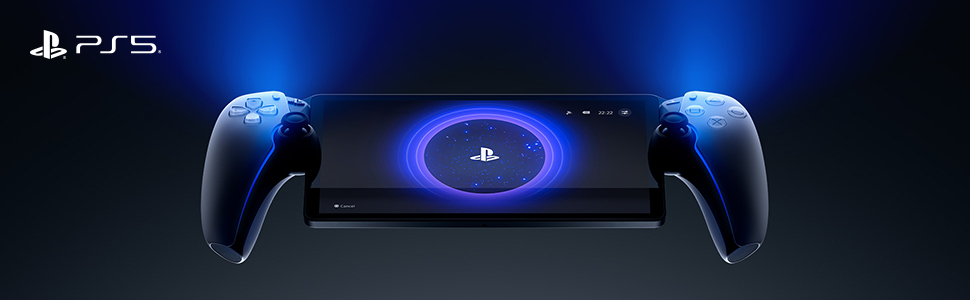
🎮 PlayStation Portal: Your PS5, untethered and unstoppable.
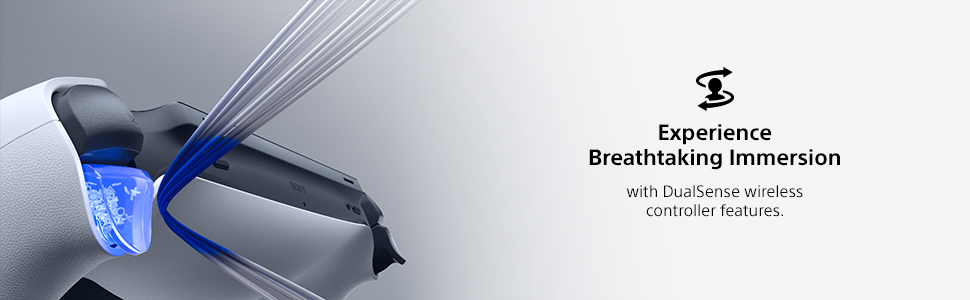
The PlayStation Portal Remote Player is a cutting-edge handheld device that streams compatible PS5 and PS4 games from your console or PlayStation Plus cloud library. Featuring an 8-inch Full HD screen, 60fps gameplay, and immersive Tempest 3D Audio, it delivers premium gaming anywhere with DualSense controller features for true console-quality play. Requires a PS5 console, broadband Wi-Fi, and PlayStation Network account.



| ASIN | B0CJT5DJ16 |
| Batteries | 1 Lithium Ion batteries required. (included) |
| Best Sellers Rank | #39 in Video Games ( See Top 100 in Video Games ) #2 in PlayStation 5 Controllers |
| Customer Reviews | 4.4 4.4 out of 5 stars (6,030) |
| Date First Available | September 29, 2023 |
| Item Weight | 1.19 pounds |
| Item model number | 1000041319 |
| Language | English |
| Manufacturer | Sony Interactive Entertainment |
| Product Dimensions | 14 x 3.88 x 6 inches; 1.19 Pounds |
| Rated | Rating Pending |
| Release date | November 15, 2023 |
| Type of item | Video Game |
P**Y
Works well you just need a good internet connection but it is a good product
Amazing WORKS BETTER THAN I THOUGHT. Besides being stuck at 60 fps in 1080p IT IS AMAZING!!!!!! Would recommend you just need a good internet connection to stream your portal
V**A
Far better than I ever thought
I wasn’t sure if this was going to be as cool as I wanted it to be. But it’s a hundred times better. It could be a bit easier/smoother to switch between profiles, and to get the most out of it you really do need a premium plus account. Those are the downsides. But that premium account gives you access to a really quite good library of old and new games to stream, and you can stream certain games you already own. Streaming is the only way to play if someone else is using the PlayStation, otherwise you can play any game on the portal via the PlayStation. A decent WiFi connection is a must for streaming, and you are kicked off the server if youre inactive for too long. It’s really comfortable to use, the controllers are the same as normal just a little smaller. The screen is absolutely perfect - crystal clear and the exact right size. The screen is comparable in size to the size of the tv across the room, IYKWIM (see pic). I’ve found it to be a more pleasurable way of gaming. I can take it in with me while I make dinner, bring it to bed or to the bathroom (always looking for ways not to scroll on the toilet 😉), and I can curl up with it on the sofa with it. I’ve even tried it on the stationary bike with great success. The battery lasts a good long while, and you get warnings when it’s getting low and when it’s getting desperate. It’ll happily keep going if you plug it in though. I got an off brand charging stand for it, which I’d recommend because it’s fairly sizeable and I could see it being easily knocked off a surface or sat on. Excellent, I choose it over the main console almost every time.
R**N
Games would not load
Had a few problems loading games, other than that it was fine
B**N
PlayStation Portal Remote Player - PlayStation 5
The PlayStation Portal Remote Player is an intriguing addition to the PlayStation 5 ecosystem, designed to enhance the gaming experience by offering remote play capabilities. Here’s a detailed review of this innovative device: ### Design and Build The PlayStation Portal features a sleek and modern design that mirrors the aesthetics of the PlayStation 5. It’s lightweight and ergonomically designed, making it comfortable to hold during extended gaming sessions. The build quality feels premium, with a sturdy construction that promises durability. ### Display and Performance The device boasts a vibrant 8-inch LCD screen with a resolution of 1080p, ensuring crisp and clear visuals. While it’s not OLED, the display still provides good color reproduction and brightness levels, making games look sharp and engaging. The performance is smooth, with minimal latency during gameplay, provided you have a stable and fast internet connection. ### Connectivity The PlayStation Portal relies on Wi-Fi for remote play, streaming games directly from your PS5. The setup process is straightforward, and once connected, it offers a seamless gaming experience. However, the quality of gameplay heavily depends on the strength and stability of your Wi-Fi network. In areas with poor connectivity, you might experience lag or lower video quality. ### Controls The device incorporates the same haptic feedback and adaptive triggers found in the DualSense controller, providing a tactile and immersive gaming experience. The controls are responsive and intuitive, ensuring that the transition from a standard controller to the remote player is smooth and natural. ### Battery Life The battery life of the PlayStation Portal is decent, offering around 4-5 hours of continuous play on a single charge. While this might not be enough for marathon gaming sessions, it’s sufficient for casual or on-the-go gaming. The device charges via USB-C, which is convenient and ensures relatively quick recharging times. ### Use Cases The PlayStation Portal is perfect for situations where you want to play your PS5 games away from your main console setup, such as in another room or even on the go. It’s also useful for households with shared TV usage, allowing you to continue your gaming sessions without hogging the main screen. ### Price and Value Priced at a premium, the PlayStation Portal is a niche device catering to dedicated PlayStation enthusiasts. While it adds convenience and flexibility to the gaming experience, the cost might be a deterrent for some, especially when compared to simply using existing devices like smartphones or tablets with a DualSense controller for remote play. ### Conclusion The PlayStation Portal Remote Player for the PlayStation 5 is a well-designed and functional device that enhances the versatility of the PS5 gaming experience. With its comfortable design, responsive controls, and decent display quality, it offers a solid remote play solution. However, its reliance on a strong Wi-Fi connection and relatively high price point might limit its appeal to only the most dedicated PlayStation fans. If you frequently find yourself wanting to play your PS5 games away from your main setup, the PlayStation Portal is a worthy investment.
B**Y
A great companion to the PlayStation 5 console
At first I did not think much of this device. With Sony's past forays into the handheld world with the PSP and the Vita, I thought that this would be a flop. However after playing with it a bit when I was last on vacation, followed by a bunch of video reviews on the device, I became more and more intrigued. In this day & age of always (well almost) being connected to the internet and the rise of streaming services, I started to see more & more how such a device could work. I also remember my experience gaming on PlayStation Now, and I really enjoyed it back on the PS3. So I decided to take the plunge and purchase a PlayStation Portal for myself. After owning the unit for a few hours, I have to say that I am impressed. Currently using it for remote play. While I do notice a small amount of lag from button inputs, it is nothing that is game breaking. Playing my PS5 Pro games on an 8" screen in 1080P is pretty nice. Detail is pretty amazing IMO. I'll have to make sure that my connection is super stable before jumping into a game like Demon's Souls. I do not want to suddenly lose connection while playing cause I think I would lose it lol! My only issues with the system are the following: - Being unable to use the streaming services you have set up on your PS5 on the Portal - Having to subscribe to the most expensive PS Plus tier (Premium) in order to access game streaming in the PlayStation Portal There should be ample memory & internal storage to handle streaming from Netflix, Disney +, or Crunchyroll. Hopefully in a future update this is remedied. However SONY wanting it's users to subscribe to a $159.00 per year service is outrageous IMO. Now if SONY could offer streaming to anyone subscribed to any PS Plus Tier, that would make more sense. Of course the higher the tier, the more games & features you would have access to. But to make portal game streaming only available to those who are willing to shell out that amount per year is just plain greedy. I mean, people have made the investment to buy the hardware and one of the less expensive PS Plus tiers. The least you can do is just let people game. Okay... enough of the rant lol! All in all, I recommend the PlayStation Portal to those invested in the SONY gaming ecosystem. Hopefully SONY makes the aforementioned changes in the near future.
K**N
Good buy
I don’t play it, but hubby loves it. Clear imaging, good quality. Doesn’t lag & connects well. Playability is good and haven’t heard any complaints yet.
K**P
Finally a standalone handheld console with Cloud Streaming!
Edit 11/9/2025: Upping this to 5 stars. PlayStation released cloud streaming recently and it is AMAZING. All the connectivity issues with Remote Play back to my PS5 are nonexistent with Cloud Streaming, and there are nearly 3,000 games available. The Portal finally feels like a standalone handheld console, rather than being tethered to a (sometimes) finicky Remote Play connection I really wanted to use this device more. I loved the idea of having the ability to play my PlayStation 5 from the couch with something else on TV. However, there are some limitations: 1) Your PS5 must be plugged in via ethernet for this to work well. For whatever reason, the WiFi on this device isn't as strong as something like an iPhone when my PlayStation 5 was connected via WiFi. 2) Not a great device for traveling. Due to the device size, it's hard (especially adding a case) to fit this in a smaller bag or easily pull out on a plane. Obviously, this is limited too by the fact that it needs to connect back to your PS5, and I had pretty consistent issues trying to use hotel WiFi or hotspots to connect. If you don't mind the above flaws, this device feels great, the feedback is great, and as a controller it's the closest thing to a DualSense controller. My only gripe with the controller itself is the sticks are smaller than they are on normal controller, and I would've liked the bigger size.
E**T
Nice hardware, mediocre experience on a half baked product.
I really want to love this thing but Sony needs to do better. I have a gigabit mesh network and have spent the last week adjusting network settings solely for the purpose of getting the PS Portal to run better. My PS5 is already hardwired, I have adjusted my network to force the PS portal to use only 5Ghz on the main router that’s hardwired to the PS5, I have adjusted channels to the network, I have reverted from 160hz channel width down to 80hz (which allegedly works better for the PS portal) I have even done tests where I know for sure the portal is using local play and other tests where I know it’s using online remote play (I have 1gbps connection) and no matter what I do I cannot get this thing to run smoothly, to the point that the resolution drops as low as 360p, games severely lag, or it just flat out disconnects from the PS5 (even while maintaining a Medium-Strong WiFi connection). For whatever reason, Sony caps their download rates for the PS Portal to 15mbps. I haven’t seen the Portal go over 13mbps download even when I’m within a few feet of my main WiFi router, and my router can support transfer rates of 2.4gbps locally. I’m not sure why Sony is limiting the capabilities of the PS Portal, especially on the local remote play aspect but it’s clear that limiting this to just 15mbps (and not a stable 15mbps) is just not going to work. The fact that it’s been over 2 years since the release of this, and this issue hasn’t been resolved, tells me how little effort Sony is putting into this expensive add on. Recommendations from other folks have included going as far as removing the HDMI from the console, changing the settings on the consoles to reflect the PS Portal’s display (turning down 4K res to 1080p, turning off HDR, etc.), adjusting graphical performance through in game settings, and some have gone as far as to disconnect everything from their network while using their portal…. This type of work and troubleshooting is completely unacceptable for a product like this. I really want to like this thing. The controller is nice, the device feels like it was built well and the screen, while not being OLED, is still a very nice to play on. When the PS Portal has functioned properly (which is rare in my case) playing at a full 1080P 60FPS is an amazing experience. But the lack of stability with this product, the hoops you have to run through to get it to work (and it still doesn’t in my case) and the fact that Sony’s not doing much to mitigate these issues other than forcing people to spend another $160/yr for Cloud streaming, tells me that this things a huge fail for someone like myself who just wants to play the games they already own remotely. Save your money, and just get a controller attachment for your smartphone. You’d be better off and honestly, I’ve had a better gaming experience using PS Remote Play on my iPhone than with the PS Portal.
Trustpilot
Hace 2 meses
Hace 2 semanas