We remain fully operational. Our teams are working around the clock to ensure your deliveries continue safely.

Descargar la aplicación


Servicios al cliente
Sobre nosotros
Copyright © 2025 Desertcart Holdings Limited
Descargar la aplicación



Buy anything from 5,000+ international stores. One checkout price. No surprise fees. Join 2M+ shoppers on Desertcart.
Desertcart purchases this item on your behalf and handles shipping, customs, and support to Uruguay.
🔄 Master your multi-device workflow with one sleek switch!
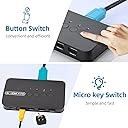
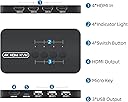
The DGODRT 4-Port HDMI KVM Switch empowers professionals to control up to 4 computers using a single 4K monitor and 3 USB devices. Supporting 4K resolution at 30Hz, it offers quick, driver-free switching via a wired controller or push button. Compatible with multiple OS and HDMI devices, it includes 4 integrated HDMI+USB cables for a tidy, efficient workspace—ideal for offices, media rooms, and multitasking pros seeking streamlined control.

| ASIN | B092PWBV1D |
| Actuator Type | Push Button |
| Best Sellers Rank | #40,924 in Computers & Accessories ( See Top 100 in Computers & Accessories ) #74 in KVM Switches |
| Brand | DGODRT |
| Brand Name | DGODRT |
| Circuit Type | 4-way |
| Colour | Black |
| Connectivity Protocol | hdmi |
| Connector Type | Plug In |
| Contact Material | ABS |
| Contact Type | Normally Open |
| Control Method | Touch |
| Controller Type | Push Button |
| Current Rating | 1 Amps |
| Customer Reviews | 3.9 out of 5 stars 727 Reviews |
| Included Components | KVM Switch * 1, KVM Cable * 4, Wired Switch Button * 1, User Manual * 1 |
| International Protection Rating | IP54 |
| Item Dimensions | 16 x 14 x 9.5 Centimeters |
| Manufacturer | DGODRT |
| Material Type | Acrylonitrile Butadiene Styrene |
| Model Number | KS604H |
| Mounting Type | Panel Mount |
| Number of Items | 1 |
| Number of Positions | 4 |
| Operating Voltage | 5 Volts |
| Operation Mode | Manual |
| Specification Met | IP54 |
| Switch Type | Toggle |
| Terminal | Physical |
| UPC | 751031441859 |
| Unit Count | 1.0 Count |
| Wattage | 5 Watts |
S**R
Budget friendly KVM switch for upto 4 computers that share 4 devices (monitor, keyboard etc)
This is a budget KVM switch for connecting upto 4 computers to a common monitor, keyboard, mouse or usb storage. This is very budget friendly - At around 2000/- INR, you get this product. It comes with 4 special HDMI cables (the one that has HDMI and USB in one end). I have attached the photo. If they also include a single HDMI cable that connects to monitor - that will be bonus. Very compact. Very minimal wiring - just the 4 cables that go into individual computers/desktops. Other than that - you need to connect your output devices - your monitor (HDMI), mouse (USB), keyboard (USB). I connected 3 input devices - one is my office mac laptop, second my personal laptop, third my desktop box. In the output section, I connected my Dell P2725H monitor, keyboard and mouse. It worked without any extra software etc. Its easy to install and use. Switching takes around 1-2 seconds and works very well. Overall - first impression - very satisfied. I will post an update after few months on the durability of this product.
N**M
Good product, but with clear room for improvement
The product is good overall and comes with all the required cables in the box. Setup is straightforward, and the build quality is decent. However, it only supports 4K at 30Hz, which is a letdown—4K@60Hz should have been supported. Also, the HDMI and USB are combined into a single cable. In my case, since my laptop’s USB port is not near the HDMI port, the cable was unusable. Because USB isn’t provided separately, I couldn’t connect my keyboard and mouse through the switch. Final take: A good product for basic use, but limited by 30Hz at 4K and an inflexible product-cable connection design.
Z**V
Does the job as advertised but only supports max 4k 30Hz
Compact lightweight KVM with 3 USB 2.0 for use with upto 4 devices with somewhat lengthy wired remote device selector. Takes a few seconds to switch but have to change resolution & refresh rate accordingly (Max 4K 30Hz) prior to connecting to the KVM. Nice workaround is to use the USB connection (without using the attached HDMI) and a direct HDMI connection to your main display device (but you have to switch individually to the corresponding device input on both the KVM & the display) to get HDR DV or higher refresh rates. Otherwise quite functional if you don’t need better/higher video output
Trustpilot
Hace 2 semanas
Hace 2 días