We remain fully operational. Our teams are working around the clock to ensure your deliveries continue safely.

Descargar la aplicación


Servicios al cliente
Sobre nosotros
Copyright © 2025 Desertcart Holdings Limited
Descargar la aplicación
Buy anything from 5,000+ international stores. One checkout price. No surprise fees. Join 2M+ shoppers on Desertcart.
Desertcart purchases this item on your behalf and handles shipping, customs, and support to Uruguay.
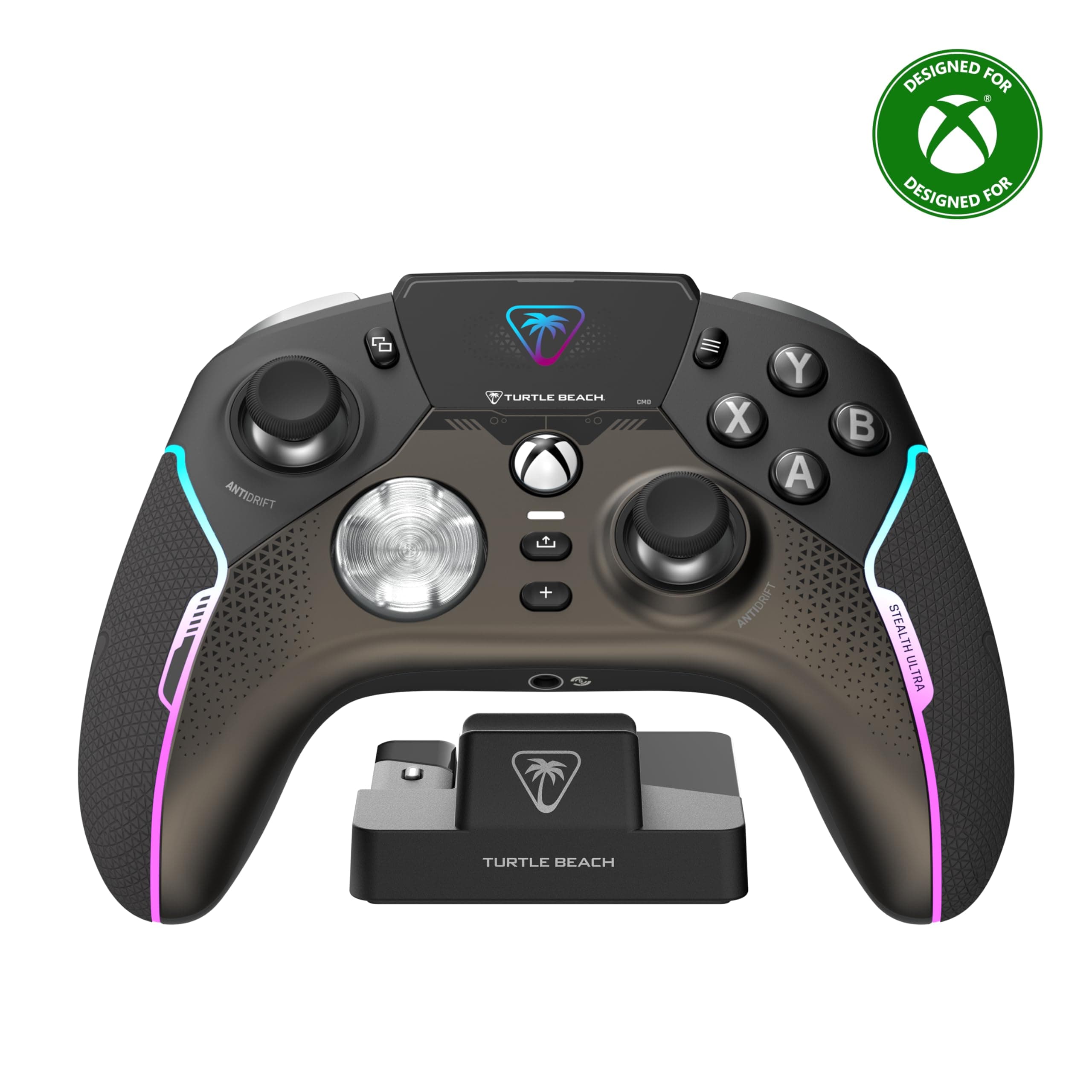
🎯 Elevate your game with precision, power, and style — don’t get left behind!
The Turtle Beach Stealth Ultra is a high-performance wireless gaming controller designed for Xbox Series X|S, Xbox One, and PC. Featuring lag-free 2.4 GHz wireless and Bluetooth connectivity, it offers up to 10 hours of battery life with rapid 2-hour charging via its included dock. Its innovative Connected Command Display allows real-time customization and social notifications, while Hall Effect thumbsticks and mechanical microswitch buttons deliver precise, durable control. Perfect for gamers demanding cutting-edge tech and seamless customization.


| ASIN | B0CJVQFZ1S |
| Batteries | 1 Lithium Polymer batteries required. (included) |
| Best Sellers Rank | 949 in PC & Video Games ( See Top 100 in PC & Video Games ) 23 in Xbox Consoles, Games & Accessories 39 in Xbox Series X & S Controllers 75 in Xbox One Consoles, Games & Accessories |
| Country of origin | China |
| Customer reviews | 3.6 3.6 out of 5 stars (2,530) |
| Delivery information | We cannot deliver certain products outside mainland UK ( Details ). We will only be able to confirm if this product can be delivered to your chosen address when you enter your delivery address at checkout. |
| Item model number | TBS-0710-05 |
| Language | Japanese |
| Product Dimensions | 16 x 6.43 x 11.99 cm; 376.48 g |
| Release date | 10 Nov. 2023 |
S**S
Really good alternative to the official controllers, now my go to controller!
I was dubious at first, but I plumped for this controller over another "Elite" Microsoft controller as I've had two of them so far and the right shoulder button has "gone" on both of them! I decided if I was going to spend in the region of £120 on a premium controller I'd try something different. Been going a few months on this now, mostly playing Assassin's Creed Odyssey, which is intensive on that top right shoulder button since it's the main attack one! Still going strong and cracking heads with it. The controller sits nicely in the hands, the buttons are slightly out from the standard controller but you get used to it very quickly. It's very responsive and it looks good too, what with all the LED lighting and so on. About the lighting, it may contribute to the battery consumption quite considerably. I've not run out yet, but after maybe 6 hours of gaming I have noticed when I put it back on charge it is around the 30% mark. This might be a consideration for people out there who have a worse gaming habit than me! You can turn the lights off and so on, so you can probably extend the battery life to a certain degree if you play with the settings. I've ostensibly used this on my X Box, but I did plug it into my laptop and it performed equally well on there; plus you have the application to download where you can program the additional buttons, set profiles and the like. I have had occasions where it took a couple of minutes for a connection between the controller and the BluTooth stick that comes with it. I don't know though, that may have been me, so I'm not going to dock points for it. Overall, a very nice peripheral and one that I am glad I took a chance on. Mostly because 6 months on I'm not looking to replace it because it's faulty, like the similarly priced Microsoft ones!
O**L
Not worth the money IMO
For transparency I’ll make you all aware upfront that I have returned this controller. I was debating for a good few weeks whether to buy this controller or one of its competitors. After watching and reading countless reviews I finally settled with this one and pulled the trigger (mind the pun). I guess besides the actual issues (which I’ll detail below) I just expected more from a near £200 controller. It just feels - not quite right. I don’t know how to explain it but the ergonomics and feedback of the controller just feels so awkward and uncomfortable. So let’s get into the actual problems with the controller I received specifically: - I could swear I was sent a pre-owned controller as so many signs suggest this - the box was marked and looked like it had been re-taped, the controller case was missing, as was the USB cable. The controller itself had grease marks on and the screen had finger prints. Now I know none of this was due to Quality Inspection because of my next point. - These controllers are mass produced and have very little, to zero human QA. So mine for example arrived with a list of faults. - the LB bumper doesn’t click and it’s very hard to actually press it for it to register. -The right stick has crazy stick drift (Uhm so much for Hall effect stick). - The right D-pad button crunches and misclicks and randomly triggers the left D-pad button which is bizarre. - The controller only works while wired as whenever it is used wireless it cuts out randomly every couple of minutes. - Using the controller with a headset is absolutely useless as everyone I usually play with has said my headset (which is decent) has started sounding robotic and muffled and quiet ever since using it with this controller, I have tried multiple different mic related settings in the controller setup and nothing! - controller doesn’t work with my phone (iPhone 15) - the docking station is useless due to the controller being wired 24/7 All in all, a less than joyful experience and a disappointing inconvenience. As I mentioned earlier I have returned this now (due to lack of support from Turtle Beach) and I will be going with another brand 😄
M**T
Lightweight, versatile and easy to use
Got this when it was in a sale and my current controller (vanilla xbox controller) was getting stick drift. I have used standard controllers and the xbox elite controller for comparison. The elite, while weighted and having a solid feel, broke 3 times in a year that I had to send back to get replaced, before it broke again out of warranty and I was given a discount to buy a new one so I gave u and went back to standard controllers. On getting this I was pleased with it straight out the box, although it is lightweight, it feels solid. on first set up to the xbox I downloaded the app to manage the controller settings, this initially put me off. It felt overly complex and hard to navigate, however, after becoming more familiar I discover that all the settings are able to be changed from the controller itself in a very user friendly interface on the controller display. This then made the xbox app easier to understand, though I still change all setting directly on the controller. Yoju can set different profiles, change the controller colours, switch hair triggers on or off, reset calibrate the controller thumbsticks and triggers, change various headphone auido options. The battery life is great, though if you have all the lights on, vibration etc etc it will obviously draw the battery a lot quicker. This is a fantastic bit of kit and so far has served me well. Very happy.
J**S
Triggers fail and ruin game experiences
This WAS an awesome bit of kit, felt great and when you got used to some of the quirks it was superb, however the build quality is appalling where the triggers move laterally and then only activate the function on a game. Ruined many a game for me, until I went to a different replacement controller. Sadly there is zero suitable customer support for the faults. I love the headsets, and always will, but the controllers are a huge let down. Not worth the money in my personal opinion
L**K
So far so good. I have no complaints. It feels great. Love the crisp buttons. No grinding sticks, no button issues, no broken triggers. Had it for almost a year. It has turned off a couple times. But so has my elite 2 and my vader 4. Charger works great. Battery isnt the greatest but ive never had a issue. Priced high yes. I got it on sale. But i have no complaints. And i play more then the average guy.
T**Y
J'ai récemment acquis la manette Turtle Beach Stealth Ultra, et je suis vraiment impressionné par ses performances et ses fonctionnalités. Points positifs : Confort de prise en main : La manette est ergonomique et agréable à utiliser, même lors de longues sessions de jeu. Les poignées antidérapantes offrent une bonne adhérence, ce qui est très appréciable. Réactivité des boutons : Les boutons sont très réactifs et bien positionnés. Les gâchettes et les bumpers offrent une réponse rapide, ce qui est idéal pour les jeux d’action et de tir. Connectivité sans fil : La connexion sans fil est stable et sans latence, ce qui permet une expérience de jeu fluide. La portée est également impressionnante. Station de charge rapide : La station de charge est très pratique et permet de recharger la manette rapidement. Cela évite d'avoir à chercher des câbles et rend le rangement plus facile. Personnalisation : La possibilité de personnaliser certains boutons et de modifier les paramètres de la manette est un excellent ajout pour les joueurs qui souhaitent adapter leur expérience. Points négatifs : Poids : Certains utilisateurs pourraient trouver la manette légèrement plus lourde que d’autres modèles, mais cela dépend vraiment des préférences personnelles. Autonomie de la batterie : Bien que l’autonomie soit raisonnable, il peut être nécessaire de la recharger fréquemment si vous jouez intensivement. En résumé, la manette Turtle Beach Stealth Ultra sans fil est un excellent choix pour les gamers qui recherchent confort, réactivité et praticité. La station de charge rapide est un vrai plus, et je recommande cette manette à tous ceux qui veulent améliorer leur expérience de jeu !
M**A
No puedo decir que lo prefiero antes de mi series elite 2. Pero si puedo decir que es muy cómodo y pesa muy poco. Está bastante bien. Ya depende del uso que le quieras dar.
P**R
Der Stealth Ultra ist eine Antwort von Turtle Beach auf den Elite Series 2 oder den Scuf Instinct. Auch wenn er sich nicht individuell konfiguriert bestellen lässt, halte ich ihn dennoch für einen ernstzunehmenden Kandidaten. Konnektivität: Hat man erst mal die Software installiert und alle Updates durchlaufen, verbindet sich der Controller mit einem Klick zuverlässig über den Dongle am PC. Bei der Geschwindigkeit kann ich keinen Unterschied zu kabelgebundenen Verbindungen feststellen. Laut Angaben gehört er auch zu den schnelleren Controllern, auch ohne Übertaktung. Laden und Batterieleistung: Das Laden erfolgt durch die mitgelieferte Ladestation, in der man auch den Bluetooth-Dongle einsteckt. Nach ca. 5 Stunden (angeschlossen via USB am PC) hat der Controller seine volle Ladekapazität erreicht. Ich spiele mit gedimmtem Display und sehr schwacher LED-Optik und komme ca. 15 Stunden mit einer Ladung aus. Ob man die angegeben 30 Stunden auch erreichen kann, ist fraglich – zumindest bei schnellen Spielen wie Rocket League oder FPS Games. Komfort: Der Stealth Ultra liegt sehr gut in der Hand. Gamer, die einen Xbox-Controller Series X gewohnt sind, brauchen sich hier kaum umzustellen. Es ist keine Gummierung wie beim Elite verbaut, aber der verwendete Kunststoff ist an den Außenflächen etwas weicher und liefert so genügend Grip. Die Anordnung der Sticks und der A,B,X,Y Buttons ist ebenfalls identisch zum Xbox-Controller. Sticks und Buttons: Ein wichtiger Punkt zur Kaufentscheidung waren für mich die verbauten Halleffekt-Sticks. Stickdrift ist eine der häufigsten Ursachen für defekte Controller, da die ständige Reibung zur Abnutzung der Mechaniken führt. Durch Magnettechnologie ist dieses Problem hier nicht mehr gegeben – ein klarer Vorteil gegenüber dem Elite Series 2, der, glaubt man den Einträgen diverser Reddit Foren, besonders häufig von Stickdrift betroffen ist. Die Standard-Buttons sind mechanisch und arbeiten mit Mikro-Switches – daher hört man auch, durch ein angenehmes Klickgeräusch, dass man den Button gedrückt hat. Für Spiele wie Rocket League, wo man auch mal mehrere Buttons gleichzeitig drückt oder auch mal die Buttons „fächern“ muss, kann das tatsächlich auch ein Nachteil sein. Ich selbst spiele aber auch RL und kam nach kurzer Umgewöhnung recht gut mit den Buttons zurecht. Das Steuerkreuz (Dpad) ist ebenfalls mit Mikro-Switches ausgestattet. Ich verwende das Steuerkreuz aber nur recht selten und kann zur Bespielbarkeit wenig sagen. Die Schultertasten (Bumpers) sind ebenfalls mechanisch und lassen sich an allen Stellen recht gut klicken. Ich hätte mir für den LB und RB allerdings noch eine kleine Erhöhung der Buttons zur Mitte hin gewünscht, da ich mit meinen langen Fingern gerne mal über die Tasten greife. Die Trigger-Buttons haben einen normalen Widerstand beim Drücken, der nicht zu stark ist und die Finger bei längerem Spielen auch nicht ermüdet. Die Trigger-Stopps begrenzen gut 90% der Distanz und sind daher gut für schnelle Shooter geeignet. Die Back-Buttons gehören aus meiner Sicht zu den Design-Highlights des Controllers. Im Gegensatz zu vielen anderen Herstellern, ist die Anordnung der Buttons sehr ergonomisch durchdacht. Mit einem normalen Gripp lassen sich alle vier Buttons gut erreichen. Bei den inneren Back-Buttons kommt es gelegentlich mal zu „Missclicks“, jedoch meist nur dann, wenn man den Controller kurz einhändig halten muss. Auch die Back-Buttons machen einen mechanischen Eindruck und reagieren sehr gut. Die Menü- und Sondertasten sind nicht auf der gleichen Höhe wie beim klassischen Xbox-Controller. Hier muss man sich lediglich etwas umgewöhnen. Display: Ich nutze das Display eigentlich nur, um zwischen meinen Profilen zu wechseln. Aber man kann hier auch die LED-Beleuchtung, die Tastenbelegung und die Konnektivität einstellen. Theoretisch kann man sich sogar mit anderen Spielern über die Controller unter dem Menüpunkt „Social“ vernetzen. Allerdings habe ich das bisher nicht verwendet und kann dazu nichts sagen. Die Helligkeit des Displays lässt sich ebenfalls einstellen. Nach X Minuten/Sekunden kann man das Display auch ganz abschalten lassen, um die Batterieleistung zu erhöhen. Fazit: Für mich ist der Turtle Beach Stealth Ultra aktuell der beste Controller für den PC. Wie er an den Konsolen funktioniert, kann ich nicht beurteilen. Ich halte ihn mit 200 Euro für etwas überteuert. Bei ca. 150 Euro hätte er ein wirklich unschlagbares Preisleistungsverhältnis. Ob die verbauten mechanischen Switches sowie die Halleffekt Sticks auch zu einer längeren Haltbarkeit führen, wird sich noch zeigen. Nach einem Monat intensiver Nutzung habe ich jedenfalls noch keine Probleme.
R**.
Top controller ! Vind de TurtleBeach Stealth Ultra veel beter dan de Elite controllers van Microsoft die super snel stuk gaan, vooral de schouderknoppen en de sticks die gaan driften. Dit is bij verre de beste xbox controller die ik tot nu in 6 jaar tijd heb gehad en nooit meer last van stickdrift dankzij de antidrift sticks die via magneten werken. BELANGRIJK voordat je begint !!! Sluit eerst de USB C aan op de docking station/oplaadstation die bij de controller wordt geleverd en daarna de USB A op je Xbox (series), start je xbox daarna pas op en laat alles zitten zoals het nu zit. Wacht echt met het aanzetten van de controller anders loop je tegen mogelijke problemen aan want er moet eerst geupdate worden (ja ik weet je kan niet wachten maar nog niet aanzetten je controller, maar dit is belangrijk !) Ga eerst naar de Microsoft Store waar je ook je spellen zoekt op je Xbox en zoek de Controller Center 2 app van TurtleBeach en installeer die op je xbox. Zodra dat klaar is dan open je de App op je Xbox en daarna zet je de controller aan en verbind die met de xbox (gaat automatisch, anders de pair knop op je xbox indrukken en dan het knopje die op je dongel/usb transmitter zit die weer aan de linkerkant van je docking station zit ingeplugd, zie foto's) Ga met de rechter schouderknop op de controller naar Firmware update en selecteer eerst de Docking Station die je wil updaten ! Wacht tot dit klaar is en zorg dat je het niet onderbreekt wanneer die aan het updaten is!! Als het klaar is dan trek je alleen de USB C los van je docking station en plug je die in je controller tussen de LB en RB schouderknoppen terwijl de USB A gewoon nog ingeplugd is op je xbox. Selecteer dan bij Firmware update de Stealth Ultra controller die je wil updaten en wacht tot deze helemaal klaar is zonder te onderbreken, deze update duurt wel iets langer. Als deze update klaar is dan is het wat betreft de updates in orde en moet je af en toe deze handeling herhalen om nieuwe updates te zoeken en te installeren. Doe dit dan weer voor beide de docking station en de controller! Nu steek je de USB C connectie weer in de docking station/snellader of als je bedraad wil spelen dan laat je het aangesloten op je controller. Maar je kunt nu ook de Dongel/Transmitter die links op je Docking Station (zie foto's) zit aangesloten los halen van je docking station en dan steek je de dongel/transmitter voorin de USB A aansluiting op je xbox en kun je draadloos spelen. En zodra je de controller moet opladen dan steek je de USB C kabel in de docking station om te snelladen met je controller erop of als je tijdens het spelen wil opladen dan doe je de USB C kabel in je controller terwijl de andere kant USB A zit aangesloten op de voorkant van je xbox in de USB aansluiting. Snelladen gaat dus wel alleen met de controller op je docking station geplaatst en de USB C kabel dus op je docking station aangesloten en de andere kant USB A op je Xbox aangesloten aan de voorkant. Succes en veel plezier met deze fantastische controller die hopelijk niet zo snel stuk gaat als alle anderen, fingers crossed 🤞🏻 En ff complimenten voor de logistiek afdeling bij Amazon 🫶🏻 dinsdag avond rond 22:00 uur besteld en woensdag de volgende dag al om 15:00 uur in huis 👍🏼
Trustpilot
Hace 2 meses
Hace 2 semanas