We remain fully operational. Our teams are working around the clock to ensure your deliveries continue safely.

Descargar la aplicación


Servicios al cliente
Sobre nosotros
Copyright © 2025 Desertcart Holdings Limited
Descargar la aplicación
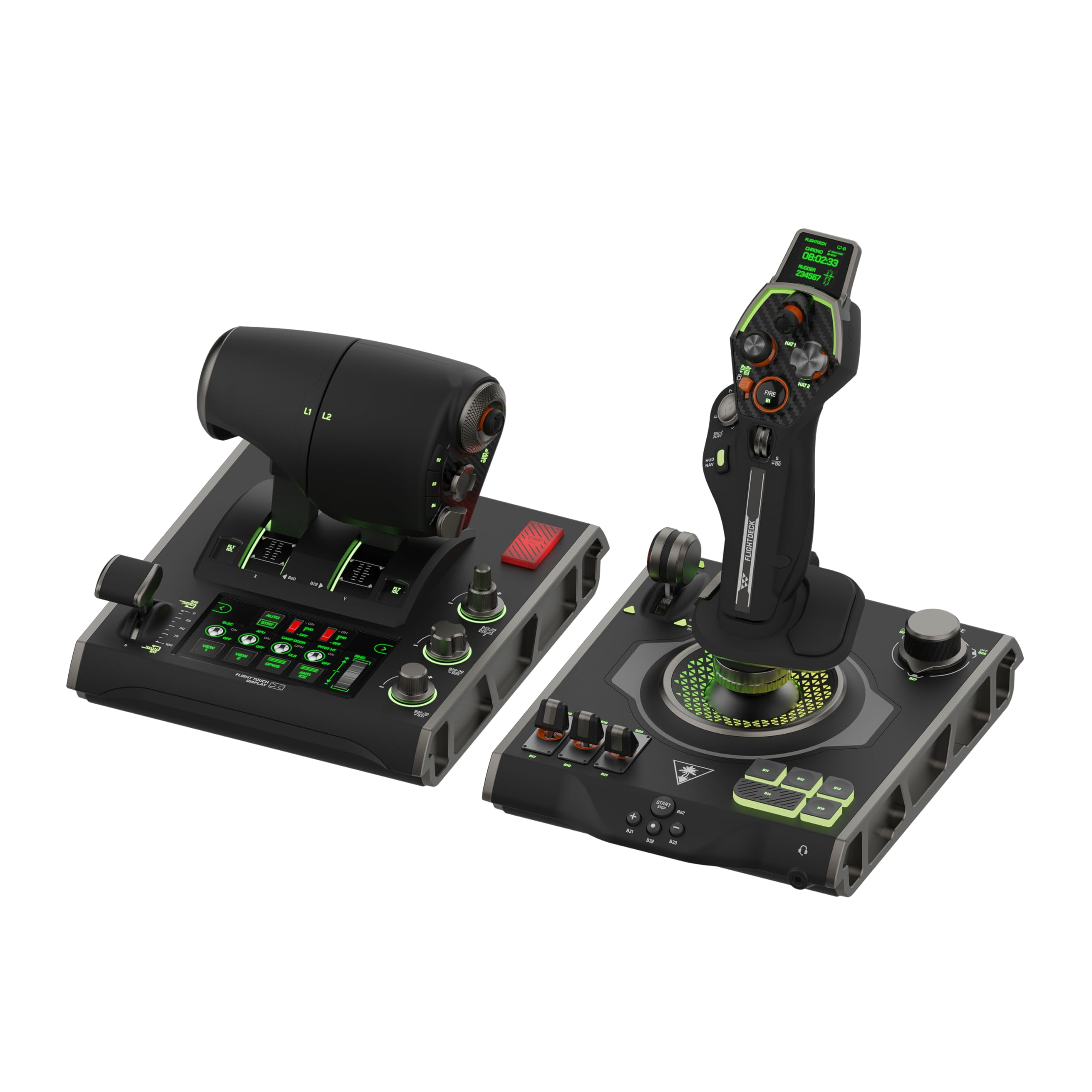
✈️ Elevate your flight sim game with the VelocityOne — where precision meets next-level immersion!
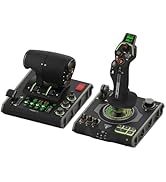
The Turtle Beach VelocityOne Flightdeck is a cutting-edge HOTAS system designed for Windows 10 & 11 PCs, featuring 139 programmable controls, a pioneering Flight Touch Display, and hall-effect sensors for precision. It offers customizable RGB lighting, adjustable ergonomics, and integrated audio enhancements, making it the ultimate tool for professional-grade air and space combat simulation.












| ASIN | B0CPQ7RF6Z |
| Best Sellers Rank | #637 in Video Games ( See Top 100 in Video Games ) #3 in PC Game Flight Controls |
| Date First Available | December 14, 2023 |
| Item Weight | 9.41 pounds |
| Item model number | TBS-0724-05 |
| Language | English |
| Manufacturer | Turtle Beach |
| Product Dimensions | 6.93 x 20.63 x 10.04 inches; 9.41 Pounds |
| Release date | February 13, 2024 |
| Type of item | Video Game |
A**X
Amazing HOTAS for the price
(Bought on sale) I have owned this HOTAS for a few weeks at this point with regular use in combat flight simulators (DCS World, War Thunder), and I can confidently say that this is an amazing HOTAS system for the money, Turtlebeach really outdone themselves with this product. The build quality is amazing and all the buttons and switches function perfectly. However, and this was stated quite a lot before me- The three switch covers on the Joystick base feel loose and wobble on the metal switch arm itself- However for me it is not an issue at all. _Stick_ Pros: - Stick grip is very ergonomic and fits most hand sizes with the sliding feature. - A lot of programmable buttons, switches, HAT switches, joysticks and rotary switches. - Build quality is amazing for the price. - Very satisfying buttons and switches. - Very responsive gimbal. Cons: - Pretty useless screen ontop of the stick - "Mouse" feature on the pickle button is very rough and unresponsive, as well as also being useless as it is right now with how choppy it is. _Throttle_ Pros: - Very accurate throttle readings. - Extremely smooth throttle sliding. - "Fire" button extremely satisfying to press (personal opinion) - Many useful buttons, HAT switches, 3 position switches and joysticks all over the throttle grip. - Split throttle feature, can prove useful in certain twin-engine aircraft. - Useful programmable screen (Can make your own switch panel using keyboard bindings in the software) that makes use of digital switches, dials and buttons. - Satisfying knobs and dials near the throttle grip Cons: - Never found a use for the "flap" lever as no game I tried recognizes the lever moving (as an axis), instead recognizing the switch clicks on the bottom and top of the travel - Touch screen is pretty low framerate and can wash out at certain angles. Overall, I really recommend buying this HOTAS system as it is a great product overall and you get an amazing system without breaking the bank like some of the more higher end HOTAS out there by Thrustmaster, Winwing, Etc. And you get a lot for what you pay which is always a big plus!. and I really recommend buying the Turtlebeach Rudder pedals along with this HOTAS system for an immersive flying experience!.
A**R
EXCELLENT. BUY IT.
Amazing. Switched my thrustmaster 16000 and rudimentary throttle quadrant for this to play Warthunder sim in VR and DCS and so far all I’ve played is Warthunder, but it works like a charm. Haven’t had this much fun flying in a long time, you have to map out each button for Warthunder and DCS but anyone who plays will know this already. The only complaint I have is that one of the 6-8 hat buttons doesn’t have a binding for if you click down and only works directionally. Would be an issue if there weren’t FIVE OTHER hat switches that do let you bind clicking it. Buy it you won’t be disappointed.
J**S
Very nice controllers BUT game compatibility is lacking (11 games) - support is awesome
I bought Everspace 1 hoping I could use the Flightdeck with it, and while I like the game to a certain extent, I am thoroughly P!$$3d 0ff that my flight stick and throttle aren't compatible with it. I have played with both the keyboard and mouse, as well as an Xbox contoller; while the game is playable with either (each has definitive pros and cons compared with each other), I would have much preferred using the flightstick (Turtle Beach Velocity One Flightdeck, so shame on them for not supporting their hardware better). Supposedly they are compatible with Everspace 2, but I just wasn't impressed with the first one enough to want to spend money on the second (at least I'll probably buy it when it goes on a good sale). To be fair, while my Flightdeck is nice, really nice, however, the support for multiple games REALLY $uck$. At this time Turtle Beach is only showing they are compatible with only 11 games, WTF??? for as expensive as it is, really? But I suppose that part of that is in the game makers too, having so little compatibility with more "elaborate" controllers, which again is why I'm kind of disappointed in Everspace, so shame on them as well. Truthfully, I don't really like using the Xbox controller for most games other than some platformers, for flight games, even this one which is a more "basic" sim (well okay, not sim, more of a shooter), I just don't like controlling with it (forget using it in an FPS, it feels like you're playing gimpy-games). Regardless, any game that offers any kind of flight mechanic, I'd prefer to use a flightstick, just as any driving game I'd prefer to use a wheel... Anyhow, it would have been REALLY nice if the Flight Hangar software offered better flexibility to allow users to at the very least emulate other controller profiles, such as the mouse for flight stick or having you be able to mimic a game controller input so at the very least be able to play "legacy" games, like the old Star Wars games, No Man's Sky, any number of mech games. Really any game you can ride or fly something, a compatibility mode or legacy mode would be really nice. Right now, I only have 2 games that this system is actually compatible with, Elite Dangerous and Star Wars: Squadrons. The others that are compatible I don't have or have much interest in playing. I should have researched this system more than I did to be honest, but I had faith in Turtle Beach products, at least until now. This was a LOT of money to spend to be only able to use it for two games :s I'm really hoping more game compatibility is to come, and more games. So yes, I really like the Flightdeck system, but I am really disappointed in the games supported and the ability to modify control settings. To be fair, on behalf of Turtle Beach, their support is really top notch. I had a problem with the controllers out of the box, and they immediately sent me a replacement. The support staff was extremely polite and efficient. Kudos to them. PS another future add-on that would be nice is to be able to have more control over the skins the throttle display, stick HUD, and tablet controls (nice feature BTW) can have applied. The stock ones could be nicer (or at least Turtle Beach could add some more).
R**A
It died 5 minutes out of the box
Was looking forward to trying out my first HOTAS setup. Was in the market for an entry level throttle and joystick combo and saw a few reviews on this combo unit. Some of them had some comments about quality being unsatisfactory in some areas but I just brushed it off as nitpicking. When the unit arrived I noticed it was shipped in box within another box within an Amazon box with a bit of paper packaging. Inside the product box was just some cardboard packaging. No foam or any kind of impact packaging. Not exactly what I would want to see after paying $400 but again was going to brush it off as nitpicking. That opinion changed when I was updating firmware for both units when suddenly the throttle unit turned off. I was updating the UI for the display on the joystick when this happened. I had only just plugged in the USB cable for the first time and had the unit out of the box for about 5 minutes. Joystick works just fine with no issues while updating firmware. Tried swapping cables. Using different USB-C to A cables I had for other peripherals. Tried power cycling PC. Did the recovery process on the support page. No luck. Device won't power on and no data signal detected in control software. At this point I accepted the fact the throttle unit was defective and would need to be sent back. Updating the firmware was rather easy but does take some time to complete. While I didn't have a chance to use the setup, some things I noticed about the HOTAS are the fact that they used a lot of plastic which make it somewhat light weight. This could be an issue for those who don't have proper mounting points for their controls as they could accidentally lift their controls off the desk. Another thing I noticed that also was mention in reviews is how "loose and wiggly" some of the caps on buttons and switches are. The throttle grip seems a bit on the large hand size as trying to reach some of the buttons either on the back or side could be difficult and might require frequent repositioning of your hand's grip on the throttle controls. The left throttle also doesn't seem to go all the way down to Max Rev but the right throttle does. The grips are also covered in a rubber like plastic coating or material to give you a good grip but it feels like it could lose that characteristic with frequent use. All in all this would be a hard pass for me in future as it's not worth the time spent trying to get everything set up only for it to give up the ghost after unboxing the unit.
G**Y
A Very Comfortable Joystick
So, I started playing War Thunder and I was using the Logitech 3D Extreme and after some time playing in the simulator mode, I realized I wanted to upgrade to a more quality joystick that had more features (buttons) that would suit my game play. I saw that Turtle Beach offered the Velocity One joystick listed on Amazon and after reading a few reviews and watching a couple YouTube videos I decided to go ahead and invest in one since I already owned the Turtle Beach gaming headset and ordered the joystick through Amazon. Now that I have been using it for the past three weeks, I can give an honest review. I love it. There are so many ways you can configure this stick and it comes with more than just extra buttons... it's got two throttles and a middle mouse wheel along with a touch pad to control the mouse pointer. It is unique in that you can adjust, calibrate, modify and do everything right on the stick that has a small navigation screen you use to adjust your settings. I could even adjust the audio and mic settings on the Turtle Beach gaming headphones right on the stick which is so cool. You can even change the button lights right on the stick for heaven's sake! Since I am a PC player, I cannot speak to how it performs on Xbox, but it does have a compatibility feature that enables a player to use it on an Xbox console. You just have to go to their website and download and install the new firmware version. You should do that whether you are a PC or console player right off the bat. It was painless for me. There is one thing that I must admit that I don't use on the stick and that is the mouse pointer pad. It is so sensitive that even the slightest touch will activate the mouse pointer when you don't want or have the need for it, so I turn that feature off. But it is really unique that it has that feature. One other thing I experienced when I first started using it is that it may seem a little stiff at first, but once you use it for a few hours it seems to get "broken in" and now it is very comfortable for me, I think that's due to the heavy spring that is inside. It can be configured for right or left-handed players and the palm rest is height adjustable in case you have large or small hands. I play a lot of War Thunder and this joystick has performed perfectly for me. I honestly feel that I really got my money's worth, and it is absolutely an upgrade from my Logitech's 3D Extreme stick. A solid 5 stars from me.
L**Z
Not Bad, Not Great
1. it was missing the screws to secure it. 2. If you're not going to secure it, it kind of sucks because when you move the joystick, the base is not heavy enough to keep it down due to the tension of the stick. 3. Touchpad is pretty much a worthless gimmick. I'd rather they didn't have it then having it the way it works (which doesn't really work). Regardless of the sensitivity settings, it never worked right for me. Very difficult to use, not accurate, pointless. Aside from those two negative things, the Joystick itself works. I used it with Microsoft's flight simulator 2020. Looks nice, quality feels good (although all plastic) but very sturdy. Lights look nice, functionality overall is good as well. I liked the multiple buttons which allow for a good amount of mapping to your Joystick so that you don't have to be moving your hands a lot back and forth between Joystick, keyboard and mouse. Due to its limited use (having to secure it which I don't want) and practicality, based on it's price I don't think it's worth it and I'm returning it.
H**.
Flight controllers
I purchased the item used and it was advertised as in mint condition. The package for the controllers was wet and dried so the box was swollen and contorted. The controllers were placed back into the box but not as it was originally packaged which caused a button on the flight stick to get broken off. The broken button was missing. I did notify Amazon and the were going to refund me the purchase however I wanted to keep the flight controllers so they placed me in contact with Turtle Beach. Turtle Beach responded very quickly and sent me a new flight stick right away. Turtle Beach customer support and service was top notch. I highly recommend any product from Turtle Beach because the quality is in every component including the support and service.
P**E
Works Great
I purchased this item to use with Microsoft Flight Simulator 2024. It works great. Very easy hook up. Very comfortable controls. Easy access to all the buttons. I am very happy with it.
Trustpilot
Hace 4 días
Hace 2 meses