We remain fully operational. Our teams are working around the clock to ensure your deliveries continue safely.

Descargar la aplicación


Servicios al cliente
Sobre nosotros
Copyright © 2025 Desertcart Holdings Limited
Descargar la aplicación


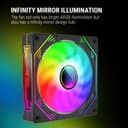
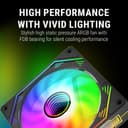

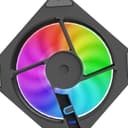
🌌 Cool your game, light your world — the future of airflow is here!
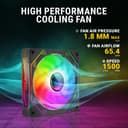
The Ant Esports Sciflow 120mm ARGB Case Fan combines cutting-edge infinity mirror ARGB lighting with high-performance 1500 RPM PWM-controlled cooling, delivering 65.4 CFM airflow. Designed for silent operation with fluid dynamic bearings and vibration-dampening rubber pads, it offers both stunning aesthetics and reliable, quiet cooling for demanding gaming PCs.


| ASIN | B0CQJP1VM9 |
| Air Flow Capacity | 65.4 Cubic Feet Per Minute |
| Best Sellers Rank | #857 in Computers & Accessories ( See Top 100 in Computers & Accessories ) #1 in Case Fans |
| Brand | Ant Esports |
| Brand Name | Ant Esports |
| Compatible Devices | Desktop |
| Cooling Method | Fan |
| Customer Reviews | 4.2 out of 5 stars 243 Reviews |
| Importer Contact Information | Acro Engineering Company |
| Item Type Name | Case Fan |
| Item Weight | 150 Grams |
| Manufacturer | Ant Esports, Ant Esports |
| Manufacturer Contact Information | Ant Esports |
| Material | Polycarbonate |
| Material Type | Polycarbonate |
| Max Rotational Speed | 1500 RPM |
| Noise Level | 30.8 Decibels |
| Packer Contact Information | Ant Esports |
| Power Connector Type | 3-Pin |
| Unit Count | 1 Count |
| Warranty Description | 1 Year |
P**R
These Case Fans Are Worth It (But a Pain in the Basement to Install)
Initial Impressions The fans are good. At first, I was confused because I couldn’t control the fan speed or RGB colors. After doing some research, I figured out how to set them up properly. How to Connect the Fans I won’t go into too much detail, but here’s a general overview. I bought the 3-fan combo, which comes with a hub and the single fan. If you don’t want the hub, you can get single fans instead and chain-link them. The setup process is similar. The hub includes a PWM cable (4-pin) and a 3-pin JRGB cable. Connect the PWM cable to a SYS_FAN port on your motherboard. Connect the 3-pin JRGB cable to a 3-pin JRGB header on your motherboard. Make sure your motherboard has a 3-pin JRGB header. If it doesn’t, you won’t be able to control the RGB lighting through the motherboard. How to Control the Fans For RGB lighting: By default, the fans are controlled using the remote. If you want to use your motherboard software (like MSI Mystic Light), press and hold the M/B button on the remote. This switches control to the motherboard. If you want to switch back to using the remote, press and hold the M/B button again. For fan speed: Go into the BIOS, then into Hardware Monitoring. Find the SYS_FAN port where the hub is connected. Change the fan mode from DC to PWM. If your motherboard supports it, enable Smart Fan Control. You can then adjust the fan speed curve manually. Performance In Mystic Light and in the BIOS, the fan speed shows between 1650 and 1700 RPM. The fans are a bit noisy at full speed. You won’t really hear them below around 1150 RPM, which is a good thing. The colors are bright and look good. The fans also feel heavier than my CPU cooler fans. Installation This was the most frustrating part. Installing the fans was difficult. The screw holes are tight, and it was hard to get the screws in properly. It took a while to get them mounted, and I didn’t even use all four screws for each fan. I bought the 3-fan combo and one additional single fan. Build Quality The fans feel a bit cheap for the price. The materials could have been better. Are They Worth It? I think they are. This is my first PC, which I built last year. The default case fans weren’t great and were connected via Molex, which meant I couldn’t control the fan speed or lighting. I really didn’t like the fixed rainbow effect they had. After more than a year, I upgraded to these fans. I don’t have experience with other brands, but based on my needs, these are a big improvement. Aside from the difficult installation, I’m happy with them. Final Verdict I’d give these fans a solid 4.5 out of 5. Great features and performance, but the installation and build quality could be improved.
R**Y
Very nice fans, easy to fit, lokos good, nice default effects. Better if you use RGB software
Replaced the three cabinet fans that came in-built on my PC with these and they are super cool. The old cabinet fans did not support direct connectivity to the mother board fan headers and so ran at full throttle all the time, even if the CPU was quiet. With these, I am able to connect my fans to the motherboard headers and my PC is so silent all of a sudden. Tweak the BIOS and all is well. Fitting the fans and daisy chaining them, connecting them to the ARGB headers was also a piece of cake.
S**B
Average and good
Good product Can be synced with motherboard rgb sync and can be modified according to needs Performance is 1200 rm which is okay Needs to be connected to hub properly to be used Screws given with it are not that good so consider getting your own
V**I
Best in price and looks
Good product I have installed it at bottom in my cabinet for intake Fans are great quality you can feel it when you hold them Fan speed is also good ⭐⭐⭐⭐ Looks wise also great ⭐⭐⭐⭐⭐ Air flow great ⭐⭐⭐⭐⭐ Over all budget wise best in class
V**A
Felt CHEATED - Consider alternative brands for better performance and ease of installation
Disappointed with ANT esport Fan - Not Recommended I'm writing this review after thoroughly researching the ANT esport fan. While it has some good aspects, my overall experience was very negative. Pros: * ARGB lighting works well. Cons: * Fan noise is a significant issue. * Airflow is inadequate, not comparable to Cooler Master fans (which cost slightly more). * Compatibility problems: The fans lack washers for the screws, causing them to loosen. I had to spend 1.5 hours cutting rubber, creating holes, and making washers to mount the fans on my NZXT H6 FLOW RGB case. * Mounting difficulty: The fans lack grooves for the screws, making them incredibly challenging to install. I could only manage one full turn and one forced turn on the screws. * Missing screws: The fans didn't come with long enough panel screws for proper mounting. I had to create washers of the exact thickness to use the provided screws, further extending the installation time. * Cheap build quality: Performance feels compromised for the price, although the lighting looks good. * Poor wire management: The fan has a loose wire visible from the front due to improper placement behind the fan blade. * Insufficient fan speed: The fan speed is not powerful enough for optimal cooling. Final Thoughts: Despite recommendations against buying ANT esport fans, I decided to give them a chance. Unfortunately, I feel cheated by the company. Their customer service helpline is constantly busy, making it impossible to return the product, request a refund, or get any assistance. I strongly advise against purchasing ANT esport fans due to the numerous issues I encountered.
F**A
I trust on amezon 👌
Realy Good products sell on suitable price
P**Y
Great
Great product
S**A
Very Good
No Remote control , no noice , Fan speed good .RGB lights nice .
Trustpilot
Hace 1 mes
Hace 1 mes