We remain fully operational. Our teams are working around the clock to ensure your deliveries continue safely.

Descargar la aplicación


Servicios al cliente
Sobre nosotros
Copyright © 2025 Desertcart Holdings Limited
Descargar la aplicación

🎬 Elevate your media game with 4K clarity and powerhouse storage — don’t just watch, experience!
The MYPIN 4K Media Player delivers ultra HD 4K@30Hz video playback with support for a vast array of video, audio, and image formats. It features dual USB 2.0 ports compatible with up to 8TB external hard drives and TF cards, plus HDMI output supporting 7.1 surround sound for immersive audio. Crafted with a durable aluminum alloy shell, it offers versatile connectivity including AV and optical outputs, and supports smart control via USB mouse or keyboard. Ideal for professionals seeking a comprehensive media hub that integrates PPT and photo slideshow capabilities with multi-format playback.

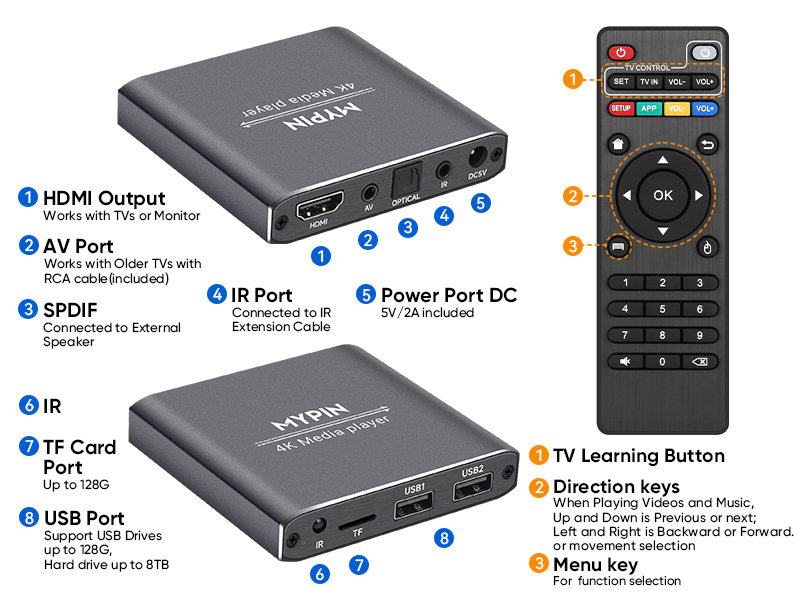


| ASIN | B097RGNS3W |
| Best Sellers Rank | #77,556 in Electronics ( See Top 100 in Electronics ) #410 in Streaming Media Players |
| Item model number | mypin_4k_media_player_ha0284 |
| Manufacturer | MYPIN |
| Package Dimensions | 14.7 x 9.2 x 8.6 cm; 128 g |
N**D
Good quality and easy to use
good quality and easy to use
A**R
Very overpriced for what you get. The software in the device is horrible ! the benefit is that you can connect 2 hard drives but a lot of drawbacks. After all, you are paying for the software because the hardware is all simple and off the shelf. For example, if you are down two folder levels to select a file to play, you cant go back up one level but just to the very top. Also, there is no way to turn off subtitles. Another example is that If you are going back to play a video file, you cant select whether you want to start from the beginning or from where you left off. You have to go to settings and re-set the type of playback that you want. These are only a few examples. The fact is there is almost no software built in to provide the normal media player options. What little software there is often doesnt work correctly. I have had 6 media players over the last 15 years and this is definitely the worst. After a couple of months of use, my opinion is even worse. The device does allow the user of larger usb drives but after a few weeks, it wont turn on if I have 2 usb drives connected. also, the device writes something to the harddrives as when I connect to my PC's, the PC OS thinks the drive needs to be reformatted. I can get by this but it is annoying and certainly of concern if it writes to the device. also, navigating through a lot of files, is a nightmare with this device. If you go down 2 folder levels, then it cant go backwards more than one level on the next attempt to go up a level it reverts to the very top. \ also, the device has no means to turn off subtitles.
M**K
My Roku Ultra has a media player but the video formats it plays are limited. My Blu-ray also has a media player but the remote is tiny. So I purchased this unit. It took me a bit to get it set up, because I'm running it through my receiver. Most items that I plugged into it are plug and play. I had to go into the HDMI assign mode with this unit. Once I did, it was recognized and worked great. I have set the sound out on the receiver to surround. It has an auto detect mode, so if you run a video with mono or stereo or 7.1 surround it will automatically adjust. This unit doesn't seem to trigger the automatic audio out. So I defaulted to surround and it sounds great. So far this has played every format I have run through it. Even TS/VOB files. I'm very happy with my purchase. The interface is pretty easy to use. The physical size is small so it's footprint on my entertainment center is manageable. And it doesn't get too hot. The remote buttons are a nice size, I do wish it was slightly thicker, so that it fit in my hand a bit better. One strange side note, some of the buttons on the remote, power up and open the disc tray on my Blu-ray. But I would defiantly purchase again. Update: I had some issues with video locking up while the audio kept playing, or the audio and video getting out of sync. I discovered if you go into the Apps folder you can use KODI or VLC players. So far the KODI player works better than the stock MPIN player. I also like that KODI has a bookmark feature, so that if you need to stop watching, you can bookmark where you stopped and then pick up where you left off.
L**W
Great way to play YouTube videos, home movies and produced movies if you can get a digitized version. Produces a great quality video on your TV.
S**Z
This MYPIN media player (grey) is a great little player. I bought it about 10 days ago and have run it thru it's paces and so far it's played every single type of file I've thrown at it. Setup was pretty easy and all the items I needed to know were available in the on-screen menu's. Took me a bit to figure out the Subtitles, but they work just fine and can be turned on and off at will. However you need to turn on/off the subtitles from the setup page before you start the actual video, and the subtitle file (.srt) must be in the same directory as the video file. I am using two USB drives, both from Western Digital hooked up to the two USB ports. One is a 500 Gb Passport and the other a 2 Tb Passport. Both seem to read and run just fine. They are both HDD and I have yet to try an external SSD with the MYPIN. My only little gripe is that even after I have turned off the MYPIN box, the power lights on both drives continue to slowly flash indicating they are powered up and still running. This isn't too good IMHO as that means the drive itself might still be spinning inside. What could this do to longevity? My solution will be a simple one. For now just unplug the MYPIN when not in use, and then I'm just going to put an external power switch on the line somewhere. A bit inconvenient to remember to turn it on before I sit down, but better than a potential HDD failure from continually being powered up. Other than that, video quality, build quality, audio quality are all excellent and do the job nicely. Will recommend the unit based on this but deduct one star. Rating is 4 STAR.
R**S
Could not find information on the Watt Hour consumption of the MyPin, so I looked it up… The MYPIN 4K media player uses a 5V/2A power supply. To calculate its power consumption in Watt-hours (Wh), use this formula: Watts (W) = Volts (V) x Amps (A) Therefore, the MYPIN 4K media player uses: 5V x 2A = 10W This means the device consumes 10 watts of power when in use. To determine the Watt-hours (Wh), multiply the wattage by the number of hours the device is used. For example, if you use the MYPIN 4K media player for 2 hours, the Wh consumption would be: 10W x 2 hours = 20Wh This calculation provides an estimate, and the actual consumption may vary slightly. This depends on factors like the type of content being played and the connected devices (e.g., external hard drive, USB mouse). However, the 10W power consumption provides a good baseline for understanding the energy usage of the MYPIN 4K media player.
Trustpilot
Hace 1 día
Hace 3 días